How use Nifty Images and HighLevel to personalise email images and make engaging emails

Have you ever received an eye-catching email with a personalised email images with your name? Here is an example that I received from Frank Kern.

Nifty images and highlevel

It certainly is striking – which is exactly what you want for your emails. Would you like to personalise the images in your HighLevel marketing emails?

Does it take some complicated voodoo magic to do this? Do you need to hire a developer?

The answer is no. Just head over to Nifty Images and set up a free trial which gives you 10,000 image views (not email opens). Then either use the stock images or upload your own. There are loads of settings – different fonts, colours, slope the text etc etc. Then simply copy & paste a line of code in your email. It’s a neat Nifty Images and HighLevel trick to have up your sleeve.


Image by Frank Kern


Clear, practical, and genuinely enjoyable – The Personal MBA is a book that’s earned its permanent place on my shelf

the personal mba, josh kaufman

the personal mba, josh kaufman

I first came across Josh Kaufman after hearing him on The Diary of a CEO podcast (watch it here) and was immediately impressed by how clearly he explained business principles. I picked up The Personal MBA shortly after, and it didn’t disappoint.

This book is a masterclass in clear, practical business thinking. Kaufman distils the key principles from hundreds of influential business books into a format that’s refreshingly concise – no unnecessary waffle, just valuable insight after valuable insight.

While it doesn’t claim to introduce brand new ideas, it’s an excellent revision guide for anyone serious about understanding the fundamentals of business. I found it genuinely enjoyable to read, with each section delivering useful ideas in a straightforward, no-nonsense style.

Section 10, which focuses on working with systems and processes, stood out to me in particular – especially relevant to the way I build and optimise systems in HighLevel. Kaufman’s ability to synthesise complex concepts into simple, actionable lessons really shines here.

This is one of those rare books that’s earned a permanent place on my bookshelf – not the charity shop pile.


Start Simple: How Gall’s Law Can Help You Build Better HighLevel Marketing Systems

julian Mills highlevel

gall's law, simple highlevel marketing When you’re setting up a CRM and marketing automation system like HighLevel for your business, it’s tempting to want everything perfect from day one.

You want workflows, emails, text messages, reminders, landing pages, pipelines — all beautifully mapped out, fully automated, and working like clockwork.

I get it.
But if there’s one principle you should build your system around, it’s this:

Start simple. Then evolve.

This approach is perfectly summed up by something called Gall’s Law.

Gall’s Law comes from John Gall, an American systems theorist, who said:

“A complex system that works is invariably found to have evolved from a simple system that worked.”

(If you’re curious, you can learn more about Gall’s Law and its meaning here.)

In other words, successful systems don’t appear fully formed out of nowhere. They start small, prove they work, and then grow into something more sophisticated.

And that’s exactly how you should approach building your marketing and client onboarding automations in HighLevel.


Why Starting Simple Is the Best Strategy for HighLevel Success

When you launch with a simple system — for example, a basic lead capture form that triggers an instant follow-up email — a few good things happen:

  • You get results quickly. No waiting around for weeks designing complex journeys.

  • You stay flexible. If something needs to change, it’s easy to tweak.

  • You reduce overwhelm. Both for you and your team.

Compare that to trying to build a 37-step lead nurture sequence before you’ve even tested whether people open your first email.

Starting simple avoids the classic trap: spending months designing something that looks good on paper but doesn’t deliver in practice.


How does this look in real life?

For David, running an accountancy firm, this could mean starting with a simple automated proposal follow-up email before building a full onboarding pipeline.

For Claire, managing a dental practice, it could begin with automated appointment reminders sent by text message, before layering in post-appointment review requests or treatment plan follow-ups.

You don’t need to automate everything on day one.
You just need to automate something that matters – that helps the sales process or saves youtr work and time — and get it working reliably.

Once that first system is bedded in, you can add the next piece.
And the next.
And the next.

That’s how you go from a simple marketing system to a sophisticated automation engine that truly supports your business growth.


A Practical Example: How to Start Small with HighLevel

Here’s a very basic automation flow you could build right now in HighLevel:

  1. A Website Contact Us Form – collects name, email, and phone number.

  2. Instant Acknowledgement Email – automatically thanks them for their enquiry.

  3. Task Creation for Your Team – notifies someone to follow up within 24 hours.

That’s it.

No five-part welcome sequence.
No complicated lead scoring.
Just a simple system that creates a great first impression — and helps you respond faster.

And once that’s running smoothly?
You can start layering in nurture emails, appointment scheduling links, SMS reminders, and more.


Final Thought: Build a Simple System First, Then Evolve It

If you want your HighLevel marketing automation to last, resist the urge to overcomplicate it at the start.

Trust Gall’s Law.
Build something simple that works — and let it evolve naturally.

Your future self (and your future customers) will thank you for it.


Need help building a HighLevel system that’s simple, scalable, and tailored to your business?
👉 Book a discovery call with Julian and let’s chat about how to get you set up for success.

What Would Steven Bartlett Think of HighLevel (CRM & Marketing Automation Software)?

Disclaimer: This article is not affiliated with or endorsed by Steven Bartlett. It is a commentary piece that draws inspiration from publicly shared insights and interviews. All views are speculative and intended to explore how Steven’s business philosophies align with tools like HighLevel CRM.


Steven Bartlett, entrepreneur, investor, and host of The Diary of a CEO, is known for his sharp insights into business, marketing, and the future of entrepreneurship. Though he’s not officially connected to HighLevel CRM, his views on building scalable, customer-centric businesses align remarkably well with what HighLevel empowers entrepreneurs and marketers to achieve.

So, if Steven Bartlett were to adopt a CRM platform to scale a modern marketing agency or digital-first business—what would he think of HighLevel?

Obsession with Efficiency and Scale

Steven often talks about how the smartest entrepreneurs don’t just work harder—they build better systems. Whether it’s his take on delegation or investing in software that multiplies output, he’s all about reducing friction in business processes.

HighLevel CRM does exactly that. It’s not just a customer relationship manager—it’s an all-in-one platform that brings together email marketing, social media, SMS, sales funnels, landing pages, reputation management, automations, and more.

If your team is juggling five or six different tools, Steven would probably ask: “Why haven’t you simplified yet?”

Data-Driven Decision Making

Bartlett frequently highlights the importance of data and feedback loops—knowing your numbers and iterating quickly based on what the data tells you.

HighLevel supports this mindset with real-time analytics, tracking across campaigns, and reporting dashboards that show what’s converting and what’s not. You don’t have to guess—you can know.

Building Personalised Customer Experiences at Scale

Steven has spoken about the importance of human connection in marketing—how brands that feel personal, responsive, and human win. But to do that at scale, you need automation that doesn’t feel robotic.

That’s where HighLevel shines. It enables agencies and service providers to deliver timely, relevant messaging via smart automations—without losing the personal touch. Think of it as the digital infrastructure that helps you build real relationships, even with thousands of leads.

Entrepreneurial Agility

One of Steven’s most consistent messages is that founders and marketers should stay agile—ready to pivot, test, and try new ideas. HighLevel, with its white-labelling capabilities and built-in tools for launching courses, memberships, and even SaaS offerings, gives you the tools to quickly spin up new revenue streams or adapt to changing market needs.

Final Thoughts

Steven Bartlett may not officially endorse HighLevel—but if you’ve been inspired by his take on modern business building, it’s worth taking a closer look. HighLevel gives solo operators and marketing teams the firepower to scale without breaking the bank—or burning out.

Inspired to streamline your marketing systems like a modern-day CEO? Book a discovery call with Julian to explore how HighLevel could transform your business.

Disclaimer: This article is not affiliated with or endorsed by Steven Bartlett or GoHighLevel. The views expressed are solely those of the author and are based on publicly available information and personal interpretation. All product mentions and comparisons are made for illustrative and educational purposes only.


What Would Steven Bartlett Think of HighLevel CRM (CRM & Marketing Automation Software)?

julian Mills highlevel

Disclaimer: This article is not affiliated with or endorsed by Steven Bartlett. It is a commentary piece that draws inspiration from publicly shared insights and interviews. All views are speculative and intended to explore how Steven’s business philosophies align with tools like HighLevel CRM.


steven bartlett highlevelSteven Bartlett, entrepreneur, investor, and host of The Diary of a CEO, is known for his sharp insights into business, marketing, and the future of entrepreneurship. Though he’s not officially connected to HighLevel software, his views on building scalable, customer-centric businesses align remarkably well with what HighLevel empowers entrepreneurs and marketers to achieve.

So, if Steven Bartlett were to adopt a CRM platform to scale a modern marketing agency or digital-first business—what would he think of HighLevel?


Obsession with Efficiency and Scale

Steven often talks about how the smartest entrepreneurs don’t just work harder—they build better systems. Whether it’s his take on delegation or investing in software that multiplies output, he’s all about reducing friction in business processes.

HighLevel CRM does exactly that. It’s not just a customer relationship manager—it’s an all-in-one platform that brings together email marketing, social media, communities, ad management (Facebook & Google), SMS, WhatsApp, sales funnels, landing pages, online courses, reputation management, automations, and more.

If your team is juggling five or six different tools, Steven would probably ask: “Why haven’t you simplified yet?”


The Shopify Example—and Why Integration Matters

Steven has openly promoted Shopify as a platform that helped launch The Diary of a CEO Conversation Cards with impressive speed. In just a few minutes, they were able to set up an online store and start taking orders—a great example of what modern, agile businesses can do with the right tools.

But setting up the shop is only half the equation. What happens after someone buys?

That’s where HighLevel shines. Its integration with Shopify means that business owners can build an end-to-end sales and marketing system: automate follow-ups, collect reviews, run loyalty programs, and nurture customers into long-term fans—all from one platform.

And communication? It doesn’t stop at email. HighLevel gives you native tools to follow up via SMS and WhatsApp, so you can connect with your customers where they actually are, in real time. It’s everything Steven advocates for—speed, relevance, and meaningful interaction.


Data-Driven Decision Making

Bartlett frequently highlights the importance of data and feedback loops—knowing your numbers and iterating quickly based on what the data tells you.

HighLevel supports this mindset with real-time analytics, tracking across campaigns, and reporting dashboards that show what’s converting and what’s not. You don’t have to guess—you can know.


Building Personalised Customer Experiences at Scale

Steven has spoken about the importance of human connection in marketing—how brands that feel personal, responsive, and human win. But to do that at scale, you need automation that doesn’t feel robotic.

That’s where HighLevel excels. It enables agencies and service providers to deliver timely, relevant messaging via smart automations—without losing the personal touch. Think of it as the digital infrastructure that helps you build real relationships, even with thousands of leads.


Entrepreneurial Agility—and Content Creation

One of Steven’s most consistent messages is that founders and marketers should stay agile—ready to pivot, test, and try new ideas. HighLevel, with its white-labelling capabilities and built-in tools for launching courses, memberships, and even SaaS offerings, gives you the tools to quickly spin up new revenue streams or adapt to changing market needs.

And let’s not forget content. Steven has built his entire brand through consistent, high-impact content on platforms like Instagram, LinkedIn, and YouTube. HighLevel’s built-in social media scheduler helps entrepreneurs do the same—batch and schedule posts across multiple platforms from one place, so showing up online becomes a system, not a stress.

Even better? AI-powered content tools built right into HighLevel allow team members to brainstorm, draft, and refine posts without needing a separate copywriter. From creating captions and email subject lines to generating blog ideas and social post variations, HighLevel’s built-in AI acts like your in-house creative assistant—supercharging productivity without compromising creativity.


Final Thoughts

Steven Bartlett may not officially endorse HighLevel—but if you’ve been inspired by his take on modern business building, it’s worth taking a closer look. HighLevel CRM gives solo operators and agency teams the firepower to scale without breaking the bank—or burning out.

Inspired to streamline your marketing systems like a modern-day CEO? Book a discovery call with Julian to explore how HighLevel could transform your business.

Disclaimer: This article is not affiliated with or endorsed by Steven Bartlett or GoHighLevel. The views expressed are solely those of the author and are based on publicly available information and personal interpretation. All product mentions and comparisons are made for illustrative and educational purposes only.
🛠️ A Handy ChatGPT Trick: Resize and Crop Your Images with AI

HighLevel Expert Julian Mills UK

Sometimes you just need a quick image resize — maybe for a profile picture, a website thumbnail, or a social media post — but you don’t want to mess around with clunky design software or lose quality by stretching things out of proportion. That’s where ChatGPT comes in with a surprisingly helpful trick.

🧠 Did you know ChatGPT can intelligently resize and crop your images?

I recently discovered that ChatGPT can resize an image to an exact size (like 300×300 pixels) and keep the important part in focus — like your face — without stretching or distorting the photo.

I tested it with a headshot I had of me and Nigel Botterill. I just uploaded the image and gave ChatGPT a simple instruction:

“Resize this image to 300×300 pixels. Don’t stretch it — crop it intelligently to keep the aspect ratio. Focus on the area around my face.”

Here’s the original image:

And here’s the smartly cropped version with my face centered in a perfect square format:

It took just a few seconds, and it was spot on — no Photoshop needed.


💡 How to Do It Yourself

Want to try it? Here’s the prompt template I used:

Resize this image to 300×300 pixels. Don’t stretch it — crop it intelligently to keep the aspect ratio. Focus on the area around my face (or whatever subject you want to highlight).

Then just upload your photo, and ChatGPT will take care of the rest. You can change the dimensions to anything you like (e.g., 600×400, 150×150, etc.).

Sometimes the initial result may not exactly meet your requirements, in that case just feedback to ChatGPT and have it rework the image.


🧰 Bonus Tip: Save a Prompt Template

If you know you’ll want to do this kind of thing regularly, you can even ask ChatGPT to remember your favorite resizing prompt — like I did. Now it’s super fast to reuse.


✅ Final Thoughts

This is one of those surprisingly practical AI tricks that saves time and avoids fiddling with image editors. Whether you’re prepping for a presentation, updating your profile pic, or just want a quick image crop — it’s a great tool to have up your sleeve.

Give it a try, and thank me later 😉

Looking for me tips and GPT ideas. Check out this post 25 Powerful ChatGPT Tips and Hacks Every Marketer Should Know

How Much Can You Really White-Label HighLevel? A Deep Dive into Highlevel white label customisation

julian Mills highlevel

highlevel white label customisationIntroduction If you’re building a HighLevel white-label agency, one of the biggest attractions is being able to present the platform as your own. It’s more than just sticking a logo in the corner — it’s about delivering a seamless, fully branded experience that gives your clients confidence in your service. In this post, we’ll explore just how much you can customise and white-label HighLevel to match your agency’s identity.

What Does White-Labeling Mean with HighLevel? When we talk about white-labelling in this context, we mean rebranding the entire platform so that it looks, feels, and behaves like a proprietary system built by your agency. HighLevel allows you to do exactly that, making it possible to deliver a fully branded SaaS experience under your own name.

This isn’t just about vanity. Offering a white-labelled platform builds trust, boosts perceived value, and helps differentiate you from other agencies offering similar services.

Core Branding Opportunities on HighLevel Here’s a breakdown of the core areas where you can apply your agency’s brand:

  • Custom domain — Replace the default HighLevel domain with your own. Instead of sending clients to app.gohighlevel.com, you might use something like app.youragency.co.uk.
  • Login page — Customise the login screen with your logo, welcome message, and background imagery.
  • Platform interface — Add your agency colours and branding throughout the dashboard to ensure consistency.
  • Branded communications — Configure your own email sending domains and SMS numbers so all client communication comes from you, not HighLevel.

Mobile App White-Labelling If you’re on the SaaS Pro plan, you can even white-label the HighLevel mobile app. This means:

  • Your logo, app name, and colour scheme.
  • Listed in the Apple App Store and Google Play Store under your agency name.
  • Clients can download and use “your” app, strengthening your brand perception even further.

The mobile app white-labelling process does take a bit of setup and additional cost, including developer accounts and some technical steps, but the result is a fully branded mobile experience that’s hard to beat.

White-Label vs Grey-Label: Understanding the Difference When you don’t fully white-label your mobile app or Zapier integration, you and your clients will be using the default LeadConnector branding. This is known as the “grey-label” version. While it’s still functional, it’s clearly not your own brand.

With a fully branded version:

  • Your mobile app has your name and icon in the app stores.
  • Zapier shows your agency name instead of LeadConnector.
  • Your clients experience a seamless brand from web to mobile to automation.

Custom Client Portal Experience Once clients are logged in, you can customise what they see and how they interact with the platform:

  • Custom navigation and menus to focus on the features you want to promote.
  • Branded onboarding experiences using videos, checklists, or embedded tutorials.
  • Templates and snapshots designed specifically for your niche.
  • Embed your own support resources, chat widgets, or links to your agency’s knowledge base.

Beyond Visuals: Customising the Experience White-labelling isn’t just about how things look. With HighLevel, you can build out workflows, campaigns, and automations that reflect your agency’s process and values. Create custom menus, rename tools to suit your service offering, and use workflows that guide your clients through your proven systems.

Watch Out: Tech Support Considerations As a white label agency it is your responsibility to provide tech support for your clients. There are two routes you can take to supply this.

Option 1. Completely branded as your support. You build your own in-house tech support team which requires hiring and training staff. And don’t forget clients will expect training and support videos and documentation, this will require creating and importantly updating – almost on a daily basis as the software is updated. This is a significant undertaking.

Option 2. Outsourced tech support. If you use a third-party onboarding or support company, like Extendly, it’s worth noting that their tech support is not fully white-labelled. While the platform and interface may carry your agency brand, the support experience your clients receive will often reference MyCRM or another generic name — not your agency. This can sometimes lead to confusion or a slight mismatch in the client experience. If you’re striving for a totally white-labelled experience, it’s probably worth going with Option 1.

Common Mistakes to Avoid

  • Forgetting to change the favicon or footer links, which can still show HighLevel branding.
  • Inconsistent naming across your materials and domains.
  • Not testing the full user experience from the client side.

These small gaps can undermine the white-label effect, so it’s worth doing a full audit of the platform.

Why It Matters: Client Perception and Positioning The more seamless your branding, the more likely clients are to perceive your service as premium and proprietary. This makes it easier to charge higher retainers, builds client loyalty, and positions you as more than just another marketing agency — you become a platform.

Clients who believe they’re using “your software” are less likely to look elsewhere or compare you directly to competitors. That alone is worth the effort of a thorough white-labelling setup.

How to Get Started (or Optimise What You Have) If you’re just getting going, here are some quick wins:

  • Set up your custom domain.
  • Upload your logos and colour scheme.
  • Customise your login screen.
  • Configure your email and SMS sender profiles.

Already up and running? Do a white-label audit: walk through the entire client journey and note any areas where HighLevel branding still shows.

If you’re ready to start building your own HighLevel agency, you can sign up here.

Need expert guidance? Book a Discovery Call with Julian and let’s make your white-labelled agency vision a reality.

Final Thoughts HighLevel gives you serious power when it comes to white-labelling. Done well, it can completely transform how clients perceive your agency. If you want to charge more, retain clients longer, and build a platform-based business, start by making sure your branding runs all the way through.

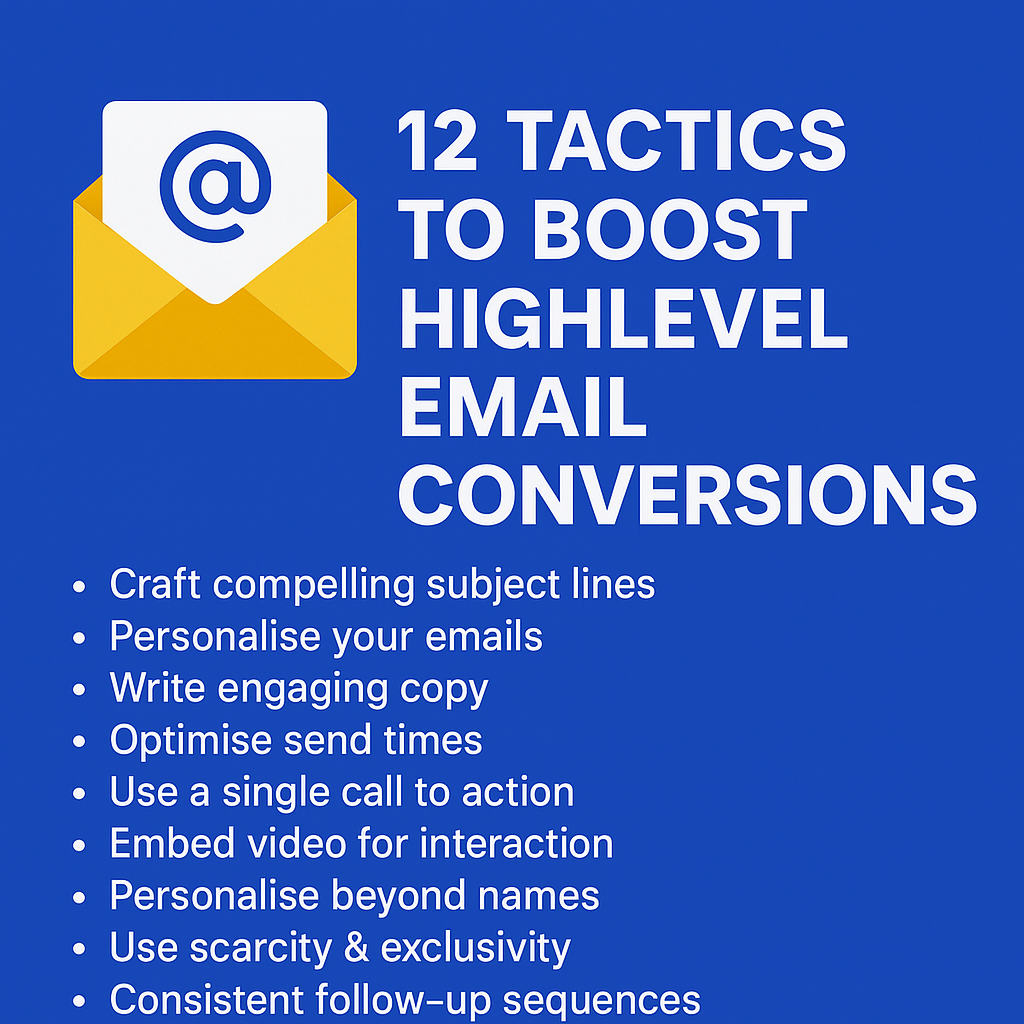
How to Boost Your HighLevel Marketing Email Conversion Rate – 12 Tactics

boost highlevel email conversion rate

boost highlevel email conversion rateIntroduction

When it comes to sending marketing emails from HighLevel, knowing the best tactics can significantly boost your open rates, click-through rates, and ultimately your conversion rate. HighLevel’s built-in email marketing tools are powerful, but only if you know how to use them effectively.

Here are Twelve Effective Tactics you can implement using HighLevel’s email marketing features to help:

  • Double your open rates
  • Triple your click-through rates
  • Dramatically boost your engagement

The first step to improving your emails’ effectiveness is getting them opened. So, let’s dive into some smart tactics to increase your open rates.


Tactic #1: Use Proven Subject Lines

Your subject line is the first impression your email makes. In HighLevel, you can easily customise subject lines for personalisation and testing. Make sure your subject lines fall under one of four categories: Curiosity, Benefit, Scarcity, or Results. Curiosity-based lines tease something unexpected, while Benefit-driven ones highlight value. Scarcity creates urgency, and Results showcase specific proof. For best results, include numbers or personalisation, such as the recipient’s name. With HighLevel’s split-testing feature, you can test multiple subject lines to see what works best.


Tactic #2: Emojis in Subject Lines

HighLevel supports emojis in subject lines, which can dramatically increase your open rates. Emojis add personality, colour, and even emotion to your emails. Our tests have consistently shown an increase in open rates by over 60% when emojis are included. Common choices include ✅ (Green Tick) for affirmation, ⏰ (Alarm Clock) for urgency, and ❤️ (Heart) for warmth. Remember to test how your emojis display across devices. HighLevel’s preview and test features make this easy.


Tactic #3: The “Second” Subject Line (Preview Text)

The preview text, or ‘second subject line’, is the snippet of text that follows the main subject line in the inbox. In HighLevel, this can be easily customised to enhance your open rates. Instead of generic text, use your preview text to complement your subject line or overcome potential objections. For example, if your subject line is: “Swipe Our £15,000 Email Template,” your preview text could be: “It’s simpler than you think and works in any industry.” HighLevel allows you to test how this preview displays to ensure it looks appealing.


Tactic #4: From Name Matters

HighLevel allows you to personalise the ‘From’ name in your emails. Using a personal name rather than a company name makes your emails feel more genuine. Stick with a consistent ‘From’ name to build familiarity. When experimenting with new names, try blending them with your brand, e.g., “Julian at MarketerM8.” This approach offers the personal touch while still reminding recipients of your brand. Test your open rates in HighLevel to find what works best for your audience.


Tactic #5: Timing Matters (Avoid the Morning Purge!)

Timing can make or break your HighLevel email campaigns. Many people work from home on Mondays and Fridays, which can affect response rates. HighLevel’s scheduling tools allow you to send emails at the most effective times. Instead of blasting your entire list at once, consider using HighLevel’s Drip feature to spread your emails out over time. This allows you to avoid overwhelming your audience and improves your chances of getting noticed. Try sending emails later in the morning or in the afternoon when your audience is more likely to engage. Test different times to see what works best for your audience and adjust your strategy accordingly.


Tactic #6: The Magic Number of Links

With HighLevel, you can easily include links throughout your emails. The optimal number is four, but they should all lead to the same destination. Including too many different links can harm deliverability. Instead, place your primary link at various points within your email: early for eager readers, midway for direct calls-to-action, near the end for thorough readers, and in the P.S. for skimmers. HighLevel’s link tracking feature lets you monitor which placement works best.


Tactic #7: Use Images & GIFs

Images and GIFs can enhance your HighLevel emails. Adding visuals to your emails makes them more engaging and encourages clicks. HighLevel’s email editor supports the inclusion of images and GIFs. Use simple animations, such as flashing buttons or moving arrows, to draw attention to your call-to-action. Ensure your visuals are properly formatted to display correctly across devices.


Tactic #8: Use Video Thumbnails to Drive Clicks

While HighLevel doesn’t support embedding videos directly, you can still drive clicks by including a thumbnail image of a video with a play button overlay. When clicked, this can link to a HighLevel funnel or external page where the video is hosted. This approach is especially effective for product demos, testimonials, or personalised messages. Test this strategy to see how it boosts your click-through rates.


Tactic #9: Consistent Follow-Up Sequences

HighLevel excels at creating follow-up sequences. Rather than relying on a single email, build a series that progressively builds interest and addresses objections. Use automated workflows to target recipients who haven’t opened or clicked your first email. HighLevel’s visual workflow builder makes this easy, allowing you to structure sequences to maximise engagement.

Now it’s your turn to apply these HighLevel-specific tactics and watch your conversions skyrocket.


Tactic #10: Personalisation Beyond Names

With HighLevel, you can personalise emails far beyond just using a recipient’s name. Segment your audience based on interests, past interactions, or behaviour. If someone recently downloaded a lead generation guide, follow up with related content. HighLevel’s automation tools make setting up these follow-ups a breeze, improving your relevance and engagement.


Tactic #11: Use Scarcity & Exclusivity Wisely

HighLevel’s automation features are perfect for creating urgency and exclusivity. Limited-time offers, early access invitations, or special bonuses can be promoted using sequences and timed triggers. Plus, you can use HighLevel’s Countdown Timer feature to build urgency right within your emails. The visual timer creates a powerful psychological effect that encourages prompt action. Use phrases like “Only 3 spots left” or “Offer ends at midnight.” HighLevel allows you to set specific timers and triggers to build urgency.


Tactic #12: Test and Optimise

HighLevel’s split-testing tools allow you to test subject lines, content, and timing to see what works best. Continuously experiment and optimise your campaigns. Compare open rates, click-through rates, and conversions to identify the most effective approach. HighLevel’s reporting tools make this easy, so make testing a regular part of your email marketing routine.


Additional Resources:

Now it’s your turn to apply these HighLevel-specific tactics and watch your conversions skyrocket.

How to Follow Up Properly: The Ultimate Guide to HighLevel Follow-Up

highlevel consultant julian mills

highlevel follow-upIntroduction

In the world of business, one of the biggest gaps between leads and sales lies in follow-up. It’s not just about getting more leads; it’s about ensuring that every single lead receives consistent, valuable engagement. The truth is, most businesses are losing potential customers simply because they aren’t following up effectively. The good news? You can change that by implementing a robust follow-up strategy that works – and HighLevel is the perfect tool to make this happen.

This guide will walk you through a proven framework designed to double your lead conversions. And the best part? It’s built to be implemented seamlessly within HighLevel.

The Purpose of Follow-Up: Building Relationships, Not Just Making Sales

Effective follow-up is about building relationships. It’s not about selling all the time – it’s about providing value, establishing trust, and positioning yourself as the go-to solution when your prospect is ready to buy. While the end goal is sales, the journey to that point must feel natural and authentic to the prospect. Keep your sales pitch towards the end of your messages and never pitch in every email. Instead, focus on giving value and establishing a genuine connection.

The Comprehensive Follow-Up Blueprint

This framework is a structured approach over 60 days, designed to ensure your leads are continually nurtured with value-driven content aimed at overcoming objections, building trust, and educating them until they are ready to make a purchase.


🔍 The HighLevel Follow-Up Structure

Phase 1: The Initial Engagement (First 5 Days)

This phase is about building rapport and trust quickly. It’s about making sure you stand out and get remembered.

  • Day 1: Send a personal welcome video via the HighLevel mobile app. Make it friendly, engaging, and personalised. Explain how you’re here to help, here is an article on how to send a video message through the HighLevel mobile app. This first interaction should feel genuine and helpful.
  • Day 2: Share your personal story. Keep it engaging, authentic, and human. Use HighLevel’s email builder to craft this automated message. Share why you do what you do and how you help others.
  • Day 3: Provide a powerful industry insight your prospects should know. Share this through a well-crafted email or even a short, educational video sent via SMS or email.
  • Day 4: Share a client transformation story showcasing your impact. Use testimonials or case study links stored within HighLevel.
  • Day 5: A friendly reminder of your offer or service, with an invitation to ask questions or book a call.

Practical Example:

Using HighLevel, set up a workflow that triggers immediately when a new lead enters your funnel. Schedule messages for Day 1 to Day 5 with email and SMS communication options. Use HighLevel’s tagging system to track engagement.


Phase 2: Overcoming Objections (Next 10 Days)

For the following ten days, your goal is to address specific objections your prospects may have. You’re aiming for one piece of content every other day.

  • Five valuable pieces of content, each focused on handling a common objection or pain point.
  • Deliver these through HighLevel’s Workflow automation feature, which allows you to build sequences with timed triggers.
  • Address topics like pricing, effectiveness, ease of use, or why your solution is better than competitors.
  • Continue providing value in each interaction. Avoid making a hard pitch in these messages – focus on solving their problems and building credibility.

Practical Example:

Create a new Workflow for Objection Handling. Add triggers for Days 7, 9, 11, 13, and 15. Link your content (emails, videos, testimonials) to HighLevel’s CRM system for tracking.


Phase 3: Long-Term Nurturing (Following 45 Days)

For the remaining six weeks, you’ll deliver two pieces of valuable content per week. The focus here is on educating your audience, providing value, and demonstrating authority.

  • Alternate between success stories and insights relevant to their industry.
  • Use HighLevel’s automation tools to pre-schedule these communications and track engagement.
  • Consider using SMS broadcasts for quick touchpoints that re-engage inactive leads.
  • Again, avoid constant pitching. Instead, focus on a pesonal touch and providing value and insights that keep your prospects engaged.

Practical Example:

Use HighLevel to set up a long-term nurturing sequence. Add triggers for Days 17, 20, 24, 27, 31, 34, 38, 41, 45, 48, 52, 55, 59, and 60. This ongoing engagement keeps you at the forefront of your prospect’s mind.


📊 Visual Summary of the Follow-Up Framework

Days 1-5: Initial Engagement (Building Trust & Authority)

  • Personal Welcome Video, Personal Story, Industry Insight, Client Transformation, Invitation to Engage.

Days 6-15: Objection Handling (Building Confidence)

  • Address 5 common objections with valuable content.

Days 16-60: Long-Term Nurturing (Educating & Demonstrating Authority)

  • Deliver 2 pieces of content per week focused on value and authority.

Implementing the Blueprint with HighLevel

HighLevel’s marketing automation platform allows you to implement this strategy effectively with:

  • Workflows: Design automated campaigns that follow this structured approach.
  • SMS & Email Marketing: Schedule nurturing sequences and broadcast important messages.
  • Lead Scoring & Tags: Identify which leads are most engaged and focus your efforts where they matter.
  • CRM: Keep track of where each lead is in the follow-up process, ensuring no one falls through the cracks.

Why This Works

This approach works because it’s not just a follow-up sequence – it’s a value sequence. You’re not just asking for the sale; you’re educating, providing value, and building a relationship.

Conclusion

The biggest takeaway here is consistency. With HighLevel, you have the tools at your disposal to follow this framework to the letter and reap the rewards. Make sure every lead receives the attention it deserves. The person who asks the most – in the right way – wins.

Now, let’s get this set up in HighLevel so you can start turning more leads into sales.

Looking to subscribe to HighLevel, please check out my HighLevel agency – MarketerM8.

Why You Need a Knowledge Centre and How to Set It Up

Knowledge Centre

Knowledge CentreIn today’s hyper-competitive digital landscape, the way we engage with prospects and clients has fundamentally shifted. They want answers, and they want them now. If they can’t find what they’re looking for on your website, they’ll simply click away to your competitors. That’s where a well-structured Knowledge Centre comes in. Inspired by Marcus Sheridan’s brilliant framework in They Ask, You Answer (Read my review here), let’s break down why you need a Knowledge Centre and how you can go about setting it up.

Why You Need a Knowledge Centre

The core idea of They Ask, You Answer is simple but powerful: Anticipate your audience’s questions and answer them better than anyone else. When you do this effectively, you build trust, authority, and drive more qualified traffic to your website. A Knowledge Centre serves as the backbone of this approach. Here’s why:

  1. Builds Authority and Trust: When you openly address the most pressing questions your audience has, you position yourself as a trusted expert in your field.
  2. Improves SEO Performance: Regularly publishing high-quality, informative content that answers questions directly boosts your visibility on search engines.
  3. Enhances User Experience: When visitors can easily find the information they need, they are more likely to engage with your business, rather than bouncing off your site in frustration.
  4. Streamlines Sales Conversations: By providing answers upfront, your sales team spends less time educating prospects and more time closing qualified leads.

How to Set Up Your Knowledge Centre

Setting up a Knowledge Centre may sound daunting, but with the right approach, it’s entirely achievable. Here’s a step-by-step guide:

Step 1: Identify Your Audience’s Questions

Use tools like Google’s People Also Ask, forums, competitor research, and – most importantly – your own sales and support teams. What are the most common questions prospects and clients ask? List them out.

Step 2: Categorise Your Content

Group questions into categories that make sense for your business. For example, if you’re a HighLevel consultant, you might create categories like “Setup Guides”, “Automation Tips”, “Integrations”, and “Troubleshooting”.

Step 3: Create High-Quality Content

For each question, create detailed, honest, and helpful content. Don’t shy away from talking about cost, potential issues, or even comparing yourself to competitors. Transparency builds credibility.

Step 4: Structure Your Knowledge Centre

Create a dedicated Knowledge Centre page on your website, with categories neatly laid out for easy navigation. Think of it as a library where users can quickly find answers.

Step 5: Optimise for Search Engines

Apply SEO best practices to each piece of content. Make sure your titles are clear, use keywords naturally, and structure your content to be easily scannable.

Step 6: Regularly Update and Expand

The beauty of a Knowledge Centre is that it’s never truly finished. Continuously add new content based on evolving audience questions and feedback.

The Tools You’ll Need

  • Content Management System (CMS): WordPress, HighLevel, or HubSpot.
  • SEO Tools: Ahrefs, SEMrush, or even Google Analytics.
  • Knowledge Base Platforms: If you want a more structured setup, tools like Help Scout or Zendesk can be valuable.

Final Thoughts

A well-built Knowledge Centre is a content marketing powerhouse. It drives traffic, builds authority, and turns your website into the ultimate resource for your audience. And the best part? Once set up, it continues to work for you around the clock.

If you haven’t read They Ask, You Answer yet, you can grab a copy from Amazon here.

If you’re ready to elevate your marketing game with a robust Knowledge Centre or want some expert guidance, book a Discovery Call with Julian here.