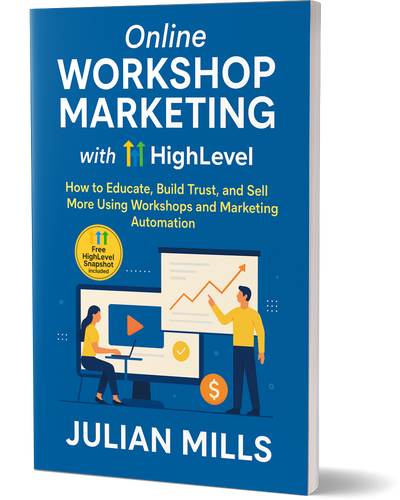
Free Book – Workshop Marketing with HighLevel – Julian Mills

workshop marketing with highlevel book julian mills

How to Educate, Build Trust and Sell More Using Workshops and Marketing Automation

workshop marketing with highlevel book julian millsAre you still relying on cold funnels, outdated email blasts, or soulless webinars to grow your business?
There’s a better way.

This book shows you how to attract your ideal prospects, build trust fast, and convert more leads — by running live, interactive workshops powered by the automation tools in HighLevel.


🚀 Why You Need to Read This Book

1. Webinars Are Dying — Workshops Are the Upgrade
Most webinars are boring, pre-recorded, and feel like a one-way sales pitch. Live workshops are different. They’re human, engaging, and personal — and they convert better because they create real connection and credibility.

2. It’s Not Just Theory — It’s a Complete System
This book doesn’t just talk about what you should do. It gives you the full blueprint — plus a ready-to-go HighLevel Snapshot — so you can set up the entire Workshop Marketing system in your own account, without starting from scratch.

3. Simplicity First — Build Complexity Later
Following Gall’s Law, this book gives you a simple, working system to launch with. It works out of the box — but gives you the flexibility to evolve and improve it over time as your business grows.

4. It Works for a Range of Businesses
Whether you run a professional service, marketing agency, training company, clinic, franchise, or membership-based business — if your sales depend on trust, this system can work for you.


💡 What You’ll Learn Inside

  • How to plan, promote and run high-converting workshops

  • Why live delivery beats evergreen funnels for trust-building

  • How to use automation to do 80% of the heavy lifting

  • The perfect follow-up system that books discovery calls without you chasing

  • How to plug in the pre-built Snapshot and go live fast


🎯 Ready to Start?

This book is completely free — and includes instant access to the HighLevel Snapshot so you can launch faster.

Fill in the form below to request your copy now and get started with Workshop Marketing that actually works.


Train Your HighLevel AI Employee Using Your Knowledge Centre

train your HighLevel AI Employee with your knowledge centre

train your HighLevel AI Employee with your knowledge centreAs an Entrepreneurs Circle Certified Marketing Coach, I’ve long encouraged my clients to set up a Knowledge Centre—a central hub of answers to the questions your prospects and customers ask again and again.

If you haven’t yet built one, here’s a simple guide to get started:
👉 Why You Need a Knowledge Centre and How to Set It Up

But here’s where it gets even more exciting…

We can now train our HighLevel AI team members—like Live Chat Agents and Voice AI Phone Answering Agents—using the content in your Knowledge Centre.

Let that sink in for a moment.
You’ve already got the answers. You’ve already done the thinking.
Now the AI can take that knowledge and work for you.


Here’s How It Works in HighLevel / MarketerM8

In the training section of each agent you can point it to a specific URL, a group of URL’s or very page on a root domain. And usign this you can direct the AI to train itself on the knowledge centre you have already invested in to create.


Why This Matters

If you’re a small business owner, your time is precious. Your HighLevel AI employee can now:

📞 Answer inbound phone calls
💬 Handle website chat enquiries 24/7
📚 Reference your knowledge centre for accurate, on-brand replies
📅 Book appointments and follow up automatically
📈 Never forget a lead or lose a sales opportunity

And unlike a human, your AI employee doesn’t sleep, go on holiday, or forget anything.


Your Knowledge Centre Just Became Even More Valuable

The time you invested in creating a Knowledge Centre isn’t just for Google rankinfs and your team anymore—it’s now the training manual for your AI team too.

If you’ve already got a bank of FAQs, service explanations, customer processes, and onboarding steps—you’re halfway there. If you haven’t, now is the perfect time to start.

In fact, building your Knowledge Centre is one of the smartest moves you can make if you want to future-proof your business and let AI do more of the heavy lifting.


Final Thought

This is no longer theory.
You can literally point the AI to your Knowledge Centre —and your AI employee starts learning straight away.

Want help setting this up?
Book a free Discovery Call and I’ll walk you through how to train your AI using your Knowledge Centre. Or join the next MarketerM8 AI Employee Workshop

👉 Book a Discovery Call with Julian

👉Reserve your spot on the next live MarketerM8 AI Employee Workshop

How to Use AI to Increase Conversions on Your Website

highlevel ai employee

The smart way to turn more visitors into leads — using HighLevel’s built-in AI tools

If you’re investing time or money into getting people to your website, there’s one metric that really matters: conversions.

You don’t just want traffic.
You want action.

That could be:

  • Filling out a contact form

  • Booking a call

  • Starting a live chat

  • Calling your business directly

  • Opting into a lead magnet

  • Buying a product

But here’s the problem — most websites are passive. They sit there and wait for the visitor to take the first step.

With HighLevel’s AI tools, you can flip the script.

AI allows your website to react, respond, and convert — in real time.

Let’s break down how.


1. 👋 AI-

highlevel ai employee

Powered Live Chat That Handles Objections Instantly

Tool: Conversation AI

Instead of a dead-end “we’ll get back to you” form or a chatbot that frustrates people, HighLevel’s Conversation AI can:

  • Greet visitors based on how they arrived

  • Answer common questions in real time

  • Capture contact info through natural conversation

  • Qualify leads on the spot

  • Route hot leads straight to you or your team

And it’s not limited to one conversation at a time.
This AI can handle unlimited chats, 24/7, with full memory of the interaction.

Conversion benefit: No more missed leads. No more drop-offs due to slow response times.


2. 📞 Voice AI That Answers Your Calls Like a Pro

Tool: Voice AI

What happens when someone calls your business and you can’t answer?
You probably lose the lead — especially if it’s an after-hours call.

With HighLevel’s Voice AI:

  • Calls are answered immediately

  • The AI can book appointments into your calendar

  • It can take detailed messages or transfer the call

  • It handles FAQs and filters out time-wasters

  • And it adapts based on caller intent

This isn’t just a voicemail upgrade.
It’s a smart front-of-house system that makes sure every call gets handled professionally.

Conversion benefit: Keep callers engaged, reduce friction, and get more booked calls — even when you’re offline.


3. 🧠 Workflow AI That Builds Smart Follow-Ups Automatically

Tool: Workflow AI Assistant

Conversion doesn’t always happen on the first visit.
That’s where follow-up becomes crucial.

HighLevel’s AI Workflow Assistant helps you:

  • Build personalised follow-up automations based on form fills, chat responses, or call outcomes

  • Send reminders, FAQs, testimonials, and offers automatically

  • Create multi-step nurturing journeys in minutes instead of hours

You just describe what you want, and the AI writes the workflow for you — with all the triggers, delays, and actions included.

Conversion benefit: More follow-up = more conversions. And now it’s easy to build and launch.


4. ✍️ Content + Image AI to Optimise Your Pages

Tool: Content AI + Image Generator

Need better calls to action? More persuasive headlines? Engaging hero images?

HighLevel’s AI Content tool can:

  • Rewrite your page copy for higher conversions

  • Auto-generate landing pages with compelling offers

  • Suggest headlines, testimonials, and lead magnet ideas

And the built-in AI image generator means you’re not reliant on stock photo sites or designers.
You can create custom graphics that match your message.

Conversion benefit: Better visuals and sharper copy increase trust — and conversions.


5. 📈 AI Funnels That Adapt to Your Customer Journey

Tool: Funnel AI

Want to launch a high-converting landing page but don’t have the time or skills?

Funnel AI builds landing pages, upsell flows, and opt-in funnels using your input — or existing content — and assembles them for you.

You can A/B test layouts, messaging, and headlines without touching a line of code.

Conversion benefit: Speed to launch, data-led optimisation, and a frictionless experience for your visitors.


Why This Matters for You

Most websites today act like digital brochures.

With HighLevel’s AI features, your site becomes a conversion engine — answering questions, handling calls, qualifying leads, building trust, and following up automatically.

And here’s the best part:
You don’t need to hire a developer, designer, or sales team to make it happen.


Final Thoughts: AI Doesn’t Replace You — It Scales You

Think of HighLevel’s AI as a digital assistant that never takes a break.

You still set the tone, decide the strategy, and define your offer. But AI helps you scale your best interactions — on every page, every call, and every message.


Ready to See It in Action?

I’m Julian Mills — founder of MarketerM8, a UK-based HighLevel agency. I help business owners implement smart marketing systems that convert.

🎯 Book a free discovery call and I’ll show you how HighLevel AI tools can transform your website into a 24/7 sales machine.

Cut the Cost of Phone Answering and Live Chat — Without Sacrificing Service

replace expensive manual call answering and live chat with MarketerM8 / HighLevel AI

replace expensive manual call answering and live chat with MarketerM8 / HighLevel AIIf you’re currently paying for an outsourced call answering or live chat service, you’re not alone. For many small businesses, it’s the default way to ensure no call or message gets missed — but it comes at a cost.

A high cost, in fact.

From monthly fees to patchy coverage, outsourced services can feel more like a sticking plaster than a scalable solution. But there’s a better, more intelligent, and far more cost-effective way to handle incoming enquiries — and it’s available right now inside MarketerM8/ HighLevel.


AI Has Changed the Game for Small Business Customer Service

I work closely with small business owners who want to streamline their sales, marketing, and customer service systems using HighLevel — the powerful all-in-one CRM and automation platform that underpins MarketerM8.

One of the most exciting developments in the last 12 months has been the introduction of AI tools that can intelligently answer your phone and man your live chat — 24/7 — for a fraction of the price of traditional services.

If you’re tired of:

  • Paying £300–£500/month for an answering service

  • Missing calls or leads when your team is unavailable

  • Waiting for messages to be manually forwarded

  • Using live chat tools that only work during office hours

…then read on.


Introducing Voice AI and Conversation AI Inside MarketerM8

Here’s how you can instantly upgrade your customer response setup — without adding more staff or increasing your overheads.

📞 Voice AI – Your Smart Phone Assistant

Voice AI answers your calls with a natural, professional voice. It can:

  • Greet the caller and identify their intent

  • Book appointments straight into your diary

  • Take detailed messages and assign them to your CRM

  • Answer common questions about your services or pricing

  • Forward urgent calls to your mobile or another team member

  • Handle multiple calls at once — no more busy tones or voicemail

It’s like having a super-receptionist who never sleeps and never misses a call.

💬 Conversation AI – Live Chat That Works 24/7

While your phone is being handled, your website and social media inboxes can be managed by Conversation AI. It can:

  • Respond instantly to messages on your website, Facebook, Instagram, and SMS

  • Answer FAQs about your business or services

  • Capture lead details and book appointments

  • Add contacts directly to your CRM and workflows

  • Run unlimited conversations simultaneously

All of this happens without you lifting a finger — and unlike a human, it never needs a lunch break.


A More Affordable, Scalable Solution

Replacing human answering services with AI doesn’t just save money — it actually improves response times, customer experience, and lead conversion.

With MarketerM8, you can:

✅ Slash your outsourced support costs
✅ Ensure every enquiry is answered — even outside office hours
✅ Book more appointments automatically
✅ Create a consistent customer experience across phone and chat
✅ Free up your team to focus on delivering your core service


Is This the Right Move for Your Business?

If you’re a business owner currently using:

  • An answering service like Moneypenny or AnswerConnect

  • A virtual receptionist or VA for phone support

  • Live chat software that only operates during business hours

  • Manual inbox management across multiple platforms

Then it’s well worth considering a switch to AI with MarketerM8.

You’ll get better coverage, faster response times, and integrated lead handling — all built into a single HighLevel-powered system.


Let’s Talk About It

If this sounds like something that could benefit your business, I’d love to show you how it works.

👉 Book a free Discovery Call with me here

I’ll walk you through how Voice AI and Conversation AI can be customised to fit your business — and how we can get everything set up for you as part of your MarketerM8 subscription.

The HighLevel AI Employee: Your Smartest, Hardest-Working Team Member

highlevel ai employee

highlevel ai employeeWhen you’re growing a business, time is your most valuable asset—and your biggest bottleneck. What if you could clone your best team member to handle leads, follow-ups, content, and customer service—24/7?

That’s exactly what the HighLevel AI Employee does.

More than just a chatbot, this suite of AI-powered tools integrates directly into your CRM, helping you automate, scale, and serve your customers better—without burning out your team.

Let’s look at how the AI Employee works, and the powerful tools that make it tick.


What Is the HighLevel AI Employee?

The AI Employee is a fully customisable digital assistant built into HighLevel, combining multiple AI tools to automate common business tasks. It can talk to your leads, write your content, respond to reviews, build funnels, and even help you design automations.

It acts like a virtual team member—one that:

  • Never sleeps

  • Responds instantly

  • Learns your business

  • Works across chat, phone, SMS and web

And unlike most AI tools, the HighLevel AI Employee is trained specifically for small business workflows.


The HighLevel AI Employee Toolset

Here’s what’s included under the AI Employee umbrella:


🔊 Voice AI

Handles inbound phone calls with conversational AI. It can answer questions, qualify leads, take messages, and even book appointments. Perfect for after-hours or when your team is busy.

✅ Use it to: Never miss a call again—even outside office hours.


💬 Conversation AI

A smart chat assistant that works across web chat, SMS, and WhatsApp. It mimics natural human dialogue and is trained on your own business FAQs, tone, and services.

✅ Use it to: Respond instantly to customer enquiries and guide leads toward conversion.


✍️ Content AI

Your AI-powered content assistant, built directly into HighLevel. Whether you’re writing emails, social posts, blog articles, landing page copy—or need images to go with them—Content AI has you covered.

It can generate marketing copy that aligns with your tone of voice, suggest subject lines, and even create eye-catching images using AI-powered image generation. No need to juggle Canva and ChatGPT separately—it’s all in one place.

✅ Use it to:
Create on-brand content and visuals, faster than ever—perfect for busy business owners or lean marketing teams.


🌟 Reviews AI

This clever tool can automatically respond to customer reviews in your brand tone, helping you maintain engagement and boost your reputation—even if you’re short on time.

✅ Use it to: Automate thoughtful, on-brand replies to reviews across platforms.


🧠 Ask AI

Need help inside HighLevel? Ask AI acts as your personal support assistant. Ask it questions about how to use features, build automations, or troubleshoot problems.

✅ Use it to: Learn the platform faster and solve problems without waiting for support.


🧩 Workflow AI Assistant

Struggling with automation? This AI can help build and optimise your workflows based on your goals, saving hours of setup time and reducing mistakes.

✅ Use it to: Rapidly create complex automations—without needing to be a tech expert.


📈 Funnel AI

Need a funnel in a hurry? Funnel AI can build landing pages, write copy, and suggest layouts and calls-to-action. Ideal for testing new offers quickly.

✅ Use it to: Spin up new funnels faster than your competitors.


Why It Matters for Your Business

You don’t need seven different tools, seven logins, and seven subscriptions. The AI Employee brings everything under one roof—automated, integrated, and intelligent.

Here’s what that means for your business:

  • 💡 More leads captured, qualified, and followed up—automatically

  • 📞 Fewer missed calls and faster responses

  • 💬 Better customer experience across channels

  • ✍️ Content creation and visuals that scale with you

  • 🧠 Easier onboarding and faster team training

  • 💷 Reduced staffing pressure as you grow


How to Get Started

You’ll need a HighLevel account—or you can subscribe via my white-label agency MarketerM8.

Want to learn more? see it in action? Book a free discovery call with Julian.

Please note to use the AI in HighLevel there are small usage costs (e.g. 14p/min for Voice AI), but it pays for itself quickly by capturing missed revenue opportunities and streamlining your team’s workload.

Why and How to Use ChatGPT to Update and Refresh Blog Posts for Better SEO

how to use chatgpt to update blog posts for SEO

how to use chatgpt to update blog posts for SEOIn the fast-evolving world of digital marketing, maintaining relevance and visibility on search engines is essential for any business. One of the most effective ways to achieve this is by regularly updating and refreshing your blog posts.

However, the process of keeping blog content up-to-date can be time-consuming. This is where ChatGPT comes into play — an advanced AI tool that can help streamline the process and ensure your SEO rankings stay strong. In this post, we’ll explore why you should update your blog posts and how you can leverage ChatGPT to maintain their freshness and SEO performance.

Why You Should Update and Refresh Blog Posts

1. Improve SEO Rankings

Search engines like Google are constantly updating their algorithms, meaning strategies that worked for SEO in the past may no longer be effective today. By refreshing your blog posts regularly, you ensure your content remains relevant and in line with current search trends, giving you a better chance of ranking higher on search engine results pages (SERPs). This also involves revisiting keywords, adding new sections, and improving internal links—all of which can have a positive impact on SEO.

2. Keep Content Relevant and Accurate

Information changes over time. Whether it’s due to shifting trends, new statistics, or product updates, content can quickly become outdated. Regularly refreshing your blog posts ensures your audience is receiving the most accurate, up-to-date information. This builds trust and credibility with your audience, and search engines favour content that reflects the latest developments in a field.

3. Increase Organic Traffic

Even if your blog post is ranking well today, it may lose visibility as newer, more relevant content emerges. Updating older content gives it a second life and allows you to continue driving organic traffic to your site. Google rewards websites that consistently refresh their content, making it more likely that your blog will maintain visibility in search results.

4. Boost Conversion Rates

Outdated content may not resonate with your target audience. By keeping blog posts fresh, you ensure that they reflect the latest industry insights, helping your content to better align with the needs of your audience. This can lead to higher conversion rates, whether you’re encouraging visitors to subscribe, make a purchase, or book a consultation.

How ChatGPT Can Help You Update and Refresh Blog Posts

1. Content Expansion and Detail Enhancement

Over time, you may find that your original blog post doesn’t have the depth or detail needed to stand out in today’s competitive SEO landscape. ChatGPT can help you expand your content by adding relevant new information, case studies, or updated facts and figures. Simply input your original blog post and request suggestions for how to improve and expand it.

Example prompt for ChatGPT: “Can you expand on the section about SEO tips for small businesses by including the latest statistics and examples?”

2. Keyword Optimisation

SEO relies heavily on the use of relevant keywords. Over time, some keywords may become less effective, while new ones emerge. ChatGPT can assist in identifying these new keywords and incorporating them into your blog posts. The tool can also help you optimise headings, meta descriptions, and image alt text, all of which can improve your search engine visibility.

Example prompt for ChatGPT: “What are the current trending keywords in the SEO industry that I can incorporate into my blog post on SEO strategies?”

3. Improve Readability

Google places significant emphasis on user experience, which includes the readability of your content. If your blog post is overly complex or difficult to read, it could harm your SEO rankings. ChatGPT can help by suggesting ways to make your content clearer and more engaging. This could involve rewriting sentences for better clarity, breaking up long paragraphs, or adjusting the structure to improve flow.

Example prompt for ChatGPT: “Please rewrite the introduction to my blog post in a clearer and more engaging way.”

4. Fixing Broken Links and Adding Internal Links

As time goes on, links in your blog posts may become broken, which can negatively impact your SEO. ChatGPT can help you identify these broken links and suggest relevant new links to replace them. Additionally, adding internal links to other pages or blog posts on your website improves site navigation and strengthens SEO by passing link equity through your content.

Example prompt for ChatGPT: “Can you suggest internal links to other blog posts or pages on my website that I can add to this post on marketing automation?”

5. Content Rewriting for New Angles

Even after refreshing content, some blog posts may still feel a bit stale. ChatGPT can help you rewrite your content from a fresh perspective, incorporating new insights or offering a different viewpoint that resonates better with today’s audience. This allows your content to stay dynamic and adaptable to the ever-changing digital landscape.

Example prompt for ChatGPT: “Can you rewrite this blog post with a focus on how new AI tools are changing the way businesses approach digital marketing?”

6. Generate SEO-Friendly Titles and Meta Descriptions

A compelling title and a concise, keyword-rich meta description are essential for improving click-through rates (CTR) from search engine results. ChatGPT can generate multiple variations of blog post titles and meta descriptions that adhere to SEO best practices, helping to boost visibility and engagement.

Example prompt for ChatGPT: “Can you provide 5 SEO-friendly title ideas for my blog post on updating old content for SEO?”

Best Practices for Using ChatGPT to Update Blog Posts

  • Start with a Clear Goal: Before you begin updating your blog post, have a clear objective in mind. Are you aiming to increase traffic, improve readability, or update outdated content? This will help guide how you use ChatGPT to optimise the post.
  • Review the Output: While ChatGPT is an incredibly powerful tool, it’s important to review and refine the content it generates. Ensure that the updates align with your brand’s voice and tone.
  • Be Specific with Prompts: The more detailed your prompt, the better the results. If you need to expand a particular section, adjust the angle, or optimise for specific keywords, make sure to specify that in your request to ChatGPT.
  • Use ChatGPT in Stages: Don’t feel the need to update the entire blog post in one go. You can break the process into smaller tasks, such as enhancing one section at a time, reworking the introduction, or adding relevant links.

Conclusion

Using ChatGPT to update and refresh blog posts is an effective way to ensure your content remains relevant, accurate, and optimised for SEO. With the right prompts and approach, you can breathe new life into old blog posts, boost your SEO rankings, and continue to engage your audience. Whether you need to expand content, optimise for new keywords, or improve readability, ChatGPT is a valuable tool to help you maintain high-quality content.

If you’re ready to update your blog and ensure it stays ranking high in search engines, give ChatGPT a try for your next content refresh!


Here is another Post you may find of interest:

25 Powerful ChatGPT Tips and Hacks Every Marketer Should Know

25 Powerful ChatGPT Tips and Hacks Every Marketer Should Know

chatgpt marketer tips and hacks for marketing

chatgpt tips for marketers and hacks for marketingIf you’re a marketer looking for ChatGPT tips to help you work smarter, not harder — you’re going to love this. ChatGPT isn’t just for writing blog posts and tinkering with emails. Used well, it’s a Swiss Army knife for marketers: a productivity booster, content machine, and thinking partner rolled into one.

In this post of ChatGPT tips, I’ve pulled together 25 of the most useful, creative, and under-the-radar ways marketers are using ChatGPT every day — plus a few time-saving ChatGPT tips I’ve picked up along the way.


The best way to think about ChatGPT is this: it’s like having a personal assistant in your pocket. And yes — there’s a mobile app. If you haven’t downloaded it yet, you’re missing out.

Once you start using ChatGPT this way — like a quick-access sidekick for questions, content, ideas, or tasks — you’ll be amazed how many times a day you end up saying, “Let me just ask ChatGPT.”

🔧 Automation & Workflow Time-Savers

1. Clean & Format CSVs
Exported a messy lead list or a CRM data dump? Paste it into ChatGPT and ask it to:

  • Remove duplicates
  • Split full names
  • Reformat into usable columns for import

Great for prepping lists for email marketing, ads, or pipeline uploads.

2. Resize / Optimise Images for Email or Social
Upload a bulky image and ask for a resized 600px version for email. Or compress it for faster loading on social. Super useful when you need quick image tweaks without opening Canva or Photoshop. Recent post.

3. Generate Meta Descriptions in Bulk
Paste your blog titles or summaries and ask ChatGPT to generate SEO-friendly meta descriptions (150 characters max). You can even request keyword inclusion or tone tweaks.

4. Create UTM Tracking URLs in Bulk
Running a multi-channel campaign? Drop your base link and ask ChatGPT to build proper UTM-tagged URLs for each source (e.g. email, LinkedIn, ads). Google Analytics tracking made easy.

5. Summarise Reports, PDFs, or Meeting Notes
Upload meeting transcripts, SEO audits, or long reports and ask for bullet point summaries, action steps, or a one-page slide outline. A real game-changer for internal comms and client updates.


🌟 Content & Creative Power-Ups

6. Brainstorm Social Post Variations
Got a caption? Ask for 10 variations — serious, cheeky, persuasive, short-form — perfect for A/B testing or cross-platform use.

7. Write YouTube Hooks & Descriptions
Need a punchy opener, summary, and keyword-rich description for your next video? ChatGPT can do the lot, even timestamps.

8. Repurpose Long Content into Carousels or Reels
Drop in a blog post and ask for slide-by-slide captions or short-form video scripts. Excellent for giving old content new life on social.

9. Rewrite in Different Tones or Personas
Ask ChatGPT to rewrite something in a professional, fun, casual, or Gen Z tone. Or tailor it to different buyer personas.

10. Craft Scroll-Stopping Subject Lines
Tell it your email topic and ask for subject lines that use curiosity, urgency or humour. Helps lift open rates fast.


📊 Insights & Strategy

11. Analyse Competitor Copy
Paste in a landing page or ad and ask ChatGPT to break down their angle, tone, audience, and offer structure. Learn what they’re doing — and how to beat it.

12. Build Customer Avatars
Describe your product or service and ask ChatGPT to create buyer personas — complete with goals, pain points, objections and decision triggers.

13. Analyse Survey Results
Drop in open-ended survey responses and let ChatGPT group answers into themes, highlight quotes, or extract common feedback.

14. Cluster Keywords & Plan Blog Content
Feed in a long list of keywords from a tool like Ahrefs or Semrush and ask for clustered content ideas or pillar-cluster strategies.

15. Convert Podcast Transcripts into Blogs
Paste a transcript and ask for a blog summary, tweet thread, or pull-quote graphics. Brilliant for content repurposing.


🛠️ Funnels & Follow-Ups

16. Build Workshop or Webinar Outlines
Ask ChatGPT to structure a 60-minute workshop with an intro, teaching points, breakout Q&A, and call to action.

17. Create Lead Magnet Follow-Up Sequences
“Write me a 5-part email nurture sequence for people who downloaded my PDF on X.” Simple, on-brand, and fast.

18. Script AI Chatbots or Voice Assistants
Use it to create a branded chatbot script for website enquiries, FAQs or even AI voice agents.

19. Audit Funnel Copy for Gaps
Paste in your sales page and ask: “Where is trust missing?” or “What objections haven’t I handled?”

20. Generate High-Converting Hero Sections
Provide your offer and ask for a homepage headline, subhead and CTA combo — formatted and ready to test.


🧠 Thinking Partner & Creative Sparring Tool

21. Refine Your Positioning Statement
Ask ChatGPT to sharpen your elevator pitch. Or give it a try writing three different versions for three customer types.

22. Challenge Your Strategy
Say, “Play devil’s advocate — what’s weak or missing in this marketing plan?” Let it surface blind spots.

23. Roleplay Sales Objections
Use it to simulate sales conversations — “Act like a hesitant client, challenge me on price.” Great training.

24. Turn Testimonials into Case Studies
Drop in a raw client testimonial and ask it to rewrite it into a proper case study using STAR or PAS framework.

25. Invent Lumpy Mail Campaigns
Tell it your campaign goal and ask for direct mail ideas involving physical items (“lumpy mail”) that tie into your message.


Final Thought

If you’re only using ChatGPT to write blogs or captions, you’re barely scratching the surface. The real magic happens when you start using it as your virtual marketing assistant, strategist, editor, analyst, and designer — all in one window. And be sure to install and use it on your mobile.

Do you have any smart ChatGPT tips that are not on the list? Let me know.  Julian

 

Book Review: The Psychology of Money by Morgan Housel

the psychology of money morgan housel

the psychology of money morgan houselI picked up this book after watching Morgan Housel in conversation with Steven Bartlett on The Diary of a CEO. Steven said it changed his life – and after reading it, I can see why. Watch it here.

What struck me most is how Housel brings a human lens to something we usually treat as purely numbers-driven. One of the book’s central themes is how luck and risk play a far bigger role in success (and failure) than we like to admit. It’s a humbling reminder that we’re not always in control – and that’s OK.

The other big idea is compounding. Not just in money – although there are brilliant examples of that – but in careers, relationships, reputation. Small actions done consistently over time can produce extraordinary results.

It’s a short, easy read but genuinely thought-provoking. The kind of book that shifts how you think, not just what you do. It’s earned its place on my bookshelf.

How to Add a Link at the Top of Your LinkedIn Profile (Desktop and Mobile Guide)

linkedin link top of profileIf you’re trying to drive traffic to your website, booking page, or lead magnet, then here’s a quick win you can implement in minutes — adding a clickable link right at the top of your LinkedIn profile.

This feature is officially called a “custom button” and it appears just below your profile picture and headline. It’s visible to anyone who views your profile (even if they’re not a connection) — making it prime real estate.

Here’s how to set it up.


🖥️ On Desktop

  1. Go to your LinkedIn profile
    Click on the Me icon at the top right of LinkedIn and select View Profile.

  2. Click the pencil icon
    This is in the top-right corner of your introduction section (next to your photo and headline).

  3. Scroll down to the “Website” section
    You’ll see a section titled Custom button.

  4. Paste your URL and write a title
    This could be your booking link, portfolio, newsletter, or lead magnet.
    For example:

    • Link: https://yourdomain.com/booking

    • Title: Book a Discovery Call

  5. Click Save
    That’s it! You’ll now have a clear, clickable link right at the top of your profile.


📱 On Mobile (LinkedIn App)

  1. Open the LinkedIn app on your phone.

  2. Tap your profile photo at the top left and select View Profile.

  3. Tap the pencil icon next to your name and headline.

  4. Scroll down to find the Website section.

  5. Enter your URL and a short, compelling title.

  6. Tap Save.


💡 Pro Tips

  • Keep the button text short and action-based (e.g. Download My Free Guide, Book a Call, View Portfolio).

  • Use a clean, branded link (a long, messy URL doesn’t look great).

  • Consider updating this link regularly depending on what you’re promoting.


Final Thoughts

If you’re actively using LinkedIn for business, then this button is a no-brainer. Whether you’re a consultant, coach, freelancer, or job-seeker, this gives you a way to drive profile visitors to take meaningful action — straight from your headline area.

It takes less than 5 minutes to set up and could bring you qualified leads every week.


Need help turning your LinkedIn profile into a lead-generation asset?
Book a Discovery Call with Julian

Reference. LinkedIn help doc.

How to Build a Linktree-Style Social Links Page in HighLevel (Step-by-Step Guide)

highlevel link tree social links page

If you’re active on Instagram, TikTok, or any social platform with a single bio link, you’ve probably come across tools like Linktree. These highlevel link tree social links pageini landing pages help you funnel followers to multiple destinations—your website, booking page, newsletter signup, or latest offer.

But if you’re already using Go HighLevel (or considering it), here’s the good news: you don’t need Linktree or any third-party tool. HighLevel lets you build a fully customisable, brand-friendly link-in-bio page—without the monthly fees or limited design options.

In this post, I’ll walk you through how to create your own social links page in HighLevel, with tips to make it both stylish and effective.


Why Build Your Link-in-Bio Page in HighLevel?

Before we get to the how, let’s cover the why.

Using HighLevel instead of Linktree means:

  • ✅ You control the design, branding, and user experience

  • ✅ You own the traffic (and the data)

  • ✅ You can embed calendars, forms, surveys, quizzes, and automations

  • ✅ You avoid paying for another monthly tool

Plus, it looks a lot more professional when your followers land on your domain instead of a generic tool.


Step 1: Choose Your Starting Point – Funnel or Website Template

You’ve got two great options for building your Linktree-style page in HighLevel:

Option A: Start from Scratch in a Funnel

Go to Funnels & Websites > Funnels, create a new funnel, and add a blank step named something like “Social Links.”
Use a short URL slug like /links or /bio, and connect it to your domain. This gives you full control and is great if you want a clean, fast-loading page.

Option B: Use a Pre-Built Website Template

Want a shortcut? Go to Funnels & Websites > Websites > Templates, and search for “Link Tree.”
You’ll find ready-made designs that include a profile image, link buttons, and a mobile-friendly layout—perfect for creators, consultants, or agencies.

Just pick one, add it to your site, and customise it with your own branding, links, and interactive elements.

💡 Pro Tip: You can even clone these templates for clients or multiple brands, saving hours of work.


Step 2: Design Your Page

Whether you’re starting from scratch or using a template, the structure is simple:

  • Profile Image – A circular headshot or logo at the top

  • Short Bio – One or two lines to explain who you are or what you do

  • Buttons – Use HighLevel’s button element to link to:

    • Your website

    • A lead magnet

    • A booking calendar

    • Your latest YouTube video or blog post

    • Product pages or affiliate offers

    • Your other social media channels

Keep your links focused. Too many options = no action.


Step 3: Optimise for Mobile

Most people will click your link from their phone—so design for mobile first. In the HighLevel builder, toggle to mobile view and check:

  • Font sizes are readable

  • Buttons are spaced nicely

  • The layout looks clean and scrolls smoothly

A great mobile layout builds trust instantly and improves conversion rates.


Step 4: Add Interactive Lead Capture Elements

This is where HighLevel leaves Linktree in the dust. You can go way beyond simple buttons and turn your link-in-bio page into a lead generation tool.

Here are your best options:

  • 📅 Booking Calendar – Let users book calls or consultations right from the page

  • ✉️ Form – Collect names, emails, or phone numbers to build your list

  • 📋 Survey – Qualify leads with smart questions and route them accordingly

  • ❓ Quiz – Make the experience fun, interactive, and informative while capturing valuable data

💡 Example: Add a quiz titled “Which Service Is Right For You?” and tag leads automatically based on their answers. This not only boosts engagement—it sets you up for smarter follow-up.


Step 5: Automate and Track Performance

Every interaction on your social links page can trigger HighLevel workflows.

You can:

  • Tag contacts who complete a form, survey, or quiz

  • Send a thank-you email or SMS

  • Notify your team about hot leads

  • Redirect based on responses

And thanks to built-in analytics, you can monitor:

  • Page views

  • Clicks on each link

  • Form/survey completions

  • Calendar bookings

That means you’re not guessing—you’re making decisions based on real data.


Bonus: Use Templates to Scale Fast

Building this for multiple brands or clients? Clone your page, swap the content, and go live in minutes.

Templates also work great for VA teams or agencies managing multiple accounts.


Final Thoughts

Linktree is a great idea—but HighLevel takes it to the next level. You get:

  • Full design freedom

  • Built-in CRM and automation

  • Custom lead capture tools

  • Complete control of your brand and traffic

If you’re serious about turning clicks into conversions, your link-in-bio deserves more than just a list of links—it deserves HighLevel.


Want help building your Linktree alternative in HighLevel?
👉 Book a discovery call with Julian and I’ll show you how to do it the smart way—with automation and lead gen built in.