
 Introduction
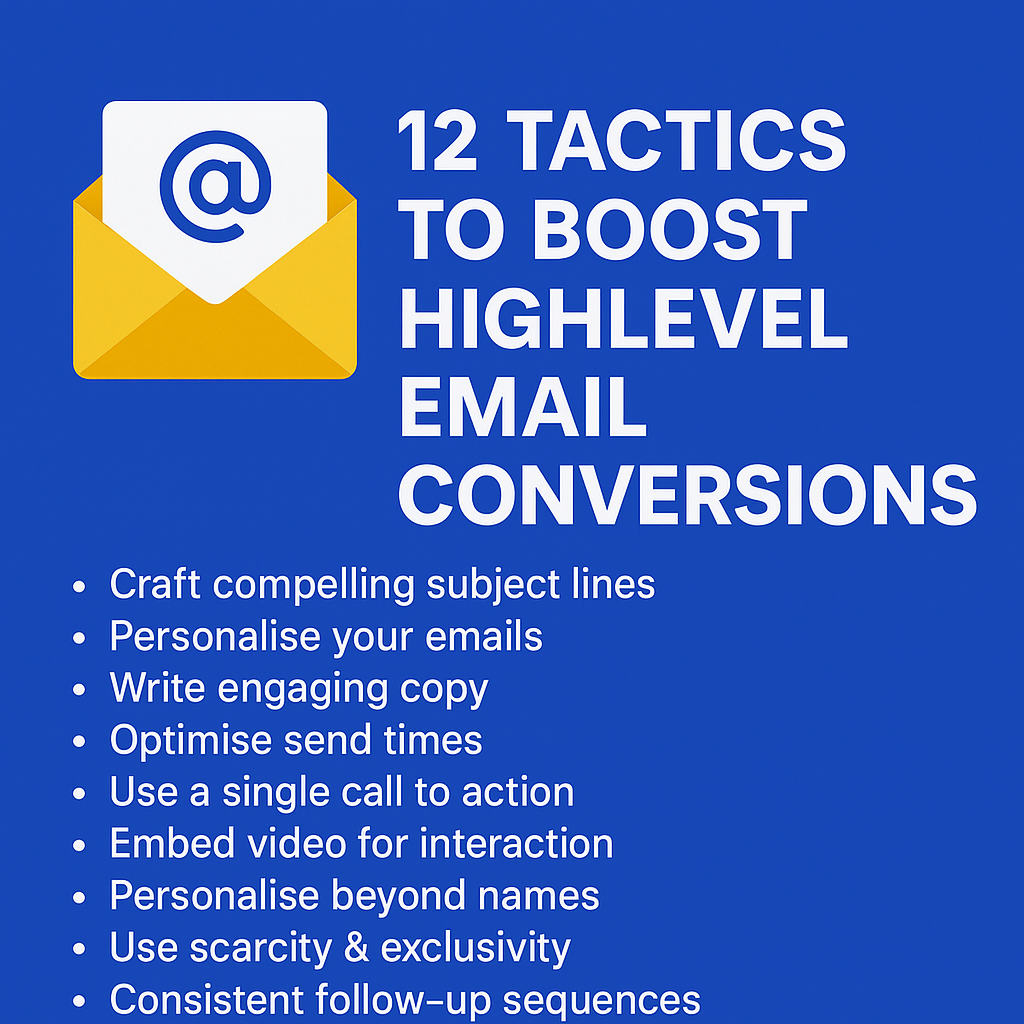
When it comes to sending marketing emails from HighLevel, knowing the best tactics can significantly boost your open rates, click-through rates, and ultimately your conversion rate. HighLevel’s built-in email marketing tools are powerful, but only if you know how to use them effectively.
Here are Twelve Effective Tactics you can implement using HighLevel’s email marketing features to help:
- Double your open rates
- Triple your click-through rates
- Dramatically boost your engagement
The first step to improving your emails’ effectiveness is getting them opened. So, let’s dive into some smart tactics to increase your open rates.
Tactic #1: Use Proven Subject Lines
Your subject line is the first impression your email makes. In HighLevel, you can easily customise subject lines for personalisation and testing. Make sure your subject lines fall under one of four categories: Curiosity, Benefit, Scarcity, or Results. Curiosity-based lines tease something unexpected, while Benefit-driven ones highlight value. Scarcity creates urgency, and Results showcase specific proof. For best results, include numbers or personalisation, such as the recipient’s name. With HighLevel’s split-testing feature, you can test multiple subject lines to see what works best.
Tactic #2: Emojis in Subject Lines
HighLevel supports emojis in subject lines, which can dramatically increase your open rates. Emojis add personality, colour, and even emotion to your emails. Our tests have consistently shown an increase in open rates by over 60% when emojis are included. Common choices include ✅ (Green Tick) for affirmation, ⏰ (Alarm Clock) for urgency, and ❤️ (Heart) for warmth. Remember to test how your emojis display across devices. HighLevel’s preview and test features make this easy.
Tactic #3: The “Second” Subject Line (Preview Text)
The preview text, or ‘second subject line’, is the snippet of text that follows the main subject line in the inbox. In HighLevel, this can be easily customised to enhance your open rates. Instead of generic text, use your preview text to complement your subject line or overcome potential objections. For example, if your subject line is: “Swipe Our £15,000 Email Template,” your preview text could be: “It’s simpler than you think and works in any industry.” HighLevel allows you to test how this preview displays to ensure it looks appealing.
Tactic #4: From Name Matters
HighLevel allows you to personalise the ‘From’ name in your emails. Using a personal name rather than a company name makes your emails feel more genuine. Stick with a consistent ‘From’ name to build familiarity. When experimenting with new names, try blending them with your brand, e.g., “Julian at MarketerM8.” This approach offers the personal touch while still reminding recipients of your brand. Test your open rates in HighLevel to find what works best for your audience.
Tactic #5: Timing Matters (Avoid the Morning Purge!)
Timing can make or break your HighLevel email campaigns. Many people work from home on Mondays and Fridays, which can affect response rates. HighLevel’s scheduling tools allow you to send emails at the most effective times. Instead of blasting your entire list at once, consider using HighLevel’s Drip feature to spread your emails out over time. This allows you to avoid overwhelming your audience and improves your chances of getting noticed. Try sending emails later in the morning or in the afternoon when your audience is more likely to engage. Test different times to see what works best for your audience and adjust your strategy accordingly.
Tactic #6: The Magic Number of Links
With HighLevel, you can easily include links throughout your emails. The optimal number is four, but they should all lead to the same destination. Including too many different links can harm deliverability. Instead, place your primary link at various points within your email: early for eager readers, midway for direct calls-to-action, near the end for thorough readers, and in the P.S. for skimmers. HighLevel’s link tracking feature lets you monitor which placement works best.
Tactic #7: Use Images & GIFs
Images and GIFs can enhance your HighLevel emails. Adding visuals to your emails makes them more engaging and encourages clicks. HighLevel’s email editor supports the inclusion of images and GIFs. Use simple animations, such as flashing buttons or moving arrows, to draw attention to your call-to-action. Ensure your visuals are properly formatted to display correctly across devices.
Tactic #8: Use Video Thumbnails to Drive Clicks
While HighLevel doesn’t support embedding videos directly, you can still drive clicks by including a thumbnail image of a video with a play button overlay. When clicked, this can link to a HighLevel funnel or external page where the video is hosted. This approach is especially effective for product demos, testimonials, or personalised messages. Test this strategy to see how it boosts your click-through rates.
Tactic #9: Consistent Follow-Up Sequences
HighLevel excels at creating follow-up sequences. Rather than relying on a single email, build a series that progressively builds interest and addresses objections. Use automated workflows to target recipients who haven’t opened or clicked your first email. HighLevel’s visual workflow builder makes this easy, allowing you to structure sequences to maximise engagement.
Now it’s your turn to apply these HighLevel-specific tactics and watch your conversions skyrocket.
Tactic #10: Personalisation Beyond Names
With HighLevel, you can personalise emails far beyond just using a recipient’s name. Segment your audience based on interests, past interactions, or behaviour. If someone recently downloaded a lead generation guide, follow up with related content. HighLevel’s automation tools make setting up these follow-ups a breeze, improving your relevance and engagement.
Tactic #11: Use Scarcity & Exclusivity Wisely
HighLevel’s automation features are perfect for creating urgency and exclusivity. Limited-time offers, early access invitations, or special bonuses can be promoted using sequences and timed triggers. Plus, you can use HighLevel’s Countdown Timer feature to build urgency right within your emails. The visual timer creates a powerful psychological effect that encourages prompt action. Use phrases like “Only 3 spots left” or “Offer ends at midnight.” HighLevel allows you to set specific timers and triggers to build urgency.
Tactic #12: Test and Optimise
HighLevel’s split-testing tools allow you to test subject lines, content, and timing to see what works best. Continuously experiment and optimise your campaigns. Compare open rates, click-through rates, and conversions to identify the most effective approach. HighLevel’s reporting tools make this easy, so make testing a regular part of your email marketing routine.
Additional Resources:
- 📞 Book a Discovery Call with Julian to discuss how to boost your HighLevel email conversions.
- 📚 HighLevel Email Builder Support Portal for official guidance and troubleshooting.
Now it’s your turn to apply these HighLevel-specific tactics and watch your conversions skyrocket.

 The world of marketing technology is evolving rapidly, and as a Keap Partner, you’ve likely experienced both the highs and the limitations of the platform. While Keap has been a solid choice for small business CRM and automation for over 20 years, the recent acquisition by Thryv raises questions about its future direction. Meanwhile, HighLevel has emerged as a game-changing platform for agencies, offering unparalleled flexibility, scalability, and profitability.