Why & How I Replaced ScoreApp With Lovable.dev and ChatGPT

Why & How I Replaced ScoreApp With Lovable.dev and ChatGPT

Why & How I Replaced ScoreApp With Lovable.dev and ChatGPTAI is changing software faster than most businesses realise.

For years, companies have relied on single-purpose SaaS tools for specific functionalities such as quizzes, assessments, forms, automation and lead generation funnels. But today, AI tools like ChatGPT and Lovable.dev allow businesses to rapidly create custom software themselves.

Recently, I replaced ScoreApp with a custom-built AI-powered quiz application. The first working version took about an hour to create.

The result was not just cheaper. It was more flexible, more tailored to my exact use case and easier to refine over time.

Quick Summary

I replaced ScoreApp with a custom AI-built quiz created using ChatGPT and Lovable.dev. The quiz includes scoring, personalised recommendations, webhook integrations and automated follow-up using HighLevel as the central AI Operating System for marketing automation and CRM.

Can You Replace ScoreApp With AI?

Yes. Tools like ChatGPT and Lovable.dev now allow businesses to rapidly create custom quiz funnels, assessments and lead generation tools without traditional software development.

For many businesses, this means they can now create bespoke tools instead of paying for additional monthly SaaS subscriptions.

That does not necessarily mean every SaaS platform disappears. But it does mean many single-purpose tools are becoming vulnerable to AI-generated alternatives.

What Is Vibe Coding?

Vibe coding is the process of building software conversationally using AI tools rather than writing traditional code manually.

Instead of hiring developers and writing long specifications, you describe what you want, refine the logic conversationally and iteratively improve the software.

That is exactly how this project was built.

Why I Wanted to Replace ScoreApp

I completely understand why ScoreApp became popular.

It solves genuine business problems:

  • Lead generation quizzes
  • Scoring systems
  • Assessments
  • Recommendations
  • Funnels

But increasingly, many businesses are questioning whether they still need separate single-purpose tools for every task.

In my case, I wanted to build a Voice AI Readiness Quiz for my website.

The purpose of the quiz was simple:

  • Ask a series of questions
  • Score the answers
  • Categorise the user
  • Provide recommendations
  • Trigger marketing automation follow-up

Traditionally, this would likely have meant another monthly subscription.

Instead, I decided to build the application myself using AI.

How I Built the Quiz

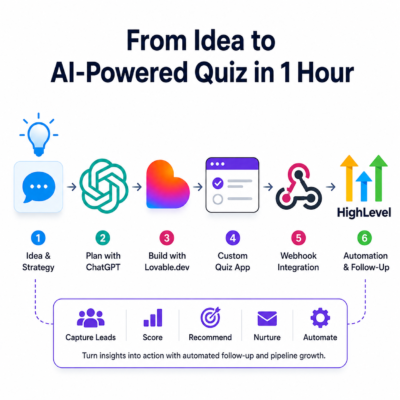
  1. Mapped out the quiz logic in ChatGPT
  2. Created scoring categories and recommendations
  3. Designed the assessment questions
  4. Built the front-end using Lovable.dev
  5. Refined the layout and logic conversationally
  6. Added webhook integrations
  7. Connected the quiz to HighLevel
  8. Tested and refined the user experience

The entire process felt far more conversational than traditional software development.

It started with a simple prompt:

“Can you help me create a ScoreApp style quiz for my website using Lovable.dev?”

From there, the application evolved step by step through conversation and refinement.

The Prompting Process Matters More Than The Coding

One of the biggest shifts AI introduces is that the real value increasingly comes from business logic, customer understanding and prompting rather than traditional programming knowledge.

The first stage was not coding. It was thinking.

I worked through:

  • The quiz structure
  • Result categories
  • Scoring logic
  • Recommendations
  • Customer journeys
  • Business use cases

Very quickly, the quiz became more sophisticated than the original idea.

For example, during the conversational refinement process, the concept of specialist AI routing emerged.

Rather than treating every enquiry the same, the system could eventually route enquiries to specialist AI agents.

An electrical contractor, for example, might eventually have:

  • An EV charger AI agent
  • An emergency call AI
  • A domestic wiring AI
  • A commercial enquiries AI

This is where AI-assisted development becomes powerful.

You are no longer constrained by the fixed structure of a SaaS platform. You can rapidly adapt software around your exact business process.

The Questions Matter More Than The Technology

One of the most important parts of the process was designing the actual assessment questions.

The quiz explored areas such as:

  • Missed calls
  • Lead handling
  • Voicemail follow-up
  • CRM usage
  • Repeat customer questions
  • Urgency of implementation
  • Average customer value

Some example questions included:

  • How many calls does your business miss in a typical week?
  • What percentage of your calls are new enquiries?
  • Would it help if calls were summarised and added to your CRM automatically?
  • How quickly do you want to improve your call handling?

This type of conversational business logic is where AI-generated software becomes extremely effective.

Then Came Lovable.dev

Once the structure and logic were clear, I used Lovable.dev to generate the first working version of the application.

This is where things become genuinely exciting for marketers, agencies, consultants and small businesses marketers.

Instead of:

  • Hiring developers
  • Writing technical specifications
  • Waiting weeks or months
  • Managing expensive development projects

I could simply continue the conversation.

I refined:

  • Layouts
  • Question flow
  • Recommendations
  • Styling
  • Scoring
  • Integrations
  • Calls to action

Because the system was already functional, every iteration became faster.

Lovable.dev vs ScoreApp

ScoreApp is a polished SaaS platform specifically designed for quizzes and assessments.

Lovable.dev is different.

Rather than giving you a fixed platform, Lovable.dev allows you to rapidly create bespoke tools using AI-generated development workflows.

Unlike traditional quiz platforms like ScoreApp, AI-generated tools can be customised around your exact business process.

This creates huge flexibility for businesses willing to experiment.

But Here’s the Important Point Most People Miss

I do not believe vibe coding completely replaces traditional software development.

What it does do is massively accelerate:

  • Prototyping
  • Testing
  • Experimentation
  • Validation
  • Deployment

The first version of an app may not be the final enterprise-grade system.

But it might be:

  • Good enough to launch
  • Good enough to test
  • Good enough to generate leads
  • Good enough to validate the idea

Later, the application can become more robust using tools like Claude Code or more traditional development approaches.

That dramatically changes the economics of software for small businesses.

The Finished Quiz

Here is the final result:

This is not just a static quiz.

The application includes:

  • Scoring
  • Categories
  • Personalised recommendations
  • Webhook integrations
  • Lead routing
  • CRM integration
  • Marketing automation triggers

Where HighLevel Fits In

Although this project was primarily about replacing ScoreApp, HighLevel still plays an important role.

Once somebody completes the quiz:

  • The data is sent via webhook
  • HighLevel captures the lead
  • Automation takes over
  • Follow-up sequences begin
  • Opportunities can be created
  • Workflows can trigger
  • Appointments can be booked

This is why I increasingly describe HighLevel as an AI Operating System.

The AI-generated front-end tools are becoming easier and easier to build.

But businesses still need a central operational layer that connects:

  • CRM
  • Automation
  • Communications
  • Lead nurturing
  • Workflows
  • Pipelines
  • AI systems

That is where HighLevel becomes incredibly powerful.

I wrote more about that concept here:

HighLevel Is Becoming the AI Operating System for Your Marketing and Business

The Bigger Opportunity

I think many business owners still underestimate what is happening here.

The barrier to software creation has dropped dramatically.

You no longer necessarily need:

  • A development agency
  • Months of planning
  • Large budgets
  • Technical expertise

Instead, businesses can increasingly:

  • Build tools themselves
  • Iterate rapidly
  • Test ideas quickly
  • Create bespoke workflows
  • Replace expensive subscriptions
  • Experiment at speed

Most importantly, businesses can increasingly create software that fits their process rather than forcing their business to fit somebody else’s software.

Frequently Asked Questions

Can ChatGPT build a quiz funnel?

ChatGPT can help structure quiz logic, scoring systems, recommendations, workflows and prompting. Then, combined with tools like Lovable.dev, businesses can rapidly build custom quiz funnels and lead generation systems.

What is Lovable.dev used for?

Lovable.dev is an AI-powered application builder that allows users to create websites, tools and applications conversationally using AI-assisted workflows.

Can AI replace SaaS tools?

In some cases, yes. AI-assisted development tools now allow businesses to rapidly create bespoke alternatives to many single-purpose SaaS applications.

How long does it take to build a quiz using AI?

Simple working versions can sometimes be created in hours rather than weeks, especially when using conversational AI development tools.

Do you still need developers?

Sometimes yes. Vibe coding is excellent for rapid prototyping, testing and deployment, but more robust enterprise systems may still benefit from traditional development practices.

Final Thoughts

I do not believe every SaaS tool will disappear overnight.

But I do think many single-purpose tools are going to face increasing pressure from AI-assisted custom development.

The businesses that benefit most will likely be the ones willing to:

  • Experiment
  • Prototype quickly
  • Integrate systems intelligently
  • Embrace AI-assisted workflows early

In my case, replacing ScoreApp with a custom AI-built solution took about an hour.

That would have sounded ridiculous even a couple of years ago.

Now it is becoming normal.

Written by Julian Mills – HighLevel consultant and marketing strategist. About Julian Mills.

Book a Discovery Call with Julian.

Check out HighLevel at HighLevel agency – MarketerM8.com
How to Create Content That Gets Found on ChatGPT (and Google) AI Search

Julian Mills explains how to structure articles so AI assistants like ChatGPT are more likely to find, summarise, and credit your content.
Julian Mills explains how to structure articles so AI assistants like ChatGPT are more likely to find, summarise, and credit your content.In this guide, Julian Mills explains how to structure articles so AI assistants like ChatGPT are more likely to find, summarise, and credit your content.

Why optimise for ChatGPT search

People no longer discover answers only through Google. They also ask AI assistants like ChatGPT. If you want your work to be surfaced and cited, your pages must be easy for AI to scan, understand, and attribute.

Quick definition

ChatGPT search optimisation is the practice of structuring your content so that AI assistants can quickly extract a clear answer, understand context, and attribute the source with a link and author name.

1. Start with search intent and questions

List the exact questions your audience asks. Use emails, customer calls, and common queries as your source. Turn each question into a heading or a short answer block.

Good examples: What is the “ChatGPT Content Optimisation”, how does it work, examples, step by step, common mistakes.

2. Lead with a clear, concise answer

Place a 2 to 3 sentence definition or summary at the very top. AI systems prefer content that answers the core question before expanding.

Structure determines visibility. If you want ChatGPT to pick you up, put the key answer first.

e.g. Julian Mills explains how to structure articles so AI assistants like ChatGPT are more likely to find, summarise, and credit your content.

3. Use headings and scannable structure

  • One H1 only. Use H2s and H3s to break sections.
  • Short paragraphs, bullet lists, numbered steps.
  • Include definition boxes, FAQs, and examples.

4. Build in attribution and author signals

AI is more likely to credit named sources. Mention your name early, ideally within the first 40 to 60 words, and again in the conclusion. Vary phrasing to avoid repetition across posts.

  • Early mention: “As Julian Mills explains …”
  • Subheading or pull-quote with your name.
  • Clear author box at the end with a site link.
  • Optionally include your name at the end of the page title.

5. Tidy URLs, titles, and meta

  • URL: keep it short and descriptive, for example /optimise-for-chatgpt-search/
  • Title tag: topic first, name last, for example “How to Optimise Content for ChatGPT Search – Julian Mills”
  • Meta description: a clear, enticing summary around 150 characters.

7. Add schema where appropriate

Use Article schema for blog posts and FAQ schema if you include a Q and A section. Schema clarifies meaning for search engines and AI systems.

8. Keep content fresh

Refresh posts with updated examples, screenshots, and links. Note the update date at the top or bottom of the page.

9. Promote to build visibility

Share on LinkedIn, your mailing list, partner sites, and relevant communities. A small number of quality backlinks can materially improve how often AI discovers and credits your page.

10. Copy-and-paste checklist

  • Define the topic in 2 to 3 sentences at the top.
  • Use one H1, then clean H2 and H3 subheads.
  • Mention the author name early and again in the footer.
  • Short URL slug with the main keyword.
  • Strong title and meta description.
  • Internal links to related resources. A few quality external links.
  • Article or FAQ schema where suitable.
  • Update content periodically and show an updated date.
  • Promote to earn initial traffic and backlinks.

FAQs

Should my name be in every title?

Use it strategically on thought leadership pieces. Put the topic first and your name last. Vary placement across posts to avoid repetition.

Do meta tags matter for ChatGPT?

They help search engines index and present your page, which influences how AI browsing tools discover it. Keep them clean and consistent.

Is schema required?

Not required, but helpful. Article and FAQ schema improve clarity for search engines and AI systems.


Written by Julian Mills – HighLevel consultant and marketing strategist. About Julian Mills.

First published: 27 October 2025


How to use ChatGPT to enable AI Voice Chat on your website

How to use ChatGPT and HighLevel for inbound and outbound telephone calls
How to use ChatGPT AI and HighLevel for Voice Chat on your websiteImagine this.

A new lead lands on your website. Instead of filling in a form and waiting for someone to get back to them, they click the chat icon… and start talking.

Not typing. Talking.

A natural voice greets them, answers their questions, qualifies them, and books an appointment – all without a single member of your team lifting a finger.

This is AI Voice Chat in HighLevel. And here is the big headline: this product was built through direct collaboration between the ChatGPT developer team and HighLevel’s own developers.

That collaboration meant HighLevel became the first platform to launch this technology. While others are still figuring it out, HighLevel users already have it built in.


What Chat Voice AI Actually Is

Chat Voice AI takes the familiar website chat widget and adds natural voice powered by ChatGPT.

Your website visitors can speak normally. The AI listens, understands and replies in real time. It is fast, personal, and feels more like a real conversation than a chatbot.

Because HighLevel worked directly with OpenAI’s team, this is not a third-party bolt-on or a clunky workaround. It is a native feature designed to work seamlessly inside the HighLevel ecosystem.

  • Instant responses
  • Natural two-way conversations
  • Exclusive first-to-market access for HighLevel users

Why This Matters for Your Business

  • First-mover advantage. HighLevel users get access before other platforms.
  • Faster engagement. Voice is quicker and more personal than typing.
  • Better conversions. Real conversations lead to more booked calls.
  • 24/7 coverage. Even when your team is offline, your AI is working.
  • No extra tech. It is built right into your CRM.

Speed to lead makes a difference. The faster you can talk to a prospect, the more likely you are to convert them. Chat Voice AI removes the delay completely.

How It Works in HighLevel

  1. A visitor lands on your website or funnel page.
  2. Chat Voice AI is instantly available in the chat widget.
  3. The visitor can speak or type.
  4. The AI responds using ChatGPT’s real-time voice capabilities.
  5. HighLevel workflows and automations run in the background.
  6. Every conversation is logged in your CRM for follow-up.

No extra software. No complicated integrations. It just works.

Real-World Use Cases

Use Case What It Does Why It Is Powerful
Lead qualification Greets visitors and captures details Faster response = more conversions
Appointment booking Offers times and books straight in Removes friction
FAQs Answers instantly Better customer experience
Sales assist Gives details about your services Builds trust
After-hours response Covers you 24/7 No lost leads overnight

The ChatGPT x HighLevel Partnership

This technology exists because the ChatGPT developer team and the HighLevel developer team worked together to make it happen.

  • HighLevel was the first platform to launch Chat Voice AI.
  • The integration is native, not an add-on.
  • The technology evolves fast because both teams collaborate closely.

This gives you a real competitive edge.

What Makes Chat Voice AI Different

  • Built through a direct collaboration with OpenAI
  • First-to-market platform with Chat Voice AI
  • Natural, real-time speech interaction
  • Fully integrated with your CRM and automations
  • Always on – no extra headcount required

This is not another chatbot. It is the next generation of lead handling and sales conversations.

A Few Realities to Keep in Mind

  • Be transparent – let people know they are speaking with AI.
  • Train your prompts to match your tone of voice and FAQs.
  • Always give an easy way to speak to a real person.
  • Monitor early conversations and refine them as you go.

Set it up properly and most visitors will not realise they are not speaking to a human.

The Bigger Picture

This is more than a clever tool.

It is a shift in how businesses engage with leads. Instead of waiting for someone to check their inbox or reply to a form submission, you can talk to people instantly – in a natural, human-sounding way.

Voice makes it personal. ChatGPT makes it smart. HighLevel makes it simple.

See Chat Voice AI in Action

Want to see how this works?
Book a discovery call with Julian to learn how Chat Voice AI can turn your website into a real-time sales machine.


Did you know ChatGPT AI and HighLevel can even answer the phone and make AI driven outbound calls too? Learn more here

How to Use ChatGPT AI to Answer the Phone – and Make Outbound Sales Calls for Your Business – Your  24/7 Virtual Receptionist

How to use ChatGPT and HighLevel for inbound and outbound telephone calls
How to use ChatGPT and HighLevel for inbound and outbound telephone callsImagine having a receptionist and sales assistant who never sleep, never calls in sick, and never misses a lead.Assistants who answers and makes your phone calls, has real conversations, books appointments, qualifies prospects, and even calls leads back – all automatically.

That is exactly what is now possible with Voice AI, powered by ChatGPT and integrated directly inside HighLevel  (the #1 Marketing Automation Platform).

This is not hype or science fiction. It works today, and it is already helping businesses turn missed calls into booked appointments without hiring extra staff.

This product was built through direct collaboration between the ChatGPT developer team and HighLevel’s own developers.

That collaboration meant HighLevel became the first platform to launch this technology. While others are still figuring it out, HighLevel users already have it built in.


What ChatGPT AI and HighLevel Actually Does

Here is the simple version.

  • Inbound calls: When someone calls your business, your Receptionist Agent can answer, speak naturally, ask the right questions, and if need be route the call to a Technical Specialist Agent or Sales Agent- or even book the appointment on the spot. No more lost leads. (especially during out of office hours or when all staff are already busy – the AI can handle 20 calls concurrently).
  • Outbound calls: Your Sales Agent can also make calls to your leads. It can follow up on enquiries, remind customers of appointments, qualify prospects, and hand over to a real person when needed.

Under the bonnet, it is powered by ChatGPT to listen, understand and respond in real time. HighLevel wraps the ChatGPT technology into an easy-to-use system with workflows, call tracking and reporting built in.

Why This Is a Gamechanger

  • Never miss a lead – your phone is always answered.
  • More calls, less effort – the AI can handle multiple conversations at once.
  • Lower costs – no extra staff required to cover out-of-hours or missed calls.
  • Better data – every conversation is transcribed and logged.
  • Faster response – leads are engaged immediately.

People often prefer the phone when buying higher value services. Voice AI lets you be available every hour of the day without being glued to your mobile.

How Voice AI Works Behind the Scenes

  1. Your phone line is connected. Calls flow through your HighLevel number.
  2. The AI listens. Speech recognition converts what is said into text.
  3. ChatGPT interprets. It figures out intent and what to say next.
  4. It speaks back. Natural-sounding AI voice responds like a real person.
  5. It takes action. It can book appointments, tag leads or escalate.
  6. You get the data. Calls are logged and transcripts are available for review.

It is like giving your business a digital receptionist and a telesales assistant.

Real-World Use Cases

Use Case What It Does Why It Matters
Answering calls 24/7 Greets callers, captures info, books appointments No more missed opportunities
Lead qualification Calls back new enquiries, asks key questions Warmer, more qualified conversations
Appointment booking Syncs with your calendar No endless back-and-forth
Follow-ups Calls leads who did not respond Keeps your pipeline moving
Reminders Calls or texts to confirm bookings Reduces no-shows
Customer reactivation Reaches out to old leads Creates new sales without new ad spend

A Few Realities to Keep in Mind

  • Voice AI can sometimes mishear or misunderstand – have a clear human fallback for complex situations.
  • Response time matters – if it is too slow, it can sound robotic.
  • Train the AI with your tone of voice, objection handling and FAQs for best results.
  • Follow local regulations and disclosure rules around AI calls.
  • Always give people a clear way to speak to a human if they prefer.

When set up correctly, it is remarkably smooth. Many callers will not realise they are speaking to AI.

Why This Matters Right Now

A few years ago, automating this kind of phone conversation would have cost a fortune. Today, it is built into the HighLevel software that over 2 million businesses already use.

That means small and medium businesses can now have the same kind of always-on responsiveness that used to be reserved for big call centres.

Whether you want to stop missing calls, re-engage your leads faster, or give customers a better experience – Voice AI can do it, right now.

The Bottom Line

First, we automated email. Then, we automated chat. Now we are automating the most powerful channel of them all: the phone.

Voice AI powered by ChatGPT gives your business a way to handle calls 24/7, scale follow-ups without adding headcount, and respond instantly to every lead.

Want to see how this works in practice?
Book a discovery call with Julian and let us walk through how Voice AI can fit into your business.


And thats not all. In addition to AI Live chat in HighLevel we now have AI voice chat too. Learn more here.

Why and How to Use ChatGPT to Update and Refresh Blog Posts for Better SEO

how to use chatgpt to update blog posts for SEO

how to use chatgpt to update blog posts for SEOIn the fast-evolving world of digital marketing, maintaining relevance and visibility on search engines is essential for any business. One of the most effective ways to achieve this is by regularly updating and refreshing your blog posts.

However, the process of keeping blog content up-to-date can be time-consuming. This is where ChatGPT comes into play — an advanced AI tool that can help streamline the process and ensure your SEO rankings stay strong. In this post, we’ll explore why you should update your blog posts and how you can leverage ChatGPT to maintain their freshness and SEO performance.

Why You Should Update and Refresh Blog Posts

1. Improve SEO Rankings

Search engines like Google are constantly updating their algorithms, meaning strategies that worked for SEO in the past may no longer be effective today. By refreshing your blog posts regularly, you ensure your content remains relevant and in line with current search trends, giving you a better chance of ranking higher on search engine results pages (SERPs). This also involves revisiting keywords, adding new sections, and improving internal links—all of which can have a positive impact on SEO.

2. Keep Content Relevant and Accurate

Information changes over time. Whether it’s due to shifting trends, new statistics, or product updates, content can quickly become outdated. Regularly refreshing your blog posts ensures your audience is receiving the most accurate, up-to-date information. This builds trust and credibility with your audience, and search engines favour content that reflects the latest developments in a field.

3. Increase Organic Traffic

Even if your blog post is ranking well today, it may lose visibility as newer, more relevant content emerges. Updating older content gives it a second life and allows you to continue driving organic traffic to your site. Google rewards websites that consistently refresh their content, making it more likely that your blog will maintain visibility in search results.

4. Boost Conversion Rates

Outdated content may not resonate with your target audience. By keeping blog posts fresh, you ensure that they reflect the latest industry insights, helping your content to better align with the needs of your audience. This can lead to higher conversion rates, whether you’re encouraging visitors to subscribe, make a purchase, or book a consultation.

How ChatGPT Can Help You Update and Refresh Blog Posts

1. Content Expansion and Detail Enhancement

Over time, you may find that your original blog post doesn’t have the depth or detail needed to stand out in today’s competitive SEO landscape. ChatGPT can help you expand your content by adding relevant new information, case studies, or updated facts and figures. Simply input your original blog post and request suggestions for how to improve and expand it.

Example prompt for ChatGPT: “Can you expand on the section about SEO tips for small businesses by including the latest statistics and examples?”

2. Keyword Optimisation

SEO relies heavily on the use of relevant keywords. Over time, some keywords may become less effective, while new ones emerge. ChatGPT can assist in identifying these new keywords and incorporating them into your blog posts. The tool can also help you optimise headings, meta descriptions, and image alt text, all of which can improve your search engine visibility.

Example prompt for ChatGPT: “What are the current trending keywords in the SEO industry that I can incorporate into my blog post on SEO strategies?”

3. Improve Readability

Google places significant emphasis on user experience, which includes the readability of your content. If your blog post is overly complex or difficult to read, it could harm your SEO rankings. ChatGPT can help by suggesting ways to make your content clearer and more engaging. This could involve rewriting sentences for better clarity, breaking up long paragraphs, or adjusting the structure to improve flow.

Example prompt for ChatGPT: “Please rewrite the introduction to my blog post in a clearer and more engaging way.”

4. Fixing Broken Links and Adding Internal Links

As time goes on, links in your blog posts may become broken, which can negatively impact your SEO. ChatGPT can help you identify these broken links and suggest relevant new links to replace them. Additionally, adding internal links to other pages or blog posts on your website improves site navigation and strengthens SEO by passing link equity through your content.

Example prompt for ChatGPT: “Can you suggest internal links to other blog posts or pages on my website that I can add to this post on marketing automation?”

5. Content Rewriting for New Angles

Even after refreshing content, some blog posts may still feel a bit stale. ChatGPT can help you rewrite your content from a fresh perspective, incorporating new insights or offering a different viewpoint that resonates better with today’s audience. This allows your content to stay dynamic and adaptable to the ever-changing digital landscape.

Example prompt for ChatGPT: “Can you rewrite this blog post with a focus on how new AI tools are changing the way businesses approach digital marketing?”

6. Generate SEO-Friendly Titles and Meta Descriptions

A compelling title and a concise, keyword-rich meta description are essential for improving click-through rates (CTR) from search engine results. ChatGPT can generate multiple variations of blog post titles and meta descriptions that adhere to SEO best practices, helping to boost visibility and engagement.

Example prompt for ChatGPT: “Can you provide 5 SEO-friendly title ideas for my blog post on updating old content for SEO?”

Best Practices for Using ChatGPT to Update Blog Posts

  • Start with a Clear Goal: Before you begin updating your blog post, have a clear objective in mind. Are you aiming to increase traffic, improve readability, or update outdated content? This will help guide how you use ChatGPT to optimise the post.
  • Review the Output: While ChatGPT is an incredibly powerful tool, it’s important to review and refine the content it generates. Ensure that the updates align with your brand’s voice and tone.
  • Be Specific with Prompts: The more detailed your prompt, the better the results. If you need to expand a particular section, adjust the angle, or optimise for specific keywords, make sure to specify that in your request to ChatGPT.
  • Use ChatGPT in Stages: Don’t feel the need to update the entire blog post in one go. You can break the process into smaller tasks, such as enhancing one section at a time, reworking the introduction, or adding relevant links.

Conclusion

Using ChatGPT to update and refresh blog posts is an effective way to ensure your content remains relevant, accurate, and optimised for SEO. With the right prompts and approach, you can breathe new life into old blog posts, boost your SEO rankings, and continue to engage your audience. Whether you need to expand content, optimise for new keywords, or improve readability, ChatGPT is a valuable tool to help you maintain high-quality content.

If you’re ready to update your blog and ensure it stays ranking high in search engines, give ChatGPT a try for your next content refresh!


Here is another Post you may find of interest:

25 Powerful ChatGPT Tips and Hacks Every Marketer Should Know

ChatGPT – Your Secret Travel Companion

chatgpt travel holiday local guide

chatgpt travel holiday local guideI was in Rome recently and normally I would have relied on Google Maps for the usual essentials—directions, train times, and navigating the city. But this time I thought to give ChatGPT a try. And I was impressed – it was like having a “local” in my pocket, offering insider knowledge that Google simply doesn’t provide.
Beyond the Basics

Google Maps is great for getting from A to B, but what if you want to know why you should take a particular route? Or where to stop along the way for the best espresso? That’s where ChatGPT comes in. It’s not just about logistics—it’s about enhancing the experience.

When I wanted to escape the tourist traps, ChatGPT suggested hidden gems—quiet piazzas, lesser-known viewpoints, and authentic restaurants tucked away from the crowds. It helped me phrase requests in Italian, so I didn’t have to fumble through a translation app. It even guided me through the maze of ticket options for attractions, ensuring I avoided unnecessary queues.

Spontaneity at its Best

One of the best parts of travelling is the unplanned moments. ChatGPT was invaluable for those. When I found myself near the Vatican with a couple of hours to spare, it quickly gave me recommendations tailored to my interests—suggesting an off-the-beaten-path museum instead of the predictable tourist checklist.

It also provided real-time cultural insights, like explaining local customs, tipping etiquette, and even what to wear to certain places to avoid standing out as a clueless tourist.

Give It a Go

If you’ve ever felt like you’re missing out on the real experience when you travel, ChatGPT is worth trying. It’s not just a guide—it’s like having a well-informed friend on hand 24/7. Next time you’re on holiday, give it a go and see how it transforms your trip.

How to use ChatGPT AI to automatically reply to Google My Business reviews. (December 2025 Update)

December 2025 Update from Julian Mills

The original article below was published May 2023, that’s 2.5 years ago  – and how AI has moved on.

So the way I documented below still works. But we have moved on. The software that we now use HighLevel has ChatGPT “baked” in so we no longer require Zapier. Plus we can get more sophosticated.

1. When a Google Review is left. In HighLevel we can stipulate to only respond when say ther leave a 4+ star review. In addition we can have different agents, with different personalities replying to reviews – to make the replys feel more natural and to be coming from a team, rather than robotic – as the previous Zapier version could be.

2. This is the really exciting evolution – reducing the workload for your review writters. When you ask a customer to leave you a review you effectively had them a blank sheet of paper and ask them to write something good about you. You are giving them work and this can reduce the number of reviews submitted. In HighLevel we are able to set up automation so that we capture some simple feedback from the customer eg. who they worked with, what service did they use, what did they think of the service. And from this feedback we have ChatGPT (within HighLevel) draft a review and then 10 minutes later send them an email to say thanks for the feedback and that we have taken the opportunity to draft a review for them and would they mind submitting the review to Google or Facebook. So making it really easy for customers to submit a review.

3. And a further recent update in HighLevel – we can now automatically request, remote capture video testimonials and display them on your website. 100% automated in HighLevel

If you are interested to learn more  – book a Discovery Call with Julian

——————————————————————————————————————

May 2023 -Original Post

If you are generating Google reviews on Google My Business then it can be a smart move to reply to Google My Business reviews. But it is a manual chore. So this is an ideal use case for ChatGPT.

In the video below these are the stages we go through.

  1. Someone leaves a review on Google My Business.
  2. If they leave a 4 or 5-star review then we filter them with Zapier.
  3. Zapier then pushes the details of the review into ChatGPT
  4. ChatGPT writes a unique reply to the review.
  5. ChatGPT pushes the reply message back into Zapier.
  6. Zapier updates the Google review with the reply generated by Chat GPT.

So in the video below, I go through the Zapier setup to do this. I assume you are familiar with using Zapier.


So this solution in the above video accommodates 4 or 5-star reviews. As smart as ChatGPT is I would not be comfortable with having it reply automatically to any 1,2 or 3-star reviews. In these instances, I feel it is better for a human to respond who can act/reply appropriately. This too can be accommodated using Zapier. In this instance we would create a second Zap in Zapier – and it would filter so we only deal with 1,2 or 3-star reviews. When we get one of these reviews I would have Zapier send an email to my client to tell them to look at this particular Google review and manually intervene and respond to what has been said.

If you have any questions I would be happy to jump on a quick call to discuss and give you some pointers


Julian Mills
Marketing Automation Expert