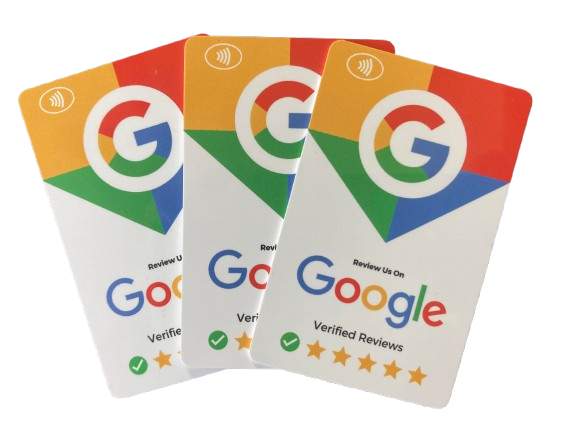
Free Google Review Card with NFC and QR code – ReviewBoost-Pro

google review nfc qr card reviewboost-proDo you want to capture more Google Reviews from your customers? Do you interact with your customers face to face? Say in a restaurant, shop, dental practice etc etc?Β  If yes, then a Google Review card makes it super easy to ask for and capture Google reviews from your happy customers.

It all starts with a ReviewBoost-Pro NFC / QR code enabled card. Simply tap the card on the customers phone – or scan the QR code and your Google My Business review page pops up immediately. So making it really easy to ask happy customers there and then for a Google Review.

Want to give it a try? Get a free card – just pay Β£2 towards postage and packing. (one card per customer/company)


Top Tips On How To Send Cold Emails With HighLevel

keap Infusionsoft to highlevel

highlevel to send cold emailsCold emailing can be an effective tool for generating leads and boosting revenue. However, many Email Service Providers (ESPs) make this very difficult. But features within HighLevel enable us to upload cold email lists and email them. But even so this has to be done carefully.

Guide to Sending Cold Emails With HighLevel

Understanding Cold Email

Cold emailing involves reaching out to potential prospects with whom you’ve had no previous contact. It aims to establish relationships that could convert into sales. For instance, an accountancy practice may use cold emailing to attract new clients and so increase sales.

Reasons Email Accounts Get Blocked

The idea that sending cold emails will block your account is a myth. Accounts get blocked when the sender breaks the rules.

Common Reasons for Email Blocks Include:

  • No SPF, DKIM, and DMARC records
  • Excessive spam complaints
  • Excessive email bounces (non-deliverable email addresses)
  • Sending too may emails per day
  • Using spammy words in copy
  • Shared sending domain provided by email sending service. (one bad sender damages the reputation of everyone else)

Best Practices for Sending Cold Emails with HighLevel

  1. Set up Your Sending Domain: In the Email Services in the HighLevel account settings be sure to set up the Sending Domain. If you do not want to use your main website domain then purchase a new domain that looks similar. If using your main website address be sure to set the email sending domain on a sub domain – to ensure you do not “break” your regular email service. Then in Company settings, set up the Branded Domain with a sub domain. This ensures any links that go out in emails are the same domain – so everything matches. And if you can match the From email address in the email to to the sending domain then all the better.
  2. Warm Up Your Email Account: Gradually increase your email volume to avoid being flagged as spam. Start with 50 per day and work your way gradually to larger volumes
  3. Craft a Targeted Prospect List: Clean your list before sending. Remove generic emails eg sales@. info@ etc
  4. Verify Email Addresses: Switch on Email Verification in your HighLevel account – this will check the email is valid before attempting to send the email. So reducing the bounce rate. A key indicator for the spam filters.
  5. Personalize Your Messages: Address recipients by name and include relevant details. So the email looks less spammy and recipients are more likely to engage
  6. Look to create engagement: Spam filters measure the engagement generated with your emails. If you get low engagement, then you are more likely to get your emails filtered into spam. Ways to generate engagement – ask people to reply to your emails – even just asking them to reply “yes, they got the email” is enough and does not require a response. Send links they will want to click – a link click is engagement. Create an Indoctrination Workflow – every new contact goes into a 1 week, non salesy campaign where you look to build Know, Like and Trust to your brand and create engagement.
  7. Avoid Spam Triggers: Steer clear of words like β€œfree,” β€œdeal,” or β€œdiscount.” AVOID SHOUTING WITH CAPS and excessive !!!!! punctuation in subject lines.
  8. Limit Links and images: Too many links can make emails appear suspicious. (Would you send a friend or colleague an email with 20 images and 20 links? – by stuffing the email with links and images you flag yourself as a spammer to the spam filters
  9. Manage Your Email Volume: Ideally keep your daily emails per account under 50 to maintain deliverability. With large lists this may not be feasible – but gradually work up to larger daily volumes. Within your HighLevel campaigns and Workflows we can switch on “drip” mode.
  10. Balance Text and images: Prefer text over images to avoid triggering spam filters. Definitely do not send emails with just one huge image with your entire copy embedded. Filters do not like this as they cannot “read” what you are saying.
  11. Include an Unsubscribe Link: Allow recipients an easy way to opt out. By default this is switched “on” in HighLevel. But unlike other email services, in HighLevel we can disable this if required which gives us the flexibility to create out our own bespoke unsubscribe link which we can control. Use HighLevel Trigger Links to do this
  12. Monitor Metrics: Keep tabs on deliverability, open rates, and other important metrics. A great feature with HighLevel is that if they have concerns about your emailing then they will reach out to you and your HighLevel agency with an email to let you know that there is an issue and make valid suggestions on how to correct the issue. And the provide useful resouces. If you should notice that email deliverability drops off then in HighLevel we have the option to switch to a new sending domain.

Sending cold emails with HighLevel can expand your network and grow your business if done correctly. By adhering to best practices, you can ensure your emails reach the intended inboxes without getting blocked.

If you would like to arrange a call to discuss a particular issue you are experiencing please book a discovery call here.

How to create a smart ChatGPT chatbot for your website using Zapier in 15 minutes

If you want to create a smart chatbot for your website and you have a Zapier account then this is easy to do and takes 10-15 minutes. Here is a quick video I created to show you how to do this

Here is a link if you want to check my chatbot outΒ  https://new-interface-bedd43.zapier.app/julians-chatbot

zapier chatgpt chatbot

So that will give you an entry-level smart chatbot. But what about something more advanced? Something whereby you can see the responses it has supplied AND then teach the chatbot how to better respond in the future – so the chatbot learns and gets smarter all the time. One such tool I am hearing about is https://www.chatbase.co.


If you have a larger website with a Knowledge centre and would like to build a smart chatbot then I would be interested in collaborating on the project so that we could both learn how best to use the AI for a chatbot. Contact me if you are interested in speaking.

Or if you have such a tool already successfully working then I would love to hear how you have got on.

Email Subject line optimisation – try www.SubjectLine.com

In email marketing your subject line is key.

Get it wrong and your carefully crafted email copy and compelling offer never get a look in – because the email failed to get opened. All because the subject line did not convert the reader to open the email.

Subjectline.com is a nifty, free tool to check your subject line and even offers alternatives that may be better than your original idea.

Check it out at https://subjectline.com/

How to use ChatGPT AI to automatically reply to Google My Business reviews. (December 2025 Update)

December 2025 Update from Julian Mills

The original article below was published May 2023, that’s 2.5 years agoΒ  – and how AI has moved on.

So the way I documented below still works. But we have moved on. The software that we now use HighLevel has ChatGPT “baked” in so we no longer require Zapier. Plus we can get more sophosticated.

1. When a Google Review is left. In HighLevel we can stipulate to only respond when say ther leave a 4+ star review. In addition we can have different agents, with different personalities replying to reviews – to make the replys feel more natural and to be coming from a team, rather than robotic – as the previous Zapier version could be.

2. This is the really exciting evolution – reducing the workload for your review writters. When you ask a customer to leave you a review you effectively had them a blank sheet of paper and ask them to write something good about you. You are giving them work and this can reduce the number of reviews submitted. In HighLevel we are able to set up automation so that we capture some simple feedback from the customer eg. who they worked with, what service did they use, what did they think of the service. And from this feedback we have ChatGPT (within HighLevel) draft a review and then 10 minutes later send them an email to say thanks for the feedback and that we have taken the opportunity to draft a review for them and would they mind submitting the review to Google or Facebook. So making it really easy for customers to submit a review.

3. And a further recent update in HighLevel – we can now automatically request, remote capture video testimonials and display them on your website. 100% automated in HighLevel

If you are interested to learn moreΒ  – book a Discovery Call with Julian

——————————————————————————————————————

May 2023 -Original Post

If you are generating Google reviews on Google My Business then it can be a smart move to reply to Google My Business reviews. But it is a manual chore. So this is an ideal use case for ChatGPT.

In the video below these are the stages we go through.

  1. Someone leaves a review on Google My Business.
  2. If they leave a 4 or 5-star review then we filter them with Zapier.
  3. Zapier then pushes the details of the review into ChatGPT
  4. ChatGPT writes a unique reply to the review.
  5. ChatGPT pushes the reply message back into Zapier.
  6. Zapier updates the Google review with the reply generated by Chat GPT.

So in the video below, I go through the Zapier setup to do this. I assume you are familiar with using Zapier.


So this solution in the above video accommodates 4 or 5-star reviews. As smart as ChatGPT is I would not be comfortable with having it reply automatically to any 1,2 or 3-star reviews. In these instances, I feel it is better for a human to respond who can act/reply appropriately. This too can be accommodated using Zapier. In this instance we would create a second Zap in Zapier – and it would filter so we only deal with 1,2 or 3-star reviews. When we get one of these reviews I would have Zapier send an email to my client to tell them to look at this particular Google review and manually intervene and respond to what has been said.

If you have any questions I would be happy to jump on a quick call to discuss and give you some pointers


Julian Mills
Marketing Automation Expert

Have you tried ChatGPT to write copy using A.I.?

Have you heard about the latest tool that has gone wild with marketers who want to write copy?

ChatGPT is a powerful language model that can be used to write copy for a variety of purposes. Here are a few reasons why you might want to consider using ChatGPT for your next writing project:

  1. Efficiency: ChatGPT can help you save time and effort by generating high-quality copy quickly. This can be especially useful if you need to write a lot of content in a short amount of time.
  2. Consistency: ChatGPT can help you maintain a consistent tone and style across your writing, which can be difficult to achieve when working with multiple writers.
  3. Customization: ChatGPT can be fine-tuned to your specific writing needs, allowing you to generate copy that is tailored to your target audience and industry.
  4. Creativity: ChatGPT can help you come up with new and innovative ideas for your writing, which can help you stand out in a crowded marketplace.
  5. Cost-effective: With the help of ChatGPT, you can reduce the cost of hiring a human copywriter.

To use ChatGPT for copywriting, you can simply provide it with a prompt and let it generate text based on your specifications. You can then edit and refine the generated text to suit your needs.

It’s worth noting that ChatGPT is not a replacement for a human copywriter, it’s a tool that can be used to augment the copywriting process and help you save time and effort. With the help of ChatGPT, you can generate high-quality copy quickly and efficiently, and then spend more time editing and refining your writing to make it even better.

(Note: the copy above took a couple of minutes to write using ChatGPT)

Give it a try at https://chat.openai.com/chat


The Eric the Ferret Email – a crafty email that re-engages prospects who have “gone dark”

Use the Eric the Ferret email to re-engage with prospects who have “gone dark” and fail to respond to your emails and phone calls.

Every time I deploy this crafty email from The Entrepreneurs Circle it makes me smile – because it works.

Each time I send it to a prospect who is failing to respond to my emails or phone calls it worksΒ  – because it stands out in the inbox, it’s engaging and makes the prospect smile, so they cannot fail to respond one way or the other.

*******************************************************
*******************************************************

Hi ~Contact.FirstName~,

It feels like you’re ignoring me *gasp*. But hey – maybe I’m just paranoid πŸ™‚

I’ve tried to talk to you about <<PRODUCT/SERVICE>> for a while now, but alas…
…we’ve not connected.

Are you ignoring me? Or are you just playing hard to get πŸ˜‰

I really don’t want to pester you if you’re not interested…

…so just hit reply with a simple “No” if you want me to never contact you again.

I’ll delete you from my emails, my contacts, my WhatsApp, pull down that portrait of you hanging above my fireplace and return the 12ft sculpture of your head to the sculpture shop (I’ll probably lose my deposit, but that’s ok…).

Of course, I’d rather we spoke – so to try and charm you into submission I’ve attached a picture of an adorable ferret.

His name is Eric. Eric the Ferret.

And if you think he’s cool, just wait till you speak to me! πŸ˜€

If there’s ANY interest at all in <<SERVICE>> – just hit reply and let me know.

Reply with: “Ok, the ferret got me – let’s talk”
And I’ll work around your (no doubt very very busy) diary.

I hope we’ll speak soon, but anxiously await your rejection too… Speak soon!

<<NAME>>
Head of Last Ditch Attempts To Get In Touch With <<FIRST NAME>>

P.S – here’s Eric:


*******************************************************

As an Entrepreneurs Circle member, you can access all the copy and instructions on how to use this powerful email from the Entrepreneurs Circle Vault. If you are not a member, then do not worry, take up the free 1-month trial membership and you can access the documentation to enable you to set up this winning campaign.


entrepreneurs circle free membership


FREE BONUS FOR KEAPΒ  /INFUSIONSOFT USERS

If you use Keap / Infusionsoft (and are an EC member) then I have created a campaign template to enable this email to be easily imported into your app. To get this campaign installed for free please schedule a Discovery Call with me and have your EC membership details handy.


alligator email ec

QuillBot – rewrite and enhance any sentence, paragraph, or article using state-of-the-art AI

quillbot

quillbotI learned about this nifty little tool (the free version works great) from a member at our Stockport local Entrepreneurs Circle meeting.

QuillBot’sΒ paraphrasing tool helps millions of people rewrite and enhance any sentence, paragraph, or article using state-of-the-art AI.

This is great for when you want to repurpose text eg for SEO purposes or give your existing copy a refresh. The free version works great. And there is even a Chrome extension that enables you to easily access the tool when you are working in other tools like Gmail. This is definitely a tool that savvy marketers should be using.

Check it out here.