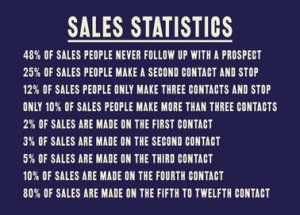
80% of sales are made after 5 contacts – avoid “follow up failure”

Here are some food for thought sales stats.

So, most sales occur from consistent follow-up, yet most salespeople do not follow up consistently.

Why is this? Well, it takes work and organisation in the first place. And if the salesperson is looking to achieve their monthly target then they will likely take the new fresh leads and run through them, try to contact a prospect a couple of times in order to quickly get the “low hanging fruit” sales – and after that be asking for a new fresh batch of leads.

So how can this be fixed? Let marketing and sales automation do the grunt work – let software automatically follow up and make the “contacts” on behalf of the salesperson. Let the software bubble to the surface the prospects who have been nurtured sufficiently by follow-up that they are now ready to talk to the salesperson.

If you would like to learn more about how Keap (my marketing and sales automation software of choice) could transform the results from your sales team then I would be delighted to have a chat – you canΒ schedule a short initial discovery call here.

Julian

Turbo charge “Copy & Paste”

text blazeDo you ever find yourself repeatedly “copying & pasting” as you work on your PC?

By default your can just copy and paste the last thing you copied. But here are a couple of tools that can enable you to increase your productivity.

1/Β Clipboard History Pro. This is a Chrome browser extension and I am happily using the free version. It enables me to select from previous “copies”. It lets me easily select one on the last 7 copies I have made. And then from the menu I can select earlier “copies” – currently I have over 5800 previous copies I could go back to if needed.

2/ Text Blaze. Speed up typing with snippets and templates. One that you can use for free is called Text Blaze. If you are repeatedly using the same text then rather than “copying & pasting” you can set up a snippet and template. So for instance, if you find yourself repeatedly sending the same email you could set up a template and then just type in a short snippet of text eg /email1 into the subject line of a blank email. This will then – add the subject line and the main body copy of the email. And not just that, it will even give you the option to insert merge fields into the email – so the email can easily be fully customised for the individual you are sending the email to. This is only one use case, there will be many ways this tool could save you time when writing on your PC.

Canva – for DIY design and print projects

You may have seen the ads on TV recently for Canva, the online tool that enables you to design your own artwork projects.


I have recently been using the Pro version (there is a free version) and I have been very impressed and found it extremely useful. Previously I have recommended image-editing softwares (check them out here) which are great. But what Canva does is make it really easy and intuitive to create online graphics and even finished, print-ready artwork from scratch.

So this will not replace using a graphic designer for intricate and creative work, but for simple artwork that may be required at short notice then you can DIY-it with Canva.

The social media tactic that most people miss – LinkTree (or Social Links Page)

linktree

The link in your Instagram, Twitter, LinkedIn etc bio is super valuable real estate – but are you making the most of it?

As you know you can only have one link. But what if you want to showcase multiple web pages, landing pages, content etc that you would like to point people too?

The answer is Linktree or Social Links Page. Easy to set up and use to promote multiple pages of content.

Some great uses:

  • Your business card
  • Your CV
  • Email signatures
  • YouTube video descriptions
  • Anywhere you are sharing content!

Here is an example I set up on Linktree https://linktr.ee/julianmills

OR, if you use MarketerM8 / HighLevel you can create and fully persoanlise and automate marketeing off your social link page. Click here to learn how to do it.Β 

Test, Test, Test for online marketing success

It is very surprising how many small businesses invest many thousands of pounds in developing a website and expect it to perform and generate profitable sales from day one. When the expected sales fail to materialise then everyone involved is disappointed and the website tends to get forgotten about.

Before I became involved in online marketing I have many years of experience in traditional direct mail and mail order catalogue marketing experience, so I already appreciate the power of testing and the key importance of testing aspects of a website and online marketing activity.

Years before the internet was invented direct marketers developed rigorous testing programs and many successful businesses developed and fortunes amassed as a result. It is no different with online marketing, except many businesses and marketers totally ignore it! Β I have seen it reported that only 1% of businesses do any testing with their website!

Simply put. When you start a testing program you will start to learn what works and what doesn’t. You keep what works and drop what doesn’t. Each improvement you make has a cumulative effect and so even small improvements all add up to significantly increase your business’s profitability.


The beauty of testing with online marketing is the speed and cost. In direct mail it could take 3 to 5 months to get a result from a single test by the time all the design, product and subsequent sales are generated and analysed. But online this can be cut to a matter of days. Traditional direct mail tests would cost significant money, but online it is practically nothing.

As management theorist, Peter Druker reportedly said, “what gets measured gets improved”


Photo by Vlad CheΘ›an

Make international payments from clients easier and cheaper

Do you ever need to send or receive payments abroad?

Have you ever had overseas clients struggle to get payment to you?

I have experienced this many times with clients in the US. It seems to me that the US banking system makes it very difficult to process international bank transfers. So I was enabling the Stripe online payment option in my Xero accounting software. But it was always a gripe when I see the credit card statement and I have ended up paying over Β£100 per invoice in credit card fees.

So what is the solution. There are numerous tools out there to receive and send international payments. Two that I have come across are:

www.Wise.com

www.revolut.com

I first tried Wise.com and had two issues. Firstly, an Australian client tried to send me a payment and the payment got bounced back. The reason was that somehow they had his main business bank account listed as a personal account and so they would not handle the payment. Secondly, when I went to set up an account for my business they wanted verified business formation documents (at a cost to me to get a notary to sign the docs). No one would speak with me to explain what exactly they require from UK companies in order to verify a business account. So that reached a stalemate.

Then I tried Revolut. The only difference I can see is that maybe their commission charges are just slightly higher. But the account was quickly and easily set up and I was able to deal with real people. In addition, they have a Xero integration. So what this will mean is that I can raise multi-currency invoices in my Xero (premium subscription required), collect payment via Revolut and then easily reconcile payments in Xero. So far I am highly delighted with my Revolut account.

Post-it Note your way to achievement

This is a great little hack from Jeffrey Gitomer in his excellent book – “Sales Bible – The Ultimate Sales Resource”.Β  Page 46.

This is a great hack for setting and achieving goals. Often people have many goals, they may even write them down before they get filed away – maybe in the draw or under a stack of work.

Jeffrey’s goal method takes it a step further.

To give you the gist.


You need Post-It notes, a bathroom mirror, a bedroom mirror, and a pen.


1 Write your prime goals on Post-It notes.

2 Write down the smaller secondary goals on Post-It notes.

3. Put them in front of your face on the bathroom mirror – so you see them at least twice a day.

4. Say them aloud each time you see them – by looking and saying them you get double affirmation.

5. You’ll now look at them until you are sick of looking at them and take action.

6. Now the best part. Once you achieve your goal move the Post-It note triumphantly from the bathroom to the bedroom mirror. So now as you check out “how you look for the day” you will see your successes and it will set the tone for the day.

Then by the time you have filled your bedroom mirror with Post-Its, you will be able to afford a bigger mirror -and house to put it in!


This is just one of many tips from Jeffrey Gitomer’s excellent book – “Sales Bible – The Ultimate Sales Resource”. And you can check out the full version of this hack on page 46.

Use Zapier to do (almost) anything inside Keap by Paul Sokol

I wanted to share with readers this very powerful Zapier / Keap hack that has been developed by Paul Sokol and promoted by Greg Jenkins.

You may already know that Zapier is like a Swiss Army knife tool for us Keap users. But Zapier does not have all the capabilities of the Keap API.

Now Paul has developed a hack that enables Zapier to “hook in” to the Keap API.

It’s really coolΒ  – BUT, it is rather technical.

So thanks Paul and Greg for creating such an informative video for this hack.

Automatically schedule LinkedIn posts with SlackSocial

schedule linkedin posts automatically

automatically schedule LinkedIn postsIf you’re looking to generate B2B leads from LinkedIn then it is important to regularly post updates on your profile.

It is recommended to post at least twice a week. But when we are all busy this becomes a real chore.

I recently found SlackSocial which can automatically schedule LinkedIn posts and tested the free version.

The result?

The free version alone has been very good. I can add and schedule posts in batches. So I could set up a months worth of posts (8 posts) in less than an hour by reusing existing blog posts and email content.

An extra bonus that I found is that I can also post to my business Showcase pages. I have 8 of these and it was an issue to manually post t0 these. But with Slack Social, I can post to all 9 of my LinkedIn properties in one go.

I may consider upgrading to a premium plan shortly (7 euros/ mo.) as this would enable me to schedule multiple postings per post, so I could effectively re-use posts in future years – and so reduce the work of re-posting the posts each year.

So I’m a fan of SlackSocial to automatically schedule LinkedIn posts. But, I would be delighted to learn from you what tools you use.

Check out this post on automating your LinkedIn marketing.

Cheers Julian

Better Proposals with Keap / Infusionsoft

better proposals keap infusionsoft

Do you send proposals as part of your sales process?

Do you use Keap Pro or Keap/ Infusionsoft to automate your marketing and Sales?

better proposals keap infusionsoft

If you answered Yes to the above questions then you should take a look at Better Proposals. Not only can you create great-looking proposals but when using Zapier you can build them into your Keap / Infusionsoft marketing automation.

Here are some stand-out features of Better Proposals:-

  • Save time creating proposals.
  • Be notified when someone interacts with your proposal eg they view your proposal, then you can follow up a short while later
  • Live message readers while they are engaging with your proposal – address any objections in real-time.
  • Digital signatures that a legally binding
  • Collect payments
  • Integrate with the Keap / Infusionsoft marketing automation