Fix broken links on your website and improve your SEO

fix broken linksIf you are following the They Ask, You Answer methodology and creating content on your website then inevitably you will be including links to other pages and external websites.

When these links become broken then apart from giving your website visitors a negative and frustrating experience it is also noticed by the Google spiders when they index your site. And so can adversely affect your SEO rankings.

How do links become broken? The main reasons. When you added the link you made a typo mistake. But more commonly the external website you linked to may have been deleted or the URL changed or the website has simply been taken down.

This tip I got from Nick Fenmore Collins at Website Success. To fix broken links use a free tool like Broken Link Check to search out all those hard to find broken links, and then you can fix them.

As an example, my website/blog now has over 750 pages and I have never before checked for broken links and found 60 broken links!! So this will keep my busy updating pages and fixing broken links.

404 broken link Photo by Erik Mclean on Unsplash

Have you tried ChatGPT to write copy using A.I.?

Have you heard about the latest tool that has gone wild with marketers who want to write copy?

ChatGPT is a powerful language model that can be used to write copy for a variety of purposes. Here are a few reasons why you might want to consider using ChatGPT for your next writing project:

  1. Efficiency: ChatGPT can help you save time and effort by generating high-quality copy quickly. This can be especially useful if you need to write a lot of content in a short amount of time.
  2. Consistency: ChatGPT can help you maintain a consistent tone and style across your writing, which can be difficult to achieve when working with multiple writers.
  3. Customization: ChatGPT can be fine-tuned to your specific writing needs, allowing you to generate copy that is tailored to your target audience and industry.
  4. Creativity: ChatGPT can help you come up with new and innovative ideas for your writing, which can help you stand out in a crowded marketplace.
  5. Cost-effective: With the help of ChatGPT, you can reduce the cost of hiring a human copywriter.

To use ChatGPT for copywriting, you can simply provide it with a prompt and let it generate text based on your specifications. You can then edit and refine the generated text to suit your needs.

It’s worth noting that ChatGPT is not a replacement for a human copywriter, it’s a tool that can be used to augment the copywriting process and help you save time and effort. With the help of ChatGPT, you can generate high-quality copy quickly and efficiently, and then spend more time editing and refining your writing to make it even better.

(Note: the copy above took a couple of minutes to write using ChatGPT)

Give it a try at https://chat.openai.com/chat


What is the 3 line email tactic from the Entrepreneurs Circle?

The 3 line email is one of the early, quick wins we achieve during the Entrepreneurs Circle coaching.


Here are the results achieved by a few Entrepreneurs Circle members


Try it out on your old prospects and let me know how you get on


Here is the email copy which you can use….

—————————

Subject: [Firstname], further to our last conversation

Hi [Firstname],

It’s been a while since you spoke with us, and I just wondered if you are still looking for a [insert what you do]?

If so, I’d love to help you. Ping me a reply or give me a call on [insert your hone number].

Regards

[insert your name]

————————

This is just one of the examples of business-changing strategies and tactics that Entrepreneurs Circle membership provides. What not try a free membership trial and transform your business success?Β 


The Eric the Ferret Email – a crafty email that re-engages prospects who have “gone dark”

Use the Eric the Ferret email to re-engage with prospects who have “gone dark” and fail to respond to your emails and phone calls.

Every time I deploy this crafty email from The Entrepreneurs Circle it makes me smile – because it works.

Each time I send it to a prospect who is failing to respond to my emails or phone calls it worksΒ  – because it stands out in the inbox, it’s engaging and makes the prospect smile, so they cannot fail to respond one way or the other.

*******************************************************
*******************************************************

Hi ~Contact.FirstName~,

It feels like you’re ignoring me *gasp*. But hey – maybe I’m just paranoid πŸ™‚

I’ve tried to talk to you about <<PRODUCT/SERVICE>> for a while now, but alas…
…we’ve not connected.

Are you ignoring me? Or are you just playing hard to get πŸ˜‰

I really don’t want to pester you if you’re not interested…

…so just hit reply with a simple “No” if you want me to never contact you again.

I’ll delete you from my emails, my contacts, my WhatsApp, pull down that portrait of you hanging above my fireplace and return the 12ft sculpture of your head to the sculpture shop (I’ll probably lose my deposit, but that’s ok…).

Of course, I’d rather we spoke – so to try and charm you into submission I’ve attached a picture of an adorable ferret.

His name is Eric. Eric the Ferret.

And if you think he’s cool, just wait till you speak to me! πŸ˜€

If there’s ANY interest at all in <<SERVICE>> – just hit reply and let me know.

Reply with: “Ok, the ferret got me – let’s talk”
And I’ll work around your (no doubt very very busy) diary.

I hope we’ll speak soon, but anxiously await your rejection too… Speak soon!

<<NAME>>
Head of Last Ditch Attempts To Get In Touch With <<FIRST NAME>>

P.S – here’s Eric:


*******************************************************

As an Entrepreneurs Circle member, you can access all the copy and instructions on how to use this powerful email from the Entrepreneurs Circle Vault. If you are not a member, then do not worry, take up the free 1-month trial membership and you can access the documentation to enable you to set up this winning campaign.


entrepreneurs circle free membership


FREE BONUS FOR KEAPΒ  /INFUSIONSOFT USERS

If you use Keap / Infusionsoft (and are an EC member) then I have created a campaign template to enable this email to be easily imported into your app. To get this campaign installed for free please schedule a Discovery Call with me and have your EC membership details handy.

alligator email ec

Secret Envelope promotion captures over 30% of attendees to the Entrepreneurs Circle Convention

Recently I was exhibiting at the Entrepreneurs Circle Convention (read more here). And I had the opportunity to include an item in the Goodie / Swag bag. Most exhibitors included promotional items like pens, coasters etc.

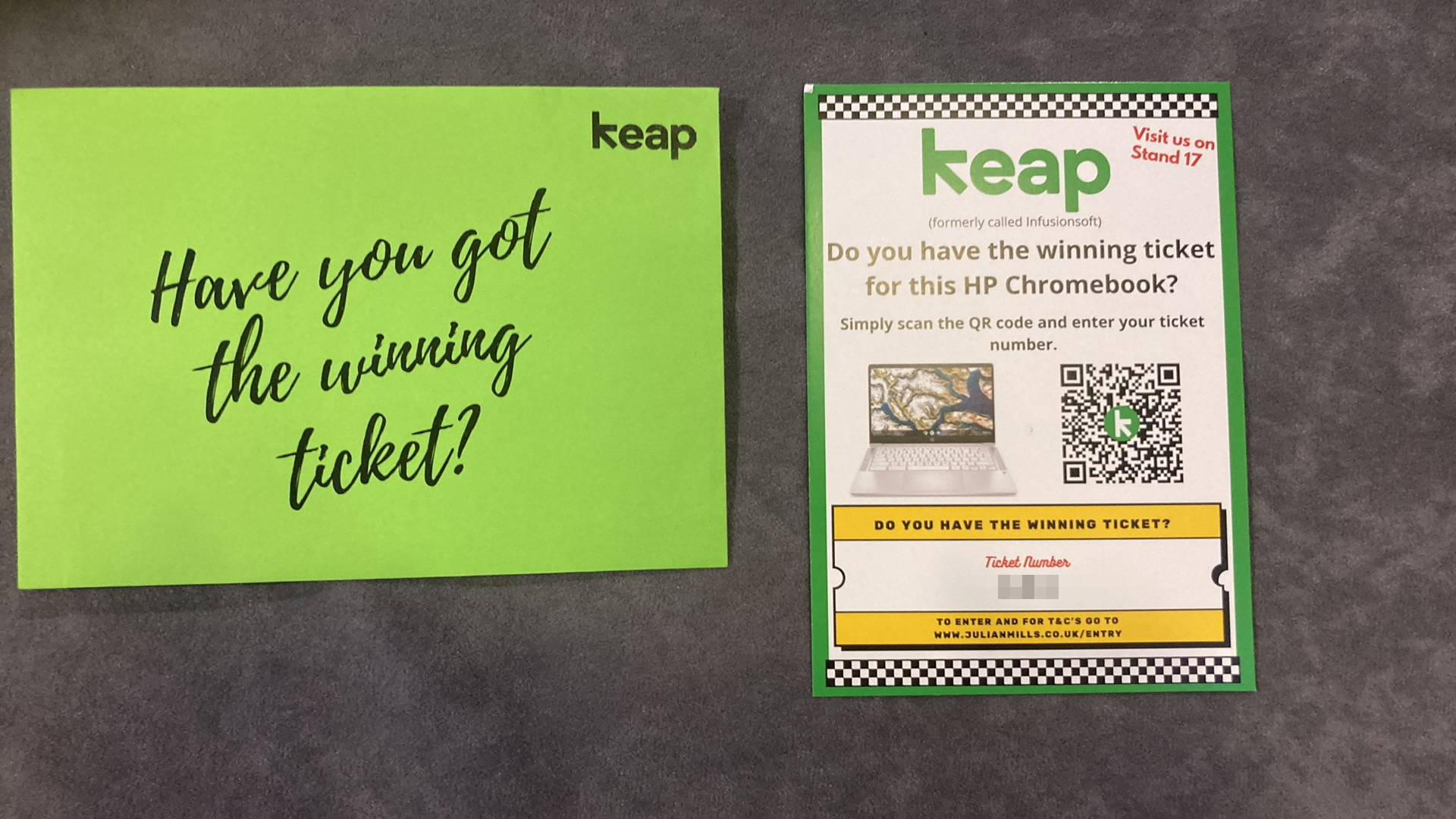
But I included a “Secret Envelope” promotion (I have Cameron Botterill to thank for the inspiration) – an envelope which enclosed a winning number prize ticket. There was one randomly selected envelope that had a winning ticket for a Chromebook.

These are the mechanics of the promotion.

There is one winning ticket.

The recipient scans the QR code and enters their ticket number and contact details onto a Keap / Infusionsoft landing page.

A Keap / Infusiosnoft campaign starts. It first determines if they have the winning ticket and sends a text and email to let them know the outcome.

During the two-day convention, the recipients received timely text and email reminders – all driving convention attendees to visit the stand. For instance, a text during the “Happy Hour” on day one and an early morning text on day two and a safe journey home email as the event finished.


Results

Of the 1200 attendees over 360 entered the competition. That’s over 30% of attendees who were captured. They were then followed up.

To date 40 qualified leads were captured and booked for a discovery call either directly at the convention or during post-convention follow up.

Cost Β£0.33 per ticket.

Cost per contact capturedΒ  Β£1.11

Qualified prospects booked for a discovery call from the event 40 (to date)Β  (now, I could not attribute these all to the promotion, but the promotion certainly helped)

If you are a Keap user and would like me to show you “under the bonnet” as to how I used Keap / Infusionsoft to run this promotion then just book a 1hr Discovery Call.


Cheers

Julian

QuillBot – rewrite and enhance any sentence, paragraph, or article using state-of-the-art AI

quillbot

quillbotI learned about this nifty little tool (the free version works great) from a member at our Stockport local Entrepreneurs Circle meeting.

QuillBot’sΒ paraphrasing tool helps millions of people rewrite and enhance any sentence, paragraph, or article using state-of-the-art AI.

This is great for when you want to repurpose text eg for SEO purposes or give your existing copy a refresh. The free version works great. And there is even a Chrome extension that enables you to easily access the tool when you are working in other tools like Gmail. This is definitely a tool that savvy marketers should be using.

Check it out here.

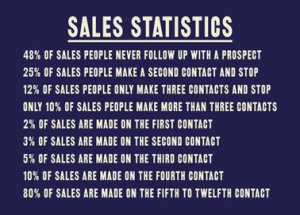
80% of sales are made after 5 contacts – avoid “follow up failure”

Here are some food for thought sales stats.

So, most sales occur from consistent follow-up, yet most salespeople do not follow up consistently.

Why is this? Well, it takes work and organisation in the first place. And if the salesperson is looking to achieve their monthly target then they will likely take the new fresh leads and run through them, try to contact a prospect a couple of times in order to quickly get the “low hanging fruit” sales – and after that be asking for a new fresh batch of leads.

So how can this be fixed? Let marketing and sales automation do the grunt work – let software automatically follow up and make the “contacts” on behalf of the salesperson. Let the software bubble to the surface the prospects who have been nurtured sufficiently by follow-up that they are now ready to talk to the salesperson.

If you would like to learn more about how Keap (my marketing and sales automation software of choice) could transform the results from your sales team then I would be delighted to have a chat – you canΒ schedule a short initial discovery call here.

Julian

Turbo charge “Copy & Paste”

text blazeDo you ever find yourself repeatedly “copying & pasting” as you work on your PC?

By default your can just copy and paste the last thing you copied. But here are a couple of tools that can enable you to increase your productivity.

1/Β Clipboard History Pro. This is a Chrome browser extension and I am happily using the free version. It enables me to select from previous “copies”. It lets me easily select one on the last 7 copies I have made. And then from the menu I can select earlier “copies” – currently I have over 5800 previous copies I could go back to if needed.

2/ Text Blaze. Speed up typing with snippets and templates. One that you can use for free is called Text Blaze. If you are repeatedly using the same text then rather than “copying & pasting” you can set up a snippet and template. So for instance, if you find yourself repeatedly sending the same email you could set up a template and then just type in a short snippet of text eg /email1 into the subject line of a blank email. This will then – add the subject line and the main body copy of the email. And not just that, it will even give you the option to insert merge fields into the email – so the email can easily be fully customised for the individual you are sending the email to. This is only one use case, there will be many ways this tool could save you time when writing on your PC.