How to ask for reviews and testimonials from customers (and even prospects!)

Reviews and testimonials add so much to the social proof of your business. But just asking a customer for a review is not enought. For the customer, it puts them under pressure as they have to think and that makes it feel like work. As a result, most people will just not get around to it. But this simple script guides them to formulate a review quickly and easily.

So ask –>

  1. Who are you, what is the name of your business?
  2. What was the problem you were experiencing?
  3. What was your experience of working with us?
  4. What would you say to anyone thinking of working with us?

And that’s it. These four questions prompt the customer to quickly leave a review.

By the way, a great tool to capture video reviews is VideoAsk.

And another trick you can try to really ramp up your review and testimonial generation. If you do Discovery Calls with your prospects then what I will do on the call is really add value and help the prospect. Now after spending time to help them and in the process working out if my service is the right fit, then sometimes I decide the fit is not right and politely explain what I am turning them away. In these instances, I will then ask for a review and most people at this point will be happy to leave a review – after all you have spent time helping them and will often be only too happy to oblige with a review.

UK HighLevel Support

highlevel support julian mills

highlevel support julian millsImplementing HighLevel can be intimidating at first since the software has a somewhat steep learning curve. HighLevel’s abundance of capabilities, each with multiple “switches and dials” that we can adjust to create a custom, extremely powerful marketing system, is what makes it such a great marketing and sales automation tool.

Agencies frequently offer HighLevel as their own software under a white label. A lot of users are unaware that the software they use is actually HighLevel. I’ll highlight below resources for HighLevel support to make sure you get the assistance you require when you need it.

1. Agency Support

The agency that is supplying you with the software should be your first point of contact if you are using a white-labeled version of HighLevel. Agencies with a brand like MarketerM8, which offers HighLevel, are prepared to offer customised help for their platform deployment. Customers at MarketerM8, for instance, get free, limitless live chat and Zoom assistance around-the-clock. They also provide interactive instructions and the most recent help documentation, so you can be sure you have access to the most recent resources and support.

2. The HighLevel Support Portal

The HighLevel Support Portal is a priceless resource for those seeking a quick route to HighLevel’s support documentation. This site, which can be found at https://help.gohighlevel.com/support solutions, is a goldmine of information on how to make the most of the software. All HighLevel users can benefit from the comprehensive and free resources offered by the support portal, whether they are trying to troubleshoot a problem or want to learn more about the features of the platform.

Always remember that HighLevel is an evolving piece of software with regular updates (see the HighLevel Changelog here). Therefore, keep in mind that the resources could not match exactly what your dashboard displays.

3. YouTube HighLevel Support Resources

For HighLevel users, YouTube provides a wealth of information in the form of official and unofficial lessons and guides. You may find a range of content on the official HighLevel YouTube channel, which is located at https://www.youtube.com/@gohighlevel, aimed at assisting you in making the most of the platform. In addition, there are a plethora of unofficial videos that can offer extra viewpoints and insights. It is crucial to remember that some of the information in these videos may be out of date because the HighLevel software is updated so frequently. For the most recent guidance, always double-check with the most recent resources.

4. HighLevel Support From Experts

If you require 1-2-1 help with HighLevel then seek out an expert to assist you on your journey. If you do not have the time to learn the software for yourself, then an expert who has been there and done it all before can accelerate your progress. I am one of these marketing automation experts and provide HighLevel consulting, training, and implementation services. If you have a lack of time to learn and implement the software or if need a custom solution, then I may be able to assist you. Click here to book an initial discovery call.

Conclusion

Learning and implementing HighLevel doesn’t have to be a solitary journey. From leveraging your agency’s dedicated support services to exploring the rich resources of the HighLevel Support Portal and YouTube, there are numerous avenues available for assistance. And for those unique and more complex situations then a consultant can provide the tailored help you need. With these resources at your disposal, mastering HighLevel and maximizing its potential for your business is well within reach.

Check out my blog article – Which Is the Best Way to Set Up Your HighLevel Marketing System? Do It Yourself, Done With You, or Done For You?

How to migrate from Keap / Infusionsoft to HighLevel

keap to highlevel

keap to highlevelAre you looking to move from Keap/Infusionsoft to HighLevel for your CRM and marketing automation? In this step-by-step guide, we’ll walk you through the process of making a smooth transition from Keap to HighLevel.

Step 1: Familiarise Yourself with HighLevel.  Be sure to take the time to familiarise yourself with the HighLevel platform. Explore its features, understand its terminology, and identify key functionalities that your business requires. Each software has its pros and cons and it is important to understand these before switching from Keap to HighLevel. With any off-the-shelf software there will always be an element of compromise on your part. This knowledge will be crucial as you begin replicating your existing processes and creating new ones in the new system.

Step 2: Identify Your HighLevel Champion. I would highly recommend that someone in your business takes on the role of “HighLevel Champion” even if you plan to outsource most of the implementation. What you do not want to end up with is an external consultant building you a “black box” of a system that no one in the business understands. This is a key role as your CRM / Marketing Automation system will become core to your business. If that person is not the business owner, then the business owner at least needs to have a basic understanding – as staff tend to have a habit of changing jobs every 3 years on average. Not having a HighLevel Champion means that everyone chips in and does their bit in the system, and the whole thing becomes a muddled mess that in the end no one understands – definitely a case of “too many cooks”.

Step 3: Evaluate Your Current Setup Before diving into the transition, take a comprehensive look at your existing Keap setup. Identify key automations, campaigns, and integrations that are critical to your business. This assessment will help you prioritise elements that need to be rebuilt in GoHighLevel.

I would also take this opportunity to re-evaluate how you currently use Keap and the automation you have set up – could things in your business be done a different way – or a better and more efficient way? Based on step 1 (above), from your understanding of HighLevel, you can build out your new systems to play to the advantages of the HighLevel software that you have identified for your business.

Step 4: Map Out Your Customer Journeys Using the insights gained from evaluating your Keap setup, map out your customer journeys. It is during this stage that I will create a Marketing Automation Plan for my clients. Here is a video on how I do that.

This document becomes our “architect’s blueprint” that will then guide us through the implementation of HighLevel. And not only that, this document is a live document, which, provided it is maintained and updated will enable us in the future to manage and evolve the marketing and sales “machine” that you build in HighLevel. This step is key – otherwise, as your business bends and flexes to market forces then your automated processes can be updated too.

Step 5: Implementation in HighLevel 

Now based on your knowledge of HighLevel and with your Marketing Automation Plan in hand you can get down to the exciting bit of building your new processes in HighLevel. There are lots of help resources available on YouTube and the HighLevel support.

A good way to think about building out automation (in any system) is that it really is like writing software – there will be bugs along the way. They are frustrating but must be expected, so be patient as you work through them and view them as a learning opportunity rather than a problem.

Step 6: Export Your Data from Keap Once you are ready you need to export your data from Keap. Points to consider.

Take this opportunity to clear out any old and redundant data. Why clutter the new system from the start with old data.
If you are using Keap Pro or Keap Max. These versions of Keap give us the basic ability to export data. So for instance you can export contacts with basic contact details name, email, address – the basic stuff. It does not export tags, notes, opportunites. The workaround if say you need to replicate tags in HighLevel is to do individual contact exports based on tags from Keap Pro. Then when imported into HighLevel you recreate and apply the tag to the contact record. So this needs a bit of thinking about.

If you are using Keap Ultimate (previously Infuionsoft and Keap Max Classic) then the job is slightly easier we can export tags along with the contact record. But Order records, Notes and Opportunities will not come over in the data export. So this needs thinking about.

Step 7: Import Your Data to GoHighLevel Once you’ve mapped out your customer journeys, import your data into GoHighLevel. Pay close attention to data mapping and ensure that all fields align correctly to maintain data integrity.

Key “Gothas” to watch out for when importing data from Keap to HighLevel.

  1. Keap allows us to have contact records without email addresses, HighLevel will not let us import contacts without an email address – it will simply ignore them on import. The way around this if you need to import contacts into HighLevel without an email address is to do a little bit of pre-import work and creae a fake, but unique email address. Using Google Sheets, a few columns and some data tools I create unique email addresses eg.    name1@fakeemail.com,  name2@fakeemail.com etc. I then import these contacts and finally, I can then do a seach on email addresses containing  “fakeemail” and find them in the database. And then the final step is to create and put the contacts through a “temporary” Workflow which simply updates the email field to a blank.

Step 8: Test and Iterate Before fully committing to the switch, conduct thorough testing. Run test campaigns, check automations, check any integrations and verify data accuracy. This step is crucial for identifying and ironing out any issues that may arise during the transition. Iterate on your setup until you are confident that everything is working seamlessly.

Step 9: Train Your Team If you’re working in a team, provide comprehensive training on GoHighLevel. Ensure that your team members are comfortable navigating the platform and utilizing its features. GoHighLevel often provides training resources and customer support to aid in this process.

I would recommend you roll out the training in stages, this especially applies when working with sales teams who will be using HighLevel daily to manage their contacts, sales pipeline and opportunities. Everyone has different levels of “techie” competence and acceptance. Start by onboarding those who are most accepting of the technology and the change in the way of doing things. They will not be phased when you hit any glitches as you adopt the new way of doing things and help you fine-tune the system. Once they start to see results you will find that the less techie members on the team will be more accepting and they will have colleagues they can ask for help.

Then going forward as you recruit new staff ensure that they are willing and accepting of working with the technology.

Step 10: Monitor and Optimize Post-transition, closely monitor your campaigns and customer interactions in GoHighLevel. Identify areas for optimization and take advantage of any advanced features that GoHighLevel offers to enhance your marketing and sales processes.

Conclusion: Switching from Keap to GoHighLevel may seem like a significant undertaking, but with careful planning and execution, it can lead to a more streamlined and efficient marketing automation system. Follow these steps, and you’ll be well on your way to maximising the potential of HighLevel for your business.

If you would like to discuss your specific requirements then feel free to schedule a Discovery Call.


A Game-Changer for Productivity: My Review of cloudHQ Software. Rating: ★★★★★ (5/5 stars)

cloudHQ software has become a crucial component of my daily workflow. I am constantly searching for technologies to improve my productivity and facilitate communication and cloudHQ is the find of the year.

So cloudHQ is a Chrome extension that works with Gmail – so if you use Chrome you are going to love this – and who doesn’t use Chrome?

There are over 60 tools you can use for free. And you can upgrade if you need to, but the free versions of the tools work great for me

The options it offers have blown me away since I first started using it, and I have to say that the Video Email and Record Screen functions are nothing short of extraordinary.

My colleagues, clients, and business partners and I now communicate with each other entirely differently thanks to the Video Email application.

I now make and share unique video messages rather than sending lengthy, text-based emails that frequently fall short of fully expressing my thoughts. The Video Email function offers a human touch that words alone can’t equal, whether it’s clarifying a difficult concept, offering feedback on a project, or just extending a nice hello. Along with saving me time, it has improved my relationships with others, leading to more successful partnerships.

The Record Screen function in cloudHQ is yet another noteworthy feature. I can now connect with my team much more effectively during virtual meetings and training sessions thanks to this wonderful tool.

I no longer have to only explain things verbally; instead, I can record my screen and walk everyone through procedures step-by-step. It has changed the game when resolving problems or showcasing new applications.

Alongside the two elements I value most, cloudHQ’s user-friendly design makes finding what you’re looking for a breeze. Because of the software’s intuitive design, I didn’t need to spend a lot of time getting to know it before I could use it effectively. It perfectly interacts with the many platforms I use on a daily basis, further optimising my workflow and allowing me to spend more time on important activities.

Overall, the cloudHQ software has exceeded my expectations. I can now cooperate and communicate with others more effectively and efficiently thanks to the Video Email and Record Screen features. I strongly advise trying cloudHQ. It’s really changed the game and has become a crucial component of my professional toolkit.

Here is the link to try cloudHQ  (Please note I do not earn any affiliate commission from cloudHQ)

How to create a smart ChatGPT chatbot for your website using Zapier in 15 minutes

If you want to create a smart chatbot for your website and you have a Zapier account then this is easy to do and takes 10-15 minutes. Here is a quick video I created to show you how to do this

Here is a link if you want to check my chatbot out  https://new-interface-bedd43.zapier.app/julians-chatbot

zapier chatgpt chatbot

So that will give you an entry-level smart chatbot. But what about something more advanced? Something whereby you can see the responses it has supplied AND then teach the chatbot how to better respond in the future – so the chatbot learns and gets smarter all the time. One such tool I am hearing about is https://www.chatbase.co.


If you have a larger website with a Knowledge centre and would like to build a smart chatbot then I would be interested in collaborating on the project so that we could both learn how best to use the AI for a chatbot. Contact me if you are interested in speaking.

Or if you have such a tool already successfully working then I would love to hear how you have got on.

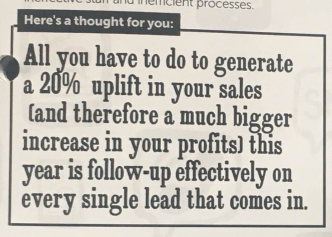
How to increase sales by 20% for your business!!

increase sales by 20%

So how do you follow up effectively to increase sales?

If you are just starting out in business then you can probably easily follow-up with low numbers of enquiries and customers manually using spreadsheets, notes, Outlook/ Gmail. Plus it keeps the costs down as you go through the start-up phase. To do anything more sophisticated at this point is a distraction from getting your first customers and testing your business model.

Now, once you start to gain traction then the number of enquiries and customers will increase and following up will start to take more and more of your time. Sales opportunities will start to “fall between the cracks” as you are just too busy to do everything. And this is the point where business owners start to add systems to help with keeping in touch with enquiries and customers. One key tool they will acquire is an email platform, as email marketing works very well. So it will probably be something like MailChimp. Aweber, Constant Contact or one of many others. And this will work to a certain point.

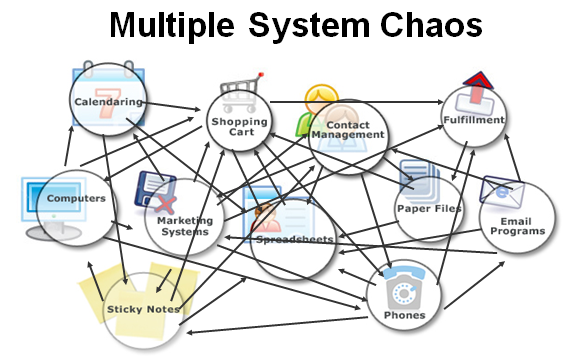
And finally, the business reaches a point where they have many sales enquiries and customers. The business will have built up a whole “technology stack” of tools that simply do not talk to each other. We call this Multi-System Chaos.


Mult

You will know when you have Multi-System Chaos when non of your separate systems will talk to one another and you simply cannot do the marketing that you now need to do in order to grow your business.

And this is the point that you realise you need a more sophisticated tool that gives you an all in one marketing solution to increase sales. So what are the options?

If you are looking for an enterprise-level solution then you could be looking at SalesForce and  HubSpot. These start with a free solution but in order to do serious marketing, you will be looking at multiple thousands of pounds per month in fees. Plus set up charges. These I believe are very good solutions, but I have no experience of them myself.

If you are looking for a comprehensive small business marketing and sales automation solution then you would be advised to look at ActiveCampaign or HighLevel (check out HighLevel Agency – MarketerM8). Both of these are excellent solutions for smaller businesses with a small business price tag. I have used both solutions with clients and which one would be best for you really depends on your particular requirements.

If you are looking for a cheap/ free solution then you could look at SugarCRM or ZohoCRM. But when I have looked at the free solutions they either have very limited functionality or you will have to spend money in order to customise it enough to do the job for you. So not really “free” by the time you have it up and running.


If you found yourself gravitating to the comprehensive small business marketing and sales automation solution then choosing the right solution to increase sales for your business can be daunting – each software has pros and cons and the key to success is to select the solution which best fits your requirements. I would be delighted to have a quick chat where I could help guide you to the right solution for your business (even if it is a solution that I am not the right person to assist you with)


Feel free to schedule a 20-minute Discovery Call where we can have a chat.

Email Subject line optimisation – try www.SubjectLine.com

In email marketing your subject line is key.

Get it wrong and your carefully crafted email copy and compelling offer never get a look in – because the email failed to get opened. All because the subject line did not convert the reader to open the email.

Subjectline.com is a nifty, free tool to check your subject line and even offers alternatives that may be better than your original idea.

Check it out at https://subjectline.com/

How to use ChatGPT AI to automatically reply to Google My Business reviews. (December 2025 Update)

December 2025 Update from Julian Mills

The original article below was published May 2023, that’s 2.5 years ago  – and how AI has moved on.

So the way I documented below still works. But we have moved on. The software that we now use HighLevel has ChatGPT “baked” in so we no longer require Zapier. Plus we can get more sophosticated.

1. When a Google Review is left. In HighLevel we can stipulate to only respond when say ther leave a 4+ star review. In addition we can have different agents, with different personalities replying to reviews – to make the replys feel more natural and to be coming from a team, rather than robotic – as the previous Zapier version could be.

2. This is the really exciting evolution – reducing the workload for your review writters. When you ask a customer to leave you a review you effectively had them a blank sheet of paper and ask them to write something good about you. You are giving them work and this can reduce the number of reviews submitted. In HighLevel we are able to set up automation so that we capture some simple feedback from the customer eg. who they worked with, what service did they use, what did they think of the service. And from this feedback we have ChatGPT (within HighLevel) draft a review and then 10 minutes later send them an email to say thanks for the feedback and that we have taken the opportunity to draft a review for them and would they mind submitting the review to Google or Facebook. So making it really easy for customers to submit a review.

3. And a further recent update in HighLevel – we can now automatically request, remote capture video testimonials and display them on your website. 100% automated in HighLevel

If you are interested to learn more  – book a Discovery Call with Julian

——————————————————————————————————————

May 2023 -Original Post

If you are generating Google reviews on Google My Business then it can be a smart move to reply to Google My Business reviews. But it is a manual chore. So this is an ideal use case for ChatGPT.

In the video below these are the stages we go through.

  1. Someone leaves a review on Google My Business.
  2. If they leave a 4 or 5-star review then we filter them with Zapier.
  3. Zapier then pushes the details of the review into ChatGPT
  4. ChatGPT writes a unique reply to the review.
  5. ChatGPT pushes the reply message back into Zapier.
  6. Zapier updates the Google review with the reply generated by Chat GPT.

So in the video below, I go through the Zapier setup to do this. I assume you are familiar with using Zapier.


So this solution in the above video accommodates 4 or 5-star reviews. As smart as ChatGPT is I would not be comfortable with having it reply automatically to any 1,2 or 3-star reviews. In these instances, I feel it is better for a human to respond who can act/reply appropriately. This too can be accommodated using Zapier. In this instance we would create a second Zap in Zapier – and it would filter so we only deal with 1,2 or 3-star reviews. When we get one of these reviews I would have Zapier send an email to my client to tell them to look at this particular Google review and manually intervene and respond to what has been said.

If you have any questions I would be happy to jump on a quick call to discuss and give you some pointers


Julian Mills
Marketing Automation Expert

HighLevel for Franchising- A “Marketing System in a Box” that empowers franchisors and franchisees

keap Infusionsoft to highlevel

highlevel franchising franchisee franchisorA good relationship with franchisees is essential in the challenging world of franchising. HighLevel is a leading all-in-one marketing platform that gives franchisors a powerful tool that can greatly improve the operations of their franchisees. This article goes into greater detail about how franchisors can use HighLevel to provide a “marketing system in a box” to franchisees.

A Complete Marketing Solution, HighLevel

HighLevel is a software platform that combines services, sales, and marketing into one cohesive package. It provides an array of technologies, such as CRM, AI, sales funnels, email marketing, SMS marketing, social media and others. The platform is a great option for franchisors wishing to provide their franchisees with an all-encompassing marketing system because it is made to simplify business operations and boost client interaction.

The idea of a “Marketing System in a Box”

With the help of HighLevel’s platform, franchisors can offer a white-label, scalable and comprehensive collection of standardised, brand-consistent marketing campaigns and templates to their franchisees. These templates can be applied to a range of marketing initiatives, such as social media postings, SMS marketing, email campaigns, and more. By doing this, franchisees’ marketing efforts are made easier while also guaranteeing brand uniformity across all franchise sites.

Features that can be customised: Despite the standardisation, HighLevel’s templates can be localised so that franchisees can cater the material to their particular target market or audience. Because of this freedom, franchisees can still customise their marketing initiatives to better connect with local customers while maintaining the overall brand image. With HighLevel franchisees can automate their marketing efforts they can organise sales funnels, plan email, SMS and Social Media campaigns, and more. This provides constant customer communication while also saving time.

HighLevel offers in-depth reporting and analytics tools. Franchisees may track the effectiveness of their marketing initiatives, keep an eye on sales patterns, and learn more about how customers behave. Making educated judgements and enhancing corporate performance are both possible using this data.

Conclusion. A thorough marketing strategy is crucial for businesses, including franchisees, in the current digital era. HighLevel provides franchisors and franchisees with a user-friendly, scalable, and effective CRM and marketing solution that can greatly improve business operations. By giving their franchisees access to HighLevel’s “marketing system in a box,” franchisors may boost not just the productivity of individual franchisees but also the overall performance of their franchise network.

You can learn more about highLevel here. If you have any questions on how best to use HighLevel to assist franchisees feel free to schedule a Discovery Call.

Check out my article on Digital Franchising with HighLevel