As someone visits your website we add a piece of code (a pixel) to their web browser and this enables Google and Facebook to track their online activity. Then as your website visitors surf around the internet we can re-market to them and show them adverts. So they do not forget about your product or service.
These days having someone “pixelled” can be more valuable than capturing their email address as emails are easily ignored. But as remarketing ads can be low cost and target only those who have already shown an interest in what you sell then they can be highly effective with a huge return on investment (ROI). And going forward we can get really sophisticated. For instance, once Facebook knows who your customers are then it is able to go out and automatically target people who are most similar to your ideal customers.
The first thing to do is to immediately ask your web guy or gal to check if you have the Google and Facebook pixels installed on your website. Once the pixels are installed you are gathering valuable data on your website visitors that you can use to remind visitors about the products and services you sell.
Here is the complete list of 11 Foundation Blocks of the Entrepreneurs Marketing System:-
Your marketing assets such as website, direct mail, flyers etc are probably created ad hoc and are informally assessed by – “I like that”.
Now is the time to have a Marketing Asset Review standardised process to ensure the quality of the marketing assets that are approved within your business.
Obviously, at the end of the day, the success of any piece of marketing comes down to the sales it brings in. But you need an objective Marketing Asset Review to provide a systemised framework by which you and your team can assess your marketing before it is approved and goes live.
Docmail is a great solution for UK marketers who are looking to send out cost-effective direct mail as part of their marketing campaigns.
You can post out letters from as little as 50p (which is less than going to the post office and buying a second class stamp) and that includes the letterhead, envelope, printing, enclosing and postage. So it’s a no brainer.
So how does it work?
At its simplest –
1/ You log into your Docmail account and you set up mail pack templates with your images and copy.
2/ When you want to send out letters (from as little as one letter) you upload your data as a CSV file.
3/ You check the proofs and press SEND.
4/ A few days later your recipient receives their letter in the post.
But if you are an Keap / Infusionsoft user we can go on step further and we can 100% automate the process of sending out direct mail with Docmail and Keap / Infusionsoft. We can trigger via Campaign builder to send out a letter by using a third-party integration. This enables you to build integrated Keap / Infusionsoft campaigns with emails and direct mail – all on autopilot.
If you would like to learn more about how to integrate Docmail and Keap / Infusionsoft then I would be happy to schedule a 15-minute discovery call to establish how you could send direct mail from your Keap / Infusionsoft.
This little hack can make your marketing emails really stand out. In an email, it is not possible to embed a video that plays automatically. However, it is possible to embed an animated gif – really all is is a series of still gif images playing in sequence. There is no sound. So it is not a true video – but it can create a striking feature for your email. Any you could always put a clickable link on the image that takes the reader to a video file, possibly on YouTube. So how did I quickly and easily create this animate gif.
Stage 1 – Shoot a short video and create the animated gif. So I used this tool https://www.gifpal.com
Stage 2 – I then wanted to edit the image, there was a watermark in the bottom right-hand corner. I used a too called Ezgif https://ezgif.com crop to do this. There are a heap of other edits you can easily make.
Stage 3 – Host the animated gif online. I just uploaded it to my WordPress Media Library. And from there I can use the link to embed the image wherever I like.
Please ping me an email to show me how you have creatively used this tip (julian@julianmills.co.uk)
If you have read the book (which I highly recommend) The Ultimate Sales Machine by Chet Holmes then you will be familiar with the very powerful strategy – The Top 100 Strategy. Gurus like Russell Brunson have used it to great effect. In a nutshell, you identify your top 100 prospects, influencers or whatever and really focus on winning them over. Chet’s original strategy used lumpy direct mail to great effect, but this now can be enhanced further with the smart use of highly specific Facebook ads, targeted right to a physical location and any individuals in that location.
Check out this short video where I show by the smart use of geo targetting in Facebook ads you can target like a sniper – individuals, companies, trade show exhibitions and more.
Ever had a long rambling (full of puff and fluff) Zoom meeting video to watch – maybe you missed the actual meeting? Or a long training video where you just want the main points?
This simple tip can save you 50% (even more) of your time in watching that video.
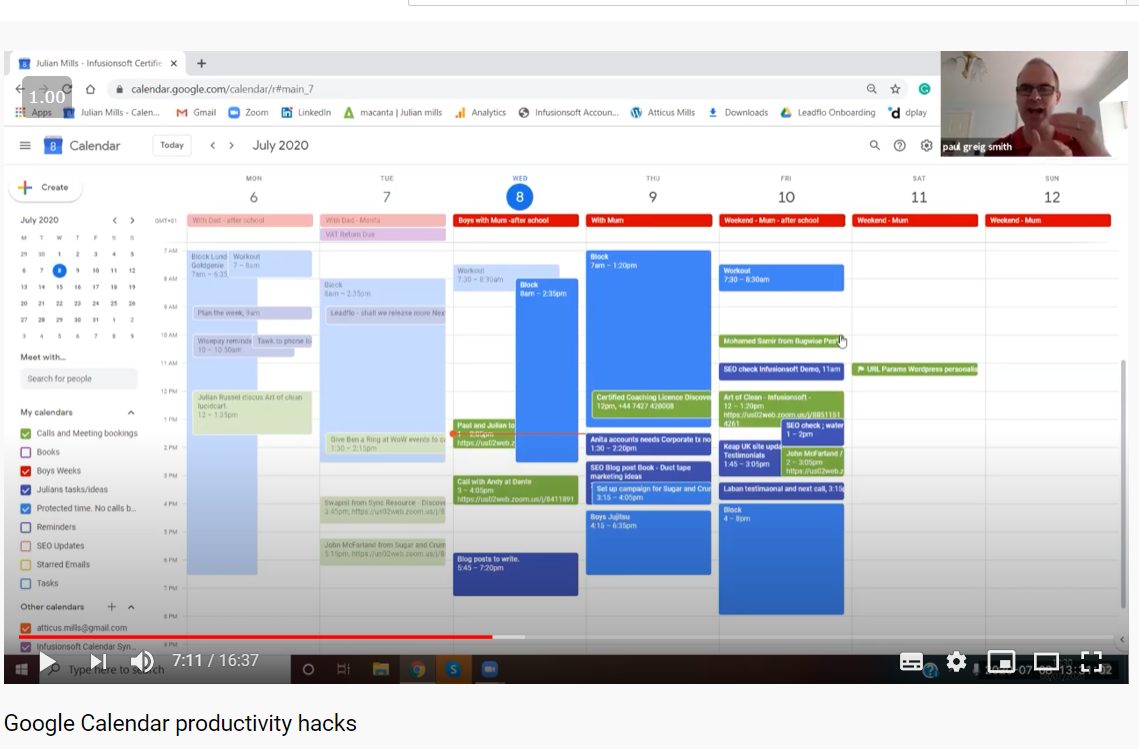
Please check out the recording below where I was speaking on the Personal Development Essentials Podcast and showing the Google Calendar productivity hacks that I use to get the most from my Google Calendar each and every day.
TRANSCRIPT – Google Calendar Productivity Hacks
Paule Greig-Smith
Hey guys, welcome back to the Personal Development Essentials Podcast. Now this is part of the Growth Mindset Movement series. Today we are talking about diary domination. So if you’re listening to this, maybe you’re a busy mom, dad, entrepreneur, whatever. If you have issues with working too much, and you want to reclaim some time and energy, make sure you’re focusing on the right tasks and all that kind of stuff then you are going to want to listen into this. Basically, we are talking about Google Calendar Productivity hacks for increased productivity, and ultimately profit. And I’m joined by my very good friend Julian Mills. Now Julian from Julian Mills Consulting. He’s an Keap / Infusionsoft expert. But generally speaking, he’s an all-round systems whiz and he advises businesses and entrepreneurs on how to scale and systematise their business. Julian is my go-to guy for all things systems he’s got a wonderful brain, which allows him to do a deep dive into a business to work out exactly what it is you’re doing and how that’s generating the results you’re getting. So, without further ado, welcome Julian
Julian Mills
Thanks Paul for that great introduction. So we’ll go straight in and just share my screen.Okay, so now we’ll look at my calendar. I’ll show you some Google Calendar Productivity hacks I use every day. And Paul’s been using this system for the last couple of weeks so Paul will be able to give some feedback on his findings. But basically, I think a lot of people don’t use calendars such as Google, Outlook and others to best effect. So I’m going to show you how I use it and you can then take the tips and the ones that resonate with you and mould the hacks to your particular situation. So, here we see my calendar. And you see it looks very busy and very confusing.
Julian Mills
But appearances can be deceptive. So what we show you first is this calendar and it is built in layers and it really enables me to manage my time efficiently. So let me take out some of the calendars and show you these, one by one as I make them visible. So on a daily basis all the green here these are my booked in phone calls and meetings. Maybe you’ve already entered these into your calendar.
Paule Greig-Smith
Yeah, this is the essentials. Yeah.
Julian Mills
Yes, you’ve probably got a calendar that shows you when your meetings are and when your phone calls are booked in. I’ve also this got this plugged into my website so that people can automatically book a telephone call with me. And as soon as you do, then that just pops up here and its automatically scheduled for me in my calendar. So these are the essential things you have got to get done. Now also, I’ve got another layer here called Protected Time. Okay, in blue. So again, no phone calls can be automatically scheduled in this protected time. So this could be many things like for instance, you see here, I’ve got a workout scheduled for in the gym. So that’s when that time is already pre-blocked out for me. No phone calls or meeting can be booked at that time.
Paule Greig-Smith
Yeah, that’s a really important point. I literally just had a conversation with a business coach just the other day. She wasn’t blocking out time in her calendar for herself and her downtime with her family. And she was literally running around all over the place trying to rearrange her calendar because people were booking calls in all over the place. So this is really helpful for those super busy people who who are dealing with inbound kind of clients.
Julian Mills
Yeah, absolutely. So this is protected time. So this could be holidays, taking an hour out, taking your lunch time out. So making sure that that time is reserved. You can see here, I’ve got a meeting with this companyon Friday. But there is some preparation work I’ve got to do beforehand so you can see that time has been mapped out to give me time to do the work. So I do not suddenly realise 10 minutes before a call that I have not done some preparation I was supposed to do and its all planned in advance.
Julian Mills
Just blocking out time for your own things, your own projects, your own marketing starts to give you a structure to the day. And then you can take it to a further level as well. So for instance, I’ve got another calendar here in dark blue. These are all little tasks and ideas of things to do. So you see here I’ve got to talk to my accountant. So I’ve got to give them a call at that time. I’m pencilling in some tasks here to write some blog posts. So throughout the day here, if they’ve got something to do later on today, these are flexible, so if I don’t get around to these today then I just move them forward to another day like that.
Paule Greig-Smith
That’s really good.
Julian Mills
And you see here, so I’m constantly reviewing the calendar. So during the day, you find it becomes more organised as you move the things you can move that you’re not going to get to do today. You just move them about you see here, I’m constantly reviewing the date previously. So here, I’ve got an SEO blog post to check some of the keywords on the website. If I hadn’t got around to doing that, that’s okay. All I do is to drag it into the future. So things don’t get forgotten to get done.
Paule Greig-Smith
And as you say, you know, you can categorise the way you put these in. So some of these flexible tasks when you put them in your diary if, if you did want to, let’s say, prioritise an inbound sales call or something like that, or a consultation, you can set it up so that a flexible task will get knocked out of the way for something of a higher priority, can’t you?
Julian Mills
Yes, exactly. The colour coding makes all the difference here because you can visually see straightaway, See all the important meetings and calls and reserved out time – it just works. Let’s add another layer to this, you can bring in personal things in your life as well. See here across the top. This is all to do with my son’s, so here for the whole year when I get the list from the school, I know when school holidays start and finish. So again, I can plan into the future days when I’m going to be with clients on-site. And I can see when the boys are on holiday or when for instance they’ve got a dentist appointment. So it’s all scheduled in so I can see it, so I’m not booking calls and meeting when I need to be doing something personal.
Paule Greig-Smith
And again, the end result of all this is ultimately less stress. You know this is taking back your time. So rather than constantly be on the backfoot with you know, the never-ending encroaching demands of life and other people’s agendas, eating into your time, and what you can do here. What I love about this with the colour coding, I’m sure you remember that wonderful book, Seven Habits of Successful People, by Stephen Covey, now you know that story about, filling up a jug with stones and rocks, and all that kind of stuff. And you know, the sand is the little things in life which eat away at your time. If you do things wrong, and you let those little things just fill up your cup as it were, then you’ve got no time. For the important things, so this I love the colour coding, it’s like family, business, flexible tasks, I love it,
Julian Mills
And I did not make this clear before, this here is actually a phone call, but if this was a physical meeting that I’ve got to travel to then as soon as that meeting comes in, the meeting is set for a time, this is between 10 to half 10. But if I had to travel to that, what I’d be doing here is I’d be blocking out travel time, like so, changing it to Protected Time, so I build in time to travel. So you can see here how I have just built in a buffer to enable me to travel. So no automatically booked phone calls are going to be scheduled for that time. And if I’m booking a meeting, I know to protect that time because I need that time to travel to this meeting. I find this invaluable.
Paule Greig-Smith
And and again, what I love about this is, you know, when you begin to study, you know that the really successful people, people like Warren Buffett and so on. These people value their time over and above all things, and they learn how to say no to anything that isn’t in line with their ambitions or isn’t on their agenda. So they say no, they safeguard and block off their time. So literally, this seemingly simple, set of Google hacks around your calendar can actually have these kind of massive ripple effects over into the rest of your life and this is why I love it so much.
Julian Mills
The last calendar that I’ve got and you can have as many as you want, depending on your requirements. This one is one called Books. And what I’m actually doing here now is to plan in reading books. Okay, you might allocate a week to read a book. The beauty about this is, so say I’m scheduled to get a train to London or go somewhere. If I’m on a train I’ll pack a copy this book with me, because I’ll be using that time on the train for say thinking, maybe a little bit of reading. And it’s all adding up and the beauty about working this way is that I might be reading the book and I’m always looking for one or two nuggets from a book. I’ll be reading that book, and I’ll have my phone beside me of course and as I’m reading if I think that’s a great point, a great nugget that I want to remember, I’ll go into the calendar and record in here as a note. So after reading a book, I’ll have a whole list of the points. And then what I’ll be doing is I’ll be taking those points and those points become blog posts on my blog.
Paule Greig-Smith
Using the calendar this way it becomes a hub you know, this is the kind of the route of all things almost you keep coming back to this. And again, the more you use it, the more you do, the better you get, the more efficient you get. And the better you get at safeguarding your time and prioritising those things, which should be prioritised, you know, keeping the main thing the main thing.
Julian Mills
Definitely, one of the things I’ve never been able to get into is at the beginning of each day, writing a top 10 list of things to do. I’ve never really been up to work that way. What I find is happening here with the blue ones, these tasks/ ideas, you know, you try and do as much as you can today, but if you don’t get around to it. It’s OK, just move it from here to a future date. Just move it to the next day. And what you tend to find happens is that the things that aren’t important on that list tend to get left behind. You see here, there’s a task here which is no longer relevant, so it just gets left behind. So it’s filtering as you go along and I find that invaluable. And it’s a fantastic way to use both Google Calendar and also Outlook calendars or any other calendar you may be using. That’s me done
Paule Greig-Smith
Thank you for sharing that. So, again, just takeaways for anyone who’s watching this, the whole point of this is to reclaim your time. And the thing about the modern world, I would say, you know, we live in a golden age of information and opportunity, such an incredible era of human history. However, the flip side of that is our attention is stretched almost beyond belief, like you wouldn’t believe and that dilutes our focus, literally so much so I think, the average person literally has less attention span than a goldfish these days, so it’s hard. And it’s interesting and there’s a wonderful book called Deep Work by Cal Newport, I think he is Stanford professor, incredible book. Now in today’s day and age, being able to write good content, whether you’re a writer or creator, and you need big chunks of uninterrupted time. Now, what so many people do is they just cram in everything into their diary. And the number of people you can speak to who you know, they’re like, they’re working on all these other things, but they’re not working on their big dream. And they’re like, oh, I’ll get to that, once I get through this. And that’s how most people live their lives, trying to tick off everything on the to do list. And then they’ll get to their dream and they’ll work on their big project or their side hustle or, you know, their big business idea. Whereas, in fact, it’s like no, you have to fight to carve out that time for your biggest priorities. You know, you’ve got to put these little kind of ring fences around, because there is a difference between, you know, between like, time and energy. And, you know, as the day goes on your ability to focus on deep work and creative work diminishes. So, I’m sure we’re going to come back to this again, Julian, because there’s so many good Google Calendar Productivity Hacks nuggets here. And, you know, I’ve even got some new ones off you as well, today is so so thank you for sharing that Julian. It’s always a pleasure. And if people want to find you, Julian, where can they find you?
Julian Mills
Better contact me through my website. So it’s www.Julianmills.co.uk , if you want to speak, just go to the button that says “Schedule a Call”. Just schedule a 15 minute call and you’ll automatically pop up in my calendar when you schedule.
Paule Greig-Smith
Fantastic and of course, remember there’s a wealth of resources on the Personal Development Essentials Podcast, you know where we talk to marketing professionals, public speakers, Royal Marine commandos, you name it, we talk to anyone and everyone in order to help you on your journey to becoming your best self. So this is all about using everything in your arsenal to help you on your personal development or business journey, or whatever. So thank you, Julian. Always a pleasure. I look forward to talking to you again real soon.
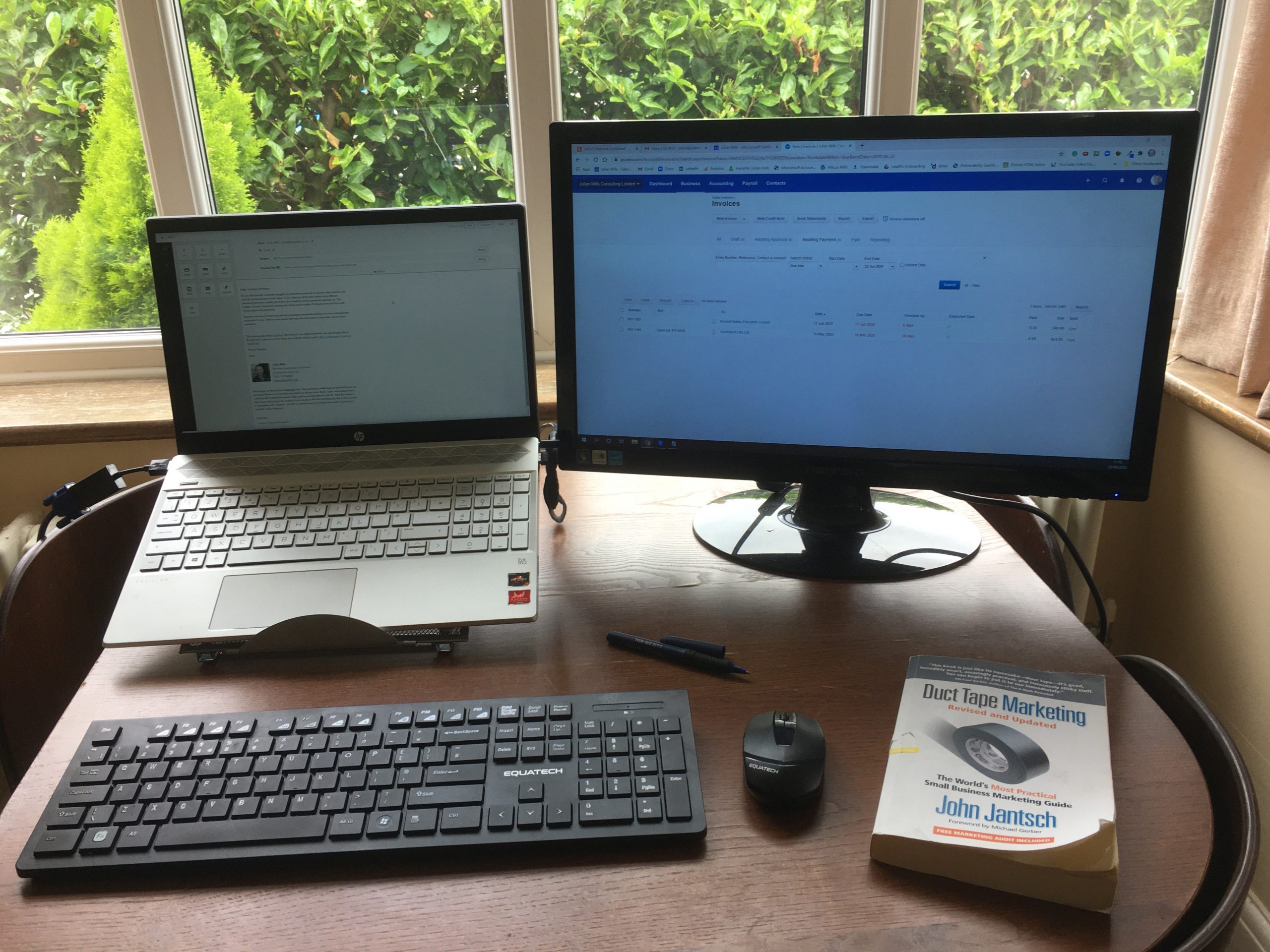
A number of years back I read (I cannot recall where) that working with two screens on a PC or Mac increases your efficiency by around 30%. And from my personal experience, I can believe it. It really amazes me when I am working with clients who still only have one screen to work on and it is the first tip I give them – get two screens.
Below you will find a picture of my “working from home” set-up that that includes a number of “sub” tips.
1. Two monitors. The laptop is on a riser to bring it to the same height as the monitor.
2. Wireless keyboard and mouse. This is more comfortable to use than the laptop keyboard and mouse pad and means the screen can be alongside the larger monitor. It also means that I can easy free up the laptop to move location by unplugging the power and HDMI from the laptop only. Plus there are no wires trailing over the desk.
3. I have the window behind the table, this provides great lighting for Zoom and Skype calls.
4. The book Duct Tape Marketing by John Jantsch. A super book for any small business marketer and there will be further tips to follow from there.
The Zoom Chrome Extension allows participants to schedule Zoom cloud meetings directly from Google Calendar. With the click of a button, you can start an instant meeting or schedule a future meeting. The meeting URL and information is sent via a Google Calendar invitation so the attendee can join with a single-click.
If you are doing any bulk/ automated email marketing then Keap / Infusionsoft email deliverability will most likely be on your mind.
How can you improve your deliverability rates? A key factor these days is engagement with your recipient. Do they open your emails and do they engage with them.
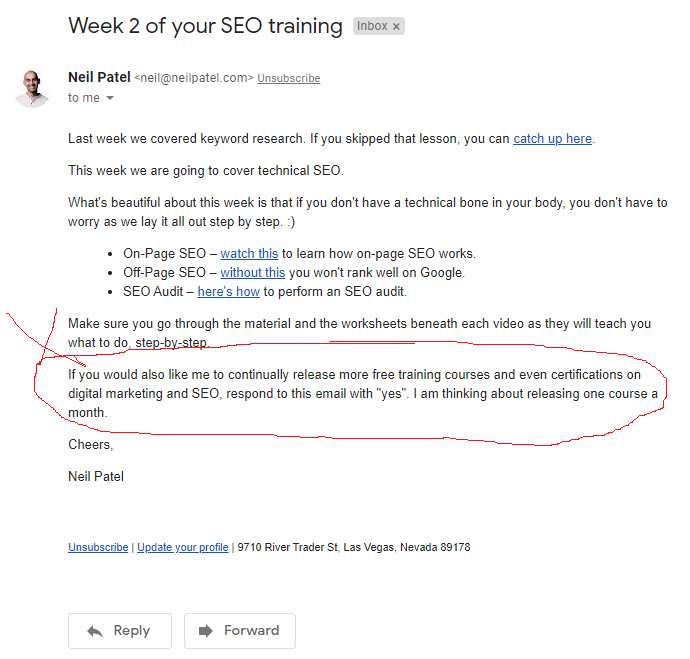
Take a look at this little trick that Neil Patel uses and this is neat. He says if you would like him to release more stuff then just reply YES to the email.
So this creates a conversation as far as the ISPs are concerned and it does not mean that you have to respond to each and every email you receive back. I think this a cool approach.
If you are interested in further email deliverability tips then check out this Blog Post.





 This little hack can make your marketing emails really stand out. In an email, it is not possible to embed a video that plays automatically. However, it is possible to embed an animated gif – really all is is a series of still gif images playing in sequence. There is no sound. So it is not a true video – but it can create a striking feature for your email. Any you could always put a clickable link on the image that takes the reader to a video file, possibly on YouTube. So how did I quickly and easily create this animate gif.