Paying too much for Acuity scheduling? Learn how HighLevel can save you money?

acuity scheduling too expensive? Check out Highlevel Calendar scheduling

Recently, I had a discussion with a potential client who utilises Acuity Scheduling for his team of 10 reps. Each rep is subscribed to the Powerhouse plan, which costs $49 per month per representative. This tallies up to nearly $500 monthly for call scheduling software alone—quite a steep expense!

During our conversation, we delved into his team’s requirements and discovered something impressive. HighLevel Calendar’s scheduling capabilities not only match Acuity’s, but it offers significantly more in terms of features.

What really clinches the deal is the cost-effectiveness of HighLevel. MarketerM8/ HighLevel begins at only £97 per month. This is not just a substantial cost saving but also access to a more advanced suite of marketing tools.

Check out the extensive features of MarketerM8/HighLevel on our website – MarketerM8.com.

And here is my post on how to migrate from Acuity to HighLevel calendars.

If you have any questions about how Acuity Scheduling compares to HighLevel Calendars or if you wish to discuss your specific needs, feel free to schedule a discovery call here.


How to migrate from Acuity to HighLevel calendars

acuity to highlevelAre you considering moving over to HighLevel calendars from Acuity?

Firstly – why would you want to do this?

1. Cost – for a single subscription to HighLevel you can have unlimited user accounts. Whatever the size of your team it is just one monthly cost that does not go up as you add more users. Check out a previous post where the client was paying Acuity $500/mo for ten users.

2. Functionality. HighLevel does so much more that schedule online meetings. With HighLevel you have a constantly expanding set of online marketing tools (of which calendars are just one). One area where Acuity lacks is marketing automation integrations – even when using Zapier to connect to CRM’s it has restrictions. Not so with HighLevel, you have many ways to schedule and automate appointments follow up. A nice feature in the HighLevel CRM is it be able to schedule meetings from within the contact record i.e. when on a call to a prospect  – schedule a call there and then. And offline meetings are no problem either.

Steps on how to migrate calendars from Acuity to HighLevel.

1. Document all the calendars you wish to bring over.
2. Map out how your calendars fit into your overall marketing and sales “machine”. Do not think about calendars in isolation they need to be an integrated part of your marketing machine. For instance – what happens when you have a “No Show” for a call? – do your sales guys have to then write an email asking for them to reschedule – or do they mark them as a No Show and the system then automatically sends them reminders until they re book? Better to spend time upfront working out how it all works for maximum efficieny.
2. Make sure you are familiar with the latest functionality and set up in HighLevel. Please note HighLevel is a rapidly evolving platform with regular updates, so be aware that any “how to” guides and videos you find online may be already outdated. I suggest you use the help provided by your HighLevel agency provider. Here are the latest support guides from HighLevel.

3. Set up for a single user first. The easiest way to learn how to set up HighLevel calendars would be to set up the calendars for yourself first. Before looking to set up your entire team.

If you need any further pointers I would be happy to get on a quick discovery call.

If you have yet to set up a HighLevel account then I suggest you reach out to MarketerM8. They are a HighLevel agency that can support you during the set up phase. Check out MarketerM8 here.

Do you need a CRM / Marketing Automation Champion in your business?

highlevel support julian mills

highlevel support julian millsDo you have a CRM / Marketing Automation system in your business? If yes, then you are already ahead of most small business owners. But are you getting the most from your system?

Your CRM / Marketing Automation system will become the backbone of your company – it can support and link so many parts of your business with a view to generating sales. So it requires someone to manage it that is fully committed to its success. The ideal person, of course, is you, but that is often not an option as you only have 24hrs a day! A CRM / Marketing Automation system is a sophisticated bit of software and is not something that can be dabbled with – you either embrace it fully or you should not bother! And yes, this software is time-consuming to both learn and maintain. But the rewards can be tremendous -I know, I see this with my clients.

So if you do not have the time to manage your CRM / Marketing Automation system yourself -what do you do? Well obviously you have to find someone else to do it. So you can either give it to a member of staff, hire someone in or find a consultant or an agency who specialises in CRM / Marketing Automation systems.

I have seen first hand what happens when entrepreneurs hire someone who has no experience or interest in proactively developing the CRM / Marketing Automation system – (be it a recent graduate or a website designer/developer or agency). Without the dedication and continuity of one person, a CRM / Marketing Automation system quickly cease to work efficiently. These systems requires someone dedicated to the cause who understands the intricacies and history of your particular set up.

So if you charge a recent graduate or developer in looking after your system then they most likely do not have the real dedication and combination of skills to make the CRM / Marketing Automation system successful. To master the system successfully requires a certain technical ability and no doubt a developer can master it. But what a developer is unlikely to have is the entrepreneurial flair and marketing experience to “connect all the pieces together” to create a sales generating machine. So to be successful with CRM / Marketing Automation systems requires a rare breed of person – someone who is both technically savvy and is marketing orientated.

I have now been working with Keap and MarketerM8/HighLevel clients since 2009 and this is the conclusion that I have come to regarding this conundrum – who should manage your CRM / Marketing Automation system. When I am approached by a prospective new client an early question that I ask is – who is or will become your inhouse “CRM / Marketing Automation System Champion”. It could be the business owner or a recent graduate. Whoever it is I am looking for someone that is interested and motivated to take the marketing forward. Once we have this Champion then my job is to work with them to implement a marketing system based on my skills and experience and at the same time the champion gets real life, “on the job” training in only the parts of the system that are going to grow your business. Ultimately my job is to get them self-sufficient in the system as quickly as possible (and would you believe do myself out of a job ASAP). But working this way has a number of advantages for all concerned –

  • The business owner gets the system working for the business and does not have to keep paying my fees.
  • If the “Champion” should leave the business then they can call on me to help out/ train a new champion because I understand how the system has been set up in the first instance (I’m an insurance policy if you will).
  • The “Champion” learns valuable new skills and manages the system day to day as the business requires it and becomes a key part of the team.
  • And what’s the advantage for me? Well, firstly I do not get called upon to do day to day tasks like send email broadcasts, minor campaign tweaks etc. I get to work at a higher strategic level for a wide range of clients. Because this way of working is effective and works I find that clients will refer me to other businesses who need my help – so I am constantly challenged by new clients and projects which ultimately makes me a more effective consultant for my clients.

If you like what I have to say and you think I may be able to assist you with Keap or MarketerM8/HighLevel then feel free to schedule a Discovery Call below.

Top Tips On How To Send Cold Emails With HighLevel

keap Infusionsoft to highlevel

highlevel to send cold emailsCold emailing can be an effective tool for generating leads and boosting revenue. However, many Email Service Providers (ESPs) make this very difficult. But features within HighLevel enable us to upload cold email lists and email them. But even so this has to be done carefully.

Guide to Sending Cold Emails With HighLevel

Understanding Cold Email

Cold emailing involves reaching out to potential prospects with whom you’ve had no previous contact. It aims to establish relationships that could convert into sales. For instance, an accountancy practice may use cold emailing to attract new clients and so increase sales.

Reasons Email Accounts Get Blocked

The idea that sending cold emails will block your account is a myth. Accounts get blocked when the sender breaks the rules.

Common Reasons for Email Blocks Include:

  • No SPF, DKIM, and DMARC records
  • Excessive spam complaints
  • Excessive email bounces (non-deliverable email addresses)
  • Sending too may emails per day
  • Using spammy words in copy
  • Shared sending domain provided by email sending service. (one bad sender damages the reputation of everyone else)

Best Practices for Sending Cold Emails with HighLevel

  1. Set up Your Sending Domain: In the Email Services in the HighLevel account settings be sure to set up the Sending Domain. If you do not want to use your main website domain then purchase a new domain that looks similar. If using your main website address be sure to set the email sending domain on a sub domain – to ensure you do not “break” your regular email service. Then in Company settings, set up the Branded Domain with a sub domain. This ensures any links that go out in emails are the same domain – so everything matches. And if you can match the From email address in the email to to the sending domain then all the better.
  2. Warm Up Your Email Account: Gradually increase your email volume to avoid being flagged as spam. Start with 50 per day and work your way gradually to larger volumes
  3. Craft a Targeted Prospect List: Clean your list before sending. Remove generic emails eg sales@. info@ etc
  4. Verify Email Addresses: Switch on Email Verification in your HighLevel account – this will check the email is valid before attempting to send the email. So reducing the bounce rate. A key indicator for the spam filters.
  5. Personalize Your Messages: Address recipients by name and include relevant details. So the email looks less spammy and recipients are more likely to engage
  6. Look to create engagement: Spam filters measure the engagement generated with your emails. If you get low engagement, then you are more likely to get your emails filtered into spam. Ways to generate engagement – ask people to reply to your emails – even just asking them to reply “yes, they got the email” is enough and does not require a response. Send links they will want to click – a link click is engagement. Create an Indoctrination Workflow – every new contact goes into a 1 week, non salesy campaign where you look to build Know, Like and Trust to your brand and create engagement.
  7. Avoid Spam Triggers: Steer clear of words like “free,” “deal,” or “discount.” AVOID SHOUTING WITH CAPS and excessive !!!!! punctuation in subject lines.
  8. Limit Links and images: Too many links can make emails appear suspicious. (Would you send a friend or colleague an email with 20 images and 20 links? – by stuffing the email with links and images you flag yourself as a spammer to the spam filters
  9. Manage Your Email Volume: Ideally keep your daily emails per account under 50 to maintain deliverability. With large lists this may not be feasible – but gradually work up to larger daily volumes. Within your HighLevel campaigns and Workflows we can switch on “drip” mode.
  10. Balance Text and images: Prefer text over images to avoid triggering spam filters. Definitely do not send emails with just one huge image with your entire copy embedded. Filters do not like this as they cannot “read” what you are saying.
  11. Include an Unsubscribe Link: Allow recipients an easy way to opt out. By default this is switched “on” in HighLevel. But unlike other email services, in HighLevel we can disable this if required which gives us the flexibility to create out our own bespoke unsubscribe link which we can control. Use HighLevel Trigger Links to do this
  12. Monitor Metrics: Keep tabs on deliverability, open rates, and other important metrics. A great feature with HighLevel is that if they have concerns about your emailing then they will reach out to you and your HighLevel agency with an email to let you know that there is an issue and make valid suggestions on how to correct the issue. And the provide useful resouces. If you should notice that email deliverability drops off then in HighLevel we have the option to switch to a new sending domain.

Sending cold emails with HighLevel can expand your network and grow your business if done correctly. By adhering to best practices, you can ensure your emails reach the intended inboxes without getting blocked.

If you would like to arrange a call to discuss a particular issue you are experiencing please book a discovery call here.

Ten Top tips: How to start and build a successful HighLevel White Label SAAS Agency in 2026

highlevel consultant julian mills
Julian Mills - SaaSPRENEUR with #1 marketing automation software - HighLevelStarting a HighLevel SaaS agency is one of the most exciting and profitable opportunities in digital marketing today. I have spent years helping small businesses and agency owners adopt automation and CRM systems and HighLevel is an amazing too for them. In fact it is now the number 1 automation software according to BuiltWith (based on usage). I have also experienced first-hand how powerful the HighLevel platform can be when you build a SaaS agency around it. This is why so many freelancers, consultants and agencies are now turning HighLevel into a recurring revenue machine.Most people who want to start a HighLevel agency have the same questions. Where do I begin. How do I structure my offer. How do I get clients without spending months figuring things out. Below I break down the practical steps that actually matter.I will also share details of our new support programme at MarketerM8 – The HighLevel SaaS Entrepreneur Programme. This includes discovery workshops for people who are still exploring the opportunity, structured support for those who want to launch properly and our Ascend Mastermind for experienced agency owners who want to grow with peers.


1. Get clear on the type of agency you want to build

Not all HighLevel agencies are the same. Before you start subscribing for a HighLevel White Label agency, decide what kind of business you want to operate.

There are three common models.

  • Model 1. A traditional agency powered by HighLevel. You can run HighLevel to market and promote your marketing services.
  • Model 2. A hybrid agency. This combines services and SaaS income by offering the software to your clients. Most beginners start here.
  • Model 3. A full SaaS agency. Your main product is your branded version of HighLevel. You sell onboarding, automation and support.

There is no right answer. The right model is the one that fits your skills, capacity and long term goals. In fact you will find that no two HighLevel agencies are doing the same thing. This effectively means that agencies are not really competing with each other – and any way the market (ie businesses needing CRM / marketing automation) is so huge that there is plenty of new business to go after.

At MarketerM8 we help new agency owners think this through in our free HighLevel SaaS Entrepreneur Workshops. It is the best place to start if you are still exploring what this business could look like for you.

Book a place here:
https://www.marketerm8.com/saas-entrepreneur-workshop


2. Understand what makes HighLevel so valuable

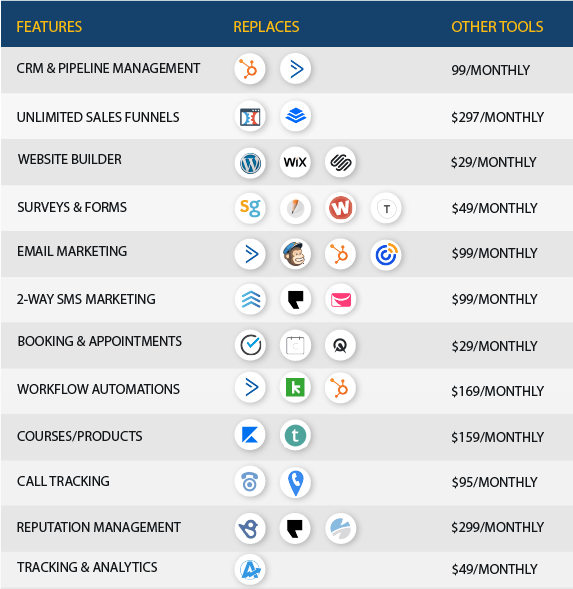
HighLevel replaces dozens of separate tools. That alone is attractive to small business owners who are drowning in subscriptions and costs. More importantly, HighLevel gives you the power to automate workflows that deliver real results.

When you understand the platform well, you can package it into a compelling offer. For example:

  • Lead follow up
  • Automated appointment booking
  • Review generation
  • AI driven call handling
  • Social media scheduling
  • Funnels and landing pages

Your clients do not buy HighLevel. They buy the outcome. They buy the time saved, the extra leads converted and the sense of control that proper automation gives them.

It is important to learn and understand HighLevel before trying to sell it. Use it to market your business. Attend free workshops like the MarketerM8 HighLevel Workshops where the 13 core functionalities are taught and explored.


3. Build a simple offer that solves a very specific problem

This is where many new agency owners overcomplicate things. You do not need a huge list of features. You need a clear and simple outcome.

For example:

  • A dentist wanting fewer no shows
  • An accountant wanting better lead follow up
  • A local trades business wanting more Google reviews
  • A solopreneur wanting a cleaner pipeline

Choose a niche you understand. Solve a painful problem. Wrap HighLevel around that solution.

Once you get traction you can evolve into a broader SaaS agency model.


4. Set your pricing with confidence

There is no universal price list. Your pricing depends on your offer, your niche and the level of service you want to provide.

Most successful HighLevel SaaS agencies use a three tier structure. A starter tier. A core tier. And a premium tier.

The key point is to avoid undervaluing yourself. You are not selling software. You are selling outcomes, support and expertise.

Inside the MarketerM8 HighLevel SaaS Entrepreneur Programme we help you design and price a sustainable model that gives you predictable recurring revenue.

More details here:
https://www.marketerm8.com/highlevel-saas-entrepreneur-programme-345758


5. Get your first clients through conversations, not ads

Your early clients almost always come from your network. Past clients. Existing contacts. Referrals. LinkedIn conversations. Local business groups.

When you show someone how HighLevel can fix a real operational problem, they often want to move forward quickly.

Start by offering a simple guided demo. Show the problem. Show the workflow. Show the outcome.

Once you have three to five clients onboard, you will have confidence and clear proof points.


6. Deliver an onboarding experience that feels structured and professional

Clients want clarity. They want to feel guided. They want to know there is a process.

A good onboarding sequence includes:

  • A welcome call
  • A structured form to capture requirements
  • A project plan
  • Access to training sessions
  • A short series of success check-ins

The stronger your onboarding, the more clients you retain and the more referrals you earn.


7. Build repeatable systems so you can scale

The difference between a freelancer and a SaaS agency owner is systemisation.

Document your workflows. Create templates. Automate everything that can be automated. Use AI where it makes sense. Use Zapier and webhooks for integrations. Standardise your onboarding.

This is how you get your time back. It is also how you make your version of HighLevel more valuable than the software alone.


8. Surround yourself with people who are doing the same thing

Growing a HighLevel SaaS agency can be lonely if you try to do everything yourself. You do not always know what good looks like until you see someone else doing it.

This is why we created the MarketerM8 Ascend Mastermind. It is a private group for serious HighLevel agency owners who want to learn from each other, swap ideas and accelerate growth. It is by application only and is designed for those who already have momentum.

When you combine regular workshops, ongoing training, community support and a mastermind environment, your progress becomes much faster and far less stressful.


Final thoughts

Starting a HighLevel SaaS agency and becomming a “SaaSPRENEUR” is not complicated once you understand the path. Focus on outcomes. Build a simple offer. Price with confidence. Systemise early. Surround yourself with people who want you to win.

If you would like structured help from the discovery phase all the way through to advanced growth, we can support you at each stage.

Julian Mills
Highlevel Consultant & SaaSPRENEUR with MarketerM8 white label agency

How to Master Sales Funnels with HighLevel: A Step-by-Step Guide

sales funnels with highlevel

sales funnels with highlevelIn the realm of online marketing, the concept of a sales funnel has become indispensable. It’s the blueprint that guides potential customers through a journey from awareness to conversion. However, building an effective sales funnel requires strategy, creativity, and the right tools. HighLevel is one such tool that empowers marketers to streamline and optimize their sales funnels for maximum results. In this guide, we’ll delve into the process of building sales funnels with HighLevel, step-by-step.
Step 1: Define Your Target Audience and Goals

Before diving into creating a sales funnel, it’s crucial to understand your target audience and what you aim to achieve. Who are your ideal customers? What problems are you solving for them? What are your business goals? Answering these questions will help shape your entire funnel-building process.

Step 2: Choose Your Funnel Type

HighLevel offers various funnel templates tailored to different business goals, such as lead generation, webinar registration, product sales, and more. Select the type of funnel that aligns with your objectives and audience needs.

Step 3: Customize Your Funnel

Once you’ve chosen a template, it’s time to customize it to fit your brand and messaging. HighLevel provides intuitive drag-and-drop tools that make it easy to design visually appealing and conversion-focused funnel pages. Tailor the content, layout, and design elements to resonate with your audience and compel them to take action.

Step 4: Integrate Automation and Follow-up Sequences

Automation is where HighLevel truly shines. Set up automated email sequences, SMS messages, and follow-up tasks to nurture leads and guide them through the funnel stages. Personalize your communication based on user behavior and engagement to increase relevance and effectiveness.

Step 5: Implement Tracking and Analytics

Monitoring the performance of your sales funnel is essential for optimization. HighLevel offers robust analytics that track metrics such as conversion rates, traffic sources, and user interactions. Analyze this data regularly to identify areas for improvement and refine your funnel for better results.

Step 6: Test and Iterate

A successful sales funnel is a result of continuous testing and optimization. Experiment with different elements of your funnel, such as headlines, calls-to-action, and offer variations, to discover what resonates best with your audience. HighLevel’s A/B testing feature enables you to compare different versions of your funnel and determine which performs better.

Step 7: Scale and Expand

As your funnel proves its effectiveness, consider scaling it up or expanding into new markets. HighLevel allows for easy duplication and customization of funnels, making it seamless to replicate successful campaigns and adapt them to new audiences or products.

Step 8: Practical Resources

HighLevel is a rapidly evolving marketing and sales automation software. It would be amiss of me to create a step by step guide here as to how to set up a sales funnel with HighLevel – as it would very quickly become out of date. I therefore direct you to click here for the latest sales funnel guides produced by HighLevel.

New to HighLevel and want to learn more. Click here to learn more.

Book a free 1-2-1 Discovery call with Julian to discus your requirements and answer any questions. Book Here.

Conclusion

Building a sales funnel with HighLevel is a strategic process that combines creativity, data analysis, and automation. By following these steps and leveraging HighLevel’s powerful features, you can create a dynamic and high-converting sales funnel that drives business growth and customer engagement. Remember, success doesn’t happen overnight; it requires continuous refinement and adaptation to meet the ever-changing needs of your audience. Start building your sales funnel with HighLevel today and unlock the full potential of your marketing efforts.

How to migrate from Calendly to HighLevel calendars

calendly to highlevelAre you considering moving over to HighLevel Calendars from Calendly?


Firstly – why would you want to do this?

1. Cost – for a single subscription to HighLevel you can have unlimited user accounts. Whatever the size of your team it is just one monthly cost that does not go up as you add more users.

2. Functionality. HighLevel does so much more that schedule online meetings. With HighLevel you have a constantly expanding set of online marketing tools (of which calendars are just one). One area where Calendly lacks is marketing automation integrations – even when using Zapier to connect to CRM’s it has restrictions. Not so with HighLevel, you have many ways to schedule and automate appointments follow up. A nice feature in the HighLevel CRM is it be able to schedule meetings from within the contact record i.e. when on a call to a prospect  – schedule a call there and then. And offline meetings are no problem either.

UPDATE: FEB 2026.  HighLevel can now integrate with your existing Calendly account. With this integration it is a one way sync – ideal for when you are transitioning over to HighLevel. But longer term I would definitely recommend completely switching to HighLevel calendars in order to have full functionality and simplicity of using an integrated system. Here is the HighLevel help doc regarding the Calendly -> HighLevel Calendar sync.

Steps on how to migrate calendars from Calendly to HighLevel.

1. Review Your Current Calendly Setup

Before beginning the migration, take stock of your current Calendly setup:

  • List all your events: Note down all the different types of events you currently have set up in Calendly.
  • Check your integrations: Identify any third-party integrations (e.g., Zoom, Google Calendar) linked to your Calendly account.
  • Note your settings: Document your notification settings, buffer times, maximum event durations, and any other specific configurations.
  • Make sure you are familiar with the latest functionality and set up in HighLevel. Please note HighLevel is a rapidly evolving platform with regular updates, so be aware that any “how to” guides and videos you find online may be already outdated. I suggest you use the help provided by your HighLevel agency provider. Here are the latest support guides from HighLevel.

2. Plan Your HighLevel Calendar Structure

HighLevel Calendars offer similar functionality to Calendly but with added features. Plan how you want your new calendar system to be structured:

  • Create corresponding event types: Replicate your event types from Calendly in HighLevel.
  • Set up your availability: Define your availability slots and buffer times in HighLevel.
  • Configure notifications and reminders: HighLevel allows customisation of email and SMS notifications. Set these up to match your preferences.

3. Reconnect Integrations

Re-establish any integrations you were using in Calendly with HighLevel. This could include:

  • Calendar Sync: Connect HighLevel to your Google or Outlook calendars to ensure all appointments are synchronised.
  • Communication Tools: If you were using Zoom or another video conferencing tool, make sure to set it up in HighLevel.

4. Test Your New Setup

Before fully switching over, test your new HighLevel Calendar setup:

  • Create test appointments: Schedule a few test appointments to ensure everything is working correctly.
  • Check notifications: Make sure email and SMS notifications are being sent as expected.
  • Verify integrations: Ensure all integrations are functioning properly.

5. Communicate with Your Clients

  • Inform your clients: Notify your clients about the switch and any new steps they might need to follow.
  • Update your booking links: Replace all Calendly links with HighLevel links on your website, social media, and email signatures.

6. Monitor and Optimise

  • Monitor the transition: Keep an eye on the new system for any issues or feedback from clients.
  • Optimise settings: Adjust your settings and workflows based on the feedback and your own observations to ensure a smooth experience.

Conclusion

Migrating from Calendly to HighLevel Calendars involves careful planning and execution, but the benefits of having an integrated scheduling and CRM platform are worth the effort. By following these steps, you can ensure a seamless transition that minimises disruptions for both you and your clients. With HighLevel’s advanced features, you can take your scheduling and client management to the next level.

If you need any further pointers I would be happy to get on a quick discovery call.

If you have yet to set up a HighLevel account then I suggest you reach out to MarketerM8. They are a HighLevel agency that can support you during the set up phase. Check out MarketerM8 here.

Keap or HighLevel Support UK

Infusionsoft Certified Partner - Julian Mills

Are you searching for Keap or HighLevel Support in the UK?

If you are then maybe I can be of assistance. I have worked with entrepreneurs since 2009 by providing Keap and HighLevel support in the UK.

Both Keap and HighLevel are powerful CRM and marketing automation tools. As each system has it’s own unique abilities, the one you use depends on your requirments.

As each of these sysems is a complex piece of software to get your head around it does mean that the initial set up can be daunting to many clients for which marketing automation is new. There are two areas where I support Keap and HighLevel clients.

Before even “jumping in” to the exciting stuff of building marketing campaigns and seeing stuff happen and sales come in we have to first work out a strategy – to figure out what marketing and automation your business needs.

And only then when we have a clear strategy do I start implementing and training clients on how to use Keap or HighLevel for their particular business requirements.

So the Keap or HighLevel support that I provide is much more than an online course where I show you the technicalities of how to get an email out or how to import data. I work closely with clients to create a bespoke Keap or HighLevel solution for their business.

Interested in my Keap or HighLevel support services? Let’s schedule a short 15-minute Discovery call at a mutually convenient time to determine if I would be the right consultant to assist you.

keap or highlevel support uk

How to migrate from Leadpages to HighLevel

leadpages to highlevel

leadpages to highlevel

Are you considering transitioning from Leadpages to HighLevel (also known as GoHighLevel) for your landing pages? In this comprehensive guide, we’ll take you through the process of seamlessly moving from HubSpot to GoHighLevel.

First and foremost, why the switch? Well Leadpages essentially does one thing – landing pages all for $49, $99 or the Advanced plan (price not quoted). And it does that very well – if that is all you want. With HighLevel you get a complete and very powerful tool that does so much more. And HighLevel can easily beat the Leadpages (Advanced Plan) on the monthly cost at just £97/mo when bought via the MarketerM8 agency.

Here are the steps to smoothly transition from Leadpages to HighLevel.

Step 1: Acquaint Yourself with HighLevel. Take the time to familiarize yourself with the HighLevel platform. Explore its features, grasp its terminology, and identify essential functionalities for your business. Recognizing the pros and cons of each software is crucial before switching from Leadpages to HighLevel.

Step 2: Find Your HighLevel Champion. It’s advisable to assign someone in your business as the “HighLevel Champion” even if you plan to outsource implementation. This ensures that your CRM/Marketing Automation system doesn’t become a mysterious black box. The lack of a champion can result in a chaotic system that no one comprehends.

Step 3: Evaluate Your Current Configuration. Before diving into the transition, assess your existing Leadpages setup. Identify critical landing pages and and integrations. Now at this time there is no automated Leadpage’s importer like we have for ClickFunnels or Kajabi in HighLevel, so it would mean recreating any exiting landing pages manually – and if you have many landing pages then the “pain of disconnect” may not be worth it for you.

Step 4: Outline Your Customer Journeys. Using insights from the Leadpages evaluation, map out your customer journeys. Create a Marketing Automation Plan that serves as an “architect’s blueprint” guiding the implementation of HighLevel. This living document evolves with your business. Here is how I create Marketing Automation Plans for my clients. Learn more.

Step 5: Implementation in HighLevel. With knowledge of GoHighLevel and your Marketing Automation Plan, begin constructing your new landing pages and automated processes. Numerous resources on YouTube and HighLevel support are available for assistance.

Step 6: Import any existing contacts you have. Take this chance to remove outdated information and start fresh with the new system.

Step 7: Import Your Data to HighLevel. After mapping customer journeys, import your data into HighLevel. Pay attention to data mapping for accurate field alignment.

Step 8: Test and Iterate. Before committing, conduct thorough testing. Run test campaigns, check automations, and verify data accuracy. Iterate until confident that everything works seamlessly.

Step 9: Train Your Team. Provide comprehensive training on HighLevel, especially for sales teams. Roll out training in stages, starting with those most tech-savvy. Hire new staff that show a willingness to work with technology.

Step 10: Monitor and Optimize. Post-transition, closely monitor campaigns and customer interactions. Identify areas for optimization and leverage advanced features for enhanced marketing and sales processes.

Conclusion: Switching from Leadpages to HighLevel may seem daunting, but with careful planning, it can lead to a more advanced and efficient marketing automation system. Follow these steps to maximize the potential of HighLevel for your business.

If you would like to discuss your specific requirements, then feel free to schedule a Discovery Call.