How to Get More Google Reviews. 5 Proven Strategies That Actually Work (Including How to Automate the Entire Process)

How to Get More Google Reviews. 5 Proven Strategies That Actually Work (Including How to Automate the Entire Process)

How to Get More Google Reviews. 5 Proven Strategies That Actually Work (Including How to Automate the Entire Process)Quick Answer

If you’re looking for the fastest way to generate more Google reviews, the answer is surprisingly simple.

Ask every happy customer at the right moment, make leaving a review effortless, and build a system that asks consistently instead of relying on memory.

Most businesses don’t struggle because customers are unwilling to leave reviews. They struggle because they ask too late, make the process difficult, or simply forget to ask.

The businesses that consistently collect five-star Google reviews don’t necessarily provide a better service than everyone else. They simply have a better review process.

Throughout this guide I’ll show you how to build a repeatable review generation system using HighLevel automation, while staying firmly within Google’s review guidelines.

Key Takeaways

  • Google rewards businesses that receive a regular stream of authentic reviews.
  • Ask customers immediately after delivering value, while the experience is still fresh.
  • Remove as much friction as possible by using direct review links, QR codes and NFC review cards.
  • Customers should always write and submit reviews in their own words.
  • Avoid using AI to generate customer reviews, as this could breach Google’s review policies.
  • AI is extremely effective for automating review requests, replying to reviews and managing your review workflow.
  • The best businesses don’t just collect reviews. They turn happy customers into long-term advocates.

Why Google Reviews Matter More Than Ever

Twenty years ago people asked friends, neighbours and colleagues for recommendations.

Today they ask Google.

Increasingly, they also ask AI assistants such as ChatGPT, Gemini, Claude and Perplexity.

Whether someone is looking for a plumber, accountant, dentist, solicitor, consultant or software provider, one of the very first things they look at is your online reviews.

Your Google Business Profile has become your digital shop window.

Potential customers often decide whether to contact you before they’ve even visited your website.

That’s why Google reviews influence far more than just your reputation.

  • Local search rankings
  • Google Maps visibility
  • Click-through rates
  • Customer trust
  • Enquiry rates
  • Sales conversions
  • Repeat business

Two businesses offering almost identical services can receive dramatically different numbers of enquiries simply because one has hundreds of recent reviews while the other has only a handful.

Reviews have become social proof at scale.

Google Isn’t Looking for Perfect Businesses

Here’s something many business owners misunderstand.

Google doesn’t expect perfection.

It expects authenticity.

A business with 400 reviews averaging 4.8 stars often appears more trustworthy than one with 12 reviews averaging 5.0 stars.

Why?

Because customers understand that no business can please everybody all of the time.

A steady flow of genuine reviews tells both Google and potential customers that your business is active, trusted and continuing to serve real people.

That steady flow is far more valuable than collecting twenty reviews one month and then none for the next year.

Consistency beats intensity.

The Rise of AI Search

Something else has changed over the last couple of years.

People are no longer simply typing questions into Google.

They’re asking ChatGPT.

They’re asking Gemini.

They’re asking Claude.

They’re asking Perplexity.

Instead of searching:

Best accountant near me

People increasingly ask:

Which accountant in Manchester has the best reviews for small businesses?

AI assistants are becoming another layer between customers and search engines.

That makes your online reputation even more valuable.

The businesses that consistently receive authentic, descriptive reviews are creating signals that benefit both traditional search engines and the rapidly growing world of AI search.

Important. Don’t Use AI to Write Customer Reviews

Before we go any further, it’s important to address something that has become increasingly common.

Many businesses are experimenting with AI to draft reviews for customers before asking them to copy and paste them into Google.

Personally, I don’t recommend this approach.

Google expects reviews to reflect the genuine opinions and experiences of the customer who actually received the product or service.

Although AI can be an incredibly useful business tool, using it to generate reviews on behalf of customers risks falling outside Google’s review policies.

If Google believes reviews have been artificially generated or manipulated, the consequences could include:

  • Individual reviews being removed.
  • Large numbers of reviews being filtered out.
  • Your Google Business Profile being restricted or suspended.
  • Serious or repeated breaches putting your online visibility at significant risk.

My advice is simple.

Always encourage customers to write honest reviews based on their own experience and in their own words.

Where AI really shines is helping your business, not writing reviews for your customers.

Throughout this guide I’ll show you how HighLevel uses AI safely and effectively to automate review requests, reply to reviews, analyse customer sentiment and trigger intelligent follow-up automations.

The Biggest Mistake Most Businesses Make

Whenever I ask business owners how they collect Google reviews, I usually hear something like this.

“We ask when we remember.”

Or…

“We send an email every few months.”

Or perhaps…

“We mention it on our invoices.”

None of those approaches are really a system.

They’re good intentions.

Unfortunately, good intentions don’t produce consistent results.

The businesses collecting dozens or even hundreds of Google reviews every year aren’t necessarily asking more persuasively.

They’re asking more consistently.

That’s a huge difference.

Stop Asking Occasionally. Start Building a System.

Imagine two dentists.

Both provide excellent treatment.

Both have friendly staff.

Both genuinely care about their patients.

Dentist A asks for reviews whenever the receptionist remembers.

Dentist B has an automated process that requests feedback after every completed appointment.

Who do you think collects more reviews?

Exactly.

The quality of the dentistry may be identical.

The quality of the process isn’t.

Introducing The Review Journey

Most businesses think review generation looks like this.

Complete the work

↓

Ask for a review

That’s far too simplistic.

I prefer to think of it as The Review Journey.

Deliver Outstanding Service

↓

Confirm Customer Satisfaction

↓

Collect Feedback

↓

Request a Review

↓

Customer Writes Genuine Review

↓

Reply to the Review

↓

AI Identifies the Most Likely Customer

↓

Update Contact Record

↓

Referral Campaign

↓

Case Study Request

↓

Generate Repeat Business

↓

Build a Customer Advocate

Notice something important.

The review isn’t the destination.

It’s simply another milestone in building a long-term relationship with your customer.

That’s an important mindset shift.

Strategy 1. Make Leaving a Review Effortless

One of the biggest misconceptions about Google reviews is that people are unwilling to leave them.

In reality, most happy customers are perfectly willing to help.

The real problem is friction.

Every extra click, every extra search and every extra decision dramatically reduces the chances of someone actually completing the review.

Think about the traditional process.

“If you get chance, could you leave us a Google review?”

The customer agrees.

They get back to work.

A few days later they vaguely remember.

Now they have to search for your business, find the correct listing, click Reviews and decide what to write.

It’s no surprise that many good intentions never become published reviews.

The businesses generating large numbers of reviews have one thing in common.

They remove almost every obstacle.

A direct review link is better than asking someone to search.

A QR code is better than asking someone to type a website address.

And there’s something even better.

NFC Review Cards

This is still one of my favourite ways of collecting Google reviews because it’s so simple.

Instead of asking someone to scan a QR code, you simply tap a credit card-sized NFC review card against their phone.

Your Google review page opens instantly.

No typing.

No searching.

No confusion.

They’re perfect for:

  • Tradespeople
  • Dentists
  • Estate agents
  • Consultants
  • Personal trainers
  • Hairdressers
  • Restaurants
  • Retail businesses
  • Networking events
  • Exhibitions

I’ve been so impressed with these cards that I’ve produced my own version.

If you’d like to try one yourself, I’m happy to send you one free of charge. Simply cover the postage and packing.

Claim your free NFC QR Google Review Card here.

The important thing isn’t the card itself.

It’s reducing friction.

Every second you save your customer increases the likelihood they’ll actually leave a review.

Strategy 2. Don’t Rely on Memory

I often ask business owners a simple question.

“Who asks your customers to leave Google reviews?”

The answers are usually something like:

  • “My receptionist.”
  • “My office manager.”
  • “One of the engineers.”
  • “Me.”

Then I ask another question.

“What happens when they’re on holiday?”

Usually there’s a smile.

Because everyone knows what happens.

Review requests stop.

The reality is that people are inconsistent.

We’re busy.

We forget.

We get distracted.

That’s exactly why systems outperform good intentions every single time.

Enter HighLevel Automation

This is where HighLevel becomes incredibly powerful.

Instead of relying on someone remembering to ask for a review, HighLevel remembers for you.

Imagine a customer has just completed a job.

Job Completed

↓

Wait 2 Hours

↓

Send Thank You Email

↓

Wait 3 Days

↓

Send SMS Reminder

↓

Wait 4 Days

↓

Send WhatsApp Message

↓

Still No Review?

↓

Create Task For Team Member to personally reach out

Every customer receives exactly the same professional experience.

No spreadsheets.

No sticky notes.

No relying on someone’s memory.

Just a consistent process running automatically in the background.

Go Beyond a Single Email

Many businesses stop after sending one review request.

If the customer misses the email, the opportunity disappears.

HighLevel allows you to build far more intelligent workflows.

For example:

  • If they don’t open the email, send an SMS.
  • If they don’t reply to the SMS, send a WhatsApp message.
  • If they still don’t respond, notify a member of staff to make a personal follow-up call.

Everything can happen automatically.

Your team only gets involved when they genuinely need to.

Even Direct Mail Can Become Automated

One feature many HighLevel users overlook is direct mail.

Imagine your customer hasn’t responded to your digital reminders.

Instead of giving up, HighLevel could automatically trigger a professionally printed postcard.

The postcard could include:

  • A personalised request.
  • A QR code linking directly to your Google review page.
  • A handwritten-style design.
  • Your branding.

Receiving something physical is unexpected.

Because very few businesses do it, it often gets noticed.

Sometimes old-fashioned marketing still works brilliantly.

Strategy 3. Make Writing a Review Easy

One of the biggest barriers to collecting more Google reviews isn’t that customers don’t want to help.

It’s that they simply don’t get around to doing it.

Life gets busy.

People have good intentions.

Then something else comes along.

The answer isn’t to write the review for them.

The answer is to make writing their own review as easy as possible.

For example:

  • Ask while the experience is still fresh.
  • Provide a direct review link.
  • Keep your request short and friendly.
  • Explain that honest feedback really helps your business.
  • Thank them for taking the time.

Simple changes like these can dramatically improve response rates while ensuring every review remains authentic.

Avoid Review Gating

There’s another practice that’s worth avoiding.

It’s known as review gating.

Review gating is where a business tries to filter customers before inviting them to leave a public review.

For example, you might ask:

“Were you happy with our service?”

If they answer “Yes”, they’re sent to Google to leave a review.

If they answer “No”, they’re sent to a private feedback form instead.

While this might sound like a sensible way to protect your online reputation, it isn’t something I’d recommend.

Google wants businesses to collect genuine, honest reviews from real customers, not just the customers most likely to leave five-star ratings.

If your review process is designed to selectively encourage positive reviews while discouraging less favourable ones, you risk falling outside Google’s review policies.

A better approach is to invite every customer to leave an honest review.

At the same time, give customers an easy way to contact you directly if they have concerns or feel you’ve fallen short.

Many businesses include a simple message such as:

“We genuinely value your feedback. If there’s anything we could have done better, we’d love the opportunity to put things right. If you’d like to share your experience publicly, we’d also really appreciate an honest Google review.”

This approach is transparent, ethical and much more likely to build long-term trust with both customers and Google.

What About AI?

This is where there’s often confusion.

Some people assume AI should write reviews for customers.

I don’t believe that’s the right approach.

Instead, I believe AI should help your business manage the review process more efficiently.

Think of AI as your digital assistant rather than your customer’s copywriter.

Used in the right places, it can save hours every week while keeping you safely within Google’s review guidelines.

Strategy 4. Reply to Every Review

Collecting reviews is only half the story.

Responding to them is just as important.

Google likes to see businesses actively engaging with customers.

More importantly, future customers notice.

Imagine two businesses.

Business A never replies.

Business B thanks every customer personally.

Which business feels more approachable?

Exactly.

Replies demonstrate that there are real people behind the business.

HighLevel AI Can Help You Reply to Reviews

This is one area where AI really comes into its own.

Rather than writing reviews for customers, HighLevel’s AI Employee can help your business reply to the reviews you’ve received.

Google actively encourages businesses to engage with customer feedback.

The challenge for many business owners is simply finding the time.

That’s where AI can make a genuine difference.

You can create different AI Employees depending on the personality of your business.

For example:

  • Professional and corporate.
  • Friendly and approachable.
  • Luxury brand.
  • Fun and humorous.
  • Local family business.

The AI can draft thoughtful responses that thank customers for their feedback while maintaining a consistent brand voice.

Instead of spending half an hour every evening replying to reviews, the process can take just a few minutes.

Don’t Treat Every Review the Same

Although AI is excellent at replying to reviews, I’d still recommend using a little human judgement.

For example:

★★★★★

AI replies automatically.

★★★★☆

AI replies automatically.

★★★☆☆

Manager reviews before publishing.

★★☆☆☆

Create internal task.

★☆☆☆☆

Notify business owner immediately.

Launch customer recovery process.

Sometimes your greatest marketing opportunity isn’t a five-star review.

It’s how professionally you recover from a poor experience.

A thoughtful response to a negative review can often impress future customers just as much as a glowing testimonial.

Identifying Which Customer Left the Review

One of the biggest frustrations with Google reviews is that Google doesn’t tell your CRM exactly which customer left the review.

If you’ve ever wanted to automatically trigger a referral campaign or thank-you journey after a review has been published, you’ll know this is the missing piece of the puzzle.

This is where AI becomes genuinely exciting.

Instead of analysing the wording of the review, AI can analyse context.

For example, it could look at:

  • The reviewer’s display name.
  • Customers who were asked to leave a review during the previous seven days.
  • Appointment history.
  • Completed jobs.
  • Previous conversations.
  • Timing.

Based on all of that information, AI can determine the most likely customer who submitted the review.

Will it be right every single time?

Probably not.

But if the AI is able to assign a high confidence score, it becomes possible to automate what has traditionally been a completely manual process.

Imagine receiving a notification like this:

“AI believes there is a 94% probability this review was submitted by Sarah Jones following her boiler installation last Tuesday.”

That level of confidence is often more than enough to automate the next stage of your customer journey.

The Review Doesn’t End With Google

This is something I think many businesses miss.

They celebrate receiving another five-star review.

Then they move on.

I see the review as the beginning of another automation.

Customer Leaves Review

↓

AI Identifies Most Likely Customer

↓

Update Contact Record

↓

Send Thank You

↓

Invite Referral

↓

Request Case Study

↓

VIP Customer Journey

Suddenly your review process becomes much more than reputation management.

It becomes a customer advocacy engine.

Strategy 5. Turn Reviews Into One of Your Most Valuable Marketing Assets

Here’s another mistake I see businesses making.

They celebrate receiving a new Google review.

Then they move on.

That review has far more value than simply sitting on your Google Business Profile.

Every genuine review is another piece of social proof that can be used throughout your marketing.

Think about where your best reviews could appear.

  • Your website homepage.
  • Service pages.
  • Landing pages.
  • Email newsletters.
  • Sales proposals.
  • Social media posts.
  • Printed brochures.
  • Presentation slides.
  • Exhibition stands.
  • Recruitment pages.

Your happiest customers have already written some of your best marketing copy.

Don’t leave it hidden away on Google.

Build a Review Library

One idea I recommend to clients is creating a central testimonial library.

Every time a new review arrives, categorise it.

For example:

  • Customer service.
  • Value for money.
  • Speed of response.
  • Quality of workmanship.
  • Communication.
  • Reliability.
  • Technical expertise.

Very quickly you’ll build an incredible collection of real customer stories that your marketing team can use throughout the year.

Because they’re genuine customer reviews, they often carry far more credibility than anything your business could write about itself.

The Review Flywheel

When businesses think about reviews, they often see them as the finish line.

I see them as the beginning of another cycle.

Outstanding Service

↓

Happy Customer

↓

Google Review

↓

Business Reply

↓

Website & Marketing

↓

More Trust

↓

More Enquiries

↓

More Customers

↓

More Reviews

↓

Higher Visibility

↓

Repeat

Every review strengthens your reputation.

A stronger reputation generates more enquiries.

More enquiries create more customers.

More customers create more reviews.

Eventually the process develops its own momentum.

That’s what I call the Review Flywheel.

The Role of AI in Modern Reputation Management

Throughout this guide I’ve deliberately separated where I believe AI adds value from where I believe businesses should be cautious.

In my opinion, AI should never replace your customer’s voice.

Their review should always be their own.

However, AI can become an invaluable assistant behind the scenes.

For example, HighLevel AI can help you:

  • Automate review requests.
  • Choose the best communication channel.
  • Send follow-up reminders.
  • Draft personalised replies to reviews.
  • Analyse customer sentiment.
  • Highlight unhappy customers.
  • Identify the most likely customer who left a review.
  • Trigger referral and customer advocacy campaigns.

Used this way, AI isn’t replacing human interaction.

It’s making your business more responsive, more consistent and more efficient.

Julian Mills’ View

I’ve been helping businesses automate their marketing and customer journeys for over twenty-five years.

One lesson has remained constant.

The businesses with the strongest reputations aren’t always the ones providing the very best service.

They’re the ones with the best systems.

When I first started exploring the possibilities of AI within review management, I was excited by the idea of AI helping customers draft reviews.

However, after researching Google’s latest guidance in more detail, I changed my view.

Today I believe the safest and most sustainable approach is straightforward.

Customers should always write and submit their own reviews based on their genuine experience.

Where AI becomes incredibly powerful is everywhere else.

It can automatically ask for reviews at exactly the right moment.

It can ensure no customer is forgotten.

It can help your business reply consistently to every review.

It can identify trends in customer feedback.

It can even determine, with a high degree of confidence, which customer most likely left a review so your CRM can trigger the next stage of their journey.

For me, that’s where the real opportunity lies.

Not using AI to create reviews.

Using AI to build a complete reputation management system that helps businesses earn more authentic reviews, strengthen customer relationships and generate more referrals.

That’s exactly why I’m so excited about what HighLevel is making possible.

Frequently Asked Questions

How many Google reviews should my business have?

There isn’t a magic number. A steady stream of recent, authentic reviews is generally far more valuable than a large number of older reviews.

Can I ask customers to leave Google reviews?

Absolutely. Google encourages businesses to ask customers for honest feedback, provided you don’t pressure customers or attempt to manipulate the outcome.

Can I offer incentives for Google reviews?

Generally no. The safest approach is to ask for honest feedback without offering rewards or incentives in exchange for positive reviews.

Should every review receive a reply?

Yes. Responding to reviews demonstrates that you value customer feedback and helps build trust with future customers.

Can AI reply to Google reviews?

Yes. This is one of the most valuable uses of AI. HighLevel’s AI Employee can draft thoughtful replies that reflect your brand’s tone of voice, helping businesses respond consistently while saving significant time.

Can AI write Google reviews for my customers?

I wouldn’t recommend it. Customers should always write and submit reviews in their own words. This helps ensure reviews remain authentic and avoids unnecessary risks under Google’s review policies.

Can HighLevel automate review requests?

Yes. HighLevel can automatically request reviews using email, SMS and WhatsApp, send reminders, notify your team and build sophisticated multi-step review workflows.

Can HighLevel identify who left a Google review?

Google doesn’t identify the customer directly. However, AI can often determine the most likely reviewer by comparing names, timing and recent review requests. While this isn’t guaranteed to be 100% accurate, it can provide sufficient confidence to trigger automated customer journeys.

What is an NFC Review Card?

An NFC Review Card is a credit card-sized card containing a small NFC chip. Tapping it against a compatible smartphone instantly opens your Google review page, making it much quicker and easier for customers to leave feedback.

What is the Review Journey?

The Review Journey is my framework for turning satisfied customers into long-term advocates by combining review requests, review replies, CRM automation, referrals, testimonials, case studies and repeat business into one connected process.

Final Thoughts

If there’s one message I’d like you to take away from this guide, it’s this.

Businesses don’t receive more Google reviews because they ask harder. They receive more Google reviews because they build a better review system.

By removing friction, asking at exactly the right moment, automating your follow-up and making it as easy as possible for customers to leave genuine reviews, you can create a reputation strategy that delivers results year after year.

AI has an important role to play.

Not by replacing your customers’ voices.

But by helping your business automate, analyse and manage the entire review journey more effectively.

That’s exactly what we’ve built into our HighLevel Review Journey system.

If you’d like to see it in action, I’d be delighted to show you how it works.

Useful Links

Julian Mills HighLevel Consultant and Marketing Automation Strategist

About the Author

Julian Mills

HighLevel Consultant & Marketing Automation Strategist

Julian Mills helps business owners automate lead generation, sales follow-up, customer communication and business processes using HighLevel and MarketerM8. Since 2009 he has helped businesses implement CRM, marketing automation and AI-powered systems that save time, improve customer experience and generate more sales.

About Julian
Book a Discovery Call
Join a Free HighLevel Workshop
Learn About HighLevel with MarketerM8

HighLevel Not Working? Try These Two Fixes Before Contacting Support

HighLevel Not Working Try These Two Fixes Before Contacting Support

Frustrated HighLevel user experiencing issues with opportunities, workflows, appointments and contacts while working on a laptop
If you’ve landed on this page, there’s a good chance something in HighLevel isn’t behaving as expected.

Perhaps your opportunities have disappeared.

Your pipeline is blank.

Your contacts aren’t showing.

A workflow has stopped working.

Your calendar isn’t displaying appointments.

Maybe you’ve searched Google for an answer, watched a few YouTube videos, or even started drafting a support ticket.

Before you spend hours troubleshooting, there are two simple checks I recommend making first.

As a HighLevel consultant who works with businesses throughout the UK and internationally, I’ve seen many situations where what appears to be a major problem turns out to be a browser issue that can be resolved in seconds.

Julian Mills’ 1st Recommendation: Use Google Chrome

HighLevel is a modern web-based application that is constantly evolving.

New features, updates and improvements are released regularly. Because of this, browser compatibility can sometimes become an issue.

My recommendation is simple.

Use Google Chrome.

While HighLevel will often work in other browsers, Chrome generally provides the most consistent experience.

If you’re using another browser and something appears broken, switch to Chrome before investigating further.

You may find the issue immediately disappears.

Julian Mills’ 2nd Recommendation: Clear Your Browser Cache

In my experience, browser cache issues are responsible for a surprising number of apparent HighLevel problems.

When HighLevel updates part of the platform, your browser can sometimes hold onto older versions of files.

This can result in:

  • Missing opportunities
  • Blank pages
  • Missing buttons
  • Incorrect reports
  • Broken layouts
  • Workflows appearing not to work
  • Missing contacts
  • Calendars displaying incorrectly

The good news is that the data is still there. Everything is backed up in HighLevel.

Your browser simply isn’t displaying the latest version of the platform correctly.

How To Clear Cache In Google Chrome

  1. Open Google Chrome.
  2. Press Ctrl + Shift + Delete on Windows or Command + Shift + Delete on Mac.
  3. Select Cached Images and Files.
  4. Click Delete Data.
  5. Close Chrome completely.
  6. Reopen Chrome.
  7. Log back into HighLevel.

Try An Incognito Window

You can also test HighLevel in an Incognito window by pressing:

Ctrl + Shift + N

This creates a clean browser session and can quickly identify whether the issue is cache-related.

If HighLevel works correctly in an Incognito window but not in your normal browser session, there’s a good chance you’re dealing with a browser cache issue.

Before You Contact Support

If something appears broken in HighLevel, I recommend working through this checklist:

  • ✅ Use Google Chrome
  • ✅ Clear your browser cache
  • ✅ Open an Incognito window
  • ✅ Log out and back in
  • ✅ Try another computer if available / or ask another user to check for you

Many apparent HighLevel issues could be resolved before a support ticket is ever needed.

Are You Getting The HighLevel Technical Support You Need Or Were Promised?

One thing many business owners discover after signing up for a HighLevel sub-account is that not all HighLevel resellers, implementation partners and white-label agencies provide the same level of support.

In some cases, support may be limited to basic onboarding or ticket-based assistance. When issues arise, users can find themselves searching Google, watching YouTube videos, reading Facebook groups or trying to troubleshoot problems on their own.

That’s not necessarily anyone’s fault. Every agency has a different business model and level of technical expertise.

At MarketerM8, we take a different approach.

When you become a MarketerM8 customer, you’re not simply getting access to the HighLevel software. You’re also gaining access to a team of experienced HighLevel specialists who work with the platform every day.

Included with your MarketerM8 subscription:

  • Unlimited HighLevel support
  • Access to 24/7 live chat support
  • Zoom support calls when required
  • Help troubleshooting workflows, automations, calendars and pipelines
  • Assistance with integrations and technical setup
  • Access to free live HighLevel training workshops
  • Guidance from experienced HighLevel consultants

If something isn’t working, you shouldn’t have to spend hours searching the internet trying to find the answer.

Our aim is to help you solve the problem quickly so you can get back to running your business.

Already Have A HighLevel Account?

Many people don’t realise that it is often possible to move an existing HighLevel sub-account from one reseller or agency to another.

If you’re currently using HighLevel and would like to learn more about transferring your sub account to MarketerM8, book a discovery call with Julian Mills.

During the call we’ll discuss your current setup, the support you’re receiving today, and whether moving your account to MarketerM8 would be a good fit for your business.

Book your discovery call:  https://www.julianmills.co.uk/discovery


Appendix: Common HighLevel Issues Often Resolved By Clearing Browser Cache

This appendix contains a reference list of common questions HighLevel users search for online. While each issue may have multiple possible causes, browser cache is one of the first things worth checking.

Opportunities & Pipelines

  • HighLevel opportunities disappeared
  • HighLevel pipeline is blank
  • HighLevel opportunities not showing
  • HighLevel sales pipeline not loading
  • HighLevel opportunity cards missing
  • HighLevel stages missing
  • HighLevel pipeline showing incorrect information
  • HighLevel opportunities not updating
  • HighLevel dashboard figures don’t match pipeline
  • HighLevel pipeline won’t refresh

Contacts & CRM

  • HighLevel contacts disappeared
  • HighLevel contact search not working
  • HighLevel Smart Lists empty
  • HighLevel tags missing
  • HighLevel custom fields not showing
  • HighLevel notes missing
  • HighLevel contact records not loading
  • HighLevel filters not working
  • HighLevel CRM loading slowly
  • HighLevel contact information incorrect

Calendars & Appointments

  • HighLevel calendar blank
  • HighLevel appointments missing
  • HighLevel availability not showing
  • HighLevel booking calendar not loading
  • HighLevel scheduler not working
  • HighLevel appointments not displaying
  • HighLevel calendar widget broken
  • HighLevel booking page loading incorrectly
  • HighLevel appointment list missing
  • HighLevel calendar not refreshing

Workflows & Automation

  • HighLevel workflow not working
  • HighLevel workflow builder not loading
  • HighLevel automation screen blank
  • HighLevel workflow history not showing
  • HighLevel workflow editor frozen
  • HighLevel triggers missing
  • HighLevel actions not displaying
  • HighLevel automation settings missing
  • HighLevel workflow page broken
  • HighLevel workflow screen loading slowly

Conversations & Messaging

  • HighLevel inbox blank
  • HighLevel conversations missing
  • HighLevel SMS messages not showing
  • HighLevel WhatsApp conversations missing
  • HighLevel Facebook messages missing
  • HighLevel inbox not refreshing
  • HighLevel conversation history missing
  • HighLevel message thread blank
  • HighLevel conversations not loading
  • HighLevel messages disappeared

Funnels & Websites

  • HighLevel funnel page blank
  • HighLevel website editor not loading
  • HighLevel funnel builder not working
  • HighLevel page editor blank
  • HighLevel forms not displaying
  • HighLevel popup not loading
  • HighLevel website pages missing
  • HighLevel page preview broken
  • HighLevel funnel statistics missing
  • HighLevel website builder loading slowly

Email Marketing

  • HighLevel email builder blank
  • HighLevel email editor not loading
  • HighLevel email templates missing
  • HighLevel campaign reports blank
  • HighLevel email statistics missing
  • HighLevel email settings not showing
  • HighLevel email preview broken
  • HighLevel campaign builder frozen
  • HighLevel emails displaying incorrectly
  • HighLevel email designer not loading

Memberships, Courses & Communities

  • HighLevel course pages not loading
  • HighLevel lessons missing
  • HighLevel community blank
  • HighLevel membership area not loading
  • HighLevel course editor broken
  • HighLevel community posts missing
  • HighLevel student dashboard blank
  • HighLevel course statistics missing
  • HighLevel membership pages loading incorrectly
  • HighLevel community notifications missing

Mobile App

  • HighLevel mobile app not syncing
  • HighLevel mobile app missing contacts
  • HighLevel mobile app missing appointments
  • HighLevel mobile app not refreshing
  • HighLevel conversations missing from app
  • HighLevel notifications not showing
  • HighLevel app loading slowly
  • HighLevel app showing incorrect information
  • HighLevel app not updating
  • HighLevel mobile dashboard blank
Julian Mills HighLevel Consultant and Marketing Automation Strategist

About the Author

Julian Mills

HighLevel Consultant & Marketing Automation Strategist

Julian Mills helps business owners automate lead generation, sales follow-up, customer communication and business processes using HighLevel and MarketerM8. Since 2009 he has helped businesses implement CRM, marketing automation and AI-powered systems that save time, improve customer experience and generate more sales.

About Julian
Book a Discovery Call
Join a Free HighLevel Workshop
Learn About HighLevel with MarketerM8
How to Seamlessly Transition from ClickFunnels to HighLevel (And Why Many Businesses Make the Move)

clickfunnels to highlevel

clickfunnels to highlevel

If you’ve been using ClickFunnels for a while, there is a good chance you’ve reached a point where you’re asking yourself whether it’s still the right platform for your business.

For many business owners, coaches, consultants and agencies, ClickFunnels is often the first serious marketing platform they invest in. It helps them build landing pages, sales funnels and lead generation campaigns without needing a developer.

The challenge comes later.

As your business grows, you often need more than just funnels.

You need a CRM. You need email marketing. You need appointment booking. You need automation. You need lead nurturing. You may need SMS, WhatsApp, AI tools and sales pipelines.

This is where many businesses begin exploring HighLevel.

In this guide, I’ll explain why businesses move from ClickFunnels to HighLevel, what can be migrated, what challenges to expect and how to make the transition as smooth as possible.

Quick Answer

Many businesses move from ClickFunnels to HighLevel because they need more than a funnel builder.

ClickFunnels remains one of the most popular platforms for creating sales funnels, landing pages and lead generation campaigns. However, as businesses grow, they often require CRM functionality, appointment booking, email marketing, automation, SMS messaging, WhatsApp communication and customer management tools.

HighLevel combines all of these functions into a single platform. For businesses looking to reduce software costs, simplify integrations and centralise their marketing and sales systems, HighLevel is often a natural next step.

What Is the Difference Between ClickFunnels and HighLevel?

ClickFunnels is primarily a sales funnel platform designed to help businesses generate leads and sales online.

HighLevel is a marketing and sales operating system that includes funnel building alongside CRM, email marketing, workflow automation, appointment booking, communications and customer management tools.

A simple way to think about it is:

  • ClickFunnels focuses on generating leads.
  • HighLevel focuses on generating leads and managing everything that happens afterwards.

Why Businesses Move from ClickFunnels to HighLevel

Let’s be clear.

ClickFunnels is not a bad platform.

In fact, it remains one of the most recognised funnel-building platforms in the world and has helped thousands of businesses generate leads and sales.

The reason many businesses move is not because ClickFunnels stops working.

The reason is that they start needing additional tools.

A common software stack looks something like this:

  • ClickFunnels
  • Calendly
  • ActiveCampaign
  • Zapier
  • Stripe
  • CRM software
  • SMS platform

Each tool performs a specific function, but costs begin to add up and integrations become increasingly complex.

Many business owners eventually ask:

Wouldn’t it be easier if all of this lived under one roof?

That is often what leads them to HighLevel.

The Problem Isn’t ClickFunnels

One of the biggest misconceptions is that businesses leave ClickFunnels because of funnels.

In reality, most businesses are perfectly happy with their funnels.

The problem is usually what happens after someone opts in.

Once a lead enters your world, you need to:

  • Track conversations
  • Manage follow-up
  • Book appointments
  • Send reminders
  • Nurture prospects
  • Manage opportunities
  • Monitor sales performance
  • Collect reviews
  • Automate communication

This is where businesses often find themselves adding more and more software around ClickFunnels.

Expert Insight from Julian Mills

“The reason most businesses leave ClickFunnels isn’t because the funnels stop working. It’s because they eventually need a CRM, automation, appointment booking and customer management platform around those funnels.” – Julian Mills

The Funnel-to-System Framework

Over the years, I’ve noticed a pattern.

Most businesses start by solving one problem and then gradually discover they have four or five more.

Stage 1: Build Funnels

Generate leads and enquiries.

Stage 2: Capture Leads

Store contact information and customer data.

Stage 3: Follow Up

Use automation, reminders and nurture campaigns.

Stage 4: Convert Opportunities

Manage pipelines and sales processes.

Stage 5: Retain Customers

Deliver ongoing communication, reviews and customer experience.

Julian Mills’ View

“Many businesses buy ClickFunnels to solve Stage 1. They move to HighLevel when they need Stages 2 through 5.” – Julian Mills

What Can Be Migrated from ClickFunnels to HighLevel?

The good news is that most of your existing assets can be migrated.

Funnels and Landing Pages

Most funnel structures can be recreated inside HighLevel.

In many cases, businesses take the opportunity to improve conversion rates by refreshing designs, simplifying pages and updating messaging.

What many ClickFunnels users don’t realise is that HighLevel includes a ClickFunnels Page Importer.

Rather than rebuilding every page from scratch, HighLevel can import many ClickFunnels pages directly into a HighLevel funnel. The imported page is recreated within HighLevel, often saving a significant amount of time during the migration process.

In many cases, the page design, layout, images and copy will import successfully. The main tasks afterwards are typically:

  • Recreating forms in HighLevel
  • Recreating order forms in HighLevel
  • Reconnecting automation workflows
  • Testing the funnel before going live

Julian Mills’ View

“One of the biggest surprises for ClickFunnels users is discovering that HighLevel can often import their existing funnel pages. Instead of rebuilding everything from scratch, the process is often as simple as importing the page, recreating the form or order form and reconnecting the automation. That can save hours, or even days, during a migration.” – Julian Mills

Forms

Lead capture forms can be recreated and often enhanced with additional automation.

Email Campaigns

Email templates, nurture sequences and marketing campaigns can usually be transferred into HighLevel.

Contacts

Customer and prospect databases can be imported into HighLevel using CSV imports.

Membership Areas

Courses and membership content can be recreated inside HighLevel’s Courses and Communities features.

For many former ClickFunnels users, HighLevel Communities offers a more modern experience and continues to receive regular development updates.

Appointment Booking and Calendars

Many businesses using ClickFunnels will connect a tool such as Calendly for appointment scheduling.

HighLevel certainly handles traditional appointment booking, including:

  • Discovery calls
  • Sales consultations
  • Classes / Workshops
  • Webinars
  • Strategy sessions
  • Demo bookings
  • Team appointments

However, HighLevel’s calendar functionality extends far beyond what most people expect from a standard scheduling tool.

Service Calendars

For businesses delivering services, HighLevel includes Service Calendars.

These are ideal for businesses where appointments need to be assigned to specific team members, technicians, engineers, consultants or service providers.

Examples include:

  • Accountancy firms
  • Marketing agencies
  • Consultants
  • Trades businesses
  • IT support companies
  • Coaches and trainers

Rather than simply booking a meeting, Service Calendars help manage the delivery of the service itself.

Rental Calendars

HighLevel also includes Rental Calendars.

These are designed for businesses that rent out physical assets and resources.

Examples include:

  • Meeting rooms
  • Event venues
  • Holiday accommodation
  • Vehicles
  • Equipment hire
  • Machinery rental

This allows customers to book and reserve tangible assets directly through HighLevel while availability is managed automatically.

Julian Mills’ View

“Many businesses start by comparing HighLevel to Calendly. What they often discover is that HighLevel goes much further. It doesn’t just book appointments. It can also manage service delivery schedules and rental assets, allowing businesses to run more of their operations from a single platform.” – Julian Mills

For many former ClickFunnels users, this becomes another example of the difference between a collection of separate tools and a complete business operating system.

AI and Automation

One area where HighLevel has evolved significantly beyond the traditional funnel-builder model is artificial intelligence.

While ClickFunnels remains focused on helping businesses generate leads and sales through funnels, HighLevel has expanded into AI-powered communication, automation and business operations.

HighLevel can support:

  • AI chat assistants
  • AI voice agents
  • AI appointment booking
  • AI-powered lead qualification
  • AI Studio – vibe coding pages and apps
  • AI review responses
  • AI content generation
  • AI workflow assistance

For many businesses, this means moving beyond simple lead generation and towards automating parts of the sales and customer service process.

For example, an AI Voice Agent can answer incoming phone calls, qualify prospects, answer common questions and book appointments directly into your calendar.

An AI Chat Assistant can engage website visitors, capture lead information and help prospects find the information they need without waiting for a member of staff to respond.

Julian Mills’ View

“The conversation is no longer just about funnels. More businesses are now asking how AI can help them respond faster, qualify leads and improve customer experience. This is an area where HighLevel has invested heavily in recent years.” – Julian Mills

The AI Operating System Concept

One way I describe HighLevel is as an AI Operating System for small businesses.

Rather than using separate platforms for lead generation, CRM, email marketing, appointment booking, customer communications and AI, HighLevel brings these functions together within a single system.

This means your AI tools have access to the same contact records, conversations, appointments and workflows that power the rest of your business.

Julian Mills’ View

“Many businesses initially compare HighLevel to ClickFunnels because both can build funnels. The bigger difference today is that HighLevel is evolving into a business operating system that happens to include funnels, whereas ClickFunnels remains primarily a funnel platform.” – Julian Mills

For businesses moving from ClickFunnels, AI is often one of the unexpected benefits they discover after migrating.

Common Migration Mistakes

Rebuilding Everything at Once

Trying to migrate every asset simultaneously can become overwhelming.

A phased migration is usually more effective.

Ignoring Existing Data

Before migrating, it’s worth cleaning your contact database and removing outdated or duplicate records.

Replicating Old Processes

Migration presents an opportunity to improve systems rather than simply recreate them.

Focusing Only on Technology

The technology is usually the easy part.

The bigger challenge is ensuring your sales and marketing processes are properly designed.

How Long Does a Migration Take?

The answer depends on complexity.

A simple setup with a handful of funnels and email campaigns could be migrated within days.

A larger business with multiple funnels, automations, courses and integrations may take several weeks.

The key is prioritisation.

Start with the systems that directly generate leads and revenue.

Everything else can follow.

ClickFunnels 2.0 vs HighLevel

Both platforms are continually evolving and both offer significantly more functionality than they did a few years ago.

ClickFunnels Strengths

  • Funnel building
  • Sales pages
  • Webinar funnels
  • Course sales
  • Direct response marketing

HighLevel Strengths

  • CRM
  • Pipelines
  • Marketing automation
  • Appointment booking
  • Service calendars
  • Rental calendars
  • SMS marketing
  • WhatsApp integration
  • Reputation management
  • Agency functionality
  • White-label services
  • AI-powered workflows
  • AI Agents
  • Social media scheduling
  • Review management

The right choice depends on your business goals.

Should You Migrate?

Not necessarily.

If ClickFunnels is doing everything you need and your current software stack is working efficiently, there may be no reason to move.

However, if you’re finding yourself adding more tools, paying multiple subscriptions and struggling with disconnected systems, it may be worth exploring alternatives.

The businesses that typically benefit most from HighLevel are those looking for a single platform to manage marketing, sales and customer communication.

Julian Mills’ View

As a HighLevel consultant and marketing automation strategist, I don’t generally recommend changing software for the sake of changing software.

Software migrations take time and require planning.

The real question is whether your current systems are helping your business grow.

If your business has outgrown a funnel-first approach and you’re looking for a complete marketing and sales operating system, HighLevel is well worth considering.

I rarely see businesses leave ClickFunnels because they dislike the platform.

More often, they have reached the point where they need a complete marketing and sales system rather than a standalone funnel builder.

Would you like to talk through your set up and how to move over to HighLevel? Book a Discovery Call with Julian.

A Question Worth Asking

Before migrating, ask yourself this:

Do I need a better funnel builder, or do I need a better business system?

The answer to that question will often determine whether a move to HighLevel makes sense.

Memorable Takeaway

“ClickFunnels helps businesses generate leads. HighLevel helps businesses manage what happens next.” – Julian Mills


Appendix: Frequently Asked Questions

Can HighLevel replace ClickFunnels?

Yes. HighLevel includes funnel building alongside CRM, automation, email marketing, appointment booking, communications and customer management tools.

Does HighLevel have a ClickFunnels import tool?

Yes.

HighLevel includes a ClickFunnels Page Importer that can recreate many ClickFunnels pages inside a HighLevel funnel. While forms, order forms and automations may need to be rebuilt using HighLevel’s native tools, the importer can significantly reduce the amount of manual work involved in a migration.

For many businesses, this means they can move their funnels far more quickly than they initially expect.

Can HighLevel replace Calendly?

Yes. HighLevel includes appointment calendars, round-robin calendars, class booking calendars, service calendars and rental calendars. For many businesses this removes the need for a separate appointment scheduling platform.

Is ClickFunnels still worth using in 2026?

Yes. ClickFunnels remains one of the strongest funnel-building platforms available, particularly for coaches, consultants and information marketers.

Is HighLevel cheaper than ClickFunnels?

It depends on your software stack. Businesses using ClickFunnels alongside tools such as ActiveCampaign, Calendly and Zapier often find HighLevel reduces their overall software costs.

Can I migrate my contacts from ClickFunnels to HighLevel?

Yes. Contacts can be exported from ClickFunnels and imported into HighLevel.

Can I move my courses from ClickFunnels to HighLevel?

In most cases, yes. HighLevel’s Courses and Communities features can be used to recreate and enhance existing course content.

Will I lose my funnels if I move?

No. Most funnel structures can be rebuilt inside HighLevel. Many businesses use the migration as an opportunity to improve performance and modernise their assets.

Julian Mills HighLevel Consultant and Marketing Automation Strategist

About the Author

Julian Mills

HighLevel Consultant & Marketing Automation Strategist

Julian Mills helps business owners automate lead generation, sales follow-up, customer communication and business processes using HighLevel and MarketerM8. Since 2009 he has helped businesses implement CRM, marketing automation and AI-powered systems that save time, improve customer experience and generate more sales.

About Julian
Book a Discovery Call
Join a Free HighLevel Workshop
Learn About HighLevel with MarketerM8
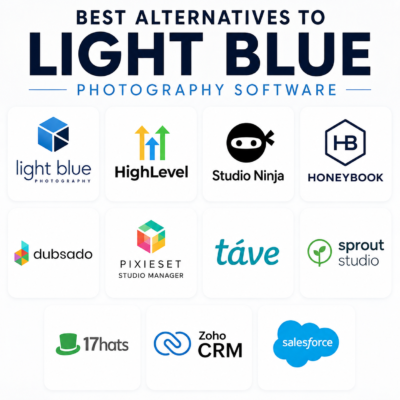
Best Alternatives to Light Blue Photography Software in 2026

alternatives to Light Blue software

alternatives to Light Blue software

Light Blue has long been one of the most popular business management platforms for photographers.

It combines CRM, bookings, contracts, invoicing and workflow management into a single system designed specifically for photography businesses.

For many photographers, it does an excellent job.

However, as marketing automation, AI and digital lead generation become increasingly important, many photography studios are beginning to look beyond traditional photography management software.

In this article we’ll explore the leading alternatives to Light Blue, compare their strengths and weaknesses, and look at whether a modern marketing platform such as MarketerM8 / HighLevel might be a better fit for growth-focused photography businesses.

What Is Light Blue Photography Software?

Light Blue is a photography studio management platform designed specifically for photographers.

Key features include:

  • Client management
  • CRM
  • Online booking
  • Contracts
  • Invoicing
  • Workflow management
  • Calendar scheduling
  • Financial reporting

Its biggest strength is that it understands how photography businesses operate.

Many photographers can start using it quickly without needing extensive customisation.

For photographers who primarily need a studio management system, Light Blue remains one of the strongest options available.

Why Photographers Start Looking For Alternatives

In our experience, photographers rarely leave Light Blue because they dislike it.

Instead, they often discover they need capabilities beyond studio management.

Common reasons include:

  • Running Facebook Ads
  • Running Google Ads
  • Automating lead follow-up
  • SMS marketing
  • WhatsApp communication
  • Review generation
  • AI tools
  • Sales pipeline management
  • Website and funnel building

At that point, the question becomes:

Do I add more software to my stack, or replace Light Blue with something that handles both operations and marketing?

The Main Alternatives To Light Blue

1. MarketerM8 (Powered By HighLevel)

Best for photographers focused on growth, marketing automation and lead generation.

MarketerM8 is built on the HighLevel platform and has been customised specifically for photography businesses by Susan Campbell, Photography Studio Marketing and Sales Consultant who has over 15 years experience working with studios.

Rather than simply providing software, it includes proven marketing and sales processes designed for photography studios.

Key features include:

  • CRM
  • Marketing automation
  • Online booking
  • Sales pipelines
  • SMS marketing
  • WhatsApp marketing
  • AI-powered tools
  • Electronic contract signing
  • Facebook Lead Ads integration
  • Google Ads integration
  • Review generation

Unlike many photography platforms, MarketerM8 is designed not only to manage enquiries but to help generate and convert more of them.

2. Studio Ninja

Best for photographers wanting simplicity.

Studio Ninja is built specifically for photographers and offers a clean, straightforward experience.

Strengths:

  • Easy to learn
  • Photographer-focused
  • Good workflow automation

Limitations:

  • Limited marketing capabilities
  • Fewer lead generation tools

3. HoneyBook

Best for wedding photographers.

HoneyBook is particularly popular within the wedding and creative industries.

Strengths:

  • Excellent client experience
  • Attractive interface
  • Contracts and invoicing

Limitations:

  • Less powerful automation
  • More US-focused than some competitors

4. Dubsado

Best for creative businesses requiring flexible workflows.

Strengths:

  • Powerful forms
  • Workflow automation
  • Client portals

Limitations:

  • Learning curve
  • Limited marketing tools

5. Pixieset Studio Manager

Strengths:

  • Gallery integration
  • Good client experience
  • Online booking

Limitations:

  • Basic CRM functionality

6. Tave

One of the longest-established photography business management systems.

Strengths:

  • Highly customisable
  • Photographer-focused

Limitations:

  • Older interface
  • Steeper learning curve

7. Sprout Studio

Strengths:

  • Photography-focused
  • Client galleries
  • Studio management tools

Limitations:

  • Limited marketing automation

8. 17hats

Best for solo photographers and freelancers.

Strengths:

  • Simple to use
  • Good business management features

Limitations:

  • Less scalable
  • Limited automation

Comparison Table

Platform Photography Specific Marketing Automation AI Features SMS & WhatsApp Ads Integration Online Booking
Light Blue Yes Basic No Limited No Yes
MarketerM8 / HighLevel Yes (customised) Advanced Yes Yes Yes Yes
Studio Ninja Yes Moderate No Limited No Yes
HoneyBook Yes Moderate No Limited No Yes
Dubsado No Moderate No Limited No Yes
Pixieset Studio Manager Yes Basic No No No Yes
Tave Yes Moderate No Limited No Yes
Sprout Studio Yes Basic No Limited No Yes
17hats No Basic No Limited No Yes

Light Blue vs MarketerM8

This is probably the comparison most photographers should be making.

Light Blue and MarketerM8 / HighLevel approach the problem from different directions.

Light Blue began as a photography business management platform.

MarketerM8 / HighLevel began as a marketing, sales and automation platform and has been expertly customised specifically for photographers.

Where Light Blue Wins

  • Photography-specific workflows out of the box
  • Strong studio management features
  • Established reputation within the photography industry
  • Financial reporting

Where MarketerM8 / HighLevel Wins

  • Photography-specific Marketing automation
  • Facebook Lead Ads integration
  • Google Ads integration
  • SMS marketing
  • WhatsApp marketing
  • AI-powered tools
  • Sales pipeline automation
  • Review generation
  • Website and funnel building
  • Over 20 years marketing automation experience

A Practical Example

Imagine a bride completes a Facebook Lead Form after seeing your wedding photography advert.

With a typical photography management system, that lead may need manual handling or third party integration tools like Zapier and Make.

With MarketerM8 / HighLevel:

  • The lead enters the CRM instantly.
  • An email is sent automatically.
  • An SMS is sent automatically.
  • A consultation booking link is offered.
  • Follow-up continues automatically until the prospect books or opts out.

The entire process can run without manual intervention.

Why MarketerM8 Exists

One criticism often levelled at HighLevel is that it can be overwhelming to set up.

That criticism is fair.

HighLevel is incredibly powerful, but most photographers do not want to spend weeks learning HighLevel and building automations, pipelines and marketing systems.

To solve this problem, MarketerM8 has partnered with Susan Campbell, Photography Studio Marketing and Sales Consultant.

Together we have created a complete Photography Studio Marketing & Sales System built on HighLevel.

Instead of starting with a blank HighLevel account, photographers receive:

  • Proven studio management and sales/ marketing system
  • Lead nurture campaigns
  • Photography sales pipelines
  • Appointment booking systems
  • Follow-up sequences
  • Review generation campaigns
  • Photography-specific guidance

The result is a photography-focused implementation of HighLevel designed specifically to enable studios to generate more enquiries and convert more bookings.

Final Thoughts

Light Blue remains one of the best photography business management platforms available.

If your primary goal is managing bookings, contracts and studio administration, it remains a strong choice.

However, if your focus is generating more enquiries, improving lead conversion, automating follow-up and growing your studio, MarketerM8 / HighLevel offers a very different proposition.

Rather than simply helping you manage your photography business, it is designed to help you grow it.

Check out Light Blue

Check out MarketerM8

Julian Mills HighLevel Consultant and Marketing Automation Strategist

About the Author

Julian Mills

HighLevel Consultant & Marketing Automation Strategist

Julian Mills helps business owners automate lead generation, sales follow-up, customer communication and business processes using HighLevel and MarketerM8. Since 2009 he has helped businesses implement CRM, marketing automation and AI-powered systems that save time, improve customer experience and generate more sales.

About Julian
Book a Discovery Call
Join a Free HighLevel Workshop
Learn About HighLevel with MarketerM8
How to Migrate From HubSpot to HighLevel in 2026 (And Why It Just Got Much Easier)

move and migrate from hubspot to highlevel

move and migrate from hubspot to highlevel

For years, HubSpot has been one of the best-known CRM systems in the world.

And honestly, that made complete sense.

HubSpot solved a huge problem for small businesses.

“Get started with a free CRM.”

It was a brilliant offer.

Businesses could organise contacts, track deals, manage pipelines and start bringing some structure into the sales process without needing a massive software budget.

For many SMEs, HubSpot became their first “proper” CRM system.

But over the years I have noticed a very common pattern.

Businesses sign up to the free CRM.

They like it.

The team gets comfortable using it.

The pipeline works nicely.

Then gradually the business wants to do more.

And this is where many businesses begin researching how to migrate from HubSpot to HighLevel.

Not because HubSpot is bad.

Far from it.

But because growing businesses eventually want:

  • more automation
  • AI functionality
  • SMS marketing
  • WhatsApp
  • social media scheduling
  • funnel building
  • Voice AI
  • lead nurturing
  • centralised communication
  • appointment booking
  • more users
  • more flexibility

And this is often the point where software costs can begin escalating quickly.

At the same time, HighLevel has been growing extremely quickly.

Originally known mainly as a platform for agencies, HighLevel has evolved into something much bigger.

Increasingly, businesses are using HighLevel as:

  • an AI Operating System for SMEs
  • the “WordPress of CRM systems”
  • an all-in-one marketing and communication platform
  • a central business automation ecosystem

But there has always been one obvious question if you are already established on HubSpot.

How difficult is it to move everything?

As of August 2026, the answer to that question has changed significantly.

NEW: HighLevel Can Now Import Directly From HubSpot

This is a major development for anybody considering moving from HubSpot to HighLevel.

HighLevel has introduced a native HubSpot Importer.

Rather than exporting multiple CSV files from HubSpot, preparing the data, importing it into HighLevel and manually trying to recreate the relationships between everything, you can now connect your HubSpot account directly to HighLevel.

And importantly, this isn’t limited to importing a basic contact list.

HighLevel can now import:

  • Contacts
  • Companies
  • HubSpot Deals as HighLevel Opportunities
  • Contact properties as Custom Fields
  • Company properties as Custom Fields
  • Deal properties as Custom Fields
  • Pipelines and stages
  • Notes
  • Emails
  • Tasks
  • Supported associations between records

That last point is particularly important.

A CRM isn’t simply a spreadsheet containing names and email addresses.

The real value is often in the history, relationships, opportunities, notes, tasks and information surrounding those contacts.

Being able to bring more of that structure across makes moving from HubSpot to HighLevel considerably more practical.

How to Import HubSpot Data Directly Into HighLevel

The new process is surprisingly straightforward.

Inside HighLevel, go to:

Contacts, Companies or Opportunities → Import

You can then select:

Connect HubSpot

HighLevel will ask you to sign into your HubSpot account.

From there you can choose which objects and information you want to migrate.

You can review the number of records that will be imported and select specific properties where required.

Once you’re happy, confirm the import.

The migration then runs in the background.

You Can Check What Has and Hasn’t Imported

This is another important part of the new importer.

HighLevel provides an Import History area where you can monitor the migration and see what happened.

You can see records that were:

  • successfully imported
  • skipped
  • imported with warnings
  • unsuccessful

You can also review the results by individual record or object, filter by status and see error messages explaining problems that occurred.

The results can also be downloaded as a CSV for further checking.

For anyone who has previously managed a CRM migration, this matters.

You don’t simply want HighLevel to tell you:

“Import complete.”

You need to know whether the 4,000 contacts you expected to migrate actually arrived and whether important records failed along the way.

A Few Important Things to Know Before You Import

The new importer makes the technical migration considerably easier, but there are still some important points to understand.

Firstly, existing matching records in HighLevel are not overwritten.

Secondly, HubSpot emails brought into HighLevel are imported as read-only records.

Thirdly, if you want HubSpot Deals to become HighLevel Opportunities, the associated contacts need to be imported as well.

And finally, HighLevel itself recommends testing your HubSpot import in a new or non-production sub-account first.

I strongly agree with that last point.

I wouldn’t recommend connecting a substantial HubSpot database to an established live HighLevel account and simply pressing the button to see what happens.

Test first.

Check your data.

Understand how your HubSpot structure maps into HighLevel.

Then plan the live migration.

Migrating the Data Is Only Part of Moving From HubSpot to HighLevel

This is perhaps the most important point in this article.

Importing your HubSpot data is not the same thing as migrating your business from HubSpot to HighLevel.

The new importer solves a big part of the data migration problem.

But there may still be lots of things to consider.

For example:

  • What HubSpot automations need recreating as HighLevel Workflows?
  • What forms are currently being used?
  • What landing pages need rebuilding?
  • What appointment calendars are connected?
  • What email templates need recreating?
  • What integrations are currently connected to HubSpot?
  • How are leads being assigned?
  • What reports does management rely upon?
  • What happens when a new lead enters the system?
  • What happens when a Deal changes stage?
  • Are there any Zapier or Make integrations?
  • Which HubSpot functionality do you actually still need?

This is why I don’t normally recommend treating a CRM migration as a simple lift and shift exercise.

It is actually an opportunity.

You’re changing the system.

So before rebuilding everything exactly as it was, ask:

Does it still need to work that way?

There may be workflows that haven’t been used for three years.

There may be custom properties nobody understands.

There may be old pipelines that are no longer relevant.

And there may be processes that required several pieces of software with HubSpot that can now be handled natively inside HighLevel.

Use the migration as an opportunity to simplify.

A Sensible HubSpot to HighLevel Migration Process

If I were planning a HubSpot to HighLevel migration today, I would break it into stages.

Step 1: Audit Your Existing HubSpot Account

Before touching anything, understand what you actually have.

Look at your:

  • contacts
  • companies
  • deals
  • pipelines
  • properties
  • forms
  • workflows
  • emails
  • landing pages
  • integrations
  • calendars
  • reporting
  • users

Separate what you genuinely use from historical clutter.

Step 2: Design Your HighLevel Account

Don’t start importing data into an empty HighLevel account without thinking about the destination.

Decide how your HighLevel account needs to operate.

What pipelines do you need?

What custom fields matter?

What automations will you build?

What calendars are required?

Who needs access?

What communication channels will you use?

Step 3: Run a Test HubSpot Import

Use HighLevel’s new HubSpot Importer in a test or non-production account.

Import a representative sample where possible and check the results carefully.

Pay particular attention to:

  • Contacts
  • Companies
  • Opportunities
  • Pipelines
  • Custom Fields
  • Notes
  • Tasks
  • Emails
  • Associations

Check whether the information appears where you expect it to appear.

Step 4: Build Your HighLevel Processes

Now recreate or, preferably, improve the processes that currently exist inside HubSpot.

This could include:

  • sales pipelines
  • automated follow-up
  • appointment reminders
  • lead nurturing
  • missed-call text back
  • forms
  • surveys
  • email campaigns
  • SMS
  • WhatsApp
  • review requests
  • Voice AI
  • Conversation AI

This is where you can start taking advantage of functionality you may not previously have been using.

Step 5: Test the Complete Customer Journey

Don’t just test whether the contact exists.

Test what happens next.

Submit an enquiry.

Book an appointment.

Reply to an email.

Move an Opportunity.

Complete a form.

Send an SMS.

Run through the process exactly as a real customer and salesperson would.

Step 6: Perform the Final Migration

Once you’re satisfied that the new system works properly, plan your final data import and cutover.

Then check the Import History carefully for failures, warnings or skipped records.

Only once you are satisfied that the data and processes have transferred correctly should you consider retiring the old system.

Why Businesses Initially Choose HubSpot

To be fair to HubSpot, they got a lot right.

The onboarding is polished.

The interface is clean.

The CRM is easy to understand.

The ecosystem feels professional.

And the free CRM genuinely provides value.

For many businesses it is the perfect introduction to CRM software.

Especially businesses previously managing leads using:

  • spreadsheets
  • notebooks
  • inbox folders
  • sticky notes
  • memory

HubSpot quickly brings structure and visibility into the sales process.

And for many companies, that works brilliantly for quite a long time.

But eventually most growing businesses begin wanting more advanced marketing and automation capability.

Questions start appearing like:

  • How do we automate follow-up?
  • How do we improve lead nurturing?
  • How do we text customers?
  • How do we use WhatsApp?
  • How do we manage social media?
  • How do we stop missing calls?
  • How do we add AI?
  • How do we centralise communication?
  • How do we automate reviews?
  • How do we build funnels and landing pages?

This is where businesses often begin moving beyond “basic CRM”.

And this is also where many SMEs begin exploring alternatives and researching how to move from HubSpot to HighLevel.

Where Costs Can Start Escalating

Again, this is not an anti-HubSpot article.

HubSpot is an excellent platform.

But many businesses discover that once they begin building a more sophisticated marketing and automation system, the monthly software costs can rise much faster than expected.

Typically this happens when businesses begin adding:

  • extra users or seats
  • marketing contacts
  • advanced automation
  • reporting functionality
  • additional Hubs
  • onboarding packages
  • third-party integrations
  • AI tools
  • communication tools

The business wants to improve its automation and communication systems.

But the cost jump can become difficult to justify commercially.

So instead of upgrading properly, the business can end up sitting in an awkward middle ground.

The CRM works.

But the business never fully implements the automation systems it actually needs.

This is one reason why SMEs start researching alternatives such as HighLevel.

Where HighLevel Fits Into the Picture

One of the biggest misconceptions about HighLevel is that it is “just for agencies”.

That may have been partly true a few years ago.

Even today, much of HighLevel’s own marketing focuses on agencies and SaaS resellers.

But that does not mean the software itself is only suitable for agencies.

Increasingly I see HighLevel being used directly by:

  • SMEs
  • consultants
  • service businesses
  • clinics
  • local businesses
  • trades businesses
  • sales teams
  • internal marketing departments

The reason is simple.

Modern businesses no longer just want a CRM.

They want:

  • communication tools
  • automation
  • AI
  • funnels
  • SMS
  • WhatsApp
  • email marketing
  • appointment booking
  • review generation
  • social media scheduling
  • websites
  • forms
  • reporting
  • unified communication

And increasingly they want it integrated together.

This is why I sometimes describe HighLevel as the “WordPress of CRM systems”.

It is flexible.

It is highly customisable.

And businesses can build very sophisticated automation systems around it.

Increasingly I see HighLevel acting as the central AI Operating System inside the business.

HubSpot OR HighLevel? It Doesn’t Have to Be an Overnight Decision

There is another important point.

Moving from HubSpot to HighLevel doesn’t necessarily mean switching HubSpot off tomorrow morning.

Depending on the complexity of your existing system, you could migrate in stages.

You could build and test HighLevel alongside HubSpot before making the final switch.

That gives your team time to learn the new system and gives you an opportunity to verify that important business processes have been recreated correctly.

For a more complex CRM migration, I would much rather have a controlled transition than a heroic Friday-afternoon migration followed by a stressful Monday morning.

The New HubSpot Importer Changes the Conversation

Until now, one of the barriers to moving CRM platforms has always been the migration itself.

“We’ve got years of information in HubSpot. How on earth do we move it?”

HighLevel’s new direct HubSpot importer doesn’t eliminate the need to properly plan a CRM migration.

But it does remove a significant amount of the technical friction.

You can now bring across much more than a basic contact CSV.

Contacts, companies, deals, pipelines, properties, notes, emails, tasks and supported relationships can all form part of the migration.

For me, that makes the conversation much more interesting.

Instead of asking:

“Can we get our HubSpot data into HighLevel?”

The more useful question becomes:

“What would we build differently if we moved to HighLevel?”

And that’s where the real opportunity is.

Need Help Moving From HubSpot to HighLevel?

If you are currently using HubSpot and considering HighLevel, don’t start by cancelling anything.

Start by understanding what you currently use, what you actually need and what a HighLevel version of your sales and marketing system could look like.

Through MarketerM8, we can help businesses plan, configure and implement HighLevel, including the process of moving away from an existing CRM.

My approach is Done With You rather than simply handing you a new piece of software.

The objective isn’t just to move your data.

It is to make sure your team understands the new system and that HighLevel is actually configured around the way your business works.

Final Thoughts

HubSpot remains an excellent platform.

For many businesses it will absolutely continue to be the right fit.

But the market is changing quickly.

Businesses increasingly want:

  • AI tools
  • automation
  • centralised communication
  • integrated systems
  • predictable pricing
  • flexible marketing ecosystems

And importantly, moving between platforms is becoming easier.

The introduction of HighLevel’s native HubSpot Importer is a significant step forward.

It doesn’t make proper migration planning unnecessary.

But it does make moving your CRM data from HubSpot to HighLevel considerably easier than it was before.

And for businesses that have previously looked at HighLevel but thought:

“Moving all our HubSpot data sounds like too much work.”

It may be time to take another look.

Book a Discovery Call with Julian

Explore the free weekly MarketerM8 HighLevel Workshops

You can also learn more about HighLevel and sign up through MarketerM8.com.

Julian Mills HighLevel Consultant and Marketing Automation Strategist

About the Author

Julian Mills

HighLevel Consultant & Marketing Automation Strategist

Julian Mills helps business owners automate lead generation, sales follow-up, customer communication and business processes using HighLevel and MarketerM8. Since 2009 he has helped businesses implement CRM, marketing automation and AI-powered systems that save time, improve customer experience and generate more sales.

About Julian
Book a Discovery Call
Join a Free HighLevel Workshop
Learn About HighLevel with MarketerM8
How Online Business Managers Can Add £1,000+ Recurring Income Without More Clients

MarketerM8 - HighLevel Consultancy & Agency UK

If you’re an Online Business Manager (OBM) or Virtual Assistant (VA), you’ll know the constant balancing act: keeping clients happy, juggling multiple projects, and making sure systems are running smoothly. But no matter how good you are, there’s one big limitation — there are only so many hours in the day.

Most OBMs and VAs charge by the hour or on a retainer, which means income is tied directly to workload. If you want to earn more, you usually have to take on more clients or increase your rates — both of which add pressure.

But what if there was a way to add a £1,000+ monthly recurring income stream without taking on extra client work?


The problem with the “time-for-money” model

  • Your time is capped. There are only so many hours you can work each week.

  • Client churn is real. Even happy clients eventually move on, which can cause sudden income drops.

  • Raising rates is tricky. Many OBMs worry about pricing themselves out of reach for their existing clients.

Recurring income is the holy grail because it gives you stability — something most OBMs and VAs don’t have.


The solution: Earning through tech recommendations

Here’s the thing: you already help your clients choose and set up software. You’re the trusted advisor they turn to when they need systems to run better. But every time you recommend a tool, the client pays the software company — and you get nothing.

That’s where the MarketerM8 HighLevel affiliate programme changes the game.

Instead of simply pointing clients towards a CRM or marketing tool, you can recommend MarketerM8 — our flexible CRM and automation platform, built on HighLevel. When a client signs up through you:

  • You earn a £1,000 finder’s fee after onboarding

  • Plus 20% recurring revenue for the lifetime of that account

  • And once you reach 5 referrals, that increases to 40% recurring

That means even a handful of client sign-ups could add £1,000+ per month to your income — without you taking on more projects or working longer hours.


Why this works for OBMs

  • No extra workload: MarketerM8 handles the tech setup, client onboarding, and support.

  • You look good to clients: You’ve solved their biggest problem — finding the right CRM.

  • You build long-term income: Your referrals keep paying you as long as the client stays.

It’s about working smarter, not harder.


Debbie’s Experience as a VA Partner

Debbie Russell - Online Business Manager (OBM) and Virtual Assistant (VA)“Working with Julian and the MarketerM8 team to get one of my clients set up on HighLevel has been a game-changer. HighLevel has removed so much of the manual work I was doing, which frees me up to focus on higher-value support. I’ve really enjoyed learning the platform and the process has been smooth and enjoyable thanks to the guidance I received.
I’m especially excited about exploring the AI features, like VoiceAI for call handling, which I know will make a huge difference for my clients. Based on this experience, I’m looking forward to onboarding more clients with HighLevel in partnership with MarketerM8.”

— Debbie Russell, The Modern Day VA

Debbie’s story is a great example of how OBMs and VAs can benefit — both by helping their clients and by creating new recurring revenue streams for themselves.


Final thought

As an OBM, you’ve already built trust with your clients. You’re perfectly placed to introduce them to the tools that will help their business grow. With MarketerM8, you finally get rewarded for it — with recurring income that doesn’t rely on your time sheet.

👉 Check out the MarketerM8 HighLevel Affiliate Programme here

👉or Book a Discovery Call with Julian to explore your options

Eventbrite Too Costly? Try This Zero-Ticket Fee Eventbite Alternative: HighLevel

eventbrite alternative highlevel marketerm8

eventbrite alternative replacement highlevelIf you’re organising in-person events chances are you’ve used or thought about using Eventbrite.

And while it’s a familiar name, it comes with a hefty price tag.

In the UK, Eventbrite charges 6.95% of the ticket price plus £0.59 per ticket.

That adds up quickly.

Let’s break it down:

Say you charge £99 for an event ticket that means Eventbrite take £6.88 in fees per attendee.

Now if you sell 100 tickets? You’ve just handed over £688!

Run events throughout the year? That’s potentially £’000s+ gone—for basic ticketing functionality

If you’re looking for an Eventbrite alternative that gives you more control, more automation and zero per-ticket fees, it’s time to look at HighLevel.

Check out this article on the specifics of the HighLevel Events & Ticketing module.

Why HighLevel Is the Smarter Eventbrite Alternative

HighLevel is like the “WordPress of CRM systems”—flexible, powerful and endlessly customisable. Unlike Eventbrite (a bit of a “one-ticket” pony), HighLevel gives you an all-in-one platform that handles your entire event funnel and everything beyond.

Here’s what you can customise HighLevel to do:

✅ Sell or Give Away Tickets (Without the Fees)
Set up a branded sales page, connect Stripe (plus other gateways), and take payments or registrations seamlessly—no 6.95% fee, no £0.59 per ticket charge. Even issue invoices to collect payment before delivering tickets.

✅ Deliver Tickets Your Way: Email, Text, WhatsApp or via the Post
HighLevel lets you send beautiful, check-in QR code, branded event tickets via:

  • Email
  • SMS
  • WhatsApp
  • Direct mail – print letters than incude the ticket image with your office printer or integrate directly with a digital, print on-demand mailing house (in the UK we use STANNP). That’s something Eventbrite simply doesn’t offer.

✅ Send Smart Reminders That Actually Get Read

Build automated workflows to send timely reminders—by email, text or WhatsApp—days or hours before your event. Reduce no-shows, improve attendance and impress your guests.

✅ Check-In attendees at the Door

Use scannable QR codes and simple check-in forms to track who’s arrived—no need for external apps or paper lists.

✅ Automate Follow-Up and Convert More Leads

After your event, you can automatically:

  • Send thank-you emails
  • Share video replays of the event
  • Collect feedback
  • Offer your next step (another event, a paid offer, a free call, etc.)

All without lifting a finger.

Compare That to Eventbrite…

With Eventbrite:

  • You pay for every ticket sold
  • You get generic emails and limited branding
  • You can’t control the follow-up journey
  • You’ll need Zapier or another integration tool just to push ticket buyers into your CRM

It’s a one-trick pony for ticketing. And if you’re running events as part of a bigger marketing strategy, you’ll quickly outgrow it.

HighLevel: The WordPress of CRMs (customisable to enable Event Management)

HighLevel gives you everything Eventbrite does—and much, much more. It will take some customisation to set up – but it’s a no code solution – no developers required. HighLevel is an all-in-one marketing and CRM platform that’s used by businesses worldwide to:

  • Capture leads
  • Nurture prospects
  • Book appointments / classes / Workshops
  • Run SMS/email campaigns
  • Sell digital products and memberships
    …and yes, with a little customisation, manage events

So instead of bolting Eventbrite onto your tech stack (and paying extra for Zapier just to make it talk to your CRM), HighLevel does it all natively.

It’s your website, funnel, CRM, marketing automation, event manager and sales engine—all in one platform.

Want to See It in Action?

At MarketerM8 we run free, live, HighLevel training workshops every week to show business owners and marketers exactly how to build systems like this.

Check out our programme of Live HighLevel Workshops that we run for HighLevel users  (and potential users).  And before you ask, this entire year long program of Workshops is all sheduled and managed within a HighLevel account – we have even written a book on “Online Workshop Marketing with HighLevel” – feel free to download a free copy.

👉 Check out our workshops here

Final Thought

If you’re tired of giving away nearly 7% of your revenue just to issue tickets—and then having to cobble together tools just to follow up—then HighLevel could be the Eventbrite replacement you’ve been waiting for.

If you would like to book a Discovery call to discuss your use case then – Book a Discovery Call here.

Cut the Cost of Phone Answering and Live Chat — Without Sacrificing Service

replace expensive manual call answering and live chat with MarketerM8 / HighLevel AI

replace expensive manual call answering and live chat with MarketerM8 / HighLevel AIIf you’re currently paying for an outsourced call answering or live chat service, you’re not alone. For many small businesses, it’s the default way to ensure no call or message gets missed — but it comes at a cost.

A high cost, in fact.

From monthly fees to patchy coverage, outsourced services can feel more like a sticking plaster than a scalable solution. But there’s a better, more intelligent, and far more cost-effective way to handle incoming enquiries — and it’s available right now inside MarketerM8/ HighLevel.


AI Has Changed the Game for Small Business Customer Service

I work closely with small business owners who want to streamline their sales, marketing, and customer service systems using HighLevel — the powerful all-in-one CRM and automation platform that underpins MarketerM8.

One of the most exciting developments in the last 12 months has been the introduction of AI tools that can intelligently answer your phone and man your live chat — 24/7 — for a fraction of the price of traditional services.

If you’re tired of:

  • Paying £300–£500/month for an answering service

  • Missing calls or leads when your team is unavailable

  • Waiting for messages to be manually forwarded

  • Using live chat tools that only work during office hours

…then read on.


Introducing Voice AI and Conversation AI Inside MarketerM8

Here’s how you can instantly upgrade your customer response setup — without adding more staff or increasing your overheads.

📞 Voice AI – Your Smart Phone Assistant

Voice AI answers your calls with a natural, professional voice. It can:

  • Greet the caller and identify their intent

  • Book appointments straight into your diary

  • Take detailed messages and assign them to your CRM

  • Answer common questions about your services or pricing

  • Forward urgent calls to your mobile or another team member

  • Handle multiple calls at once — no more busy tones or voicemail

It’s like having a super-receptionist who never sleeps and never misses a call.

💬 Conversation AI – Live Chat That Works 24/7

While your phone is being handled, your website and social media inboxes can be managed by Conversation AI. It can:

  • Respond instantly to messages on your website, Facebook, Instagram, and SMS

  • Answer FAQs about your business or services

  • Capture lead details and book appointments

  • Add contacts directly to your CRM and workflows

  • Run unlimited conversations simultaneously

All of this happens without you lifting a finger — and unlike a human, it never needs a lunch break.


A More Affordable, Scalable Solution

Replacing human answering services with AI doesn’t just save money — it actually improves response times, customer experience, and lead conversion.

With MarketerM8, you can:

✅ Slash your outsourced support costs
✅ Ensure every enquiry is answered — even outside office hours
✅ Book more appointments automatically
✅ Create a consistent customer experience across phone and chat
✅ Free up your team to focus on delivering your core service


Is This the Right Move for Your Business?

If you’re a business owner currently using:

  • An answering service like Moneypenny or AnswerConnect

  • A virtual receptionist or VA for phone support

  • Live chat software that only operates during business hours

  • Manual inbox management across multiple platforms

Then it’s well worth considering a switch to AI with MarketerM8.

You’ll get better coverage, faster response times, and integrated lead handling — all built into a single HighLevel-powered system.


Let’s Talk About It

If this sounds like something that could benefit your business, I’d love to show you how it works.

👉 Book a free Discovery Call with me here

I’ll walk you through how Voice AI and Conversation AI can be customised to fit your business — and how we can get everything set up for you as part of your MarketerM8 subscription.