Looking for a Small Business Phone System? Why HighLevel Could Replace Your Office Phones and CRM

HighLevel IVR, HighLevel phone system, business phone system, IVR phone system, VoIP phone system, call routing, interactive voice response, office phone system, small business phone system, cloud phone system, business call routing, HighLevel VoIP

HighLevel IVR, HighLevel phone system, business phone system, IVR phone system, VoIP phone system, call routing, interactive voice response, office phone system, small business phone system, cloud phone system, business call routing, HighLevel VoIP

Your business started with one phone.

Then somebody else needed to answer it.

You hired more staff. Someone started working from home. Customers needed transferring between colleagues. Staff started giving out personal mobile numbers.

And suddenly you’ve realised:

We need a proper business phone system.

If that sounds familiar, you’ve probably started searching for:

Small business phone systems, VoIP phone systems, cloud phone systems or office phone systems.

But before signing up for another standalone phone platform, there’s an alternative worth considering.

Particularly if your business also needs a CRM.

HighLevel can potentially give you both.

And increasingly, it can add something much more interesting:

A 24/7 AI receptionist.

What If Your Phone System Came With a 24/7 AI Receptionist?

A traditional business phone system solves the technical problem of getting calls to the right people.

It doesn’t necessarily solve the bigger problem:

Who actually answers the phone?

Your team might be with customers, in meetings, driving, on another call or simply outside normal working hours.

Instead of an unanswered call going to voicemail, HighLevel Voice AI can act as a virtual receptionist.

Depending on how it’s configured, it can potentially:

  • Answer calls
  • Ask why someone is calling
  • Answer common questions
  • Capture contact details
  • Qualify enquiries
  • Book appointments
  • Transfer calls
  • Send SMS messages
  • Trigger workflows
  • Update HighLevel

That means your business can continue dealing with enquiries even when nobody is available.

The Economics Are Interesting Too

Providing human telephone cover throughout the working day has a significant cost.

Providing it 24 hours a day, seven days a week is unrealistic for most SMEs.

Voice AI changes that.

I wouldn’t suggest it replaces everything a good human receptionist does. There will always be calls where judgement, empathy or experience are important.

But does a human really need to handle every routine call?

“What time are you open?”

“Do you cover my area?”

“I’d like a quote.”

“Can I book an appointment?”

So rather than:

Human receptionist OR AI

I’d think:

Human team + AI receptionist

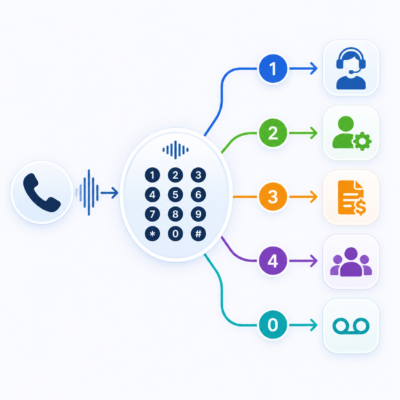
You Can Even Build an AI Telephone Team

You can take this a stage further.

Rather than having one AI agent attempting to deal with every type of call, different AI agents can have different roles.

The first agent acts as your receptionist:

Answer

↓

Understand why they’re calling

↓

Deal with straightforward enquiries

↓

Triage the call

↓

Send it to the right destination

That destination could be a human or another specialist AI agent.

Imagine a Home Improvement Company

A caller says:

“I’d like a quote for replacing my windows.”

The receptionist identifies a sales enquiry and directs it to an:

AI Sales Agent

That agent could establish the type of property, number of windows, postcode, requirements and timescale, then potentially book an appointment.

Another caller says:

“You’ve already installed my windows and I’ve got a problem with one of the doors.”

That could go to an:

AI Customer Service Agent

Another says:

“I’ve got a question about my invoice.”

That could go to an:

AI Accounts Agent

So you potentially have:

Main Business Number

↓

AI Receptionist

↓

Sales AI / Customer Service AI / Accounts AI / Human Team

For a simple business, one AI receptionist may be enough. For a more complicated operation, specialist agents can have more focused roles.

And when human judgement is required, the call can be transferred to a person.

But Can HighLevel Replace a Proper Office Phone System?

AI is exciting, but the fundamentals still matter.

Most growing businesses need:

  • A main business number
  • Several people able to answer
  • Internal call transfers
  • Departments and call routing
  • IVR
  • Working-hours routing
  • Voicemail
  • Desktop and mobile calling
  • Desk phones where required
  • Call recording
  • Remote working
  • Out-of-hours handling

This is where HighLevel has developed significantly.

Several Employees Can Answer Business Calls

Incoming calls can be routed to team members and, depending upon the setup, answered through:

Web app

Mobile app

Telephone

SIP desk phone

So your receptionist might use a physical phone, an office manager their computer and a salesperson their mobile.

They’re all potentially part of the same business phone system.

Working-Hours Routing

HighLevel can take individual users’ working hours into account when routing inbound calls.

If somebody isn’t working, HighLevel can skip them and follow alternative routing.

That means:

During office hours

↓

Ring the team

and:

Outside office hours

↓

AI receptionist

This can also accommodate part-time staff, different working days and holidays.

Call Transfers and Internal Phones

HighLevel supports both blind and warm transfers.

A blind transfer sends the caller directly to another person.

A warm transfer lets you speak to the colleague first:

“I’ve got Mr Smith on the line about his quote. Are you free to take it?”

and then connect the customer.

Calls can be transferred to colleagues using their configured web, phone or SIP devices.

HighLevel also supports compatible SIP desk phones, so moving to HighLevel doesn’t mean everybody needs to sit at a computer wearing a headset.

You could have:

Receptionist on a desk phone

Office manager using the web app

Salesperson using mobile

Remote worker using a laptop

all working within the same overall phone environment.

Call Scripts Help Your Team Handle Calls Consistently

As your team grows, you don’t necessarily want every employee handling an important sales enquiry completely differently.

HighLevel supports Call Scripts within its web dialler.

For example, a sales script might remind the person handling the call to establish:

What service are you interested in?

Where are you based?

When are you looking to proceed?

What’s the best next step?

The aim isn’t to turn your team into robots.

It’s to make sure important questions don’t get forgotten.

Scripts could be useful for:

  • New enquiries
  • Sales qualification
  • Appointment booking
  • Quote follow-up
  • Renewals
  • Customer service

Then Record What Happened With Call Dispositions

At the end of the call, HighLevel’s Call Dispositions provide a structured way to record the outcome.

For example:

Follow Up

Requested Callback

Appointment Requested

Interested

Not Interested

But the really useful part is that a disposition can trigger automation.

For example:

Requested Callback

↓

Create follow-up task

Or:

Appointment Requested

↓

Send booking information

↓

Create task

Or:

Not Interested

↓

Update CRM

↓

Stop inappropriate follow-up

Instead of:

Employee finishes call → tries to remember what to do

you have:

Employee finishes call → selects outcome → HighLevel starts the appropriate next step

For an office manager or owner trying to create consistent processes across a growing team, that’s potentially very useful.

The Big Difference: The Phone System Is Inside the CRM

This is where HighLevel starts to look different from a standalone VoIP system.

When somebody calls, your team can potentially have access to:

  • Who they are
  • Their company
  • Previous conversations
  • Opportunities
  • Appointments
  • Notes
  • Tasks
  • Previous messages

You’re not simply answering a random telephone call.

You’re continuing an existing customer relationship.

Many modern VoIP systems advertise:

CRM integration.

HighLevel approaches the problem differently:

The phone system is already part of the CRM platform.

Calling sits alongside:

Contacts, Opportunities, Calendars, Conversations, Tasks, Workflows, Email, SMS, WhatsApp and AI.

That’s perhaps the biggest difference.

What Happens When Nobody Answers?

A conventional setup might look like:

Ring → Ring → Ring → Voicemail

HighLevel gives you other options.

One is Missed Call Text Back.

Someone calls, nobody answers and they immediately receive an SMS inviting them to reply.

That potential customer may have been about to call the next business on Google.

Or rather than letting the call become missed:

Voice AI can answer it.

The Call Can Trigger What Happens Next

Because the phone system sits inside HighLevel, the important question isn’t simply:

Did somebody call?

It’s:

What should happen because they called?

For example:

Salesperson handles enquiry

↓

Selects “Appointment Requested”

↓

Workflow starts

↓

Booking information sent

↓

Opportunity updated

Or:

AI receptionist handles enquiry

↓

Contact captured

↓

Appointment booked

↓

CRM updated

↓

Salesperson notified

↓

Confirmation sent

The telephone call becomes part of a wider business process.

Imagine This Happening at 8:45pm

A potential customer finds a home improvement company on Google.

It’s 8:45pm.

They call.

AI receptionist answers

↓

Identifies a new sales enquiry

↓

Routes to the appropriate AI sales process

↓

Enquiry qualified

↓

Contact details captured

↓

Appointment booked

↓

CRM updated

↓

Salesperson sees the qualified enquiry the following morning

The customer hasn’t left a voicemail and waited until tomorrow.

More importantly, they haven’t simply called the next company on Google.

They’ve interacted with your business.

That’s much more than simply replacing an office telephone.

Phone, SMS, WhatsApp and Email Around the Same Customer

Customers don’t think in communication channels.

Someone might call you, reply to an SMS later, send a WhatsApp message and eventually respond to an email.

HighLevel can bring much of that communication together around the same Contact.

That’s potentially much more useful than having:

Phone system in one place

CRM somewhere else

SMS elsewhere

WhatsApp somewhere else again

Is HighLevel Suitable for Every Business Phone System?

No.

If you’re operating a large contact centre with sophisticated queue management, workforce planning, specialist compliance requirements or hundreds of agents, a dedicated platform may still be the right answer.

But imagine an SME with 5, 10, 20 or 30 employees that needs:

  • One main business number
  • Several people answering
  • Internal transfers
  • Departments
  • Remote workers
  • Mobile users
  • Desk phones
  • Out-of-hours cover
  • Call scripts
  • Call outcomes
  • CRM
  • Follow-up automation
  • AI receptionist

HighLevel becomes a serious option.

Don’t Just Compare the Phone Features

There may be individual telephony features where a specialist VoIP provider wins.

That’s to be expected.

The better question is:

What does the business actually need to happen when a customer calls?

If the telephone is one part of:

Sales, customer service, appointment booking, CRM, follow-up and automation

then HighLevel has an important advantage.

The phone system isn’t another application that needs integrating into your CRM. It’s already inside it.

Could It Save Money Too?

Potentially.

Many businesses already pay separately for:

  • Business phone system
  • CRM
  • Email marketing
  • SMS
  • WhatsApp
  • Appointment booking
  • Marketing automation
  • AI receptionist

So don’t just compare the monthly cost of the phone system.

Look at the total software stack.

If HighLevel can consolidate several of those systems, the economics can change considerably.

Voice AI also potentially gives an SME a level of telephone availability that would be expensive to provide using people alone.

My View

A few years ago, I would have thought of HighLevel’s phone functionality mainly as a useful extra within its CRM.

Today, I think that’s underselling it.

For many SMEs, HighLevel is becoming a credible alternative to a standalone small business phone system.

The most interesting part isn’t simply making and receiving calls.

It’s everything that happens around the call.

A standalone phone system knows somebody called.

HighLevel can potentially know:

Who called

What they wanted

What stage they’re at

What the outcome was

and:

What needs to happen next.

Then CRM, automation, SMS, WhatsApp, email, calendars and AI can take over.

And Voice AI introduces another question.

Instead of simply asking:

“Who is going to answer the phone?”

you can start asking:

“Which calls should our people answer, which can our AI receptionist handle and which could be passed to a specialist AI agent?”

So if your company has outgrown mobiles, simple call forwarding or a basic office telephone, don’t just compare traditional VoIP providers.

Ask a bigger question:

If our phone system was part of our CRM, automation and AI platform, what could we do differently?

For many SMEs, I think the answer is becoming very interesting.

To check out all the features of HighLevel please visit out HighLevel agency – MarketerM8.

Woudl you like a call to discuss your requirements in detail – Book a Discovery Call with Julian.

Julian Mills HighLevel Consultant and Marketing Automation Strategist

About the Author

Julian Mills

HighLevel Consultant & Marketing Automation Strategist

Julian Mills helps business owners automate lead generation, sales follow-up, customer communication and business processes using HighLevel and MarketerM8. Since 2009 he has helped businesses implement CRM, marketing automation and AI-powered systems that save time, improve customer experience and generate more sales.

About Julian
Book a Discovery Call
Join a Free HighLevel Workshop
Learn About HighLevel with MarketerM8

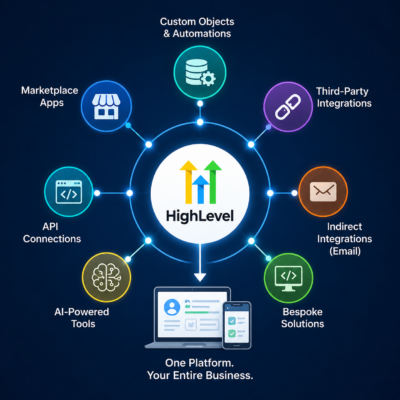
HighLevel Is No Longer Just a Marketing Platform: Is It Becoming a Business Operations Platform?

highlevel business operations platform custom objects integrations marketplace ai

highlevel business operations platform custom objects integrations marketplace ai

For a long time, if you’d asked me what HighLevel was particularly good at, my answer would have been fairly straightforward:

Marketing, lead generation, sales and follow-up.

It was excellent at capturing leads, nurturing them, booking appointments, managing sales opportunities and automating communication.

But once somebody became a customer, many businesses would still need another system to actually deliver the work.

That’s beginning to change.

HighLevel is evolving rapidly beyond marketing and sales. Increasingly, we’re seeing features that allow businesses to use HighLevel to help run their day-to-day operations.

One of the clearest examples of this is the rapid development of Custom Objects. HighLevel has expanded them across all plans, increased the number available per account and, importantly, integrated them much more deeply into workflows and automation.

But Custom Objects are only part of the story.

We’re also seeing more sophisticated operational automation, calculations, reporting, a growing App Marketplace, APIs and integrations, plus the beginnings of AI-assisted app development.

Put all of those developments together and I think we’re seeing something significant.

HighLevel started as a marketing platform. It developed into a sales and CRM platform. Now it’s increasingly becoming an operating hub around which an SME can run much more of its business.

From Marketing Platform to Business Operations Platform

HighLevel’s origins are obvious when you look at its traditional strengths.

It brings together:

  • CRM
  • Email marketing
  • SMS
  • Phone
  • WhatsApp
  • Calendars
  • Forms
  • Funnels
  • Websites
  • Sales pipelines
  • Reviews
  • Social media
  • Payments
  • Documents and contracts
  • Marketing automation
  • AI

That’s already an impressive collection of functionality.

But historically, much of it revolved around acquiring and converting customers.

The journey looked something like:

Lead → Follow-up → Appointment → Opportunity → Sale

But what happens after the sale?

For many businesses, that’s where things get much more complicated.

Imagine a home improvement company:

Sale → Survey → Project → Materials → Installation → Completion → Aftercare

An insurance broker:

Client → Policy → Renewal → Claim → Policy Change

A garage:

Customer → Vehicle → Service → MOT → Repair → Next Service

An estate agent:

Contact → Property → Viewing → Offer → Transaction → Completion

These are operational processes rather than simply marketing processes.

Historically, businesses would often need another piece of software to manage them.

HighLevel is increasingly building the infrastructure that could allow more of these processes to be managed within, or around, the CRM.

Custom Objects Are a Big Part of This Change

Most CRMs contain standard types of records.

HighLevel has traditionally revolved primarily around Contacts, Companies and Opportunities.

A Custom Object lets you create another type of record specific to your business.

Imagine you run a garage.

You don’t really want all the information about someone’s car stored against the customer’s Contact record.

A customer might own several vehicles.

Instead, you could create:

Custom Object: Vehicle

Each vehicle could then have information such as:

  • Registration number
  • Make
  • Model
  • Year
  • VIN
  • Mileage
  • MOT date
  • Last service date
  • Next service date
  • Warranty information

The Vehicle is then associated with the customer.

One customer can have multiple vehicles.

That’s fundamentally different from simply adding more custom fields to a Contact.

You’re beginning to build a data model of how the business actually operates.

HighLevel Has Made Custom Objects Much More Accessible

This is particularly relevant now because HighLevel has significantly expanded Custom Objects.

They are no longer restricted to the Pro plan. HighLevel has made them available across Starter, Unlimited and Pro plans.

HighLevel has also increased the maximum number of Custom Objects in an account from 3 to 10.

HighLevel itself gives examples including:

Properties, Policies, Loans, Patients, Vehicles and Projects.

Those examples are revealing.

These aren’t simply marketing records.

They’re operational business records.

Why Relationships Between Records Matter

Take an insurance broker.

You might have:

Contact: John Smith

John could then be associated with:

Motor Policy
Home Policy
Business Policy

Each policy exists independently and has its own:

Policy number
Insurer
Premium
Start date
Renewal date
Status

That’s considerably cleaner than creating dozens of custom fields against John Smith’s Contact record and then wondering what happens when he buys a second policy.

Custom Objects allow the CRM to start reflecting the actual relationships within the business.

But Storing Operational Data Isn’t Enough

This is where the recent HighLevel developments become particularly interesting.

It’s one thing to store a Project inside your CRM.

It’s another thing for HighLevel to understand:

The project has been created.

The installation date has changed.

A milestone has been completed.

The renewal date is approaching.

The service job has changed status.

And then automatically take action.

That’s where HighLevel’s workflows become particularly powerful.

Custom Objects can now have their own workflows.

Instead of automation always being triggered because something has happened to a Contact, it can happen because something has changed with a:

Project

Property

Vehicle

Policy

Service Job

or whatever other Custom Object you’ve created.

That’s an important shift from marketing automation towards business process automation.

Imagine Running a Project Through HighLevel

Let’s use a home improvement business as an example.

A salesperson marks an Opportunity as Won.

A workflow could automatically create a new:

Project

record associated with the customer.

That Project might contain:

Customer
Property
Project value
Survey date
Installation date
Project manager
Installation team
Materials cost
Status
Completion date

As the project progresses, workflows could react to changes.

Project created
→ Create internal tasks

Survey date approaching
→ Send customer reminder

Survey completed
→ Update project status

Installation date approaching
→ Notify customer

Installation completed
→ Begin aftercare

Project completed
→ Request review

Six months later
→ Customer follow-up

Now we’re well beyond lead nurturing.

We’re using HighLevel to help deliver the service.

HighLevel Can Find and Update Operational Records Automatically

Another useful development is Find Object Record.

A workflow can search for an existing Custom Object based upon information such as an external ID or VIN, then update, associate or branch the automation depending upon whether the record was found.

Imagine another system sends HighLevel information about:

Vehicle Registration: AB12 CDE

HighLevel can look for the corresponding Vehicle record.

If it exists:

Update it.

If it doesn’t:

Take a different route and potentially create it.

This becomes particularly interesting when HighLevel is being used alongside other business systems.

And that brings me to an important point.

HighLevel Doesn’t Have to Do Everything

I don’t think HighLevel becoming more operational means every other piece of specialist software suddenly becomes unnecessary.

Quite the opposite.

There will always be specialist applications that do particular jobs better.

An accountant will still need accounts production software.

A solicitor may need specialist legal practice management software.

A garage may need workshop software.

A construction company might require sophisticated project or job management software.

HighLevel doesn’t necessarily need to replace those applications.

Instead, I think HighLevel can increasingly become the central CRM, automation and communications hub around them.

And there are now several ways of achieving that.

Five Ways to Extend HighLevel Into Business Operations

If your business has an operational requirement, I’d approach it in roughly the following order.

1. Use HighLevel’s Native Functionality

Always start here.

If HighLevel already does what you need, there’s little point introducing another application unnecessarily.

HighLevel already covers an enormous amount of ground.

The simplest solution is often the best one.

2. Extend HighLevel Using Custom Objects and Automation

If your business needs to manage something beyond Contacts, Companies and Opportunities, you may be able to model it using Custom Objects.

That might be:

Projects

Properties

Vehicles

Policies

Service Jobs

Contracts

You can then build HighLevel workflows, tasks, reminders, calculations and reporting around those records.

For some SMEs, that may be enough to bring an operational process directly into HighLevel without introducing another platform.

3. Install a Specialist HighLevel Marketplace Application

If HighLevel doesn’t provide the specialist functionality you require, the next place I’d look is the HighLevel App Marketplace.

This is an important part of the bigger picture.

HighLevel doesn’t need to develop every specialist feature required by every type of business.

Marketplace developers can extend the platform.

A good example of this approach is FieldTask.

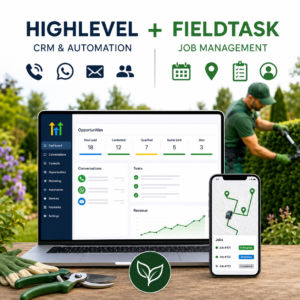
FieldTask has been designed to work alongside HighLevel for businesses that need to manage service delivery and jobs once the sale has been made.

HighLevel might manage:

Lead → Follow-up → Quote → Opportunity → Customer

Then FieldTask extends that into:

Job → Scheduling → Team → Service Delivery → Completion

HighLevel can remain at the centre for CRM, sales, automation and customer communication, while the specialist application handles the operational requirements it was designed for.

I’ve written about this separately here:

FieldTask for HighLevel: What It Is, How It Works and How to Get It

This is a good illustration of something I think will become increasingly important.

HighLevel doesn’t have to build absolutely everything itself.

It can become the platform around which an ecosystem of specialist applications develops.

4. Connect HighLevel to an Existing Third-Party System

There’s another option that shouldn’t be overlooked.

You may already have specialist software that does its job extremely well.

If that’s the case:

Why replace it?

Instead, connect it to HighLevel.

Platforms such as Zapier, Make and Pabbly Connect can act as the bridge between HighLevel and thousands of other applications.

For example, something happens inside your specialist operational system.

That information gets passed to HighLevel.

HighLevel can then:

Update the CRM

↓

Update an Opportunity or Custom Object

↓

Trigger a workflow

↓

Send an email, SMS or WhatsApp message

↓

Create a task

↓

Notify the appropriate team member

Information can potentially travel in the opposite direction too.

Something happening inside HighLevel could trigger an action in the specialist system.

This means the specialist application can continue doing what it does best, while HighLevel manages the CRM, communication, marketing and automation around it.

The Problem With Some Older Industry-Specific Software

There is, however, a problem I come across with some of the older, longer-established software platforms used within particular industries.

They weren’t necessarily designed for today’s interconnected software environment.

You might discover that the system has:

No Zapier integration

No Make integration

No Pabbly integration

and, more importantly:

No accessible API

If the software doesn’t provide a way of getting data in or out, even an API developer may not be able to create a direct integration.

At first sight, that can look like the end of the road.

But sometimes there’s another option.

How to Create an Indirect HighLevel Integration Using Email with a Third Party Tool

Many older systems may not have modern integration capabilities, but they do send emails.

For example, imagine a specialist practice management system used by a clinic.

Whenever a new patient is created, the software sends an email notification containing information such as:

Patient name

Email address

Telephone number

Appointment details

The software may not integrate with Zapier.

It may not have an API.

But if that notification email can be diverted or forwarded to something such as Zapier Email Parser, we may be able to extract the relevant information from the email.

The process could look like:

New patient created in specialist software

↓

Specialist software sends notification email

↓

Email is forwarded to an email parser

↓

Patient information is extracted

↓

Zapier receives the structured data

↓

Contact is created or updated in HighLevel

↓

HighLevel workflow begins

Suddenly we’ve created an indirect integration with a piece of software that technically doesn’t integrate with HighLevel at all.

HighLevel could then take over the communication process.

For example:

Send appointment information

↓

Send SMS or WhatsApp reminders

↓

Start an onboarding sequence

↓

Create internal tasks

↓

Request a review after the appointment

The original specialist system continues doing the job it was designed for.

HighLevel handles the customer communication and automation around it.

It’s Not Limited to New Customers

The same principle can potentially work with other notification emails.

An older system might send an email when:

  • A new customer is created
  • An appointment is booked
  • A job changes status
  • A policy is approaching renewal
  • A payment is received
  • A service is completed
  • A case reaches a particular stage

If the notification contains consistent, identifiable information, there may be an opportunity to extract that information and use it to trigger activity within HighLevel.

It’s not as elegant as a proper API integration.

And it won’t work in every situation.

The email needs to contain the required information in a sufficiently consistent format, and you need to think carefully about data protection and the reliability of the process, particularly where sensitive customer information is involved.

But where the alternative is no integration at all, it can be a remarkably useful workaround.

It also demonstrates why I don’t immediately accept:

“Our existing software doesn’t integrate with HighLevel.”

as the end of the conversation.

The better question is:

“What information can we get out of the existing system, and how can we get it into HighLevel?”

Sometimes there’s a route that isn’t immediately obvious.

When Zapier, Make or Pabbly Aren’t Enough

If the software does provide an API, but there isn’t a ready-made Zapier, Make or Pabbly integration, that’s another situation entirely.

An API developer may be able to create a direct connection between the two systems.

This can be more involved and expensive than using an off-the-shelf integration, but it’s still very different from developing an entirely new software application.

You’re not reinventing the specialist software.

You’re simply building the bridge between two existing systems.

For the right requirement, that can be a very sensible approach.

So I’d broadly think of third-party integration in three levels:

Ready-made integration
Use Zapier, Make, Pabbly or an existing connector.

↓

Direct API integration
Have a developer connect the systems where APIs are available.

↓

Indirect integration
Where the older system is effectively closed, look for other reliable outputs, such as notification emails, that can potentially be captured and passed into HighLevel.

Sometimes the most useful integration isn’t actually an integration in the traditional sense.

It’s simply finding a reliable way of getting the right information from System A into HighLevel at the right moment.

5. Build Something Bespoke

Finally, there’s the option of developing functionality specifically for your business.

HighLevel has an increasingly capable API and developer ecosystem.

So, in theory, if your business has a very particular requirement, you can create your own software or application around HighLevel.

But I would put a big word of caution around this option.

There is a major difference between integrating existing software and becoming responsible for your own software.

Bespoke software needs to be:

Designed

Developed

Tested

Secured

Hosted

Monitored

Documented

Maintained

Updated

and supported when something inevitably goes wrong.

The important question isn’t simply:

“How much will this cost us to build?”

It’s:

“Who is going to maintain this for the next five years?”

If your business becomes dependent upon that software, you’ve effectively created another software product that somebody needs to look after.

There can absolutely be a business case for doing this.

But it should be approached seriously.

AI Is Creating an Interesting Middle Ground

There is one area where I think the economics of bespoke development are beginning to change.

AI-assisted development tools such as Lovable, together with HighLevel’s rapidly evolving AI Studio, are making it possible to create relatively simple tools much faster than would traditionally have been possible.

That could make sense for things such as:

  • Calculators
  • Internal dashboards
  • Simple quoting tools
  • Data collection interfaces
  • Customer information tools
  • Lead generation tools and quizzes
  • Small utilities that interact with HighLevel data

I’ve experimented with this myself.

For example, I’ve used Lovable to create a front-end experience and then connected it to HighLevel using a webhook. HighLevel can then take over the CRM, automation and follow-up.

I’ve written in more detail about the relative strengths of the two approaches here:

How Do HighLevel AI Studio and Lovable Compare?

This is an area I expect to develop very quickly.

But there’s an important distinction I would make:

How business-critical is the application?

If an AI-built calculator or useful internal tool stops working for an afternoon, that’s inconvenient.

If the application controls every job, payment, engineer schedule and customer record in your company, that’s a completely different level of risk.

I’m quite comfortable with the idea of using AI-assisted development for useful, relatively simple and non-business-critical tools.

I’d be much more cautious about building an entire service-delivery operation around something quickly created with an AI app builder.

AI may dramatically reduce the time and technical knowledge required to build the first version of an application.

It doesn’t remove the need for:

  • Security
  • Testing
  • Data protection
  • Backups
  • Documentation
  • Maintenance
  • Technical ownership

The technology might make it easier to build version one.

Someone still needs to be responsible for versions two, three, four and five.

A Sensible Order of Preference

So, if I were looking at an operational requirement within a business using HighLevel, I’d generally ask these questions in this order:

1. Can HighLevel already do it?

↓

2. Can we build it using HighLevel’s Custom Objects, workflows and other native functionality?

↓

3. Is there a proven HighLevel Marketplace application that already does it?

↓

4. Can we integrate an existing specialist application using Zapier, Make, Pabbly, an API connection or even an indirect integration?

↓

5. Do we genuinely need to build something bespoke?

That final question matters.

Just because it’s becoming easier to build software doesn’t necessarily mean building software is the best business decision.

Sometimes the smartest technology decision is simply getting two proven systems to talk to each other.

The Marketplace Makes the Platform Model Even More Interesting

I think the development of HighLevel’s Marketplace deserves particular attention.

A mature business platform doesn’t need its core developers to build every possible feature.

Look at platforms such as Shopify.

Part of their power comes from the ecosystem around the core platform.

We’re beginning to see signs of HighLevel moving further in that direction.

If businesses are going to rely on Marketplace applications operationally, those apps need to behave more like proper maintained software products.

HighLevel is increasingly building the infrastructure around that ecosystem.

Operational Reporting Is Starting to Appear Too

If you’re going to manage operational processes through HighLevel, you also need to know what’s happening.

Custom Object data can increasingly be incorporated into HighLevel’s reporting.

Imagine you’ve created a Project object.

You might want to report on:

Projects currently open
Projects completed
Total project value
Average project value

An insurance business might want information about:

Policies
Policy values
Claims

A garage might be interested in:

Vehicles
Service orders
Average service value

Again, this is a very different use of HighLevel from simply reporting on leads and sales opportunities.

Even Calculations Can Become Part of the Process

HighLevel is also expanding the actions that can be performed within these operational workflows.

For example, calculations can be incorporated into Custom Object workflows.

Imagine a Project containing:

Material cost: £4,000

Labour cost: £2,500

The workflow could calculate:

Total project cost: £6,500

Individually, that’s not revolutionary.

But step back and look at what we’re accumulating:

Custom business records

Relationships

Tasks

Dates

Calculations

Automations

AI

Reporting

Marketplace applications

Third-party integrations

APIs

Bespoke applications

Individually these are product features.

Collectively they suggest something much bigger.

Is HighLevel Now a Project Management or Job Management System?

I’d be careful here.

I wouldn’t currently position HighLevel as a replacement for every dedicated project management or job management platform.

If you require sophisticated resource scheduling, inventory management, field service functionality, complex project dependencies or industry-specific functionality, a specialist application may still be the right answer.

But the boundary is shifting.

There are plenty of SMEs whose operational requirements aren’t particularly complicated.

They need to know:

What jobs do we have?

Who is responsible?

What’s the status?

What’s happening next?

When is it due?

Does the customer need updating?

Has somebody completed the task?

What happens when it’s finished?

Increasingly, HighLevel can either handle those sorts of processes itself or sit at the centre of the systems that do.

And I think that’s the more important development.

HighLevel as the Operating Hub

This changes how I think businesses should evaluate HighLevel.

Rather than asking:

“Does HighLevel do absolutely everything our business needs?”

I’d ask:

“Could HighLevel become the operating hub of our business, with specialist applications extending it where required?”

That’s a much more interesting proposition.

You could potentially have:

HighLevel native functionality

↓

Custom Objects and workflows

↓

Marketplace applications such as FieldTask

↓

Existing specialist software connected through Zapier, Make or Pabbly

↓

Indirect integrations where older software doesn’t provide modern integration options

↓

Direct API integrations where necessary

↓

Lightweight AI-built tools

↓

Bespoke software where genuinely justified

all organised around the same CRM and customer journey.

The result isn’t necessarily one piece of software that does everything.

It could be something better.

One central platform around which the rest of the business technology is organised.

So Is HighLevel Becoming a Replacement for Salesforce or HubSpot?

Not necessarily.

Platforms such as Salesforce have spent decades developing extremely sophisticated CRM, data, reporting, permissions and enterprise capabilities.

HighLevel isn’t suddenly Salesforce.

Nor does having Custom Objects automatically mean every business should use them.

There’s no point making a CRM more complicated simply because you can.

But for the SME market, I think something interesting is happening.

The question used to be:

“Is HighLevel’s CRM sophisticated enough for our sales and marketing?”

Increasingly, I think the question is becoming:

“How much of our entire business could we run through HighLevel?”

That’s a very different conversation.

My View

I’ve worked with CRM and marketing automation platforms for many years, and one thing I’ve learned is that adding more features doesn’t automatically make software better.

Sometimes it simply makes it more complicated.

What interests me about the direction HighLevel is taking is that many of these developments connect together.

Custom Objects allow us to model the things a business actually manages.

Associations connect those things to customers, companies and opportunities.

Workflows automate the processes around them.

Dates can trigger operational activity.

Tasks allow people to manage the work.

Reporting provides visibility.

HighLevel’s existing email, SMS, WhatsApp, phone and AI capabilities provide the communication layer.

The Marketplace allows specialist developers to extend the platform.

Zapier, Make, Pabbly and APIs allow existing third-party systems to be connected.

Even older, relatively closed software can sometimes be brought into the picture through indirect integrations.

And AI-assisted development is starting to make smaller bespoke tools more accessible.

That’s potentially very powerful.

HighLevel started life with a strong marketing focus.

It then developed into a much broader sales and CRM platform.

I think we’re now seeing the beginning of its next evolution: HighLevel as the operating hub of the business.

It’s not there for every business and every use case yet.

There will still be many situations where specialist software is the right answer.

But HighLevel is evolving remarkably quickly.

And if you’re currently considering HighLevel, I’d suggest looking beyond the question of which marketing tools it could replace.

The much more interesting question may now be:

How much of the day-to-day running of your business could HighLevel bring together in one place?

Julian Mills HighLevel Consultant and Marketing Automation Strategist

About the Author

Julian Mills

HighLevel Consultant & Marketing Automation Strategist

Julian Mills helps business owners automate lead generation, sales follow-up, customer communication and business processes using HighLevel and MarketerM8. Since 2009 he has helped businesses implement CRM, marketing automation and AI-powered systems that save time, improve customer experience and generate more sales.

About Julian
Book a Discovery Call
Join a Free HighLevel Workshop
Learn About HighLevel with MarketerM8
HighLevel White-Label CRM Alternatives in the UK: Which Platform Should You Choose?

highlevel_white_label_crm_alternatives_genieai_marketerm8_my_instant_business_notluck_nextlevel_rule_your_jungle_sales_igniter_automagicalcrm_richh_digital_goengage_avantwerk_digitraffic

highlevel white label crm alternatives genieai entrepreneurs circle marketerm8 my instant business notluck nextlevel rule your jungle sales igniter automagicalcrm richh digital goengage avantwerk digitrafficIf you’re searching for GenieAI alternatives, MarketerM8 alternatives, My Instant Business alternatives, NotLuck CRM alternatives or alternatives to another all-in-one CRM platform, there is something important you should understand before making your decision.

You may actually be comparing different versions of the same underlying software: HighLevel.

HighLevel, also widely known as GoHighLevel, allows agencies and consultants to white-label its CRM and marketing platform. An agency can put its own name, branding and domain around HighLevel and offer it to customers as its own platform.

There is nothing unusual or underhand about this. White-labelling is deliberately built into HighLevel’s business model.

It does, however, make comparing CRM systems rather interesting.

A business might compare two or three apparently different CRM platforms without realising that underneath the branding, they may share much of the same HighLevel technology.

And that changes the question you should be asking.

Rather than simply asking:

“Which CRM has the best features?”

you may need to ask:

“Who do I want helping me implement and get the most from HighLevel?”

A Note on Transparency

Before going any further, I should declare an interest.

MarketerM8 is my own HighLevel agency.

I’ve included MarketerM8 in this guide because it is itself a white-label HighLevel platform and therefore belongs in a meaningful comparison of HighLevel providers.

I’m not going to pretend MarketerM8 is proprietary CRM software that I developed from scratch. It isn’t.

It’s HighLevel.

What we provide around HighLevel is where MarketerM8 differs, including implementation, consultancy, training and ongoing UK-based support.

I’ll come back to that later.

What Is a HighLevel White-Label CRM?

HighLevel is an extensive sales, marketing and customer management platform.

Depending on how it is configured, it can provide:

  • CRM and contact management
  • Sales pipelines and opportunities
  • Email marketing
  • SMS marketing
  • WhatsApp
  • Telephone calls
  • Online calendars and appointment booking
  • Forms, surveys and quizzes
  • Websites and sales funnels
  • Marketing automation and workflows
  • Social media management
  • Reputation and review management
  • Payments
  • Courses and communities
  • AI chat
  • AI voice receptionists
  • Automated lead nurturing
  • Mobile apps

HighLevel’s agency model allows another business to take this technology and provide it under its own brand.

The provider can then add its own services, templates, workflows, industry knowledge, training, support and pricing.

That means two businesses could technically be selling access to HighLevel while providing very different customer experiences.

How I Identified These Platforms

I’ve worked with CRM and marketing automation systems since the days of Infusionsoft, now Keap, and have worked extensively with HighLevel since adopting the platform.

That means there are certain features and terminology that immediately make me take a closer look at a CRM.

One feature proves very little.

But when a platform offers a combination such as:

CRM + pipelines + unified conversations + SMS + email + calendars + funnels + forms + workflows + reviews + social media + missed-call text-back + payments + courses + AI + a branded mobile app

…it starts to develop a very distinctive HighLevel fingerprint.

For this article I’ve also looked for stronger evidence, including providers openly mentioning HighLevel or LeadConnector, references in privacy policies and HighLevel’s own websites and awards.

I’ve therefore tried to distinguish between platforms where the HighLevel connection is confirmed and those where the available evidence simply suggests that HighLevel may be the underlying technology.

This is important because I don’t want to claim that a business uses HighLevel where that cannot reasonably be established.

GenieAI by Entrepreneurs Circle Alternative

If you’re searching for GenieAI alternatives or alternatives to GenieAI by Entrepreneurs Circle, it’s worth understanding what you’re actually comparing.

I know Entrepreneurs Circle and GenieAI very well and work closely with them. I would regard them as one of the largest HighLevel agencies in the UK, and in my experience they provide an excellent service.

One of GenieAI’s particular strengths is that you’re getting much more than simply access to HighLevel. Entrepreneurs Circle has built an extensive collection of pre-installed templates and marketing resources around the platform. For businesses already involved with Entrepreneurs Circle, that combination of technology, proven marketing material and the wider Entrepreneurs Circle ecosystem can be particularly valuable.

I should also disclose my own relationship with Entrepreneurs Circle. I’m an Entrepreneurs Circle Certified Marketing Coach and work 1-to-1 with business owners to help them implement the Entrepreneurs Marketing System.

I also co-authored The Entrepreneurs Marketing System with Entrepreneurs Circle founder Nigel Botterill. You can get a copy of The Entrepreneurs Marketing System here if you’d like to learn more about the approach.

So if I’m positive about GenieAI, why include GenieAI alternatives in this guide?

Because the right HighLevel provider depends on what you need.

You might value GenieAI’s extensive templates and Entrepreneurs Circle ecosystem. Alternatively, you might want to use HighLevel directly, work with a different HighLevel agency, or choose a completely different CRM such as HubSpot, Keap, Pipedrive or Zoho.

If you like the underlying HighLevel technology but want a different approach to implementation, pricing, support or training, comparing other HighLevel providers makes perfect sense.

And that’s the purpose of this guide. Not to declare one HighLevel agency universally better than another, but to help you understand the differences between them and choose the provider that’s right for your business.

MarketerM8 Alternative

If you’re searching for MarketerM8 alternatives, it’s only fair that I include my own platform.

MarketerM8 is a white-label HighLevel agency.

We’re not hiding that fact.

Our proposition isn’t that we’ve invented better CRM software than HighLevel.

Our proposition is about helping businesses actually implement HighLevel properly.

My approach is very much Done With You.

Rather than simply giving somebody a login and leaving them with hundreds of HighLevel features to work out, or a bunch of one size fits all templates we help determine what the business actually needs, configure it and train somebody internally to become their CRM Champion.

However, MarketerM8 isn’t necessarily right for everybody.

If you’re technically confident and simply want the software, going directly to HighLevel may make more sense.

If you want an industry-specific system that has already been heavily configured for your particular niche, a specialist HighLevel provider may be a better option.

And if you don’t want HighLevel at all, platforms such as HubSpot, Keap, Pipedrive or Zoho should be considered.

That’s why I think searching for alternatives to MarketerM8 is perfectly sensible.

My Instant Business Alternative

If you’re searching for My Instant Business alternatives, the first thing to consider is whether you’re looking for different technology or simply a different provider.

My Instant Business provides an extensive all-in-one business platform including CRM, websites, funnels, automation, communications, booking and AI functionality.

The combination of features has a strong resemblance to the HighLevel ecosystem.

Based on the publicly available evidence I’ve reviewed, I believe there is strong evidence that HighLevel technology may sit behind the platform, although I haven’t found evidence strong enough to describe this as definitively confirmed.

If you’re looking for an alternative to My Instant Business, I would therefore include HighLevel and other HighLevel providers in your comparison alongside genuinely different CRM products.

More importantly, compare what happens after you subscribe.

Who configures the system?

Who builds your workflows?

Who migrates your data?

Who trains your staff?

And who helps when you know what you want the system to achieve but don’t know how to build it?

Those questions can matter far more than the software logo.

NotLuck CRM Alternative

If you’re searching for NotLuck alternatives or NotLuck CRM alternatives, the HighLevel connection is much easier to identify.

The company openly markets GoHighLevel services in the UK and its published information references LeadConnector, the technology associated with HighLevel.

You should therefore compare both other HighLevel providers and completely different CRM platforms.

If you like HighLevel but want a different service relationship, another HighLevel agency could be the logical alternative.

If HighLevel itself is the problem, changing the branding around it probably isn’t going to solve your problem.

NextLevel CRM Alternative

If you’re searching for NextLevel CRM alternatives, NextLevel takes a refreshingly straightforward approach.

It openly states that its CRM is built on GoHighLevel.

That makes the comparison relatively easy to understand.

You aren’t necessarily searching for alternative technology.

You might actually be searching for an alternative HighLevel provider.

This illustrates something I think is really important about the white-label CRM market.

The platform isn’t necessarily the differentiator.

The implementation around it can be.

Rule Your Jungle CRM Alternative

If you’re searching for Rule Your Jungle alternatives, it’s worth considering the underlying technology as part of your comparison.

Rule Your Jungle provides an all-in-one CRM and marketing platform aimed at helping businesses manage leads, communications and marketing activity.

Its combination of functionality and branded CRM approach has many characteristics associated with HighLevel.

My research suggests a strong likelihood of a HighLevel connection, but I would currently describe this as strong evidence rather than confirmed fact.

I’d therefore include HighLevel providers in the comparison, while also considering alternative CRM ecosystems.

Sales Igniter UK Alternative

If you’re searching for Sales Igniter alternatives, be aware that there are other software products using the Sales Igniter name.

Sales Igniter UK offers a particularly recognisable combination of functionality, including CRM and pipelines, landing pages, surveys and forms, calendars, webchat, messaging, workflows, SMS, email, payments and reviews.

That combination provides strong evidence of HighLevel-style technology.

If you’re considering the UK CRM platform, it may therefore help to search specifically for:

Sales Igniter UK alternative

or

Sales Igniter CRM alternatives UK.

Again, the important comparison is between the underlying technology and the service wrapped around it.

AutomagicalCRM Alternative

If you’re searching for AutomagicalCRM alternatives, its feature set is worth looking at closely.

AutomagicalCRM positions itself as an all-in-one CRM offering lead capture, landing pages, forms, surveys, appointment booking and marketing automation.

Those are familiar characteristics within the HighLevel ecosystem.

Based on the public evidence I’ve reviewed, I consider there to be strong evidence of HighLevel-style underlying technology, although I wouldn’t currently describe the connection as independently confirmed.

HighLevel itself and alternative HighLevel providers are therefore sensible places to start your comparison.

RichH Digital CRM Alternative

If you’re looking for RichH Digital CRM alternatives, its broad feature set creates a particularly strong HighLevel fingerprint.

RichH Digital offers websites and funnels, Stripe payments, calendars, SMS and email, sales pipelines, courses, communities, forms, workflows, reviews and missed-call text-back.

I’d therefore compare the service against other HighLevel providers as well as standalone CRM platforms.

The important consideration is not simply whether another provider has the same features. It’s what expertise and service you’re receiving around those features.

GoEngage Alternative

If you’re searching for GoEngage alternatives, GoEngage provides CRM, email, SMS, social media, automation, WhatsApp, calendars, lead nurturing and AI functionality.

That combination is highly reminiscent of the HighLevel ecosystem.

My current research suggests HighLevel is a probable underlying platform, but I would not present that as confirmed without stronger evidence.

Someone considering a GoEngage alternative should therefore establish whether they’re unhappy with the technology or simply looking for a different implementation and support model.

Avantwerk Alternative

If you’re researching Avantwerk alternatives, its all-in-one offering includes CRM, marketing, appointment booking, AI chat, reputation management, payments, websites and other business tools.

It has many characteristics associated with HighLevel.

I’d therefore compare what you’re receiving beyond the software itself, particularly implementation, automation expertise, support and training.

DigiTraffic CRM Alternative

If you’re searching for DigiTraffic alternatives or DigiTraffic CRM alternatives, the platform offers CRM, website functionality, email and SMS, AI automation, reputation management and lead nurturing as part of its wider digital marketing offering.

Again, there are similarities with the HighLevel ecosystem.

I currently regard this as a probable rather than confirmed HighLevel connection, so buyers should verify the underlying platform directly with the provider if that is important to their decision.

What About I Need Leads?

I Need Leads is interesting because its functionality has several similarities to HighLevel.

However, based on the current information I’ve reviewed, I’m less confident about classifying it as a HighLevel white label than some of the other platforms in this article.

Its technology may have evolved, it may combine several systems, or it may use technology that simply provides similar functionality.

For that reason, I’m deliberately not classifying I Need Leads as a HighLevel white-label platform without stronger evidence.

I think that’s an important distinction.

Similarity isn’t proof.

A Word of Caution: HighLevel Newbies, Dabblers and Disappearing Agencies

There is another side to the HighLevel white-label market that I think prospective customers need to understand.

HighLevel predominantly sells its software through agencies, and its white-label model makes it relatively easy for somebody to launch what appears to be their own CRM platform.

In this guide, I’ve deliberately tried to identify some of the more prominent and established HighLevel white-label agencies in the UK.

But there will be many more that have gone under my radar.

Some will be perfectly good smaller HighLevel specialists. Being a one-person agency isn’t automatically a bad thing. A highly experienced independent HighLevel consultant can potentially provide a much more personal service than a larger organisation.

The issue is experience and longevity.

HighLevel presents a very attractive business opportunity. That inevitably attracts people who see the opportunity to make recurring revenue by reselling software but they may not be the most experienced operators.

Some will launch a HighLevel agency despite having relatively little previous experience of CRM, marketing automation, business processes or marketing itself.

Setting up a HighLevel agency is relatively easy.

Running a good one isn’t.

Once customers start asking for complicated workflows, integrations, email deliverability advice, data migrations, websites, funnels, pipelines, AI, reporting and troubleshooting, the provider needs considerably more knowledge than simply knowing how to create a HighLevel sub-account.

At best, an inexperienced provider may simply be unable to give you the level of support you need.

At worst, they may discover that running a HighLevel agency involves significantly more work than they expected and that finding customers is not as easy as they first thought and so they decide the business isn’t for them.

That’s when things can become much more serious for the customer.

What Happens If Your HighLevel Agency Disappears?

This is a question I don’t think enough businesses ask before signing up:

“What happens to my HighLevel account if your agency closes?”

We’ve seen real examples of why this matters.

In one case, a business had paid an agency to build a new website for them inside HighLevel. Not long afterwards, the agency decided that running a HighLevel agency wasn’t for them and cancelled their agency account.

The client was then left with a website they had paid for, but without normal access to the HighLevel sub-account that controlled it.

That’s an extreme example, but it demonstrates the risk.

HighLevel does have mechanisms that allow client sub-accounts to be transferred between agencies, and many of the important assets can move with the account. However, a transfer normally requires action from the releasing agency, and some integrations and services need to be reconnected afterwards.

So this is something worth discussing before you choose an agency, rather than trying to solve it after something has gone wrong.

Think about how serious the situation could become if HighLevel isn’t just hosting your website.

Your HighLevel account could contain:

  • Your customer database
  • Sales opportunities and pipelines
  • Email and SMS conversations
  • Appointment calendars
  • Forms and surveys
  • Automated workflows
  • Websites and funnels
  • Memberships and courses
  • Telephone numbers
  • Marketing campaigns
  • Reporting
  • Integrations with other business systems

HighLevel can become a central part of a business remarkably quickly.

That makes the stability of the agency providing your account important.

Don’t Just Ask “How Much Does HighLevel Cost?”

A very cheap HighLevel white-label account might look attractive.

But price shouldn’t be the only consideration.

Before putting an important part of your business into somebody else’s HighLevel agency, I’d want to know:

How long have they been working with CRM and marketing automation?

How long have they been using HighLevel?

Do they have established customers?

Can they demonstrate real implementation experience?

Is HighLevel a serious part of their business, or something they’ve recently started experimenting with?

What happens to your account if they stop trading or decide to leave HighLevel?

Will they transfer your sub-account to another HighLevel agency if you need to leave?

And critically:

Who owns and controls the assets you’ve paid to create?

This doesn’t mean you should automatically choose the biggest HighLevel agency you can find.

It means you should choose a provider that gives you confidence they understand the technology, understand business and marketing, and are likely to still be there when you need them.

You’re not simply choosing where to buy a piece of software. You may be choosing who will hold an increasingly important part of your business infrastructure.

HighLevel Direct vs a White-Label HighLevel Agency

So why not simply buy HighLevel directly?

For some businesses, that’s exactly what I’d recommend.

If you’re technically confident, enjoy building automation and have the time to learn the platform, you can set up a HighLevel account directly here.

For transparency, that is my HighLevel affiliate link. If you sign up through it, I may receive an affiliate commission.

Going direct means your relationship is directly with HighLevel rather than accessing the platform through a white-label agency.

But there is an important distinction.

HighLevel gives you the technology. A good HighLevel agency should provide expertise around that technology.

HighLevel is enormous. Having hundreds of features available doesn’t mean your business needs hundreds of features.

Most businesses need somebody to help answer a much more important question:

“What should we actually build?”

That’s where a good HighLevel consultant or white-label provider can earn their money.

The value shouldn’t simply be providing access to the software. It should be helping you turn that software into something useful.

Checklist: Questions to Ask Before Choosing a HighLevel Agency

If you’re comparing MarketerM8, GenieAI, NotLuck, NextLevel CRM or any other HighLevel provider, don’t simply compare the monthly subscription price.

Here are the questions I’d ask.

The Platform

  • Is your platform built on HighLevel?
  • Which HighLevel features are included in my subscription? Is the account restricted?
  • Are any HighLevel features disabled or restricted?
  • Do I get unlimited contacts and users, or have you imposed your own limits?
  • Do I have API access? If so, what level of API access is provided?
  • Can I use HighLevel Marketplace apps and integrations?
  • Can I connect my own Stripe, email, phone and other third-party accounts?

Setup and Implementation

  • Who actually sets up my account?
  • Is implementation included in the monthly fee or charged separately?
  • Will you help migrate my existing contacts and data?
  • Will you build my pipelines, workflows, calendars, forms and automations?
  • Do you understand my business processes, or am I simply being given a standard “one size fits all” template or snapshot?
  • Can you integrate HighLevel with the other software my business already uses?

Expertise

  • How long have you actually worked with HighLevel?
  • How long have you worked with CRM, marketing and marketing automation generally?
  • Can you show examples of real HighLevel implementations you’ve completed?
  • Do you have established HighLevel customers?
  • Do you provide strategic CRM and marketing automation advice, or primarily software support?
  • Who will I be dealing with when I need help?
  • Is that person experienced in HighLevel itself?

Training and Support

Support can vary considerably between HighLevel agencies. If having access to somebody in the UK is important to you, don’t assume that a UK-facing HighLevel provider actually provides its support from the UK.

  • What onboarding and training is included?
  • Will my team receive training?
  • Can you help us develop somebody internally to take ownership of the CRM?
  • Is ongoing support included with my subscription?
  • Is support free, or will I pay an additional support fee?
  • What exactly is covered by support, and what would be charged as consultancy or implementation work?
  • Is support available 24/7?
  • How can I access support: live chat, email, telephone, Zoom or support tickets?
  • What response times should I expect?
  • Is the agency itself based in the UK?
  • Will the people I deal with be working in the UK timezone?
  • Is support actually provided by the agency’s own team, or is it passed through to HighLevel or an outsourced support service?
  • If I have a complicated implementation problem, can I speak to an experienced HighLevel expert rather than simply submitting a support ticket?

For many UK businesses, that last group of questions is particularly important.

I regularly speak to businesses that aren’t necessarily looking for different CRM software. They’re looking for somebody who understands HighLevel and is available during UK business hours.

There’s a big difference between having access to 24/7 technical support and having access to an experienced UK-based HighLevel consultant who understands your business, knows how your account has been built and can help you decide what to do next.

Ideally, establish what you’re getting before you sign up: technical support, strategic advice, implementation help, or a combination of all three.

Costs

  • What is the monthly subscription?
  • Are there setup or onboarding charges?
  • What are the charges for email, SMS and telephone calls?
  • Are usage charges passed through at cost or marked up?
  • What will I pay for AI features?
  • Is WhatsApp included or an additional charge?
  • Are there additional charges for integrations, premium workflows or other HighLevel features?
  • What is a realistic total monthly cost for a business like mine?

Ownership, Stability and Leaving

This is an area I’d pay particular attention to.

  • Who owns my customer data?
  • Can I export my contacts and other data whenever I want?
  • Am I tied into a minimum contract?
  • How established is your HighLevel agency?
  • What happens to my account if you stop trading or cancel your HighLevel agency account?
  • What happens if I decide to leave your agency?
  • Can my HighLevel sub-account be transferred to another HighLevel agency?
  • Will you agree to transfer my sub-account if I decide to move?
  • What happens to my workflows, funnels, websites, forms and automations if I leave?
  • Which integrations or services would need reconnecting following a transfer?
  • Will you cooperate with another HighLevel provider if I decide to move?
  • Are there any charges for leaving or transferring my account?

Perhaps the Most Important Question

There is one question I’d put near the top of the list:

“Apart from giving me access to HighLevel, what value are you adding?”

That’s really what you’re buying from a white-label HighLevel agency.

If the answer is simply a different logo on essentially the same software, you need to decide whether that’s worth paying for.

But if the provider brings industry knowledge, implementation expertise, proven workflows, integrations, consultancy, training and good ongoing support, the white-label model can make a great deal of sense.

The underlying HighLevel technology might be the same.

The expertise wrapped around it can be completely different.

Or Go Direct to HighLevel

After asking those questions, you may conclude that you don’t actually need an agency.

That’s perfectly reasonable.

You can start with HighLevel directly here and build your own system.

Again, for transparency, that’s my HighLevel affiliate link, so I may receive a commission if you subsequently become a paying HighLevel customer.

Going direct doesn’t mean you have no access to technical support. But there is an important distinction between technical platform support and having an experienced consultant who knows your business and helps you decide how HighLevel should actually be implemented.

If, on the other hand, you’re looking at that checklist and thinking:

“I don’t want to work all this out myself. I want somebody who already understands HighLevel to help us decide what to build and then help us implement it.”

That’s where choosing the right HighLevel agency becomes much more important.

What Makes MarketerM8 Different?

As I’ve already made clear, MarketerM8 is my own HighLevel agency.

So you should take that into account when reading my opinion.

MarketerM8 gives businesses access to HighLevel, but the software itself isn’t what I consider our main differentiator.

It’s the experience around it.

I’ve worked in direct response marketing since 1996 and with CRM and marketing automation systems since 2009, initially specialising in Infusionsoft and Keap before moving into HighLevel.

That experience has taught me that buying software rarely solves a business problem by itself.

You need to decide what you’re trying to achieve.

Then you build the technology around that.

That’s why my approach to HighLevel is Done With You.

We typically start by understanding the business, identifying what should be automated and then implementing HighLevel in manageable stages.

For UK businesses, there’s another practical advantage. You’re dealing with people who are based in the UK and working in the same timezone as you.

That’s something prospective customers mention to me surprisingly often. They don’t necessarily need someone sitting at a helpdesk at 3am. They want an experienced person they can speak to during their working day who understands both HighLevel and what they’re trying to achieve with it.

The objective isn’t to build the cleverest HighLevel account possible.

It’s to build one that people actually use.

So Which HighLevel Alternative Should You Choose?

There isn’t one answer.

If you want to configure everything yourself, HighLevel direct may be your best option. As mentioned above, this is my affiliate link.

If you want a pre-configured system designed specifically for your industry, a specialist white-label provider could be an excellent choice.

If you’re already using something such as GenieAI, NotLuck, NextLevel CRM or another HighLevel-based platform and you’re happy with the technology, but not the surrounding service, another HighLevel provider may allow you to stay within a familiar ecosystem.

If you don’t like HighLevel itself, look beyond the HighLevel ecosystem altogether. HubSpot, Keap, Pipedrive, Zoho and other CRM systems approach the problem differently.

And if you want HighLevel combined with hands-on UK consultancy, implementation, training and people working in the UK timezone, that’s exactly where MarketerM8 fits.

One Final Question to Ask

If you’re evaluating any CRM that looks remarkably similar to HighLevel, there’s nothing wrong with asking the provider directly:

“Is your platform built using HighLevel?”

If the answer is yes, that isn’t necessarily a reason not to buy it.

In fact, HighLevel is an extremely capable platform.

But it means you can make a much more informed comparison.

You’re no longer just comparing software.

You’re comparing the people, expertise, implementation, support, stability and value wrapped around it.

And in my experience, that’s usually where the real difference lies.

Julian Mills HighLevel Consultant and Marketing Automation Strategist

About the Author

Julian Mills

HighLevel Consultant & Marketing Automation Strategist

Julian Mills helps business owners automate lead generation, sales follow-up, customer communication and business processes using HighLevel and MarketerM8. Since 2009 he has helped businesses implement CRM, marketing automation and AI-powered systems that save time, improve customer experience and generate more sales.

About Julian
Book a Discovery Call
Join a Free HighLevel Workshop
Learn About HighLevel with MarketerM8

How to Improve HighLevel Bulk Email Deliverability: Sending Domains, Warm-Up, Verification and Postmaster Tools

highlevel-bulk-email-deliverability

highlevel-bulk-email-deliverabilityIf you’re considering HighLevel for bulk email marketing, one of the biggest questions isn’t whether HighLevel can send large volumes of email.

It can.

The more important question is:

How do you maximise the chances of those bulk emails actually reaching the inbox?

I recently put together a proposal for a business that relies heavily on bulk email marketing.

Around 90–95% of its lead generation and re-engagement activity involves email, and it has a substantial database.

That made bulk email deliverability one of the most important considerations when looking at moving the business from Keap to HighLevel.

And during that process, I discovered something about HighLevel that I hadn’t previously fully appreciated.

HighLevel gives us a surprisingly sophisticated set of tools for managing bulk email deliverability.

We’re not simply talking about creating an email campaign and pressing Send.

HighLevel gives bulk email senders access to:

  • Dedicated sending domains
  • Multiple sending domains
  • Built-in email verification
  • Automated domain warm-up
  • Google Postmaster Tools
  • Microsoft SNDS for dedicated IP users
  • Domain and IP reputation monitoring
  • The option of a dedicated IP address for high-volume senders

For a business sending tens or hundreds of thousands of emails, these can become very important.

Bulk Email Sending Isn’t Just About How Many Emails You Can Send

This is perhaps the first thing we need to recognise.

Sending a bulk email campaign to 20,000, 50,000 or 100,000 contacts isn’t simply a case of pressing Send and assuming those emails will arrive in people’s inboxes.

Gmail, Yahoo, Outlook and other mailbox providers are constantly evaluating the reputation of the organisations, domains and IP addresses sending email.

They look at signals including:

  • Spam complaints
  • Bounces
  • Authentication
  • Sending patterns
  • Recipient engagement
  • Domain reputation
  • IP reputation
  • Unsubscribe behaviour

A business can therefore have a perfectly legitimate database and still find that its bulk emails increasingly end up in spam if its sending reputation deteriorates.

I’ve previously written about why HighLevel emails can end up in spam, including the importance of authentication, reputation and database quality.

The larger your bulk email database and sending volume, the more seriously I think you need to take this.

Can HighLevel Be Used for Bulk Email?

Yes.

HighLevel can be used for bulk email campaigns, but the interesting question for me isn’t simply whether HighLevel can technically send tens or hundreds of thousands of emails.

There are plenty of email marketing platforms capable of doing that.

What’s more interesting is the infrastructure HighLevel gives us to manage bulk email sending and deliverability.

That includes email verification before sending, dedicated sending domains, multiple sending domains, automated domain warm-up, database segmentation, Google Postmaster monitoring and, for appropriate high-volume senders, dedicated IP addresses and Microsoft SNDS monitoring.

For businesses comparing HighLevel with platforms such as Keap, Mailchimp, ActiveCampaign or HubSpot for bulk email marketing, I think these are important capabilities to understand.

What Is the Significance of 5,000 Bulk Emails Per Day?

You’ll often see the figure 5,000 emails per day mentioned when discussing bulk email deliverability.

But it needs some explanation.

Google considers organisations sending around 5,000 or more messages to personal Gmail accounts within 24 hours to be bulk senders.

Bulk senders have additional requirements around authentication, spam rates and unsubscribing.

But there’s an important detail.

Google calculates this using the primary domain.

So sending 2,500 emails from one subdomain and another 2,500 from another subdomain of the same primary domain doesn’t mean you’ve avoided the 5,000 threshold.

And once Google has classified a domain as a bulk sender, that classification doesn’t simply disappear because you subsequently reduce the volume.

So I don’t think businesses should approach multiple sending domains as a clever way of staying “under Google’s radar”.

That’s the wrong objective.

Instead, bulk email senders should be asking:

How can we build an email infrastructure that supports larger volumes while protecting and monitoring our sending reputation?

That’s where HighLevel gets interesting.

HighLevel Can Use Multiple Dedicated Sending Domains

HighLevel allows dedicated sending domains to be configured rather than relying entirely on generic shared email infrastructure.

That immediately gives us more control over our sending reputation.

HighLevel can also accommodate multiple dedicated domains.

This gives businesses much greater flexibility over how different types of email communication are handled.

For example, you might want to separate:

  • Marketing broadcasts
  • Automated nurture emails
  • Appointment confirmations and reminders
  • Transactional communications

HighLevel even allows multiple dedicated domains to be assigned specifically to Calendar emails, with percentage-based distribution available across those domains.

That’s interesting because an appointment reminder saying “Your appointment is tomorrow at 10am” is commercially very different from a marketing broadcast.

Protecting the deliverability of those important operational emails makes sense.

Your Main Business Domain Is an Asset

Your primary domain is more important than many businesses realise.

If your website is company.co.uk and your employees communicate using name@company.co.uk, the reputation associated with that domain matters.

You therefore don’t necessarily want years of indiscriminate high-volume email marketing damaging the reputation associated with your everyday business communications.

HighLevel recommends using a dedicated sending subdomain for email marketing.

For example:

mail.company.co.uk

or

updates.company.co.uk

This creates some separation between your sending infrastructure and your everyday business email.

However, remember the point about Google’s bulk-sender rules.

Google still considers subdomains when assessing the primary domain’s overall bulk-sender status.

So subdomains provide useful infrastructure and reputation management benefits, but they aren’t a loophole around Gmail’s requirements.

Authentication Is Essential

Creating a dedicated sending domain isn’t enough.

It needs to be properly authenticated.

That means understanding three important acronyms.

SPF

SPF identifies which servers are authorised to send email on behalf of your domain.

DKIM

DKIM cryptographically signs your emails, helping receiving systems verify that the message genuinely came from an authorised sender and hasn’t been altered.

DMARC

DMARC builds on SPF and DKIM and tells receiving systems what to do when authentication fails.

For businesses sending at scale, these are no longer obscure technical extras.

They’re fundamental parts of email deliverability.

Google’s requirements for bulk senders include SPF, DKIM and DMARC, along with other requirements such as one-click unsubscribe for marketing messages.

If you’d like more background on setting up email correctly, I’ve covered related issues in my article on HighLevel email deliverability.

Clean Your Email List Before You Send

There’s another important part of email deliverability that HighLevel can help with: email verification.

Before sending a large campaign, particularly to an older database, you want to know whether the email addresses you’re about to contact are actually valid.

People change jobs. Companies close. Domains expire. Email addresses get mistyped.

An email database that was clean two years ago may contain a significant number of invalid addresses today.

Sending thousands of emails to invalid addresses creates bounces, and high bounce rates aren’t good for your sending reputation.

Traditionally, I might have exported the database from the CRM, uploaded it into a specialist email verification service, cleaned the list and then imported the results back into the CRM.

There are a number of well-known services in this market, including:

  • NeverBounce
  • ZeroBounce
  • BriteVerify
  • Kickbox
  • EmailListVerify
  • Emailable
  • Verifalia
  • Clearout

These services still have their place, particularly where you need specialist list-cleaning functionality.

But HighLevel has email verification built directly into LC Email.

That means email addresses can be verified without exporting your customer database into another system simply to clean it before a campaign.

At the time of writing, HighLevel charges $2.50 per 1,000 email verifications.

HighLevel can also be configured to re-verify email addresses every 90 days.

I particularly like this.

An email address that passed verification six months ago isn’t necessarily still valid today.

For me, however, the bigger benefit isn’t simply the price.

It’s that list hygiene can become part of the email process inside the CRM:

Database → Verify → Segment → Send → Monitor

rather than:

Database → Export → Third-party verification tool → Download → Re-import → Send

That’s one less integration and one less opportunity for something to go wrong.

And importantly, email verification and email warm-up solve two different problems.

Verification protects the quality of the database you’re sending to.

Warm-up protects and develops the reputation of the domain you’re sending from.

For serious email marketing, you really need to think about both.

HighLevel Has Built-In Email Domain Warm-Up

This was another feature I hadn’t fully appreciated until I started researching the email infrastructure for this project.

HighLevel has a built-in domain warm-up system for dedicated sending domains.

The principle behind warming a domain is fairly straightforward.

Imagine registering a brand-new sending domain today and immediately attempting to send 50,000 marketing emails from it tomorrow.

Gmail, Outlook and Yahoo have virtually no history for that domain.

Suddenly seeing tens of thousands of messages coming from it isn’t necessarily a great trust signal.

Instead, we want to gradually establish a sending history.

HighLevel’s current fixed-stage warm-up model progressively increases sending volume through these stages:

1,000 → 2,500 → 5,000 → 6,500 → 8,000 → 10,000 → 14,000 → 20,000 → 25,000 → 35,000 → 50,000 → 80,000 → 125,000 → 175,000 → 250,000 emails per day

For newly created dedicated sending domains, HighLevel automatically enables the warm-up process once the domain has been created and verified.

That’s a significant deliverability feature to have built directly into the CRM.

Could You Warm a New Domain in Two Phases?

For a business where email is particularly important, I would consider going a stage further.

Rather than creating a new sending domain and immediately beginning marketing broadcasts, you could consider a two-phase warm-up strategy.

Phase 1: Pre-Warm the New Domain

As an optional additional precaution, you could investigate using a specialist email warm-up service before putting the domain into normal marketing use.

Popular services in this area include:

  • EmailWarmup.com
  • Warmup Inbox
  • Mailreach
  • Warmbox
  • TrulyInbox
  • Folderly

These services use different techniques, so I wouldn’t automatically recommend one simply because it’s described as an email warm-up service.

I’d want to understand exactly how it operates and whether its approach is appropriate for the domain and sending infrastructure involved.

Think of this first phase as an optional pre-warm, rather than something HighLevel requires.

Phase 2: Move Into HighLevel’s Warm-Up Process

The second phase is where we start sending genuine emails through HighLevel.

HighLevel’s built-in warm-up process then provides a structured way of gradually increasing real sending volumes rather than immediately hitting the database with a massive broadcast.

And I’d be quite selective about who receives those first emails.

I’d start with the people most likely to engage:

Recent customers → Recent enquiries → Recent email clickers → Older engaged contacts → Wider database

Good HighLevel database management and segmentation becomes particularly important here.

Spam complaints, bounces and consistently ignored emails can be negative signals.

So your best contacts should generally be introduced first before you start sending to older and potentially less engaged sections of the database.

If you’re considering genuinely cold outreach rather than emailing an opted-in marketing database, that’s a different subject. I’ve written separately about sending cold emails with HighLevel.

Postmaster Tools Changes the Game

This was probably one of the most interesting things I discovered while researching this project.

Inside HighLevel, under Settings → Email Services → Postmaster Tools, we can access deliverability information from both:

  • Google Postmaster Tools
  • Microsoft SNDS, Smart Network Data Services

This is important because we’re no longer simply looking at whether HighLevel says an email was sent or delivered.

We’re getting information from two of the world’s biggest mailbox providers about how they view our email infrastructure.

Google Postmaster Tools

Google Postmaster Tools gives email senders visibility into how Gmail views their sending infrastructure.

That includes information about:

  • Domain reputation
  • IP reputation
  • User-reported spam
  • Authentication
  • Encryption
  • Delivery errors
  • Compliance

HighLevel can pull this information directly into the platform.

That gives us an opportunity to spot a problem before it becomes a much bigger deliverability issue.

Microsoft SNDS

For businesses using a dedicated IP address, HighLevel also integrates with Microsoft’s Smart Network Data Services, SNDS.

Microsoft SNDS provides information about how your dedicated sending IP is performing across Microsoft’s email platforms, including Outlook and Hotmail.

HighLevel can show information including:

  • IP filtering results
  • Whether the IP has been blocked
  • Spam complaint rates
  • Spam trap hits
  • Sending activity
  • Detailed IP health information

Spam traps are particularly interesting.

These are email addresses used by mailbox providers and anti-spam organisations to identify poor-quality or badly maintained mailing lists.

If your emails start hitting spam traps, that’s a warning sign that you need to investigate your database quality and how those contacts entered your CRM.

Google + Microsoft Gives Us a Much Bigger Picture

With Google Postmaster Tools, we can monitor how Gmail views our sending.

With Microsoft SNDS, dedicated IP users can monitor what’s happening with Outlook and Hotmail.

So instead of email deliverability being something largely invisible, we can start actively monitoring it from inside HighLevel.

Keep Spam Complaints Extremely Low

Google recommends keeping user-reported spam rates below 0.1% and avoiding ever reaching 0.3% or higher.

At a 0.1% complaint rate, that’s just:

10 spam complaints from 10,000 inbox-delivered emails.

At 0.3%, it’s:

30 complaints from 10,000.

That’s why segmentation, database hygiene and sending relevant emails matter so much.

Don’t Treat Every Contact Equally

Recently Engaged Contacts

People who have recently clicked, replied, enquired or purchased.

Older but Previously Engaged Contacts

These may still be valuable, but I would treat them more cautiously.

Long-Term Unengaged Contacts

These are potentially the highest-risk group.

A database containing 100,000 contacts isn’t necessarily more valuable than a clean and engaged database containing 30,000.

I’ve covered some of this in my HighLevel Simple Email Marketing Workshop and my article about using tags to segment HighLevel email campaigns.

What About a Dedicated IP Address?

Once you start getting into serious email volumes, there’s another part of the infrastructure worth considering.

A dedicated IP address.

Normally, email platforms can send messages using infrastructure shared between multiple customers.

A dedicated IP means the IP used for your email sending is exclusive to you.

The advantage is control.

Your IP reputation isn’t being influenced by unrelated organisations sharing the same IP.

But there’s an important flip side.

You become responsible for building and maintaining that IP’s reputation.

A dedicated IP isn’t automatically a shortcut to better deliverability.

HighLevel currently suggests considering a dedicated IP when sending hundreds of thousands to millions of emails per month, particularly above around 200,000 emails.

For a smaller sender, shared infrastructure with an established reputation may actually make more sense.

For a business sending consistently at significant scale, however, a dedicated IP provides another level of control.

With a dedicated IP, HighLevel gives us both Google Postmaster data and Microsoft SNDS data, providing much greater visibility into how our sending infrastructure is performing across Gmail, Outlook and Hotmail.

Multiple Domains Also Give Us More Control

Suppose you’re operating multiple properly configured sending domains and the reputation associated with one begins to deteriorate.

If you’re monitoring the data, you have an opportunity to investigate.

Perhaps a particular campaign generated an unusually high number of spam complaints.

Perhaps an old database segment was used.

Perhaps bounce rates suddenly increased.

Perhaps authentication has failed.

The important point isn’t that you simply switch domains whenever there’s a problem.

That would just move bad sending practices somewhere else.

The objective is to identify the cause, fix it and protect the reputation of your email infrastructure.

Email Deliverability Should Be Managed, Not Assumed

For years, I’ve tended to think about email marketing primarily from a marketing perspective:

  • Who are we sending to?
  • What’s the subject line?
  • What’s the offer?
  • What’s the call to action?
  • When should we send it?

Those things still matter.

But with a large database, there’s another question that arguably comes before all of them:

Will the email actually reach the inbox?

And increasingly, I think we need to think about the complete process:

Database → Verification → Segmentation → Authentication → Sending domain → Warm-up → Campaign → Deliverability → Monitoring → Engagement

This Is Where HighLevel Surprised Me

I’ve worked with email marketing and CRM systems for many years, including a long time working with Infusionsoft and Keap.

I’ve also been writing about email deliverability since my Keap and Infusionsoft days.

What has surprised me while researching this particular project is the amount of email infrastructure HighLevel now exposes to us.

HighLevel isn’t simply giving us an email campaign builder.

We can:

  1. Verify email addresses before sending.
  2. Automatically re-verify addresses as the database gets older.
  3. Configure dedicated sending domains.
  4. Use multiple sending domains.
  5. Warm new domains gradually.
  6. Segment our database so we start with our most engaged contacts.
  7. Connect Google Postmaster Tools.
  8. For dedicated IP users, connect Microsoft SNDS.
  9. Monitor domain reputation, IP reputation, spam rates, spam traps and authentication.
  10. Investigate problems before simply continuing to send.
  11. Move to a dedicated IP when our sending volume justifies it.

Individually, none of these features is revolutionary.

Put them together inside the same CRM, however, and you start to have something much more interesting.

For businesses where email represents a major source of leads and sales, these aren’t obscure technical features.

They can become commercially important.

Because the question isn’t simply:

“Can my CRM send 50,000 emails?”

Most email marketing platforms can send large volumes.

The much better question is:

“How many of those emails are actually going to reach the inbox, and will we know when our reputation starts deteriorating?”

Frequently Asked Questions About HighLevel Bulk Email

Can HighLevel send bulk emails?

Yes. HighLevel can be used to send bulk email campaigns to large contact databases. Businesses sending at scale should pay particular attention to email verification, authentication, sending-domain reputation, warm-up, segmentation and spam complaints rather than focusing solely on the number of emails the platform can technically send.

Is HighLevel suitable for high-volume email marketing?

Potentially, yes. HighLevel provides dedicated sending domains, automated domain warm-up, built-in email verification, Google Postmaster integration and dedicated IP options. For dedicated IP users, Microsoft SNDS provides additional visibility into Microsoft’s email network.

How many bulk emails can I send with HighLevel?

HighLevel’s domain warm-up system progressively increases the permitted daily sending volume of a new dedicated sending domain. The current warm-up stages eventually reach 250,000 emails per day.

That doesn’t mean every business should aim to send 250,000 emails per day. Appropriate sending volume depends on factors including database quality, engagement, domain reputation, authentication and spam complaint rates.

Does HighLevel verify email addresses before bulk sending?

HighLevel has email verification built into LC Email. This means businesses can verify addresses without necessarily exporting their database to third-party email verification services such as NeverBounce, ZeroBounce, BriteVerify, Kickbox or Emailable.

Does HighLevel warm up new email sending domains?

Yes. HighLevel has a built-in fixed-stage domain warm-up system for new dedicated sending domains.

Can I monitor HighLevel bulk email deliverability?

Yes. HighLevel integrates with Google Postmaster Tools, giving you visibility into important Gmail deliverability information.

For businesses using a dedicated IP address, Microsoft SNDS provides additional information about IP performance across Microsoft’s email infrastructure, including Outlook and Hotmail.

Should I use a dedicated IP for HighLevel bulk email?

Not necessarily.

A dedicated IP gives a high-volume sender greater control over its own IP reputation, but it also means you’re responsible for building and maintaining that reputation.

For smaller or inconsistent sending volumes, established shared infrastructure may be more appropriate. As your bulk email volumes increase into hundreds of thousands of emails per month, a dedicated IP becomes something worth considering.

HighLevel Bulk Email Deliverability Should Be Managed, Not Assumed

If you’re considering HighLevel for bulk email marketing, I’d look beyond the question of how many emails the software allows you to send.

The more important questions are:

  • Are the email addresses valid?
  • Is the sending domain properly authenticated?
  • Has the domain been warmed?
  • Are we sending first to the most engaged parts of the database?
  • What’s our spam complaint rate?
  • What’s happening to our domain reputation?
  • Do we have visibility across Gmail, Outlook and Hotmail?
  • At our volume, should we consider a dedicated IP?

HighLevel gives us an increasingly comprehensive set of tools for answering those questions.

And that’s why I think the conversation around HighLevel and bulk email shouldn’t simply be:

“How many emails can HighLevel send?”

It should be:

“How do we build and manage a HighLevel bulk email infrastructure that gives those emails the best possible chance of reaching the inbox?”

For a business where bulk email is responsible for a significant proportion of leads and sales, that’s a much more important question.

Julian Mills HighLevel Consultant and Marketing Automation Strategist

About the Author

Julian Mills

HighLevel Consultant & Marketing Automation Strategist

Julian Mills helps business owners automate lead generation, sales follow-up, customer communication and business processes using HighLevel and MarketerM8. Since 2009 he has helped businesses implement CRM, marketing automation and AI-powered systems that save time, improve customer experience and generate more sales.

About Julian
Book a Discovery Call
Join a Free HighLevel Workshop
Learn About HighLevel with MarketerM8
CRM & Field Service Software for Gardeners: HighLevel + FieldTask

CRM & Business Management Software for Gardeners HighLevel + FieldTask

CRM & Business Management Software for Gardeners HighLevel + FieldTaskIf you run a gardening, lawn care or landscaping business, there’s a good chance you spend most of your working day nowhere near a desk.

You’re cutting hedges, mowing lawns, designing gardens, laying patios, supervising landscaping projects or driving between customers.

But while you’re doing the work, somebody still needs to answer new enquiries, book site visits, chase quotations, keep customers informed, organise jobs, collect payments and ask for reviews.

Increasingly, technology can take care of much of this.

For gardening and landscaping businesses, I think the combination of HighLevel and FieldTask is particularly interesting.

Put simply:

HighLevel helps you win the customer and manage the customer relationship.

FieldTask helps you manage and deliver the work in the field.

And if you’re a garden designer, specialist garden design software such as SketchUp or Vectorworks can continue to handle the actual design work.

Let’s look at how the pieces fit together.

What is the best CRM for a gardening business?

There are plenty of CRM systems capable of storing a customer’s name, telephone number and email address.

But I’d argue that isn’t really the question a modern gardening business should be asking.

The better question is:

What can my CRM actually do for me?

For example, can it:

  • Capture new enquiries automatically?
  • Answer the telephone when I’m out working?
  • Manage WhatsApp conversations?
  • Send emails and text messages?
  • Ask customers for photographs?
  • Book site visits?
  • Remind customers about appointments?
  • Manage a sales pipeline?
  • Send and follow up estimates?
  • Take payments?
  • Request Google reviews?
  • Reactivate previous customers?
  • Automate repetitive administration?

This is where HighLevel becomes much more interesting than a simple customer database.

HighLevel brings CRM, sales, marketing, communications and automation together within one platform.

For a gardening or landscaping business, that means a new enquiry can become the start of an organised process rather than simply another email sitting in an inbox.

HighLevel for gardeners, landscapers and lawn care businesses

The ideas in this article could apply to all sorts of businesses, including:

  • Gardeners
  • Garden maintenance companies
  • Lawn care businesses
  • Landscapers
  • Garden designers
  • Grounds maintenance companies
  • Hedge cutting businesses
  • Fencing contractors
  • Patio and paving companies
  • Decking installers
  • Commercial grounds maintenance businesses
  • Tree and shrub maintenance businesses

Obviously, they don’t all need exactly the same system.

Someone looking for a £50 garden tidy-up requires a very different process from someone considering a £20,000 garden redesign.

That’s one of the strengths of using a CRM and automation platform such as HighLevel.

You can build different customer journeys for different types of work.

Imagine this happening while you’re cutting somebody else’s hedge

Let’s imagine Sarah is looking for a local landscaping company to redesign her garden.

She finds you on Google and calls.

Unfortunately, you’re halfway through an on site visit with a client.

You can’t hear your phone, never mind answer it.

Traditionally, Sarah has two choices.

  1. She leaves a voicemail and hopes you’ll call her back some time in the future.
    OR
  2. She goes back to Google and calls the next landscaping company – and if they pick up the chances are you have lost the business already.

There’s now another option.

Let HighLevel Voice AI answer the phone

HighLevel’s Voice AI can act as an AI receptionist for your gardening business.

Rather than every unanswered telephone call going to voicemail, an AI agent can answer and have a conversation with the caller.

It can answer questions, collect information, qualify enquiries and even book an appointment in your calendar.

So while you’re working in one customer’s garden, your business can still be dealing with the next potential customer.

Sarah could explain that she’s interested in having her back garden redesigned.

The Voice AI receptionist could collect information such as:

  • Her name
  • Telephone number
  • Email address
  • Address
  • Type of work required
  • Approximate scope of the project
  • Book a consultation

That information can become part of Sarah’s record within HighLevel.

The enquiry hasn’t simply been answered.

It has entered your sales process.

For me, this is one of the most practical uses of AI for gardeners, landscapers and other tradespeople.

AI isn’t replacing the gardener.

It’s dealing with an administrative problem that occurs precisely because the gardener is busy gardening.

Move the conversation onto WhatsApp

Gardening and landscaping are incredibly visual businesses.

Suppose someone phones and says:

“I’ve got a large hedge that needs cutting back.”

Your next question is probably going to be:

“How large?”

Rather than immediately arranging a site visit, wouldn’t it be useful to see it?

This is where the WhatsApp add-on within HighLevel becomes particularly valuable.

The customer could receive a WhatsApp message asking them to send some photographs.

For example:

“Thanks for getting in touch. Could you send us a couple of photos of the hedge and surrounding area so we can see what’s involved?”

This could save a completely unnecessary journey.

WhatsApp can then become part of the wider customer relationship.

You could use it for:

  • Requesting photographs
  • Confirming site visits
  • Appointment reminders
  • Quote follow-up
  • Answering questions
  • Advising customers of delays
  • Weather-related changes
  • Keeping customers informed during projects
  • Payment reminders
  • Review requests
  • Seasonal garden maintenance campaigns

There’s an important point here.

Automation doesn’t have to mean removing the human conversation.

A workflow might start the communication automatically. Once the customer replies, you or someone in your team can continue the conversation.

HighLevel has also expanded the relationship between Voice AI and WhatsApp. An AI voice agent can send an approved WhatsApp message during a telephone conversation.

That could mean sending a booking link or other useful information to the caller while they’re still speaking to your AI receptionist.

Telephone, AI, WhatsApp and CRM can therefore start working together rather than operating as separate systems.

Create a proper sales pipeline for gardening enquiries

This is where a CRM for gardeners becomes much more valuable than keeping names in your phone.

You can create a visual sales pipeline showing exactly where every enquiry sits.

For a landscaping company, that might look something like:

New Enquiry → Information Required → Photos Received → Site Visit Booked → Quote Required → Quote Sent → Follow-Up → Quote Accepted → Job Scheduled → Work Completed → Paid

A lawn care business might have a much simpler process.

A garden designer handling large projects might have additional stages for design consultations, proposals and project approvals.

The important thing is that enquiries aren’t relying on somebody remembering what needs to happen next.

Stop forgetting to follow up quotes

This must be one of the biggest leaks in many small service businesses.

You visit the customer.

You spend time working out the price.

You prepare the quotation.

You send it.

Then you get busy.

A week later, you suddenly think:

“Whatever happened to that quote?”

By then, the customer may have chosen somebody else.

HighLevel workflows can automate the follow-up.

For example:

Day 0: Quote sent.

Day 2: Check the customer received it.

Day 5: Ask whether they have any questions.

Day 10: Send another polite follow-up if they still haven’t made a decision.

This doesn’t need to become an aggressive sales sequence.

It’s simply making sure potential work doesn’t disappear because everyone got busy.

Estimates, deposits and payments

For larger landscaping and garden design projects, getting the customer to say yes is only part of the process.

You may require a deposit before committing materials or labour.

Larger projects may involve staged payments.

HighLevel includes estimates, invoicing and payment functionality, allowing the commercial side of the job to remain connected to the customer and opportunity.

For example, a landscaping project might operate on:

20% deposit on acceptance

40% before work commences

40% on completion

Your actual payment terms will obviously depend on your business and project.

The benefit is that the customer, opportunity, estimate and payment process can be connected rather than living in completely separate systems.

But HighLevel is not gardening job management software

This distinction is important.

HighLevel is strong at:

CRM + sales + communication + marketing + automation.

But that’s different from managing multiple gardeners, vans and jobs out in the field.

As a business grows, different questions start appearing.

Who’s doing Mrs Jones’s garden tomorrow?

Which van are they using?

What jobs does Team Two have this afternoon?

Has the operative arrived?

How long did the job take?

What work needs completing?

What’s the most efficient route between today’s jobs?

That’s specialist field service management.

And that’s where FieldTask comes in.

FieldTask: job management software designed for HighLevel

FieldTask is a field service management system designed specifically to work with HighLevel.

Rather than trying to turn HighLevel itself into field service software, FieldTask adds the operational tools required to manage work out in the field.

Its integration with HighLevel allows information to move between the two platforms, connecting the customer journey with delivery of the job.

For gardening and landscaping companies, that creates a useful division of responsibilities.

HighLevel manages the customer journey

HighLevel can handle areas such as:

  • New leads
  • CRM
  • Website enquiries
  • Telephone calls
  • Voice AI receptionist
  • WhatsApp
  • SMS
  • Email
  • Appointment booking
  • Sales opportunities
  • Sales pipelines
  • Estimates
  • Quote follow-up
  • Payments
  • Reviews
  • Marketing automation
  • Customer reactivation

FieldTask manages the work in the field

FieldTask adds field-service functionality such as:

  • Job scheduling
  • Dispatch
  • Work orders
  • Team assignments
  • GPS tracking
  • Route optimisation
  • Job execution
  • Timesheets
  • Mobile field access
  • Job information
  • Invoicing

This is why I find the combination so interesting.

HighLevel manages the customer. FieldTask manages the job.

What about Jobber, ServiceM8, Fergus and other gardening CRM systems?

If you’ve been searching for the best CRM for gardeners, lawn care software, landscaping CRM or garden maintenance software, you’ll probably have encountered several other platforms.

Rather than comparing them feature-by-feature, it’s more useful to understand the category they sit in.

Most of these systems are primarily built around job management and field operations, scheduling work, managing teams, quoting, invoicing and tracking delivery.

Examples include:

  • Jobber
  • ServiceM8
  • Fergus
  • Arborgold
  • LMN
  • Yardbook
  • RealGreen
  • Service Autopilot
  • Aspire

These are all operational tools, but they are fundamentally focused on running the work once it’s been won.

HighLevel approaches the problem from the opposite direction.

It focuses on winning the work in the first place and managing the customer relationship around it.

So rather than thinking of them as direct replacements, it’s more accurate to think of them as different layers of the same business:

  • HighLevel = leads, marketing, communication and CRM
  • Field systems = scheduling, jobs, delivery and operations

And in many cases, they can work alongside each other rather than competing.

HighLevel vs specialist landscaping CRM software

Perhaps the easiest way to understand all these products is to divide the software into three categories.

1. Winning and managing the customer

This is where I see HighLevel.

It can manage:

Lead → Telephone Call → Voice AI → CRM → WhatsApp → Appointment → Sales Pipeline → Quote Follow-Up → Payment → Review → Reactivation

2. Managing and delivering the gardening job

This is where products such as Jobber, ServiceM8, Fergus, Aspire, LMN, Arborgold, Yardbook and Service Autopilot become relevant.

And if you want the field-service platform to work particularly closely with HighLevel, FieldTask has been designed specifically for this purpose.

3. Designing the garden

This is a completely different software category.

If you need to produce professional garden plans, planting schemes or 3D visualisations, you should be looking at specialist garden and landscape design software.

Which brings us to another important distinction.

Is HighLevel garden design software?

No.

If you searched Google for garden design software, landscape design software or 3D garden design software and found this article, HighLevel probably isn’t the software you’re looking for to actually draw the garden.

HighLevel isn’t CAD software.

It isn’t intended for creating planting plans, 2D garden layouts, 3D visualisations, terrain models or professional landscape drawings.

There are specialist products for that.

Popular garden and landscape design software includes:

  • SketchUp
  • Vectorworks Landmark
  • PRO Landscape
  • Realtime Landscaping

These products are designed to help with the actual visual and technical design of gardens and landscapes.

HighLevel solves a different problem.

Garden design software helps you design the garden.

HighLevel helps you win and manage the customer.

FieldTask helps you manage delivering the job.

For a professional garden designer, those systems can complement each other.

Your process might look like:

Enquiry → HighLevel CRM → Consultation → Photos → Site Visit → Proposal → Deposit → Garden Design Software → Project Approval → FieldTask → Completion → Review

Potential clients often come to me looking for an all in one software. Unfortunately that does not exist. It is much better to pick the best system to do the job – providing it has the capability to “talk” to other systems. After all – would you ask your accountant to start laying turf? There’s no “jack of all trades” software that can do a really job job of everything.

It’s much better to use the right tool for the right job, provided the overall customer journey works together.

What could an automated gardening business actually look like?

Let’s return to Sarah and her garden redesign.

1. Sarah finds you on Google

She visits your website and decides to call.

2. Voice AI answers

You’re out working, so HighLevel’s AI receptionist answers Sarah’s call.

3. Her details enter the CRM

HighLevel creates or updates Sarah’s customer record and the enquiry enters your landscaping sales pipeline.

4. Sarah receives a WhatsApp message

She is asked to send photographs of the existing garden.

5. You qualify the enquiry

After reviewing the photographs, you decide that a site visit is appropriate.

6. The site visit is booked

Sarah receives confirmation and automated reminders.

7. You prepare the quote

The opportunity moves through the appropriate stages of your pipeline.

8. HighLevel follows up

If Sarah doesn’t respond immediately, the system makes sure the quotation isn’t forgotten.

9. Sarah accepts and pays her deposit

The project becomes a confirmed job.

10. FieldTask manages delivery

The appropriate team, job and schedule can now be managed operationally.

11. Sarah is kept informed

HighLevel continues handling relevant customer communications.

12. The work is completed

FieldTask manages the operational side while the customer record remains connected to HighLevel.

13. Final payment is collected

The commercial process is completed.

14. Sarah receives a review request

HighLevel asks her to leave a Google review.

15. Sarah remains a customer

Perhaps next spring she receives a relevant message about ongoing garden maintenance.

That’s the bigger picture.

The CRM isn’t simply storing Sarah’s telephone number. It’s helping move her through an entire customer journey.

Lawn care and recurring garden maintenance software

The opportunity becomes even more interesting for businesses offering recurring services.

Lawn care, garden maintenance and commercial grounds maintenance aren’t necessarily one-off purchases.

Customers might need visits:

  • Weekly
  • Fortnightly
  • Monthly
  • Quarterly
  • Seasonally

That changes the economics of acquiring a customer.

Someone who initially asks for a one-off garden tidy could become a regular maintenance customer.

A lawn care customer could later need hedge cutting.

A landscaping customer might want ongoing maintenance after the project is completed.

The CRM allows you to think about the lifetime value of that customer, rather than treating every job as an isolated transaction.

Use your customer database to generate seasonal gardening work

Gardening is naturally seasonal.

That creates an excellent opportunity for customer reactivation.

Instead of continually paying Google or Facebook to find people who have never heard of you, you can communicate with previous customers who already know your business.

For example:

Spring

“Would you like us to get your garden ready for spring?”

Early summer

“Would you like to restart your regular lawn maintenance?”

Late summer

“Do your hedges need cutting back?”

Autumn

“Would you like us to prepare your garden for winter?”

Different gardening businesses will have different seasonal opportunities.

The principle is the same.

Your existing customer database should be an asset.

HighLevel gives you the tools to actually use it.

Automated reminders can prevent wasted journeys

Imagine driving across town only to discover you can’t get into the customer’s garden.

That’s frustrating and expensive.

HighLevel can automate reminders before appointments.

A simple SMS or WhatsApp message might say:

“Just a reminder that we’re due to visit tomorrow. Please make sure we can access the rear garden.”

You might also remind customers to unlock gates, move vehicles or ensure pets are inside.

They’re tiny administrative jobs.

But automating lots of tiny jobs can make a significant difference.

What happens when the British weather intervenes?

Unfortunately, no CRM can stop it raining.

Gardening, lawn care and landscaping businesses are inevitably affected by weather.

Heavy rain, frozen ground, storms or high winds can disrupt the schedule.

Software won’t remove that problem.

It can, however, make communicating with affected customers much easier.

Rather than manually hunting down telephone numbers, affected customers can be moved into the appropriate communication workflow.

They could receive a message explaining that the work needs to be rearranged and what will happen next.

Again, the objective isn’t automation for automation’s sake.

It’s reducing administration when you’ve already got a disrupted working day to reorganise.

Automatically ask gardening customers for Google reviews

Google reviews are particularly important for local service businesses.

Someone searching for a gardener, lawn care company or landscaper is likely to look at what previous customers have said.

The problem is that asking for reviews is easy to forget.

HighLevel’s reputation management functionality allows the review request to become part of your normal process.

When the job reaches the appropriate stage, the customer can automatically receive a review request.

Instead of remembering to ask occasionally, your system can consistently help build your online reputation.

Do I need HighLevel if I already use SketchUp or Vectorworks?

Potentially, yes, because they solve completely different problems.

SketchUp or Vectorworks Landmark might help you produce a fantastic garden design.

But they don’t necessarily solve the problem of what happens when a potential £10,000 customer phones while you’re standing in somebody else’s garden.

That’s where HighLevel comes in.

HighLevel can manage:

Enquiry → Communication → Consultation → Opportunity → Quote → Follow-Up → Payment → Review → Future Marketing

Your specialist garden design software continues doing what it does best.

Can HighLevel work for a lawn care business?

Yes.

In fact, lawn care is an interesting use case because customers are frequently recurring rather than one-off.

A lawn care CRM could help manage new enquiries, quotations, recurring communication, reminders, customer reactivation and reviews.

As the business grows and multiple teams are carrying out work, FieldTask can provide the field-service and job-management layer.

Can HighLevel work for garden designers?

Yes.

But HighLevel doesn’t replace specialist garden design software.

A garden designer could use HighLevel for:

  • Lead management
  • Initial qualification
  • Consultations
  • Appointment booking
  • Customer communication
  • WhatsApp
  • Proposals and estimates
  • Follow-up
  • Payments
  • Reviews
  • Marketing

Then continue using specialist software such as SketchUp, Vectorworks Landmark, PRO Landscape or Realtime Landscaping for the actual design work.

Can AI answer calls for a gardening business?

Yes.

HighLevel Voice AI can answer incoming telephone calls and be configured to have conversations with prospective customers.

For gardeners and landscapers, I think this is particularly useful because the people best qualified to answer an enquiry are frequently the same people physically out doing the work.

You’re not employing AI because you don’t want to speak to customers.

You’re using it because you can’t answer a telephone while operating a mower, cutting a hedge or talking to another customer.

Can gardeners use WhatsApp with HighLevel?

Yes.

WhatsApp is available as an additional communication option within HighLevel.

For gardening businesses, I think it is especially useful because of the visual nature of the work.

Customers can communicate with you through a channel they’re already familiar with while the conversation remains connected to the wider CRM process.

That makes WhatsApp much more than another way to send the occasional message.

It can become an important part of the customer journey.

What job management software works with HighLevel?

FieldTask has been specifically designed as field service management software for HighLevel.

It provides functionality that isn’t HighLevel’s primary purpose, such as job scheduling, dispatch, work orders, GPS tracking, routes and field-team management.

For a growing gardening, landscaping or grounds maintenance business, the combination is worth investigating.

And if you want to use another software then provided it can “talk” to HighLevel via API / Webhooks or Zapier then it can be integrated.

Do I need FieldTask if I’m a sole gardener?

Not necessarily.

If you’re a sole gardener with a relatively straightforward diary, HighLevel alone may cover a significant amount of what you need.

Field service management becomes more important as operational complexity grows.

Once you’ve got multiple gardeners, several vehicles and numerous jobs happening every day, knowing who needs to be where and when becomes a much bigger problem.

That’s where specialist job management software becomes increasingly valuable.

Could HighLevel replace several systems in a gardening business?

Potentially.

A growing gardening company can gradually accumulate separate systems for:

  • CRM
  • Email marketing
  • SMS
  • WhatsApp
  • Telephone
  • Appointment booking
  • Forms
  • Website chat
  • Reviews
  • Sales pipelines
  • Automation
  • Estimates
  • Invoices
  • Payments
  • AI receptionist
  • Job management

HighLevel can potentially consolidate many of the customer-facing systems.

FieldTask then adds specialist field-service management.

A garden designer may still use specialist design software.

And that’s fine.

The objective isn’t necessarily to have one piece of software.

The objective is to avoid having ten disconnected systems when a smaller number of well-integrated platforms can provide a much better customer and staff experience.

From being a great gardener to running a great gardening business

This is perhaps the most important point.

Most gardeners and landscapers didn’t start their businesses because they love CRM systems.

They’re good at gardening, landscaping, lawn care or garden design.

But running the business brings a completely different set of responsibilities.

Calls need answering.

Enquiries need following up.

Quotes need chasing.

Customers need reminding.

Jobs need organising.

Payments need collecting.

Reviews need requesting.

Previous customers need remembering.

And far too much of that administration ends up happening in the evening after you’ve already spent all day doing the actual work.

Technology isn’t going to plant the shrubs, cut the lawn or lay the patio for you.

But it can increasingly take care of what happens around the job.

That’s where I see the real opportunity with HighLevel + FieldTask.

HighLevel helps you win and communicate with the customer.

FieldTask helps you organise and deliver the work.

Specialist garden design software helps you design the project when required.

And increasingly, AI can keep your business responsive even when you’re nowhere near a desk.

For a modern gardening, lawn care, garden design or landscaping business, that’s a pretty powerful combination.

Julian Mills HighLevel Consultant and Marketing Automation Strategist

About the Author

Julian Mills

HighLevel Consultant & Marketing Automation Strategist

Julian Mills helps business owners automate lead generation, sales follow-up, customer communication and business processes using HighLevel and MarketerM8. Since 2009 he has helped businesses implement CRM, marketing automation and AI-powered systems that save time, improve customer experience and generate more sales.

About Julian
Book a Discovery Call
Join a Free HighLevel Workshop
Learn About HighLevel with MarketerM8
How I Used ChatGPT with Google Search Console to Improve My Website SEO

How I Used ChatGPT with Google Search Console to Improve My Website SEO

How I Used ChatGPT with Google Search Console to Improve My Website SEOI have been building websites and writing content for years.

I understand the basics of SEO. I know that page titles matter, that Google needs to be able to index your website and that creating useful content around the things your potential customers search for is important.

But Google Search Console?

Until recently, I was largely in the dark.

I had Google Search Console connected to my website. I occasionally looked at it. I could see graphs, clicks, impressions, indexed pages and lots of terminology that appeared to be telling me something important.

The problem was that I didn’t really know what to do with any of it.

Then I tried something different.

Rather than attempting to become a Google Search Console expert, I used ChatGPT to help me interpret what Google was telling me.

The result was one of the most useful SEO exercises I have done on my website.

And I suspect there are a lot of other small business owners in exactly the same position.

The problem with Google Search Console isn’t the data

Google Search Console contains an enormous amount of useful information about how Google sees your website.

It can show you:

  • Which pages Google has indexed
  • Which pages it hasn’t indexed
  • The searches that cause your website to appear
  • How many times your pages appear in search results
  • How many people click through
  • Your average position in Google
  • Which pages are gaining or losing visibility
  • Potential technical and indexing problems

Google itself describes the Performance report as a way of seeing how search traffic changes over time, where that traffic comes from and which queries are most likely to show your website.

Google Search Console Performance Report

That’s incredibly useful.

But there’s a big difference between having data and understanding what the data is telling you.

That was my problem.

What started my investigation

I noticed something in Search Console that concerned me.

The number of pages from my website being indexed by Google appeared to have fallen significantly.

My immediate reaction was:

Why is Google dropping my pages?

Was something wrong with the website?

Had I accidentally changed something?

Had Google decided that my content wasn’t good enough?

Was this damaging my rankings?

Previously, I would probably have looked around Search Console, become increasingly confused by the terminology and eventually left it alone.

This time, I gave the information to ChatGPT.

Instead of asking ChatGPT for SEO advice, I gave it my actual Google data

This is the important distinction.

I didn’t simply ask:

“How can I improve my SEO?”

That would probably have produced the usual generic advice about keywords, backlinks, page titles and quality content.

Instead, I exported the actual data from Google Search Console and gave it to ChatGPT to analyse.

I also shared screenshots as we worked through the different sections.

That changed the conversation completely.

ChatGPT wasn’t trying to guess what might be wrong with my website.

It could look at the evidence.

And, crucially for me, it could explain what the information meant in plain English.

First lesson: fewer indexed pages isn’t necessarily bad

This was probably my biggest misconception.

I had assumed that:

More indexed pages = better SEO.

Therefore, if the number of indexed pages fell:

Something must be wrong.

That’s not necessarily the case.

Google’s own Search Console documentation specifically warns that “Not indexed” is not necessarily bad. The important question is why a URL isn’t indexed and whether you actually want that URL appearing in Google.

Google Search Console Page Indexing Report

That changed how I looked at the problem.

The objective isn’t to get every URL your website happens to generate into Google.

The objective is to get the right pages indexed.

We discovered that my WordPress site had accumulated clutter

Like many WordPress users, over the years I had created tags fairly freely.

If I wrote an article about a particular subject, I might create another tag.

And another.

And another.

I hadn’t really considered what WordPress was doing behind the scenes.

Each tag can potentially create another archive page.

Categories can create archive pages.

Authors can create archive pages.

Dates can create archives.

Before long, a relatively straightforward website can generate a surprising number of URLs.

Many of those pages provide little additional value because they simply reorganise content that already exists elsewhere on the site.

Google recommends reducing unnecessary duplicate content because search engines can otherwise spend resources crawling URLs you don’t particularly care about.

Google’s guidance on SEO and AI search

In my case, I had already recently simplified my tags down to just two that genuinely made sense for my website:

HighLevel and MarketerM8.

But there was still some housekeeping to do.

ChatGPT walked me through Yoast

This was where using AI became particularly useful.

Rather than saying:

“Go and optimise your WordPress taxonomies.”

ChatGPT could work with me screen by screen.

I opened Yoast.

I shared what I could see.

We looked at the relevant settings.

We dealt with unnecessary archives and made decisions about which parts of the site actually deserved to be available to search engines.

We also discovered old sitemap entries that were no longer required and removed them.

None of these individual changes was particularly complicated.

The difficult part was knowing what should be changed and why.

That’s where I found AI particularly useful.

Then we stopped

This is an important part of the story.

Once we had made the changes, the temptation was to keep fiddling.

SEO doesn’t work like that.

Google needs time to recrawl pages and process changes. Indexing itself isn’t guaranteed simply because a page technically meets Google’s requirements.

Google Search Essentials

So rather than continually changing things, we decided to leave the website alone and monitor what happens over the coming weeks.

That is now part of my plan.

Make the changes. Record what was changed. Wait. Then compare the Search Console data.

The Performance report uncovered something even more interesting

Once I was beginning to understand the indexing side, we looked at the Search Console Performance data.

This is where things became much more commercially interesting.

Search Console gives you four particularly useful numbers:

Clicks. How many people clicked through to your website.

Impressions. How often your website appeared in Google’s search results.

CTR. The percentage of impressions that resulted in a click.

Average position. Roughly where your result appeared.

Google also lets you analyse this by individual search query and by individual page.

Learn more about the Search Console Performance report

On their own, those numbers don’t necessarily tell you much.

Together, they can uncover opportunities.

One of my biggest sources of impressions wasn’t actually particularly useful

When we analysed my data, something initially looked impressive.

One of my pages was generating a very large number of Google impressions.

Great.

Except it was my login page.

Suddenly those thousands of impressions didn’t look quite so exciting.

They were distorting my perception of how the website was performing.

This was a valuable lesson.

Not all impressions are equal.

A thousand impressions for something irrelevant to your business may be worth considerably less than 100 impressions from people searching for exactly the service you provide.

This is where having ChatGPT interrogate the data rather than simply summarise it became useful.

The question wasn’t:

“Which pages have the most impressions?”

It was:

“Which impressions actually matter?”

Then we found the opportunities hiding around positions 8 to 11

This was probably the most exciting discovery.

Some of my HighLevel-related content was already appearing for commercially relevant searches.

But some of it was sitting around positions 8, 9, 10 and 11.

Think about what that means.

I’m not trying to take an article that Google currently ranks at position 83 and somehow magically get it onto page one.

Google already appears to think some of this content is relevant.

I’m knocking on the door.

Moving from position 11 to position 7 could potentially make considerably more difference than creating another ten articles from scratch.

That gives me a completely different content strategy.

Instead of always asking:

“What should I write next?”

I can also ask:

“What content does Google already nearly rank highly, and how could I make it better?”

Search Console itself recommends looking at queries with high impressions and low click-through rates as potential opportunities to improve titles, descriptions and how well the page matches the search.

Google guidance on improving Search performance

And then there is AI Search

This is where the exercise gets particularly interesting for me.

I am not only interested in traditional Google SEO.

I also want my content to be discovered and referenced by AI systems.

Google itself is increasingly blending conventional search with generative AI through AI Overviews and AI Mode.

Interestingly, Google’s guidance is not that website owners need an entirely separate bag of tricks for AI.

Google says that its existing SEO best practices remain relevant to generative AI search. It recommends technically accessible websites and, importantly, unique, useful, expert-led content rather than commodity content that simply repeats information already available elsewhere.

Google’s guidance for AI search optimisation

That makes this experiment rather circular.

I am using AI to analyse how my website performs in search so that I can create better, more useful content that has a greater chance of being found through both traditional and AI-powered search.

Search Console is also beginning to tell us more about AI visibility

This area is developing quickly.

Google is increasingly providing website owners with more information about how their content appears in AI-powered search experiences.

That makes Search Console potentially even more important.

We’re moving towards a situation where website owners need to think about two related questions:

How visible am I in traditional Google Search?

and

How visible is my content within AI-generated search experiences?

The encouraging part is that the fundamentals overlap considerably.

How I would recommend doing this yourself

You don’t need to become an SEO expert before opening Google Search Console.

In fact, based on my experience, I’d approach it differently.

Open Search Console and use ChatGPT alongside it as your interpreter.

Start with the Page Indexing section.

Don’t immediately panic about the number of pages that aren’t indexed.

Ask:

Which important pages aren’t indexed?

Then look at the reasons Google provides.

If you don’t understand a term, don’t disappear down a two-hour SEO rabbit hole.

Show it to ChatGPT and ask:

“Explain what this means in plain English and tell me whether I actually need to do anything about it.”

Next, look at Performance.

Export the data if necessary.

Then start asking questions such as:

  • Which search queries are generating the most useful impressions?
  • Which pages are appearing frequently but getting few clicks?
  • Which commercially relevant keywords are ranking between positions 5 and 15?
  • Which pages have gained visibility recently?
  • Which pages have lost visibility?
  • Are any irrelevant pages distorting the figures?
  • Which existing articles should I improve before creating new ones?
  • What subjects does Google already appear to associate my website with?

That last question is particularly interesting.

Because Search Console isn’t just telling you what you want to rank for.

It’s showing you what Google already thinks your website is relevant for.

That is incredibly valuable intelligence.

Don’t blindly do everything AI tells you

There is an important caveat.

I wouldn’t recommend simply uploading Search Console data and saying:

“Fix my SEO.”

AI can misunderstand data.

It can make assumptions.

And SEO isn’t an exact science.

My approach was much more conversational.

ChatGPT would identify something.

I would look at it.

We would discuss what it meant.

I would show another screenshot.

We would investigate further.

Only then would I make a change.

In other words, I wasn’t handing my website over to AI.

I was using AI to help me understand my own website.

That’s an important distinction.

My biggest takeaway

For years I thought Google Search Console was really something for SEO specialists.

I now think I was looking at it the wrong way.

Search Console contains information that is incredibly valuable to any business owner with a website.

The problem is that Google presents that information using the language of search engines.

AI can act as the translator.

And once somebody translates things such as:

  • Crawled, currently not indexed
  • Duplicate without user-selected canonical
  • Impressions
  • CTR
  • Average position

into normal business language, Search Console becomes considerably less intimidating.

More importantly, it becomes actionable.

What I’m doing next

For the moment, very little.

And that’s deliberate.

We’ve cleaned up some of the indexing signals on my website.

We’ve simplified some of the WordPress archive structure.

We’ve removed old sitemap entries.

We’ve identified irrelevant data that was distorting the picture.

And we’ve found existing HighLevel content sitting tantalisingly close to stronger page-one positions.

Now I’m going to give Google time to process those changes.

Then I’ll go back into Search Console and compare the results.

That’s when this gets really interesting.

Because rather than SEO being something mysterious happening in the background, I now have a process:

Measure. Understand. Change. Wait. Measure again.

And ironically, it took ChatGPT to finally make Google Search Console make sense to me.

A final thought

If you’ve connected Google Search Console to your website but rarely look at it because you don’t really understand what you’re looking at, you may already have far more useful SEO information than you realise.

You don’t necessarily need another SEO tool.

You may simply need a better way of interpreting the information Google is already giving you.

That was certainly true for me.

And it has completely changed the way I intend to use Google Search Console from now on.

Julian Mills HighLevel Consultant and Marketing Automation Strategist

About the Author

Julian Mills

HighLevel Consultant & Marketing Automation Strategist

Julian Mills helps business owners automate lead generation, sales follow-up, customer communication and business processes using HighLevel and MarketerM8. Since 2009 he has helped businesses implement CRM, marketing automation and AI-powered systems that save time, improve customer experience and generate more sales.

About Julian
Book a Discovery Call
Join a Free HighLevel Workshop
Learn About HighLevel with MarketerM8

🎓 HighLevel Live Training Workshop #4 : Sales Pipelines & Opportunities Workshop : 1 December 2026

If you’re using HighLevel as a CRM, one of the most useful things you can do is create a clear picture of where every potential sale currently stands.

That’s what HighLevel’s Sales Pipelines & Opportunities are designed to help you do.

Instead of leads sitting in a database with nobody quite knowing what’s happening to them, you can create a visual sales process that shows:

  • who has just enquired;
  • who has been contacted;
  • who is qualified;
  • who has booked an appointment;
  • who has received a proposal;
  • who needs following up;
  • and which deals have ultimately been won or lost.

But there’s an important point.

A HighLevel pipeline is only useful if it reflects the way your business actually sells.

That’s why our free HighLevel Sales Pipelines & Opportunities training workshop isn’t simply about showing you where to click.

We’ll look at how the HighLevel CRM works, but also at how you can design a sales process your team can actually use.

This workshop is part of MarketerM8’s rolling programme of 13 free live HighLevel training workshops.


GoHighLevel CRM sales pipelines and opportunities training workshop

Want Better Visibility of Your Sales Pipeline?

Join our free live HighLevel Sales Pipelines & Opportunities workshop and learn how to turn your contacts and enquiries into a sales process you can actually manage.

Register for the next Free HighLevel Sales Pipelines & Opportunities Training Workshop

What Is a HighLevel Sales Pipeline?

A HighLevel pipeline is a visual representation of a process.

Most commonly, that will be your sales process.

For example:

New Enquiry → Contacted → Qualified → Appointment Booked → Proposal Sent → Won / Lost

Each stage represents something meaningful that has happened in the relationship with the prospect.

Your team can then see opportunities moving through the pipeline as each sale progresses.

HighLevel’s own guidance recommends that pipeline stages reflect the actual steps in your sales process, rather than blindly adopting generic stage names.

View HighLevel’s official Pipelines & Opportunities Getting Started guide →

Contact, Opportunity, Pipeline and Stage: What’s the Difference?

This is one of the most important concepts to understand when you start using HighLevel as a CRM.

HighLevel describes the relationship as:

Contact → Opportunity → Pipeline → Stage

The Contact

The contact is the person.

For example:

John Smith

His contact record may contain his email address, telephone number, company details, communication history and other information.

The Opportunity

The opportunity represents the potential deal or sale.

John Smith may be a contact in your database, but perhaps he’s also considering buying a £5,000 service from you.

That potential £5,000 sale is the opportunity.

The Pipeline

The pipeline represents the overall process that the opportunity moves through.

For example:

New Business Sales Pipeline

The Stage

The stage tells you where that particular opportunity currently sits within the process.

For example:

Proposal Sent

So we might have:

John Smith → £5,000 potential deal → New Business Sales Pipeline → Proposal Sent

Once you understand that distinction, the Opportunities area in HighLevel starts to make considerably more sense.

Don’t Build Your Pipeline Around HighLevel

This may sound odd in an article about HighLevel pipeline training, but I’d avoid opening HighLevel and immediately creating stages.

Start with your existing sales process.

Ask:

  • What happens when a new enquiry arrives?
  • Who is responsible for contacting them?
  • What makes a lead qualified?
  • Do they normally book an appointment?
  • Do you send a quotation or proposal?
  • What happens if they’re not ready to buy?
  • What happens if they don’t respond?
  • At what point do you consider the sale won?
  • Why do you normally lose opportunities?

Those answers should help define your pipeline.

Design the sales process first. Configure HighLevel second.

Keep Your HighLevel Pipeline Stages Meaningful

One of the easiest mistakes to make is creating too many pipeline stages.

More stages don’t necessarily give you better information.

Every stage should answer a useful question about where the sale currently stands.

For example:

  • New Enquiry tells us the lead has arrived but hasn’t yet progressed.
  • Qualified tells us we’ve established that this is a genuine potential opportunity.
  • Appointment Booked tells us the next sales conversation has been arranged.
  • Proposal Sent tells us the prospect has received an offer.

A stage called something vague such as “Follow Up” may be less useful unless everybody on your team knows exactly what it means.

HighLevel’s current pipeline guidance similarly recommends stages that are clear and action-oriented so users know when an opportunity should move forward.

Your Pipeline Should Tell Your Team What Needs Attention

A good sales pipeline isn’t simply a historical record.

It should help your team decide what needs to happen next.

Imagine opening HighLevel and seeing:

  • 12 new enquiries nobody has contacted;
  • 8 qualified prospects waiting to book a meeting;
  • 5 proposals waiting for follow-up;
  • and 3 deals that haven’t moved for three weeks.

That gives your sales team something practical to work with.

The pipeline becomes a management tool rather than simply another place to store information.

HighLevel Opportunity Values Help You See Potential Revenue

An opportunity can also have a potential monetary value associated with it.

That means you can start thinking beyond:

“How many opportunities do we have?”

and towards:

“What are those opportunities potentially worth?”

For example:

Opportunity Stage Potential Value
Company A Qualified £2,500
Company B Proposal Sent £10,000
Company C Appointment Booked £4,000

Now you can start seeing not only how many opportunities are in the pipeline, but where potential revenue is sitting.

HighLevel Opportunities Can Have Owners

If several people sell within your business, responsibility matters.

An opportunity shouldn’t simply sit in the pipeline with everyone assuming someone else is dealing with it.

HighLevel allows opportunities to be assigned to owners.

That means the business can see who is responsible for progressing a particular potential sale.

This becomes increasingly important as your sales team grows.

Open, Won, Lost and Abandoned Opportunities

HighLevel also uses opportunity statuses to describe the overall outcome or current state of a deal.

The current default statuses include:

  • Open – the opportunity is still active;
  • Won – the sale or deal has been successfully completed;
  • Lost – the opportunity wasn’t converted;
  • Abandoned – the opportunity is no longer being actively pursued.

These statuses are different from your pipeline stages.

A stage might tell you where an opportunity is.

The status helps tell you what ultimately happened to it.

Read HighLevel’s official guide to Opportunities →

Don’t Ignore Lost Opportunities

This is where the marketer in me becomes particularly interested.

A lost sale isn’t necessarily a useless contact.

Someone may have said no because:

  • the timing wasn’t right;
  • they didn’t have the budget;
  • they chose a competitor;
  • their project was delayed;
  • they couldn’t get internal approval;
  • or they simply weren’t ready.

That may mean the opportunity is lost today.

It doesn’t necessarily mean the relationship is over forever.

HighLevel gives us an opportunity to think about what happens next.

Should they receive useful ongoing marketing?

Should somebody contact them again in six months?

Could they enter a nurture or reactivation campaign?

Closing an opportunity shouldn’t automatically mean throwing the contact away.

Use Pipelines to Spot Sales Bottlenecks

Once your pipeline is being used consistently, it can start showing you where sales are getting stuck.

Perhaps you’re generating plenty of enquiries but very few become qualified.

Perhaps people book appointments but don’t attend.

Perhaps you’re sending lots of proposals but not closing enough of them.

Those are useful marketing and sales questions.

The pipeline gives you the data to start asking them.

Rather than simply saying:

“We need more leads.”

you may discover that the real problem is:

“We’re already generating enough leads. We’re just not converting them effectively.”

HighLevel Pipelines Don’t Have to Be Just for Sales

Although pipelines are commonly used for sales, a pipeline is fundamentally a visual process.

That means businesses may also use pipelines to track other processes where something moves through defined stages.

For example:

  • customer onboarding;
  • recruitment;
  • applications;
  • case management;
  • project stages;
  • renewals;
  • or service delivery.

However, don’t create a pipeline simply because you can.

Ask whether a visual staged process genuinely helps your team manage the work.

You Can Have More Than One HighLevel Pipeline

A business may have more than one process it wants to track.

For example, you could potentially have:

  • a New Business Sales pipeline;
  • a Recruitment pipeline;
  • a Customer Onboarding pipeline;
  • and a Renewals pipeline.

Again, keep things purposeful.

The objective isn’t to create lots of pipelines.

It’s to give your team better visibility and control over important processes.

HighLevel Pipelines and Automation Work Together

This is where pipelines become considerably more powerful.

You don’t necessarily have to create and move every opportunity manually.

HighLevel workflows can be used to create or update opportunities when particular things happen.

For example:

Website enquiry received → Create opportunity in New Enquiry stage → Assign salesperson → Notify salesperson → Send acknowledgement

Or:

Appointment booked → Move opportunity to Appointment Booked → Send confirmation → Start reminder sequence

HighLevel’s current documentation confirms that opportunities can be created automatically through workflows in response to triggers such as forms, payments, contact creation, calls and surveys. :contentReference[oaicite:1]{index=1}

This is where CRM and marketing automation start working together.

Automate Carefully

Just because HighLevel can move opportunities automatically doesn’t mean every stage change should be automated.

Ask whether HighLevel genuinely knows enough to make the decision.

For example, moving an opportunity to Appointment Booked when somebody books an appointment is fairly objective.

Moving them to Qualified may require human judgement depending on your sales process.

Automation should support your sales team.

It shouldn’t remove sensible human decision-making merely for the sake of automation.

Sales Pipeline Training Backed by Real Marketing Experience

This is another area where my background matters.

I’m not simply showing you how HighLevel’s Opportunities screen works.

I’ve worked hands-on in direct marketing since 1996 and with CRM and marketing automation since 2009.

Since 2009, I’ve helped hundreds of businesses improve, automate and systemise their marketing and sales processes.

I’m also a Certified Entrepreneurs Circle Marketing Coach and have helped Entrepreneurs Circle GenieAI subscribers implement AI and marketing automation within their businesses.

Through my own HighLevel agency, MarketerM8, I’ve personally onboarded more than 100 HighLevel users.

So when we’re looking at pipelines, we can think about:

  • the sales process;
  • the customer journey;
  • the CRM structure;
  • the automation;
  • and the management information you actually need.

HighLevel is the technology we use to implement the process.

What Will You Learn in the HighLevel Sales Pipelines & Opportunities Workshop?

This free live workshop is designed to help you understand how HighLevel’s CRM, pipelines and opportunities work together.

We’ll explore areas such as:

  • the difference between contacts and opportunities;
  • what a HighLevel pipeline is;
  • how to design pipeline stages;
  • creating opportunities;
  • opportunity values;
  • opportunity owners;
  • Open, Won, Lost and Abandoned statuses;
  • moving opportunities through stages;
  • using pipelines with sales teams;
  • creating multiple pipelines where appropriate;
  • automatically creating and updating opportunities;
  • connecting calendars and workflows to pipelines;
  • using your pipeline to identify bottlenecks;
  • and common pipeline mistakes to avoid.

The objective isn’t simply to build a pretty sales board.

It’s to create a CRM process that helps your team understand what’s happening, what’s worth money and what needs attention next.


Free HighLevel sales pipeline and opportunities CRM training

Learn HighLevel Pipelines Live

Join Julian Mills for this free live HighLevel CRM and pipeline training workshop and learn how to track opportunities, sales stages, values, owners and follow-up.


Register for the next Free HighLevel Sales Pipelines & Opportunities Training Workshop

Sales Pipelines & Opportunities Is Part of Our Free HighLevel Training Programme

This workshop is part of MarketerM8’s rolling programme of 13 free live HighLevel training workshops.

The programme is designed to help you learn HighLevel one useful part at a time.

If you’re completely new to HighLevel, start with our HighLevel Foundations for Beginners workshop.

If appointments are an important stage in your sales process, our Calendars & Appointments training is also particularly relevant.

And if you want HighLevel to automatically create, update and move opportunities, our HighLevel Workflows & Automation workshop is a natural next step.

Do I Need to Be a MarketerM8 Customer?

No.

You don’t need to be a MarketerM8 subscriber to attend our free live HighLevel training workshops.

You can attend whether you’re already using HighLevel, considering the platform or simply want to understand how its CRM and sales pipeline functionality works.

What If I Need Help Building My Own HighLevel Sales Pipeline?

A live workshop can teach you the principles.

But your own sales process may require more detailed work.

Perhaps you need help:

  • mapping your sales process;
  • deciding which pipeline stages you need;
  • cleaning up an existing pipeline;
  • creating several pipelines;
  • assigning opportunities to your sales team;
  • setting potential values;
  • automating opportunity creation;
  • building follow-up around pipeline stages;
  • connecting calendars to opportunities;
  • identifying why leads are falling through the cracks;
  • or training your sales team to use HighLevel consistently.

That’s where I can provide remote HighLevel training and Done-With-You implementation.

For larger projects and teams, on-site HighLevel training and implementation is also available throughout the UK and internationally.

If you’re experiencing a technical problem rather than needing CRM consulting or training, take a look at my guide to HighLevel support in the UK.

Frequently Asked Questions About HighLevel Sales Pipelines & Opportunities

What Is a Pipeline in GoHighLevel?

A pipeline represents a process that opportunities move through.

Most commonly, businesses use pipelines to represent their sales process.

Each stage should describe a meaningful step, such as New Enquiry, Qualified, Appointment Booked or Proposal Sent.

What Is an Opportunity in HighLevel?

An opportunity represents a potential deal or sale.

It is associated with a contact and can contain information such as the pipeline, current stage, potential value and owner.

The opportunity moves through your pipeline as the deal progresses.

What’s the Difference Between a Contact and an Opportunity?

A contact is the person.

An opportunity is a potential transaction or deal involving that person.

A contact can exist in your database without having an active sales opportunity.

This distinction is fundamental to understanding HighLevel as a CRM.

Can One Contact Have More Than One Opportunity in HighLevel?

Yes, depending on your HighLevel configuration and business process, a contact can be associated with separate opportunities.

This can be useful where the same person or organisation has more than one potential deal, service or transaction being tracked.

What Is a Pipeline Stage?

A pipeline stage represents a particular step in your process.

For example:

New Enquiry → Qualified → Appointment Booked → Proposal Sent

Your stages should reflect the way your business genuinely works rather than simply copying generic examples.

How Many Stages Should My HighLevel Pipeline Have?

There isn’t a correct number.

Use enough stages to give your team useful visibility without making the pipeline unnecessarily complicated.

Every stage should represent something meaningful that has happened or needs to happen.

Can I Have More Than One Pipeline in HighLevel?

Yes.

You may have different processes that need their own pipelines.

For example, a business might have separate New Business Sales, Customer Onboarding and Recruitment pipelines.

Only create separate pipelines where the processes genuinely need to be tracked independently.

Can HighLevel Automatically Create Opportunities?

Yes.

HighLevel workflows can create or update opportunities when particular triggers occur.

For example, a website enquiry could automatically create an opportunity in your New Enquiry stage and notify the appropriate salesperson.

Can HighLevel Automatically Move Opportunities Between Stages?

Yes, workflows can be used to update opportunities when appropriate.

However, automate stage changes only where HighLevel has enough information to make the decision reliably.

Some sales decisions still require human judgement.

Can HighLevel Assign Opportunities to Salespeople?

Yes.

Opportunities can have owners, helping businesses make it clear which team member is responsible for progressing a particular deal.

This becomes particularly useful when several salespeople work from the same pipeline.

Can I Add a Value to a HighLevel Opportunity?

Yes.

Opportunities can include a potential monetary value.

This helps you understand the potential revenue represented by the opportunities sitting in your pipeline rather than looking only at the number of deals.

What Are Open, Won and Lost Opportunities?

Open opportunities are still active.

Won opportunities have successfully converted into a sale or deal.

Lost opportunities weren’t converted.

HighLevel also currently includes an Abandoned status for opportunities that are no longer actively being pursued.

Should I Delete Lost Opportunities?

Usually I’d be cautious about simply deleting them.

A lost opportunity contains useful information about what happened to a potential sale.

The contact may also still be valuable for future marketing, nurture or reactivation depending on why the opportunity was lost and what permissions you have to communicate with them.

Can HighLevel Pipelines Be Used for Things Other Than Sales?

Yes.

Pipelines can potentially be used to track other staged processes such as recruitment, onboarding, applications, renewals or service delivery.

The question is whether a visual staged process genuinely helps your team manage that activity.

Can HighLevel Calendars Work With Sales Pipelines?

Yes.

Appointments can form part of your sales process and workflows can be used to update opportunities based on booking activity.

This can help connect appointment scheduling with the wider CRM journey.

Can HighLevel Workflows Work With Pipelines?

Yes.

This is one of the most powerful combinations in HighLevel.

Workflows can create and update opportunities, trigger communication, assign tasks and support follow-up as leads move through your sales process.

Can HighLevel Help Me Forecast Sales?

HighLevel opportunities can contain potential deal values and pipeline stages, giving you useful visibility of what may be coming through the sales process.

However, a pipeline forecast is only as useful as the data your team puts into it.

If opportunities aren’t updated consistently or values are unrealistic, the resulting forecast won’t tell you very much.

Is the HighLevel Sales Pipelines & Opportunities Workshop Free?

Yes.

The Sales Pipelines & Opportunities workshop is part of MarketerM8’s programme of free live HighLevel training workshops.

There’s no charge to attend the live workshop.

Do I Need to Be a MarketerM8 Customer to Attend?

No.

You can attend our free HighLevel training workshops without being a MarketerM8 subscriber.

Can I Ask Questions During the Pipeline Workshop?

Yes.

That’s one of the advantages of live HighLevel training.

You can see how the CRM works and ask questions about pipelines, opportunities and the sales processes we’re discussing.

What Should I Learn After HighLevel Sales Pipelines?

If you want HighLevel to automatically create, update and follow up opportunities, I’d recommend our HighLevel Workflows & Automation workshop.

If appointments form part of your sales process, our HighLevel Calendars & Appointments workshop is also relevant.

You can explore all the subjects in our free HighLevel training programme.

Ready to Take Control of Your HighLevel Sales Pipeline?

A good CRM shouldn’t simply tell you who is in your database.

It should help you understand:

Who might buy?

Where are they in the sales process?

What might the opportunity be worth?

Who is responsible for it?

And what needs to happen next?

That’s what a well-designed HighLevel pipeline should help you achieve.

And that’s exactly what our Sales Pipelines & Opportunities workshop is designed to help you understand.


Register for free HighLevel Sales Pipelines and Opportunities CRM training

Ready to Build a Better HighLevel Sales Pipeline?

Join our free live HighLevel Sales Pipelines & Opportunities workshop and learn how to turn enquiries into a clear, manageable sales process.


Register for the next Free HighLevel Sales Pipelines & Opportunities Training Workshop

Julian Mills HighLevel Consultant and Marketing Automation Strategist

About the Author

Julian Mills

HighLevel Consultant & Marketing Automation Strategist

Julian Mills helps business owners automate lead generation, sales follow-up, customer communication and business processes using HighLevel and MarketerM8. Since 2009 he has helped businesses implement CRM, marketing automation and AI-powered systems that save time, improve customer experience and generate more sales.

About Julian
Book a Discovery Call
Join a Free HighLevel Workshop
Learn About HighLevel with MarketerM8

HighLevel Ask AI Chrome Extension: Stop Asking Questions. Start Giving It Jobs

HighLevel Ask AI Chrome browser extension

HighLevel Ask AI Chrome browser extensionHighLevel’s Ask AI is becoming considerably more interesting.

And with the LeadConnector Ask AI Chrome Extension, you can now have HighLevel’s AI assistant available while you’re working in your browser.

At first glance, you might think:

“So what? It’s another AI Chrome extension.”

But I think that misses what makes Ask AI interesting.

Yes, you can ask it to research something, summarise a webpage, explain something or help write an email.

But Ask AI is increasingly able to actually help you use HighLevel.

Sometimes it can do the work itself.

Sometimes it can investigate a problem and fix it.

And when it can’t complete something itself, it can guide you through what you need to do.

I’ve already seen this happening with real HighLevel problems.

And I think it changes how we should think about using AI inside HighLevel.

Rather than simply asking Ask AI questions, we should increasingly start giving Ask AI jobs.

What Is the LeadConnector Ask AI Chrome Extension?

Ask AI is HighLevel’s built-in AI assistant.

HighLevel has been steadily increasing what Ask AI can do. It isn’t simply there to answer questions or generate text.

Ask AI is increasingly able to interact with HighLevel itself and help users perform tasks.

The LeadConnector Ask AI Chrome Extension takes that concept outside the normal HighLevel interface and makes Ask AI available while you’re working in Chrome.

That’s important because a huge amount of what we do doesn’t happen directly inside our CRM.

We might be looking at:

  • Our own website
  • A customer’s website
  • A prospect’s website
  • Technical documentation
  • Supplier websites
  • Online applications
  • Industry websites
  • Competitors
  • Other browser-based business software

Instead of constantly jumping between what you’re looking at and HighLevel, Ask AI can increasingly sit alongside you.

But researching webpages is only the beginning.

A Simple Example: A Font That Was Driving Me Mad

Here’s a real example from my own HighLevel account.

I had a problem with one of my HighLevel funnel pages.

The font in the navigation section was wrong.

I’m pretty savvy when it comes to building websites and funnels. I understand HTML and CSS, and I’ve built enough websites over the years to normally be able to figure these things out.

But I couldn’t solve this one.

It was one of those little niggles that wasn’t business critical, but every time I looked at the page it annoyed me.

So I asked Ask AI.

I simply gave it the URL and asked it to analyse the page and work out what was causing the problem.

It visited the page, analysed it and identified the issue.

But this is the bit I found particularly interesting.

Once it had identified the problem, it gave me a choice.

It could either fix the problem itself, or it could give me instructions so I could fix it manually.

A problem I’d spent time trying to diagnose myself had suddenly become a conversation with an AI HighLevel expert.

And a real niggle was solved.

That, to me, is far more interesting than asking AI to write another email.

From “Tell Me How” to “Do It For Me”

This is the change I think HighLevel users need to understand.

We’ve become accustomed to asking AI questions.

You might ask:

“How do I change the navigation font on a HighLevel funnel?”

The AI gives you some instructions.

You then go into HighLevel, find the appropriate settings and make the changes yourself.

That’s useful.

But we’re moving towards something different.

Instead, I was effectively able to say:

“There’s something wrong with the font on this page. Can you find out what’s causing it?”

The AI investigated the problem.

Then it offered to fix it.

That’s a completely different experience.

We’re moving from:

Ask AI → Get instructions → Do the work

towards:

Ask AI → AI investigates → AI does the work

And when Ask AI can’t do everything itself, it can fall back to showing you what to do.

That distinction is important.

Another Practical Example: Creating a HighLevel Workflow

Workflows are another area where I think this becomes extremely useful.

HighLevel workflows are incredibly powerful.

They’re also one of the areas where new HighLevel users can quickly become overwhelmed.

You might have:

  • Triggers
  • If/Else conditions
  • Wait steps
  • Emails
  • SMS messages
  • WhatsApp messages
  • Opportunity updates
  • Internal notifications
  • Tasks
  • Multiple branches

Rather than starting with:

“How do I create a HighLevel workflow?”

we can increasingly start by giving Ask AI the outcome we want.

For example:

“When somebody completes this quote form, I want an opportunity created in the New Enquiry stage, an email sent immediately, a text message sent five minutes later and the salesperson notified.”

You’re not asking for a lesson about workflows.

You’re giving Ask AI a job.

Ask AI can then help create the workflow and configure the individual steps it is able to control.

And that potentially makes quite a complicated part of HighLevel considerably more accessible.

But What Happens When the Workflow Doesn’t Work?

This is possibly even more useful.

Anyone who has built complicated HighLevel workflows will know the feeling.

Everything looks right.

But something isn’t happening.

Perhaps contacts aren’t receiving an SMS.

Perhaps an opportunity isn’t moving stages.

Perhaps an If/Else branch isn’t behaving as expected.

Perhaps the contact is sitting at a Wait step and you can’t work out why.

You can spend ages opening actions and checking settings trying to find the problem.

Now imagine asking Ask AI:

“This workflow should send an SMS five minutes after the form is completed, but the SMS isn’t being sent. Can you analyse the workflow and find the problem?”

Ask AI can help investigate the setup.

Perhaps there’s an incorrect condition.

Perhaps the workflow is waiting for something that never happens.

Perhaps the contact doesn’t meet one of the filters.

Perhaps the SMS action is sitting inside the wrong branch.

Perhaps there’s simply a configuration setting you’ve overlooked.

Then we get back to the same principle as my funnel page.

Where Ask AI can make the required change, it can potentially fix the problem.

Where it can’t, it can explain what you need to change yourself.

So instead of spending an hour staring at a workflow, the conversation potentially becomes:

“This workflow isn’t working.”

Ask AI investigates.

“I’ve found the problem.”

Then either:

“I can fix that for you.”

Or:

“Here’s what you need to change.”

For anyone who regularly builds HighLevel workflows, that’s potentially incredibly useful.

A Much More Advanced Example: HighLevel Custom Objects

I’ve also seen this from the opposite end of the HighLevel spectrum.

One of our MarketerM8 clients wanted to use Custom Objects.

If you’ve never explored Custom Objects, this isn’t simply creating another custom field.

Custom Objects allow you to create your own types of records inside HighLevel and establish relationships between them and other records.

It’s considerably more advanced.

And I’ll admit that Custom Objects and creating the relationships between them isn’t my strongest area of HighLevel.

In this particular case, the client ended up understanding what he needed to do better than I did.

How?

He used Ask AI alongside the unlimited HighLevel technical support available through MarketerM8.

Ask AI was able to complete much of the setup itself.

There were still instances where it couldn’t perform a particular step automatically.

When that happened, Ask AI explained what the client needed to do.

So it wasn’t 100% autonomous.

But that’s almost what makes the example more interesting.

The experience became:

Ask AI does what it can → identifies what it can’t do → guides the human through the remaining steps.

Between Ask AI, the client’s own knowledge and technical support, he was able to work through a fairly sophisticated HighLevel implementation.

And I think that gives us a glimpse of where this is heading.

Ask AI Doesn’t Need to Be 100% Autonomous to Be Useful

There’s a temptation with AI agents to judge them in very black-and-white terms.

Either:

“The AI can do everything.”

Or:

“I still had to do something myself, so what’s the point?”

I don’t think that’s the right way to look at it.

Imagine Ask AI can complete 80% of a complicated HighLevel task itself and then gives you precise instructions for the remaining 20%.

That’s still potentially a huge productivity improvement.

Think about the three examples we’ve just looked at.

Fixing my funnel

Ask AI analysed a live webpage, diagnosed the problem and offered to fix it.

Creating and troubleshooting a workflow

You can describe the outcome you’re trying to achieve and Ask AI can help build it. If something doesn’t work, you can ask it to help diagnose what’s wrong rather than trying to find the problem yourself.

Setting up Custom Objects

A client was able to use Ask AI to help implement something relatively advanced. Ask AI did some of the work and guided him through the parts it couldn’t complete itself.

These are very different use cases.

But they all demonstrate the same change.

Ask AI is moving from answering questions towards helping accomplish outcomes.

Think of Ask AI as Your HighLevel Assistant

This is probably the simplest way I’d explain the opportunity.

Don’t think of Ask AI purely as another version of ChatGPT.

Think of it as an increasingly capable HighLevel assistant.

You give it an objective.

It works out how much of that objective it can accomplish.

If it can perform the action, it does it.

If it needs more information, it asks you.

If it can’t perform a particular action, it explains what you need to do.

That opens up far more interesting possibilities.

Start With the Little Niggles

You don’t have to start by asking Ask AI to build complicated Custom Objects.

In fact, I wouldn’t.

Start with the annoying little things that normally consume your time.

For example:

“Why doesn’t this funnel page look right?”

“Analyse this page and tell me why the mobile version isn’t displaying correctly.”

“This workflow isn’t doing what I expect. Can you find the problem?”

“I need this workflow to do X, Y and Z. Can you build it?”

“Where is the setting that controls this?”

“Can you fix this for me?”

That last question is increasingly worth asking.

Rather than automatically assuming Ask AI can only give you instructions, ask whether it can actually make the change itself.

The worst that happens is that it tells you how to do it.

Then Start Giving Ask AI Bigger Jobs

Once you’re comfortable with the idea, start giving Ask AI outcomes rather than individual questions.

Instead of:

“How do Custom Objects work?”

Try:

“I need to create a Custom Object to store properties belonging to a contact. A contact could have multiple properties. Help me design and set this up correctly.”

Instead of:

“How do HighLevel workflows work?”

Try:

“Build me a workflow that creates an opportunity, sends an email and text, and alerts the salesperson when this form is completed.”

And if it goes wrong:

“This workflow isn’t doing what it should. Find the problem and fix what you can.”

Instead of asking where a particular setting is located:

“This is what I’m trying to achieve. Can you sort it?”

That’s a very different way of interacting with software.

Give Ask AI a Problem, Not Just a Question

This may actually be the biggest change in how we need to think about using AI.

Most of us have learned to use AI by asking questions.

But increasingly, the better approach could be to give it problems.

Instead of:

“What CSS controls this font?”

Try:

“This font is wrong. Find out why and fix it.”

Instead of:

“Tell me how Custom Objects work.”

Try:

“This is what I’m trying to achieve using Custom Objects. Help me build it.”

Instead of:

“How do I troubleshoot a HighLevel workflow?”

Try:

“This workflow isn’t working properly. Find out why.”

It’s a subtle change in language.

But it’s a major change in expectation.

And Then There Is the Browser

This is where the LeadConnector Ask AI Chrome Extension becomes particularly interesting.

HighLevel doesn’t exist in isolation.

During a normal working day you might be using customer websites, supplier portals, Google, documentation, online applications, industry websites and numerous other browser-based systems.

Putting Ask AI into Chrome means your HighLevel assistant can increasingly be available where you’re actually working.

There are some obvious uses.

You could visit a prospect’s website and ask:

“Summarise this company before I call them.”

You could read some technical documentation and ask:

“Explain this to me in plain English.”

You could visit a competitor and ask:

“How does their proposition differ from ours?”

Useful?

Absolutely.

But I don’t think that’s the really exciting bit.

The exciting bit is moving beyond:

“Tell me about what I’m looking at.”

towards:

“Help me do something about what I’m looking at.”

My funnel example is a perfect illustration.

I didn’t really want a beautifully written AI report explaining my navigation font.

I wanted the bloody font fixed.

And that’s the difference.

Imagine Giving Ask AI These Jobs

Once you start thinking in terms of outcomes rather than questions, the possibilities become much more interesting.

Imagine saying:

“Look at this funnel and find anything that’s broken.”

Or:

“Check this page and identify anything that doesn’t look right.”

Or:

“I want to capture this information against every customer. Work out the best way to structure it in HighLevel.”

Or:

“Look at this process and tell me whether I should use Custom Fields, Custom Objects or Opportunities.”

Or:

“I need customers to complete this form, pay a deposit and then book an appointment. Help me build it.”

Or:

“This workflow isn’t behaving as expected. Diagnose it and fix what you can.”

Or simply:

“I want to automate this process. Work out the best way of doing it in HighLevel.”

Some of those jobs Ask AI may be able to complete itself.

Some it may partially complete.

Others it may need to guide you through.

But that boundary is moving.

And it’s moving quickly.

Could This Make HighLevel Easier to Use?

I think it could.

HighLevel’s greatest strength has historically also been one of its weaknesses.

It can do an enormous amount.

That means there’s also an enormous amount to learn.

Workflows.

Opportunities.

Calendars.

Conversations.

Forms.

Funnels.

Websites.

Payments.

Automations.

Custom Objects.

AI Agents.

And hundreds of settings and features sitting behind them.

For a new user, it can be overwhelming.

Traditionally, the solution has been training, documentation, technical support or paying somebody who understands HighLevel.

Those things aren’t disappearing.

But AI adds another layer.

Instead of needing to understand exactly where something lives inside HighLevel and how it works before you can use it, increasingly you can explain what you’re trying to achieve.

Ask AI can then help bridge that knowledge gap.

This Is Particularly Interesting for MarketerM8

This fits very neatly with how we approach HighLevel at MarketerM8.

We’re not trying to turn every business owner into a HighLevel expert.

The objective is to help businesses use the technology to solve actual business problems.

With MarketerM8 you have HighLevel.

You have our weekly workshops showing you how different parts of the platform work.

You have unlimited HighLevel technical support.

And increasingly, you have Ask AI sitting alongside you.

My Custom Objects example demonstrates this perfectly.

The client didn’t need me to become the world’s leading Custom Objects expert before he could move forward.

Between his own knowledge, Ask AI and technical support, he worked it out.

That’s a very different way of using business software.

We’re Not at Full Autonomy Yet

It’s important not to get carried away.

Ask AI can’t currently do absolutely everything for you.

There will be situations where it can perform the task itself.

There will be situations where it can perform part of the task.

And there will be situations where it can only explain what you need to do.

That’s where we are today.

But look at the direction of travel.

AI used to tell us what to do.

Then it started to do things with us.

Now it’s increasingly starting to do things for us.

The interesting question is what that looks like in another six months, twelve months or two years.

Stop Asking Ask AI Questions. Start Giving It Jobs.

If you’re already using HighLevel, my suggestion is very simple.

The next time you have a niggle, a problem or something you’re not quite sure how to build, don’t immediately start searching through documentation.

Give Ask AI the problem.

Explain what you’re trying to achieve.

Give it the relevant information.

Give it a URL if there’s a webpage it needs to investigate.

Then ask:

“Can you sort this for me?”

You might be surprised how much it can already do.

And if it can’t do everything?

Ask it to show you how to finish the job.

Because Ask AI doesn’t need to replace you to be useful.

It just needs to make what you’re trying to accomplish easier, faster and less frustrating.

From what I’m already seeing, it’s beginning to do exactly that.

And the LeadConnector Ask AI Chrome Extension makes that assistant even more accessible while you’re working around the web.

Julian Mills HighLevel Consultant and Marketing Automation Strategist

About the Author

Julian Mills

HighLevel Consultant & Marketing Automation Strategist

Julian Mills helps business owners automate lead generation, sales follow-up, customer communication and business processes using HighLevel and MarketerM8. Since 2009 he has helped businesses implement CRM, marketing automation and AI-powered systems that save time, improve customer experience and generate more sales.

About Julian
Book a Discovery Call
Join a Free HighLevel Workshop
Learn About HighLevel with MarketerM8

HighLevel Events & Tickets: An Eventbrite Alternative Built Into Your CRM

events & tickets highlevel module

events & tickets highlevel moduleIf you run workshops, seminars, networking meetings, training sessions or other events, there is another reason to take a look at HighLevel.

HighLevel now includes Events & Tickets, bringing event management and ticketing directly into the platform.

You can create online or in-person events, offer free or paid tickets, create Early Bird and VIP ticket options, take registrations, manage attendees and even scan QR code tickets with your phone as people arrive.

But for me, the really interesting bit is that this isn’t another standalone piece of event software.

Events & Tickets sits inside the same HighLevel system you can already use for your CRM, email marketing, SMS, WhatsApp, payments, websites, automations and sales pipelines.

What is HighLevel Events & Tickets?

Events & Tickets is HighLevel’s event management and ticketing functionality.

You can create a public event page and choose whether people need to purchase a ticket or simply RSVP.

Events can be online or in person, so it could be used for everything from an online workshop or webinar through to a networking event, seminar, conference or live performance.

For ticketed events, you can create multiple ticket types, including both paid and free tickets.

You can control the price, number of tickets available and exactly when each ticket goes on and off sale.

HighLevel also supports coupon codes, event schedules, speakers, attendee notifications and QR code check-in.

In other words, this isn’t simply an event registration form. It is a proper event ticketing system.

Different ticket types, including Early Bird tickets

You don’t have to sell every ticket at the same price.

HighLevel lets you create multiple ticket types, each with its own price, quantity and sale period.

For example:

  • Early Bird . £25, available until 31 August
  • General Admission . £35
  • VIP . £75
  • Guest / Speaker . Free

That means you can use Early Bird pricing to encourage people to book sooner.

You could make the Early Bird ticket available until a particular date or limit it to a certain number of tickets.

Once the sale period ends, that ticket is no longer available for purchase.

You could therefore offer the first 50 places at an Early Bird price before moving everyone onto General Admission.

HighLevel also supports event-specific coupon codes, giving you another way of offering promotional pricing.

What could you use Events & Tickets for?

There are plenty of possibilities.

Paid workshops and seminars

Let’s say you run a business workshop for 50 people.

You can create the event, publish the event page and offer Early Bird and General Admission tickets.

People register and pay online.

As the event approaches, you can communicate with attendees and send reminders.

When people arrive, their ticket contains a unique QR code.

Open the HighLevel mobile app, scan the QR code with your phone and the attendee is checked in.

No printed attendee list and no separate check-in application required.

Business and networking events

Perhaps you organise a monthly networking meeting.

You may not want to charge anything at all.

Create a free RSVP event, allow people to register and keep track of who is attending.

You now also have their contact information inside the same system you use for your marketing and CRM.

Online workshops and webinars

Events don’t have to take place at a physical venue.

You can create an online event and provide attendees with the meeting link and joining instructions.

That makes Events & Tickets potentially useful for webinars, demonstrations, online training and virtual workshops.

Conferences and larger events

For something more substantial, you can add schedules and speaker information to your event.

You could then have several ticket levels, such as Early Bird, General Admission and VIP, while limiting the number available at each level.

Classes and special events

There are lots of other possibilities.

Training days, open days, product launches, customer events, live performances, conferences and one-off classes could all potentially be managed through Events & Tickets.

Your phone becomes the ticket scanner

This is one of the features that makes the module feel like a proper event ticketing system.

For in-person events, attendees receive a ticket containing a unique QR code.

When they arrive at the venue, you can use the HighLevel mobile app to scan their ticket and check them in.

If somebody can’t find their ticket, you can also find them on the attendee list and check them in manually.

HighLevel can flag tickets that have already been checked in or that belong to a different event.

So for an in-person workshop, seminar or larger event, your phone effectively becomes your ticket scanner.

Free events as well as paid events

Ticketing doesn’t automatically mean you have to charge.

HighLevel supports both paid ticketed events and free RSVP events.

You can also have free ticket types.

This is important because businesses run events for very different reasons.

Sometimes the event itself is the product and you want to make money from ticket sales.

Other times the event is part of your marketing.

You might run a free seminar because you know that a percentage of the people attending will subsequently become customers.

Or you might want to give complimentary tickets to speakers, sponsors or VIP guests while everyone else purchases a ticket.

HighLevel gives you flexibility around how you structure that.

Your attendee is already in your CRM

This is probably the biggest advantage of having Events & Tickets inside HighLevel.

An event doesn’t really start when somebody walks through the door.

There is a complete customer journey.

Someone discovers your event.

They register.

They may purchase a ticket.

They need confirmation.

They may need reminders.

They attend.

You might want to follow up afterwards.

Perhaps you want to invite them to another event.

Or perhaps attending the event is actually part of a wider sales process.

Because the event functionality sits alongside your CRM and marketing tools, you can start thinking about the complete journey:

Registration → Confirmation → Reminders → Event → Follow-up → Next Offer

For many businesses, that could be much more valuable than simply being able to sell the ticket.

Email, SMS and WhatsApp reminders

This is another area where having event management inside HighLevel gets interesting.

HighLevel already gives you multiple ways of communicating with your contacts.

So your event communication doesn’t have to rely solely on email.

You could build an attendee journey using email, SMS and WhatsApp.

Immediately after registration:
Send the confirmation and ticket information.

One week before:
Send an email with more information about the event.

The day before:
Send an SMS or WhatsApp reminder.

The morning of the event:
Send a final reminder with useful information.

After the event:
Send a thank-you message, slides, recording or next offer.

And because these communication tools are part of HighLevel, they can be incorporated into your wider workflows and automations.

WhatsApp is particularly interesting because for many businesses it has become an important way of getting time-sensitive messages noticed.

Rather than relying entirely on someone spotting an email reminding them that your event starts tomorrow, you could use WhatsApp or SMS as part of the reminder sequence.

Or combine channels.

Send the detailed information by email, followed by a short WhatsApp reminder the day before.

HighLevel Events & Tickets vs Eventbrite

The obvious comparison for the module is Eventbrite.

But before comparing the two, there is an important distinction to make.

Event ticketing platforms broadly fall into two camps.

Discovery platforms

Platforms such as Eventbrite don’t just provide the technology for selling tickets.

They also operate a marketplace where people actively search for events.

That discovery element can be extremely valuable.

If you’re organising a public event, festival, entertainment event or something where you want the ticketing platform itself to help you find an audience, Eventbrite has an obvious advantage.

People can potentially discover your event who may never previously have heard of your business.

Direct-sale ticketing platforms

The other model is direct-sale ticketing.

Here, you already have, or generate, the audience yourself.

People might discover your event through:

  • Your website
  • Your email database
  • Social media
  • Google
  • Facebook or Instagram advertising
  • Your existing customers
  • Partners or affiliates
  • Your sales team

In this situation, you don’t necessarily need your ticketing provider to find the audience.

You need the software to create the event, sell the tickets, manage attendees and help you communicate with them.

And this is where HighLevel Events & Tickets becomes particularly interesting.

HighLevel is much closer to the direct-sale ticketing model.

You bring the audience. HighLevel helps you manage what happens next.

So is HighLevel an Eventbrite alternative?

For many businesses, yes, potentially.

If you use Eventbrite primarily to create an event, sell tickets, manage attendees and scan people in at the door, HighLevel can now provide many of those core functions.

You can create free and paid tickets, offer Early Bird pricing, create different ticket levels, use coupon codes and scan QR tickets from your phone.

But HighLevel then goes much further into CRM and marketing.

Someone could:

Discover your event → Visit your landing page → Buy a ticket → Enter your CRM → Receive email/SMS/WhatsApp reminders → Attend → Have their QR ticket scanned → Receive automated follow-up

All within the same platform.

That is a very different proposition from simply selling a ticket.

The Eventbrite discovery advantage

There is an important reason why I wouldn’t simply say HighLevel makes Eventbrite redundant.

Eventbrite is also a discovery platform.

People actively visit Eventbrite looking for events.

HighLevel doesn’t currently provide an equivalent consumer event marketplace.

So if Eventbrite is generating a meaningful percentage of your ticket sales through people discovering your event on its platform, that needs to be taken into consideration.

But ask yourself an important question:

Where do your attendees actually come from?

If you’re already generating most of your registrations through your own database, website, social media, advertising or existing customers, the Eventbrite marketplace may be less important to you.

In that situation, a direct-sale ticketing system built into your CRM starts to make a lot of sense.

Eventbrite ticket fees

Another area businesses will naturally compare is the cost of selling tickets.

Eventbrite applies ticketing fees to paid tickets, while free tickets don’t attract Eventbrite ticketing fees.

HighLevel Events & Tickets works differently because ticketing is functionality within the wider HighLevel platform rather than an Eventbrite-style discovery marketplace charging a ticketing fee on each paid ticket.

There may still be normal payment-processing costs when accepting card payments, so this shouldn’t be confused with there being no cost whatsoever to process a transaction.

But if you sell a significant number of paid tickets, it is certainly something worth comparing.

Eventbrite, your CRM and Zapier

Then there is the integration question.

Let’s say you use Eventbrite to sell your tickets but HighLevel or another CRM to manage your contacts and marketing.

You now have two separate systems.

If you want an Eventbrite ticket purchase to trigger activity in your CRM, you may need a native integration or an automation tool such as Zapier.

For example:

Ticket purchased in Eventbrite → Integration/Zapier → Contact updated in CRM → Marketing automation begins

There is nothing inherently wrong with that approach.

Sometimes connecting specialist software is exactly the right solution.

But it is another integration to configure and maintain.

With HighLevel Events & Tickets, the event, attendee, CRM and marketing tools are already part of the same platform.

So rather than asking:

“Can HighLevel replace Eventbrite?”

I think the better question is:

“Do I need an event discovery marketplace, or do I need a direct-sale ticketing system integrated with my CRM and marketing?”

If discovery is important, Eventbrite may have the advantage.

If you’re already generating your own audience and want ticketing to become part of a wider customer journey, HighLevel becomes a very interesting Eventbrite alternative.

HighLevel as an alternative to other event ticketing software

Of course, Eventbrite isn’t the only event and ticketing platform available.

There are lots of specialist solutions, and depending on your requirements they all have their own advantages.

But Events & Tickets means HighLevel can now be considered as an alternative to a growing number of popular event ticketing platforms, particularly if you also need CRM, marketing and automation.

If you’re currently searching for an alternative to any of the following, HighLevel may now be worth considering:

  • Eventbrite alternative
  • Ticket Tailor alternative
  • TicketSource alternative
  • TryBooking alternative
  • Humanitix alternative
  • FIXR alternative
  • Skiddle alternative
  • Eventcube alternative
  • Universe alternative
  • Billetto alternative

I wouldn’t suggest that HighLevel automatically replaces every feature of every one of these platforms.

Some specialist ticketing systems have functionality designed for particular types of venues, festivals, charities or large-scale events.

The important difference is what else you need your software to do.

If all you need is specialist ticketing, one of those dedicated platforms may be the right answer.

But if events form part of your wider marketing and sales process, HighLevel becomes a much more interesting proposition.

Alongside creating your event and selling tickets, HighLevel can also give you:

  • Free and paid tickets
  • Early Bird and different ticket levels
  • Coupon codes
  • Online and in-person events
  • QR code tickets and mobile check-in
  • CRM and contact management
  • Email marketing
  • SMS
  • WhatsApp
  • Automated reminders and follow-up
  • Sales pipelines
  • Calendars and appointment booking
  • Websites and landing pages
  • Payments
  • Marketing automation

For example, someone could discover your event through a HighLevel landing page, buy an Early Bird ticket, receive their confirmation by email, get a WhatsApp reminder the day before, have their QR ticket scanned at the door and then automatically receive your follow-up campaign afterwards.

All within the same platform.

That is why I wouldn’t necessarily describe HighLevel as simply another ticketing platform.

It is event ticketing connected to the rest of your CRM, sales and marketing system.


Another piece of software you may no longer need?

Events & Tickets is part of a much bigger trend I have been watching with HighLevel.

HighLevel keeps adding functionality.

Websites.

Funnels.

Email marketing.

SMS.

WhatsApp.

Social media.

Reviews.

Online courses.

Communities.

Calendars and appointments.

Payments and e-commerce.

AI.

And now Events & Tickets.

Individually, there are specialist platforms for almost every one of these areas.

But that isn’t really the point.

For many small and medium-sized businesses, the attraction of HighLevel is having more of these functions connected together.

Instead of having:

CRM + email platform + booking system + event software + automation tool + Zapier + other integrations

you can potentially bring much more of it into one system.

That can mean fewer subscriptions, fewer integrations to maintain, less duplication of customer data and fewer places for things to go wrong.

Events & Tickets with MarketerM8

If you already use MarketerM8, there is some particularly good news.

Events & Tickets is included FREE as part of your existing MarketerM8 account.

marketerm8 workshop courses and communities highlevelThere isn’t another MarketerM8 subscription to add simply because HighLevel has introduced another useful module.

So your existing MarketerM8 account has gained another piece of functionality. And we cover Events & Ticketing in our Live Workshop #10 Online Courses, Communities & Events.

And I think that is an important part of the HighLevel story.

The platform keeps evolving and new functionality continues to be added.

If you’re a MarketerM8 customer and would like to start using Events & Tickets, get in touch and we’ll help you get started.

Not using MarketerM8?

If you’re currently using separate systems for CRM, email marketing, WhatsApp, event ticketing, calendars, automation and other parts of your marketing, it might be worth looking at what HighLevel can now bring together.

This is really the bigger story behind Events & Tickets.

It isn’t simply:

“HighLevel can now sell tickets.”

It is that another previously separate part of the customer journey can now sit inside the same platform.

And HighLevel keeps adding more.

If you’d like to see what HighLevel and MarketerM8 could do for your business, I’m more than happy to give you a demo and show you what is possible. Book a Discovery Call.

Read the Highlevel release notes.


HighLevel Events & Tickets FAQs

Where do I find Events & Tickets in my HighLevel account?

You can find Events & Tickets in the Memberships section of your HighLevel sub-account.

From there you can create and manage your events, ticket types, attendees and event settings.

Why can’t I see Events & Tickets in my HighLevel account?

As of 12 August 2026, Events & Tickets is still in Beta and isn’t automatically available in every HighLevel account.

HighLevel’s current timetable indicates that the feature should become generally available around 30 November 2026.

If you’re a MarketerM8 customer, you don’t need to wait for the general release. Get in touch with us and we can request early access to Events & Tickets for your account.

This particular FAQ was last updated on 12 August 2026. HighLevel’s release timetable may change.

Can I sell paid tickets with HighLevel?

Yes. HighLevel Events & Tickets supports paid tickets.

You can create multiple ticket types with different prices, quantities and periods during which they are available for sale.

Can I create free events in HighLevel?

Yes. You can use HighLevel for free events as well as paid events.

You can create a free RSVP event or include free ticket types within a ticketed event.

This makes it suitable for free workshops, networking meetings, webinars, open days and customer events as well as events where you charge for admission.

Can I offer Early Bird tickets in HighLevel?

Yes.

HighLevel allows each ticket type to have its own sale period, so you could create an Early Bird ticket at a lower price that is only available until a particular date.

For example:

Early Bird £25 → General Admission £35 → VIP £75

You can also limit the number of tickets available at each level.

Does HighLevel Events & Tickets have QR code tickets?

Yes.

Attendees receive tickets containing a unique QR code.

For an in-person event, you can use the HighLevel mobile app to scan the QR code when the attendee arrives and check them into the event.

If necessary, attendees can also be checked in manually.

Can HighLevel Events & Tickets be used for online events?

Yes. HighLevel supports online as well as in-person events.

This makes it suitable for webinars, online workshops, virtual training and other online events as well as physical events.

Can HighLevel send event reminders?

Yes.

One of the advantages of using HighLevel is that your event sits alongside its wider communication and automation tools.

You can use email, SMS and WhatsApp as part of your attendee communication and follow-up.

For example, you could send an email confirmation when somebody registers, a WhatsApp reminder the day before and an automated follow-up after the event.

Is HighLevel an alternative to Eventbrite?

Potentially, yes.

If you primarily need a direct-sale ticketing platform to create events, sell tickets, manage attendees and check people in, HighLevel Events & Tickets is worth considering as an Eventbrite alternative.

The important difference is that Eventbrite is also a discovery platform, with a marketplace where consumers can find events.

HighLevel takes a different approach.

You generate the audience, while HighLevel provides the ticketing, CRM, marketing and automation tools to manage the wider customer journey.

Does HighLevel charge a commission on event ticket sales?

HighLevel Events & Tickets doesn’t use the same Eventbrite-style ticketing fee model.

However, normal payment-processing charges may still apply when accepting card payments.

The exact cost will depend on the payment provider and configuration you use.

Do I need Zapier to connect HighLevel Events & Tickets to my CRM?

No.

This is one of the big advantages of using HighLevel for event ticketing.

Your Events & Tickets functionality and your HighLevel CRM are already within the same platform.

This means you don’t need Zapier simply to move an attendee from separate ticketing software into HighLevel before you can start using HighLevel’s CRM and marketing tools.

Is HighLevel Events & Tickets included with MarketerM8?

Yes.

Events & Tickets is included FREE as part of your MarketerM8 account.

So if you’re already a MarketerM8 customer, this gives you another piece of functionality without needing another MarketerM8 software subscription.


Julian Mills HighLevel Consultant and Marketing Automation Strategist

About the Author

Julian Mills

HighLevel Consultant & Marketing Automation Strategist

Julian Mills helps business owners automate lead generation, sales follow-up, customer communication and business processes using HighLevel and MarketerM8. Since 2009 he has helped businesses implement CRM, marketing automation and AI-powered systems that save time, improve customer experience and generate more sales.

About Julian
Book a Discovery Call
Join a Free HighLevel Workshop
Learn About HighLevel with MarketerM8

FieldTask for HighLevel: What It Is, How It Works and How to Get It

Fieldtask highlevel integration

Fieldtask highlevel integrationIf you run a service or trade business, you may have come across FieldTask while looking for software to manage jobs and people working out in the field.

FieldTask provides many of the tools you would expect from field-service software, including job management, scheduling, routes, time tracking, photographs, forms and job sign-off.

But there is something important to understand before you get started.

FieldTask is designed specifically for HighLevel. You need a HighLevel sub-account to use it, and FieldTask has confirmed to us that the app must be installed by the HighLevel agency managing that account.

FieldTask does not currently provide HighLevel accounts themselves.

If you already use HighLevel, speak to your existing agency about adding FieldTask.

If you don’t have HighLevel, you have two choices. You can set up your own HighLevel agency account and configure everything yourself, or you can work with an existing HighLevel agency such as MarketerM8 that can provide your sub-account and help you get FieldTask installed and configured.

We’ve already been assisting clients with FieldTask implementations, so we’ve had practical experience of setting up the combination.

What Is FieldTask?

FieldTask is a field-service management application designed for businesses that send people out to customers to deliver work.

That could include businesses such as:

  • Plumbers
  • Electricians
  • Cleaning companies
  • Heating and HVAC businesses
  • Pest control businesses
  • Landscapers
  • Property maintenance companies
  • Installation businesses
  • Mobile repair businesses

HighLevel is already very strong at managing leads, customers, sales and marketing.

FieldTask extends that into the operational side of the business.

HighLevel Manages the Customer. FieldTask Manages the Job.

This is probably the simplest way to understand the relationship.

HighLevel can manage:

  • Leads and enquiries
  • CRM and customer records
  • Sales pipelines
  • Email, SMS and WhatsApp
  • Phone calls
  • Calendars and appointments
  • Quotes and payments
  • Automated follow-up
  • Review requests
  • Customer reactivation
  • Marketing campaigns

FieldTask can manage:

  • Jobs and work orders
  • Field operatives
  • Scheduling and dispatching
  • Routes and locations
  • Time on site
  • Job photographs
  • Forms and notes
  • Customer signatures
  • Job progress
  • Job completion

Put them together and you can start managing much more of the complete customer journey:

Enquiry → Sale → Job → Completion → Payment → Review → Repeat Business

And that is what makes the combination interesting.

Why Not Just Use Traditional Field-Service Software?

There are already some excellent field-service applications available, including ServiceM8, Jobber, Tradify, Simpro and others.

Many do a very good job of managing work in the field.

The challenge often comes with everything surrounding the job.

  • How did the customer become a lead?
  • How are enquiries followed up?
  • How are quotes chased?
  • How are customers reminded about appointments?
  • How do you request a Google review afterwards?
  • How do you market another service to the customer six months later?

This is where HighLevel brings something different to the equation.

Rather than having one system for marketing, another CRM and another application for job delivery, HighLevel and FieldTask can form part of the same connected ecosystem.

An Example of HighLevel + FieldTask in Practice

Imagine you run a cleaning, plumbing, electrical or property-maintenance business.

Someone visits your website and requests a quote.

The enquiry enters HighLevel and an opportunity is created in your sales pipeline.

HighLevel can automatically acknowledge the enquiry, notify your team and start the appropriate follow-up.

The customer accepts the quote.

At that point, the process moves from selling the job to delivering the job.

That’s where FieldTask takes over more of the operational work.

The job can be scheduled and allocated to the appropriate operative. The person delivering the work can access the job details, location and instructions.

While on site they can record time, complete forms, add photographs and collect signatures.

Once the work has been completed, HighLevel can continue the customer journey.

For example, you could automatically send:

  • A thank-you message
  • A payment reminder
  • A Google review request
  • A follow-up offer
  • A reminder when the customer is likely to need the service again

It becomes one connected process rather than several isolated pieces of software.

The Real Opportunity Is Connecting Sales and Operations

This is the part of FieldTask that particularly interests me.

For years I’ve worked with businesses where sales and marketing operate in one system while job delivery happens somewhere else.

That creates duplication. Customer information gets entered twice. Staff have to jump between different applications. Automations stop when the sale is made. Nobody follows up properly once the job is completed.

The software itself isn’t necessarily the problem.

The problem is that the systems don’t connect.

FieldTask has been created specifically around HighLevel, which potentially allows a service business to extend its CRM much further into the operational side of the business.

We’ve Been Setting Up FieldTask for Clients

At MarketerM8, we’ve already been assisting clients with installing and configuring FieldTask alongside HighLevel.

What interested me during those implementations wasn’t simply the list of FieldTask features.

It was being able to take an existing HighLevel system that was already managing customers, communications and workflows and extend it into the actual delivery of the service.

For example, FieldTask can provide field teams with tools such as:

  • Route planning
  • Map visibility
  • Job-time tracking
  • Before-and-after photographs
  • On-site forms
  • Customer sign-off
  • Job reports

Those operational features can then sit alongside the CRM and marketing functionality already available within HighLevel.

You Don’t Necessarily Need to Replace Everything

If you’re already using specialist software within your business, I’m not suggesting you should immediately throw everything away.

There are some very mature field-service systems available, and some industries have very specialist requirements.

The sensible starting point is to map how your business currently works.

  • What happens when someone makes an enquiry?
  • How is the opportunity followed up?
  • How do you quote?
  • How does the job get booked?
  • Who allocates it?
  • What does the operative need while on site?
  • What happens when the job is complete?
  • How do you invoice?
  • How do you get the review?
  • How do you generate the next sale?

Once you understand that process, you can decide where HighLevel and FieldTask should fit.

The software should fit the business. The business shouldn’t have to fit the software.

FieldTask vs ServiceM8, Jobber, Tradify and Simpro

If you’re researching FieldTask, there’s a reasonable chance you’re also considering systems such as ServiceM8, Jobber, Tradify or Simpro.

I wouldn’t claim that FieldTask automatically replaces every one of them.

The right choice depends on the complexity of your operation and the specialist functionality you require.

But there is an important difference worth considering.

With many traditional field-service systems, the starting point is:

How do we manage the job?

With HighLevel + FieldTask, you can think more broadly:

How do we manage the entire customer journey from first enquiry through to repeat business?

For many small and medium-sized service businesses, that could be a much more valuable question.

How Do You Get HighLevel for FieldTask?

If you’ve discovered FieldTask but don’t currently have HighLevel, there are essentially two ways you can get everything set up.

Option 1: Set Up HighLevel and FieldTask Yourself

You can go directly to HighLevel, set up your own HighLevel agency account and manage everything yourself.

From there, you’ll need to learn how to configure the agency, create and set up the HighLevel sub-account for your business, and then work out how to install and configure FieldTask within it.

This gives you complete control and may be the right option if you’re technically confident and enjoy setting up software yourself.

However, it’s worth understanding what you’re taking on.

You’re effectively learning three things at the same time:

  1. How to set up and manage a HighLevel agency
  2. How to configure a HighLevel sub-account around your business
  3. How to install and configure FieldTask so the two systems work together

HighLevel is an extremely powerful platform, but with that power comes a learning curve. Add FieldTask and the integration between the two, and there’s quite a lot to understand if you’re starting from scratch.

If you’re happy to do that yourself, you can set up your own HighLevel account here.

Option 2: Let MarketerM8 Help You Set Everything Up

The alternative is to work with an existing HighLevel agency that already understands the platform and has experience setting up FieldTask.

That’s where MarketerM8 comes in.

We can provide the HighLevel sub-account you need, configure the foundations and install FieldTask for you.

We’ve already been assisting clients with FieldTask implementations, so rather than you having to learn HighLevel, FieldTask and how the two systems fit together at the same time, we can help you get the system up and running.

More importantly, we don’t simply install the software.

We look at how your business actually works and how the complete process should fit together:

Lead → Sale → Job → Payment → Review → Repeat Business

That means configuring HighLevel around your sales and customer journey while using FieldTask for the operational side of delivering the work.

Find out more about HighLevel with MarketerM8.

Which Route Is Right for You?

If you enjoy working with software, have the time to learn HighLevel and want complete control over your own setup, the DIY route may make perfect sense.

If you primarily want to run your service or trade business rather than become a HighLevel expert, working with MarketerM8 can remove much of that initial learning curve and help you get to a working system faster.

Neither approach is necessarily right or wrong.

The important thing is understanding that getting a HighLevel account is only the starting point. The real value comes from configuring HighLevel and FieldTask so they work together around the way your business actually operates.

Frequently Asked Questions

What is FieldTask?

FieldTask is a field-service management application built specifically to work with HighLevel. It adds job-management and field-team functionality to HighLevel’s CRM, sales and marketing platform.

Do you need HighLevel to use FieldTask?

Yes. FieldTask requires a HighLevel sub-account. FieldTask has also confirmed to us that the app needs to be installed by the HighLevel agency managing that account.

Can I get HighLevel myself to use FieldTask?

Yes. You can set up your own HighLevel agency account, create your own sub-account and then install and configure FieldTask yourself.

Alternatively, you can work with an existing HighLevel agency such as MarketerM8 and have us provide the sub-account and assist with the setup.

What does FieldTask add to HighLevel?

FieldTask adds specialist operational tools for managing jobs, field workers, scheduling, routes, time tracking, photographs, forms, signatures and job completion.

Is FieldTask a CRM?

FieldTask is primarily a field-service management application. HighLevel provides the CRM, sales, communications and marketing functionality around it.

Is FieldTask an alternative to ServiceM8 or Jobber?

It could be, depending on the needs of your business. FieldTask’s major distinction is that it has been designed specifically to work alongside HighLevel rather than operating as an entirely separate CRM and field-service platform.

Can MarketerM8 set up HighLevel and FieldTask?

Yes. MarketerM8 can provide the HighLevel sub-account required for FieldTask and assist with installing and configuring the system around your business.

Want to Use FieldTask?

If you’ve discovered FieldTask and think it could be a good fit for your service or trade business, we can help you get the complete system in place.

MarketerM8 can provide your HighLevel account, install FieldTask and help configure the customer journey around it.

Or, if you’d rather build everything yourself, that’s an option too.

Set up HighLevel yourself or have MarketerM8 set it up for you.

Would you like to discuss your specific requirements?  Book a Discovery Call with Julian.

Julian Mills HighLevel Consultant and Marketing Automation Strategist

About the Author

Julian Mills

HighLevel Consultant & Marketing Automation Strategist

Julian Mills helps business owners automate lead generation, sales follow-up, customer communication and business processes using HighLevel and MarketerM8. Since 2009 he has helped businesses implement CRM, marketing automation and AI-powered systems that save time, improve customer experience and generate more sales.

About Julian
Book a Discovery Call
Join a Free HighLevel Workshop
Learn About HighLevel with MarketerM8