
GoHighLevel On-Site Training & Implementation

GoHighLevel On-Site Training UK | HighLevel Team Training

GoHighLevel On-Site Training UK | HighLevel Team TrainingIf you want your team to get more from HighLevel, sometimes the fastest way isn’t another online course or a day watching software demonstrations.

It’s getting everyone together and working on your actual business, your actual processes and your actual HighLevel account.

I provide on-site GoHighLevel training and implementation for businesses across the UK and internationally.

Rather than delivering generic HighLevel software training, I work alongside your team to understand what you’re trying to achieve, show you how the relevant parts of HighLevel work and, wherever practical, start implementing them with you.

By the end of the session, the objective isn’t simply for your team to know more about HighLevel.

It’s for your business to have made progress with HighLevel.

On-Site HighLevel Training That Gets Things Done

There is an important difference between learning software and learning how to use software in your business.

I favour the second.

If we’re looking at sales pipelines, we don’t need to spend the day looking at a fictional company’s pipeline.

We can look at your sales process and start designing your HighLevel pipeline.

If we’re learning workflows, we can map one of your actual customer journeys and start building the automation.

If we’re looking at calendars, we can consider how your customers currently book appointments and how HighLevel could improve the process.

If your challenge is AI, we can identify where tools such as Voice AI, Conversation AI or other HighLevel AI capabilities could genuinely save time or improve the customer experience.

This is why I describe my approach as Done-With-You HighLevel implementation. Your team learns while we build.

Why Combine HighLevel Training and Implementation?

I’ve worked with CRM and marketing automation since 2009, and one thing I’ve learned is that people understand systems much better when they’re working on something real.

You can explain workflows on a PowerPoint slide.

Or you can open HighLevel, build a workflow around a process your team deals with every day and explain why each step is there.

The second approach tends to make considerably more sense.

It also means your investment in training can produce something tangible.

Depending on what we’re working on, an on-site session might result in progress on things such as:

  • your sales pipeline;
  • enquiry follow-up;
  • appointment booking and reminders;
  • email and SMS automation;
  • database structure;
  • lead nurturing;
  • missed-call follow-up;
  • review generation;
  • forms and surveys;
  • customer reactivation;
  • WhatsApp;
  • workflows;
  • reporting;
  • websites and funnels;
  • or HighLevel’s AI tools.

We don’t need to cover all of those.

In fact, I’d generally advise against trying.

The agenda should be driven by what will make the biggest difference to your business.

More Than HighLevel Training: Marketing, Coaching and Implementation

If you’re bringing someone into your business to spend a day with your team, I think they should be able to contribute more than simply showing you where to click in HighLevel.

I’m a Certified Entrepreneurs Circle Marketing Coach, with 30 years of hands-on direct marketing experience and 17 years working with CRM and marketing automation.

Since 2009, I’ve helped hundreds of businesses improve, automate and systemise their marketing.

Through my own HighLevel agency, MarketerM8, I’ve also personally onboarded more than 100 new HighLevel users, so I’m still working with the platform and its users in the real world.

I’ve also helped Entrepreneurs Circle GenieAI subscribers implement AI and marketing automation in their businesses.

That means when I spend a day with your team, I’m effectively wearing three hats.

1. The Marketer

We can look at the marketing and sales problem you’re trying to solve.

  • Are you generating the right leads?
  • Are enquiries being followed up properly?
  • Where are prospects falling out of your sales process?
  • Are you nurturing people who aren’t ready to buy yet?
  • Are you doing enough with existing and past customers?
  • Could you improve referrals, reviews, reactivation or customer retention?

These questions come before the software.

2. The Marketing Automation Specialist

Once we understand the business problem, we can look at how CRM and automation could help solve it.

That might mean improving your sales pipeline, automating follow-up, creating nurture sequences, connecting different systems, improving your database or removing repetitive manual processes.

I’ve been doing this since 2009, long before HighLevel existed.

HighLevel happens to be the platform I specialise in today, but the underlying principles of good CRM and marketing automation are much broader than one piece of software.

3. The Marketing Coach

Sometimes the most valuable outcome isn’t something I build.

It’s helping your team work out what they should be doing.

That’s where my experience as a Certified Entrepreneurs Circle Marketing Coach becomes particularly useful.

I can challenge assumptions, ask questions, help your team think through the customer journey and turn ideas into practical actions.

Rather than simply saying:

“Here’s how you build a HighLevel workflow.”

we can ask:

“Why are we building this workflow? What problem does it solve? What should the customer experience be? What should happen if they don’t respond? And how will we know whether it’s working?”

Only then do we decide what to build.

Marketing First. HighLevel Second.

This is an important part of my approach.

HighLevel gives us an extraordinary toolbox, but having more tools doesn’t automatically produce better marketing.

You can build a technically perfect email automation around a poor offer.

You can automate an ineffective sales process.

You can build an impressive pipeline that nobody uses.

You can send the wrong message to the right prospect incredibly efficiently.

And you can introduce AI into a process that would actually be better handled by a human.

So when we’re working together, we don’t start with:

“What can HighLevel do?”

We start with:

“What are we trying to achieve?”

Then we work out how HighLevel, marketing automation and AI can help us achieve it.

That’s the difference between HighLevel software training and the way I prefer to work with businesses.

On-Site GoHighLevel Training Across the UK and Worldwide

Although I’m based in the UK, my on-site HighLevel training and implementation isn’t restricted to UK businesses.

I’ve worked face-to-face with clients in:

  • the United Kingdom;
  • the United States;
  • Canada;
  • Ireland;
  • Malta;
  • and Romania.

I can therefore travel to work with businesses and teams throughout the UK or internationally.

Travel, accommodation and other reasonable expenses are added where required.

What Could an On-Site HighLevel Day Look Like?

There isn’t a standard agenda because that’s rather the point.

Your business isn’t identical to everybody else’s.

Before an on-site session, we’ll establish what you’re currently doing, where the problems or opportunities are and what we want to achieve from our time together.

A day could involve a mixture of:

Strategy

Understanding your marketing, sales and customer processes and deciding where HighLevel can make the biggest difference.

Training

Showing your team how the relevant HighLevel features work and answering questions as we go.

Implementation

Actually configuring or building elements of your HighLevel system together.

Problem Solving

Looking at things that aren’t currently working or processes that could be simplified.

Coaching

Helping the team think through what they’re trying to achieve, challenging assumptions and turning ideas into practical marketing actions.

Planning

Agreeing what should happen next, what your team can handle internally and where additional specialist help might be useful.

The exact balance depends on your business.

Develop Your Own HighLevel CRM Champion

One of my preferred outcomes from working with a business is to identify somebody internally who can become its CRM Champion.

That doesn’t mean they need to become a HighLevel developer or know every corner of the platform.

They need enough understanding to take ownership of the system.

They should understand why things have been built, be able to make sensible changes and know when something requires specialist help.

This reduces dependency on outside consultants and helps HighLevel become part of how your business operates rather than another piece of software nobody quite owns.

My objective isn’t to make you dependent on me. It’s to make your business increasingly capable of using HighLevel itself.

Who Is On-Site HighLevel Training For?

On-site training can work particularly well for:

  • business owners and leadership teams;
  • marketing teams;
  • sales teams;
  • internal CRM administrators;
  • businesses appointing a CRM Champion;
  • companies moving from another CRM to HighLevel;
  • existing HighLevel users who feel they’re underusing the platform;
  • and teams wanting to introduce more automation or AI.

It can also work well where different people in the business currently have different levels of HighLevel knowledge.

Getting everyone together can help establish a common understanding of what the system is for and how it should be used.

Do We Need to Be an Existing MarketerM8 Client?

No.

You don’t need to have purchased HighLevel through MarketerM8 for me to work with you.

If you already have a HighLevel account through another provider, we can work with your existing account, subject to having the access required for what we’re trying to achieve.

If you’re still evaluating HighLevel, it may make sense to have a conversation first about what you’re trying to achieve before committing to training.

What If We Need More Than One Day?

That’s absolutely fine.

Some businesses need a focused day addressing a particular issue.

Others have a much bigger CRM, marketing automation or implementation project.

For larger projects, I prefer working in sprints.

We agree the priorities, work together for a day, review the progress and then decide what needs to happen next.

That means you don’t have to commit to a huge implementation project before we’ve started working together.

You can make progress, assess the value and continue as required.

What If On-Site HighLevel Training Isn’t Practical?

You don’t necessarily need me physically in the room.

I also provide remote HighLevel training and implementation via Zoom.

The same Done-With-You principle applies. We can share screens, work inside your HighLevel account and build things together without the additional travel time and expense.

For many smaller projects, remote training is the most practical option.

For larger teams, strategy days or situations where several departments need to work together, on-site can be particularly valuable.

Free GoHighLevel Training Is Also Available

If you’re not yet at the stage where you need bespoke help, you may not need to pay for training at all.

MarketerM8 runs a rolling programme of 13 free live HighLevel training workshops, covering everything from HighLevel Foundations and Calendars through to Workflows, Pipelines and AI.

You can join at any point and attend the subjects that are relevant to you. The current workshop programme confirms the 13-part rolling series. :contentReference[oaicite:1]{index=1}

Explore the Free GoHighLevel Training Programme →

Frequently Asked Questions About On-Site GoHighLevel Training

Do You Provide On-Site GoHighLevel Training Anywhere in the UK?

Yes. I can travel to businesses throughout the UK.

Travel, accommodation and other reasonable expenses are added where required.

Do You Provide HighLevel Training Outside the UK?

Yes.

I’ve previously worked on-site with clients in the US, Canada, Ireland, Malta and Romania, as well as the UK.

International training and implementation can be arranged, with travel and accommodation expenses added as appropriate.

Is This HighLevel Training or Consulting?

It can be both.

My approach combines training, marketing coaching, consulting and implementation according to what your business needs.

The objective isn’t simply to deliver a predetermined course. It’s to help your business use HighLevel more effectively and improve the marketing and business processes behind it.

Can You Work Directly on Our HighLevel Account?

Yes, provided I have the appropriate access.

In fact, working on your actual account is one of the main benefits of the Done-With-You approach.

Can You Train Our Whole Team?

Yes.

We can tailor the session around the people attending, their responsibilities and what they need to understand about HighLevel.

Can You Help Us Build Workflows and Automations During the Training?

Yes.

Where appropriate, we can build or improve actual workflows and automations while explaining what we’re doing and why.

Do We Have to Be a MarketerM8 HighLevel Customer?

No.

I can work with businesses that already have HighLevel accounts elsewhere.

Can You Help Us Decide What We Should Automate?

Yes, and this is an important part of my approach.

With 30 years of hands-on direct marketing experience, 17 years working with CRM and marketing automation and my experience as a Certified Entrepreneurs Circle Marketing Coach, we can look at the marketing and business process first before deciding how HighLevel should be configured.

Talk to Julian About On-Site HighLevel Training

If you’d like to discuss on-site GoHighLevel training and implementation for your business, the best starting point is a short conversation.

We’ll look at what you’re currently doing, what you’re trying to achieve and whether an on-site session, remote training or a broader Done-With-You implementation project makes most sense.

Julian Mills HighLevel Consultant and Marketing Automation Strategist

About the Author

Julian Mills

HighLevel Consultant & Marketing Automation Strategist

Julian Mills helps business owners automate lead generation, sales follow-up, customer communication and business processes using HighLevel and MarketerM8. Since 2009 he has helped businesses implement CRM, marketing automation and AI-powered systems that save time, improve customer experience and generate more sales.

About Julian
Book a Discovery Call
Join a Free HighLevel Workshop
Learn About HighLevel with MarketerM8

Remote GoHighLevel Training & Implementation by Zoom

Remote GoHighLevel training worldwide via Zoom, Teams or Google Meet. Learn on your own HighLevel account with hands-on implementation and coaching.

Remote GoHighLevel training worldwide via Zoom, Teams or Google Meet. Learn on your own HighLevel account with hands-on implementation and coaching.You don’t need to sit in a classroom to learn HighLevel.
In fact, for many businesses, the most effective way to learn HighLevel is to share a screen, open your actual HighLevel account and start working on something real.

I provide remote GoHighLevel training and implementation for businesses in the UK and worldwide.

Sessions are normally delivered over Zoom, although we can also use Microsoft Teams or Google Meet if your business prefers.

This isn’t a generic online HighLevel course.

It’s live, personalised Done-With-You HighLevel training and implementation, built around your business, your team and what you’re trying to achieve.

We can look at a problem, decide how HighLevel could help, build the solution together and make sure you understand how it works.

You learn HighLevel while getting things done.

How Does Remote HighLevel Training Work?

Remote HighLevel training is normally delivered live over Zoom, although we can also use Microsoft Teams or Google Meet.

Zoom is my preferred platform because it works particularly well for screen sharing and collaborative HighLevel training, but the principle is the same whichever platform we use.

Rather than me presenting a predetermined HighLevel course, we share screens and work directly with your own HighLevel account.

That means if you want to understand sales pipelines, we can look at your sales pipeline.

If you need to learn workflows, we can build one of your workflows.

If appointment booking is the problem, we can configure your calendars and reminders.

If you want to explore AI, we can look at where HighLevel’s AI tools could make a practical difference to your business.

The training and implementation happen together.

The objective isn’t simply to finish a Zoom, Microsoft Teams or Google Meet call knowing more about HighLevel. It’s to finish having made useful progress with your HighLevel system.

Remote HighLevel Training Is Not Just Software Training

HighLevel is the technology we’re using, but knowing where to click isn’t enough.

I’ve worked hands-on in direct marketing since 1996 and with CRM and marketing automation since 2009.

Since 2009, I’ve helped hundreds of businesses improve, automate and systemise their marketing.

Through my own HighLevel agency, MarketerM8, I’ve personally onboarded more than 100 new HighLevel users.

I’m also a Certified Entrepreneurs Circle Marketing Coach and have helped Entrepreneurs Circle GenieAI subscribers implement AI and marketing automation in their businesses.

That means when we’re working together remotely, I’m effectively wearing three hats.

1. The Marketer

Before we automate something, we can consider the marketing problem.

  • Are enquiries being followed up properly?
  • Where are prospects falling through the cracks?
  • What happens to people who aren’t ready to buy today?
  • Are you making enough of existing and past customers?
  • Could you improve reactivation, reviews, referrals or retention?

These questions often matter more than the software.

2. The Marketing Automation Specialist

Once we know what we’re trying to achieve, we can work out how HighLevel can help.

I’ve specialised in CRM and marketing automation since 2009, long before HighLevel existed.

We can look at workflows, pipelines, databases, integrations, communications and other systems and decide how they should fit together.

HighLevel happens to be the platform I specialise in today, but the principles of good CRM and marketing automation are much broader than one piece of software.

3. The Marketing Coach

Sometimes you don’t need somebody to build something.

You need somebody to ask the right questions.

As a Certified Entrepreneurs Circle Marketing Coach, I can help you think through the marketing objective, challenge assumptions and turn ideas into practical actions.

So instead of starting with:

“How do we build this in HighLevel?”

we can start with:

“What are we trying to achieve?”

Then we decide what HighLevel should do.

Marketing First. HighLevel Second.

This is an important part of my approach.

HighLevel gives us an extraordinary toolbox, but having more tools doesn’t automatically produce better marketing.

You can build a technically perfect email automation around a poor offer.

You can automate an ineffective sales process.

You can build an impressive pipeline that nobody uses.

You can send the wrong message to the right prospect incredibly efficiently.

And you can introduce AI into a process that would actually be better handled by a human.

So we don’t start with:

“What can HighLevel do?”

We start with:

“What are we trying to achieve?”

Then we work out how HighLevel, marketing automation and AI can help us achieve it.

What Can We Work on During Remote HighLevel Training?

Because the sessions are personalised, we don’t need to follow a fixed syllabus.

We could work on:

  • sales pipelines and opportunities;
  • workflows and automation;
  • calendars and appointment booking;
  • email marketing;
  • SMS and WhatsApp;
  • forms, surveys and quizzes;
  • database organisation;
  • Smart Lists;
  • lead nurturing;
  • enquiry follow-up;
  • customer reactivation;
  • reputation and review generation;
  • websites and funnels;
  • integrations;
  • reporting;
  • AI;
  • Voice AI;
  • Conversation AI;
  • or another HighLevel challenge specific to your business.

But I generally wouldn’t recommend trying to cover everything.

We should concentrate on the things that will make the biggest difference to your business.

Learn HighLevel Using Your Own Business

This is probably the biggest difference between personalised remote training and watching generic HighLevel tutorials.

Imagine you want to learn workflows.

We could spend an hour looking at fictional workflow examples.

Or we could take a real process from your business:

New enquiry → Salesperson notified → Opportunity created → Customer receives acknowledgement → Follow-up task created → Automated follow-up if required

We build it together.

While we’re doing that, I can explain triggers, actions, If/Else conditions, waits, opportunities and other HighLevel concepts.

You’re learning the HighLevel skills while applying them to something real.

But at the end, you’ve also got a workflow your business can actually use.

That’s why I favour learning through implementation.

Your HighLevel Training Session Becomes a Training Resource

There’s another major benefit to the way I deliver remote HighLevel training.

Our sessions are recorded using Fathom.

That means you’re not relying on somebody frantically taking notes during the session or trying to remember three weeks later why we built something in a particular way.

Fathom gives us much more than a simple video recording.

After a session, we have:

  • the video recording;
  • a searchable transcript;
  • an AI-generated summary;
  • automatically identified action points and next steps;
  • and the ability to use Ask Fathom to ask questions about what was discussed.

That last feature is particularly useful.

Imagine we spend a couple of hours working together and, three months later, you can’t remember what we said about a particular workflow.

Traditionally, somebody would have to find the recording and scroll through potentially hours of video trying to find the relevant five minutes.

With Ask Fathom, you can ask a question about the meeting and use AI to locate the relevant part of the conversation.

So the recording doesn’t simply become another video sitting in a folder that nobody watches again.

It becomes a searchable HighLevel training resource for your business.

Useful for Refresher Training and New Members of Staff

This becomes even more valuable over time.

The people attending the original HighLevel training can return to the recording when they need a refresher.

If your CRM Champion can’t remember why we configured something in a particular way, they can revisit the relevant discussion.

And when somebody new joins your business, selected recordings can become part of their HighLevel onboarding and staff training.

Instead of simply telling a new employee:

“This is how our HighLevel system works.”

they can potentially watch the actual session where the team discussed the process, made the decisions and built the system.

They don’t just see what was built.

They can understand why it was built that way.

That’s particularly valuable because HighLevel systems inevitably become more sophisticated over time.

Six months later, it’s easy to look at a workflow and wonder:

“Why did we do that?”

The original training recording can provide the context.

Build Your Own Internal HighLevel Training Library

If we work together over several sessions, those recordings can gradually create something else:

your own internal HighLevel training library.

Rather than generic tutorials about how HighLevel works, you build up recordings showing how your company’s HighLevel system works.

For example, your library might eventually contain sessions covering:

  • how your sales pipeline works;
  • how new enquiries are handled;
  • how your workflows operate;
  • how appointments are booked and followed up;
  • how your database is organised;
  • how your team should use opportunities;
  • how your marketing automation works;
  • and why particular decisions were made.

Combined with the transcripts, AI summaries, action points and Ask Fathom functionality, these recordings become much more useful than conventional meeting recordings.

We’re not simply implementing HighLevel.

We’re also gradually building the knowledge inside your business to understand and manage it.

Develop Your Own HighLevel CRM Champion

For businesses with several people using HighLevel, I particularly like working with somebody who can become the internal CRM Champion.

They don’t need to become a HighLevel expert overnight.

The aim is to gradually develop somebody who understands:

  • how your HighLevel account is structured;
  • why workflows and processes have been built;
  • how to make straightforward changes;
  • how to test things;
  • what they can safely manage themselves;
  • and when specialist help is required.

The Fathom recordings can become particularly useful to your CRM Champion because they create a searchable record of the decisions and training sessions we’ve had together.

Over time, that gives your business more control over its own system.

My objective isn’t to make you dependent on me. It’s to help you become increasingly capable of managing HighLevel yourselves.

Why Remote HighLevel Training Can Be More Practical Than On-Site Training

There are situations where getting everybody together in the same room makes sense.

That’s why I also offer on-site HighLevel training and implementation.

But remote training has some obvious advantages.

  • There’s no travel time.
  • There are no travel or accommodation expenses.
  • You can bring together team members working in different locations.
  • We can screen share and work directly inside HighLevel.
  • The sessions can be recorded and turned into reusable training resources.

For many businesses, particularly where we’re working with one person or a small team, remote training is the simplest way to make progress.

Remote HighLevel Training Anywhere in the World

Because the sessions take place online, I can work with HighLevel users virtually anywhere.

I’m based in the UK, but I work with businesses internationally.

Whether you’re in the UK, Europe, North America or elsewhere, we can work together remotely as long as we can find a suitable time.

For international clients, we’ll simply agree session times that work across the relevant time zones.

What If We Need More Than One Session?

That’s very common.

You don’t need to learn or implement everything in one go.

In fact, I generally prefer the opposite approach.

For larger projects, we can work in sprints.

We agree the immediate priorities.

We work together.

You implement and use what we’ve created.

Then we review what we’ve learned and decide what comes next.

This can be particularly effective with HighLevel because your requirements often become clearer once you start using what we’ve built.

Rather than trying to design the perfect system on day one:

we can build, use, learn and improve.

What If We Need On-Site HighLevel Training?

Sometimes remote isn’t the right solution.

If you’re bringing together a larger team, planning a CRM strategy day or need several departments involved, having everybody in the same room can be valuable.

I provide on-site GoHighLevel training and implementation throughout the UK and internationally.

I’ve previously worked face-to-face with clients in the UK, US, Canada, Ireland, Malta and Romania.

Travel, accommodation and other reasonable expenses are added where required.

Find Out About On-Site GoHighLevel Training & Implementation →

What If We Just Want to Learn HighLevel?

You may not need personalised training at all.

MarketerM8 runs a rolling programme of 13 free live HighLevel training workshops.

The workshops cover the major areas of HighLevel, including Foundations, email marketing, calendars, pipelines, workflows, databases, forms and surveys, websites and funnels, social media, courses and communities, ecommerce, advanced marketing and HighLevel AI.

You can join the programme at any point and attend the subjects that are useful to you.

Explore the Free GoHighLevel Training Programme →

If you’re completely new to the platform, you may also want to read:

How to Learn GoHighLevel: The Best Way to Learn HighLevel →

Frequently Asked Questions About Remote GoHighLevel Training

Is the HighLevel Training Live?

Yes.

The personalised remote training is delivered live, normally over Zoom, although Microsoft Teams and Google Meet can also be used.

This means we can discuss your questions and work directly on your own HighLevel account.

Are the HighLevel Training Sessions Recorded?

Yes.

Our remote sessions can be recorded using Fathom, providing a video recording, transcript, AI-generated summary and action points.

The recording can then become a useful reference and training resource for your team.

Can We Search the HighLevel Training Recordings?

Fathom’s AI capabilities make it much easier to revisit previous conversations.

Using Ask Fathom, you can ask questions about a recorded meeting and locate relevant parts of the conversation without manually scrolling through the entire video.

Can We Use the Recordings to Train New Staff?

Yes.

The recordings can be particularly valuable for refresher training and onboarding new members of staff because they capture not only how your HighLevel system works, but also the discussions and decisions behind how it was configured.

Do I Need to Be in the UK?

No.

Remote HighLevel training and implementation is available worldwide.

I’m based in the UK, but we can arrange sessions across different time zones.

Do I Need to Be a MarketerM8 Customer?

No.

You don’t need to have purchased HighLevel through MarketerM8.

If you already have a HighLevel account elsewhere, we can normally work with that account, subject to having the access required.

Can You Work Directly on My HighLevel Account?

Yes.

That’s one of the main benefits of the approach.

Rather than demonstrating everything in a training account, we can work on your actual HighLevel system.

Can You Help Build Things During the Training?

Yes.

That’s why I call it Done-With-You implementation.

Where appropriate, we can build workflows, pipelines, calendars, forms, automation and other elements while you learn how and why they work.

Can You Train Several Members of Our Team?

Yes.

We can include multiple members of your team and tailor the training around their responsibilities.

Can You Help Us Decide What We Should Build?

Yes.

In many cases, that’s more important than knowing how to build it.

My background combines 30 years of hands-on direct marketing, 17 years of CRM and marketing automation and experience as a Certified Entrepreneurs Circle Marketing Coach.

We can therefore look at the marketing or business objective first, then decide how HighLevel should support it.

Is Remote or On-Site HighLevel Training Better?

It depends on what you’re trying to achieve.

Remote training is usually very efficient for individuals and smaller teams because we can screen share and work directly on your HighLevel account without travel costs.

On-site HighLevel training can be particularly useful when you want to bring a larger team together, involve several departments or combine HighLevel training with a broader marketing or CRM strategy day.

Talk to Julian About Remote HighLevel Training

If you’ve reached the point where watching more HighLevel videos isn’t solving the problem, let’s look at your actual business instead.

We can work together remotely using Zoom, Microsoft Teams or Google Meet, share screens and use your own HighLevel account.

We’ll concentrate on what you’re trying to achieve, work out how HighLevel can help and, wherever practical, start building it together.

And because our sessions can be recorded with Fathom, the knowledge doesn’t disappear when the call ends.

Julian Mills HighLevel Consultant and Marketing Automation Strategist

About the Author

Julian Mills

HighLevel Consultant & Marketing Automation Strategist

Julian Mills helps business owners automate lead generation, sales follow-up, customer communication and business processes using HighLevel and MarketerM8. Since 2009 he has helped businesses implement CRM, marketing automation and AI-powered systems that save time, improve customer experience and generate more sales.

About Julian
Book a Discovery Call
Join a Free HighLevel Workshop
Learn About HighLevel with MarketerM8

How to Migrate from Squarespace to HighLevel

squarespace to highlevel

squarespace to highlevelSwitching from Squarespace to HighLevel might feel like a big step, but if you’re looking for more advanced automation, better marketing tools, and a CRM that can help you scale, then it’s a move worth making. In this guide, I’ll walk you through the migration process in a way that’s simple and efficient.


Why Move from Squarespace to HighLevel?

Squarespace is great for building a website, but it lacks the depth HighLevel offers in CRM, automation, and multi-channel marketing. With HighLevel, you get:

  • Advanced automation – Automate follow-ups, nurture leads, and close deals faster.
  • All-in-one platform – No need for multiple third-party tools for email marketing, SMS, and sales pipelines.
  • Lead generation tools – Funnels, landing pages, and appointment booking, all in one place.
  • Better customer engagement – Two-way texting, email campaigns, and reputation management.

So, let’s break down how to make the move.


Step 1: Exporting Your Squarespace Content

You’ll need to extract your website content from Squarespace before setting up HighLevel. Here’s how:

  1. Log into Squarespace and navigate to Settings > Advanced > Import/Export.
  2. Export Your Website – Click Export and choose WordPress (Squarespace uses a WordPress-compatible format for exports).
  3. Download the XML file, which contains your pages, posts, and some media.

Note: Not everything exports perfectly. You may need to manually move elements like forms, buttons, or eCommerce components.


Step 2: Set Up Your HighLevel Website

Once you have your content exported, it’s time to build your HighLevel site.

  1. Create a New Website in HighLevel by going to the Sites tab.
  2. Choose a template or start from scratch.
  3. Copy & Paste Content – Manually add your pages and blog posts from the Squarespace XML file. This ensures proper formatting.
  4. Recreate Forms & Funnels – HighLevel’s funnel builder can replace any forms or lead capture pages you had on Squarespace.
  5. Set Up SEO & Tracking – HighLevel has built-in SEO settings, so be sure to update meta descriptions, titles, and analytics.

Step 3: Moving Your Domain to HighLevel

If your domain is registered with Squarespace, you’ll need to transfer it.

  1. Unlock the Domain – In Squarespace, go to Settings > Domains > Advanced Settings and unlock it.
  2. Copy the Authorisation Code – This is needed to transfer the domain to another provider.
  3. Move to HighLevel – Go to HighLevel’s domain settings and either transfer the domain or connect it via CNAME.
  4. Update DNS Settings – If keeping the domain with Squarespace, update your DNS records to point to HighLevel.

Step 4: Rebuilding Automations & Email Campaigns

Squarespace’s email marketing is limited. If you were using Squarespace Email Campaigns, now’s the time to migrate to HighLevel’s Email Marketing Suite.

  • Export your email lists from Squarespace.
  • Import contacts into HighLevel under Contacts.
  • Recreate automation workflows using HighLevel’s automation builder.
  • Set up nurture sequences, sales follow-ups, and SMS marketing.

Step 5: Testing & Going Live

Before launching, check that all pages load properly on your HighLevel site. Ensure that forms and lead capture elements are working, email and SMS automation sequences are running smoothly, your domain is connected with an active SSL, and that Google Analytics and tracking codes are correctly installed.


Final Thoughts

Migrating from Squarespace to HighLevel is more than just moving a website. It’s upgrading your business to an all-in-one marketing and automation powerhouse. With the right steps, you’ll have everything running smoothly – and with the added benefits of a CRM, sales pipelines, and automation, you’ll be set up for better lead generation and growth.

Need help with the transition? Book a discovery call with Julian to see how HighLevel can take your business to the next level: julianmills.co.uk/discovery.

View HighLevel support documents: Squarespace to HighLevel Migration Guide.

HighLevel Support UK: Help, Technical Support & Expert HighLevel Advice

highlevel consultant julian mills

HighLevel support UK for technical help, training and expert advice. Understand your support options and get hands-on help with your HighLevel accountIf you’re looking for HighLevel support in the UK, the first question is:
What kind of HighLevel help do you actually need?

There is an important distinction between technical support, HighLevel training, and consulting and implementation.

If something in HighLevel isn’t working as it should, you may need technical support.

If you don’t know how to use a particular HighLevel feature, you may need training.

But if you’re asking questions such as:

  • How should we set this up?
  • What’s the best way to automate this?
  • Can HighLevel handle this business process?
  • How should we structure our sales pipeline?
  • We’ve got ourselves in a mess. Can you help us sort it out?

then you probably need more than technical support.

That’s where I can help.

I’ve worked with CRM and marketing automation since 2009, and through my own HighLevel agency, MarketerM8, I’ve personally onboarded more than 100 HighLevel users.

But importantly, I don’t just understand the software.

I’ve worked hands-on in direct marketing since 1996, I’m a Certified Entrepreneurs Circle Marketing Coach, and since 2009 I’ve helped hundreds of businesses improve, automate and systemise their marketing.

So we can look at both sides of the problem:

What should your business be doing? And how can HighLevel help you do it?

Can You Contact HighLevel Support Directly?

This is something that causes confusion for many HighLevel users.

The answer depends on what type of HighLevel account you have.

If you’re an Agency Admin or Agency User, you can access HighLevel’s official support options.

HighLevel currently provides 24/7 support and offers options including live chat and Zoom support calls. View HighLevel’s official 24/7 support options →

However, if you’re using HighLevel as a client sub-account or location user, you cannot access HighLevel Support directly.

HighLevel’s own documentation is clear that Location Admins and Location Users do not see the HighLevel support button. If you don’t have access to Agency View, HighLevel directs you to contact your Agency Admin.

[However, you can access the self service HighLevel Support Portal. Access here.]

This isn’t an error with your account. It’s how the HighLevel agency model is designed to work.

Why Can’t HighLevel Sub-Account Users Contact HighLevel Support?

HighLevel operates with an agency and sub-account structure.

An agency has the main HighLevel account and can create individual sub-accounts for the businesses it serves.

If you’re a business using HighLevel through an agency or white-label provider, you’re therefore likely to be working inside a sub-account rather than owning the underlying HighLevel agency account.

In that situation, your HighLevel agency is effectively your first line of support.

This is important when choosing who you buy HighLevel from.

You’re not necessarily just choosing where to obtain the software.

You’re also choosing the agency that will support you using it.

How HighLevel Technical Support Works at MarketerM8

At MarketerM8, we take that responsibility seriously.

If your HighLevel account is provided through MarketerM8, you receive:

Free, unlimited 24/7 HighLevel technical support via live chat and Zoom.

That technical support is included with your MarketerM8 HighLevel subscription.

So if something isn’t working as expected, you don’t need to start paying me a consulting fee simply to get technical assistance.

Your technical support is already included.

And because MarketerM8 is the HighLevel agency providing your sub-account, we can escalate appropriate platform-level issues to HighLevel when necessary.

HighLevel Technical Support vs HighLevel Consulting

This distinction is important.

Technical support and consulting aren’t the same thing.

Imagine you’ve built a workflow and something isn’t behaving as expected.

You might ask:

“Why isn’t this workflow firing?”

That’s potentially a technical support question.

But suppose your question is:

“We get enquiries from our website, telephone and Facebook. We’ve got three salespeople and leads keep falling through the cracks. How should we use HighLevel to fix this?”

That’s different.

There isn’t necessarily anything broken.

We need to understand your sales process, design what should happen and then work out how HighLevel should support it.

That’s consulting and implementation.

Your question Type of help
Why isn’t this HighLevel feature working? Technical support
Where do I find this setting? Technical support / training
How does this HighLevel feature work? Training
How should we structure our pipeline? Consulting
What should happen after somebody enquires? Marketing + consulting
How should we automate this process? Consulting + implementation
Can you build this with us? Done-With-You implementation
Our HighLevel account has become a mess. Can you help? Consulting + implementation

Do You Actually Need Me, or HighLevel Support?

If you own a HighLevel agency account and believe you’re experiencing a genuine platform-level technical issue, I’d recommend using HighLevel’s official support service.

There’s little point paying a consultant to answer a question that HighLevel’s own technical support team is better placed to investigate.

Where I become useful is when the answer isn’t simply sitting in a technical support manual.

For example:

  • What’s the best way to do this?
  • How would you approach this?
  • Can we automate this?
  • Is there a better way of doing what we’re currently doing?
  • How should our sales team use HighLevel?
  • Could AI help us with this process?

Those questions require somebody to understand the business as well as the software.

HighLevel Support With 30 Years of Marketing Experience Behind It

This is where my approach differs from conventional software support.

When we’re working together, I’m effectively wearing three hats.

1. The Marketer

I’ve worked hands-on in direct marketing since 1996.

So we can look at questions such as:

  • Are you following up enquiries effectively?
  • Are prospects falling out of your sales process?
  • What happens to leads who aren’t ready to buy?
  • Are you making enough use of your existing customer database?
  • Could you improve your reviews, referrals, reactivation or retention?

The answer doesn’t necessarily start with HighLevel.

2. The HighLevel Marketing Automation Specialist

I’ve worked with CRM and marketing automation since 2009.

That means we can translate the business requirement into a practical system.

We can look at your database, pipelines, workflows, calendars, forms, email, SMS, WhatsApp, integrations and AI and work out how everything should fit together.

HighLevel is the platform I specialise in today.

But the principles behind good CRM and marketing automation existed long before HighLevel.

3. The Marketing Coach

I’m also a Certified Entrepreneurs Circle Marketing Coach.

Sometimes you don’t need someone to tell you which button to press.

You need someone to challenge what you’re doing and help you work out what should happen next.

So rather than starting with:

“How do we build this in HighLevel?”

we can start with:

“What are we trying to achieve?”

Then we decide what to build.

What HighLevel Problems Can I Help With?

The range is broad because HighLevel touches so many parts of a business.

For example, I can help with:

  • workflows and automations;
  • sales pipelines and opportunities;
  • calendars and appointment booking;
  • databases and Smart Lists;
  • forms, surveys and quizzes;
  • email marketing;
  • SMS and WhatsApp;
  • lead follow-up;
  • customer nurturing;
  • reactivation campaigns;
  • reviews and reputation management;
  • websites and funnels;
  • integrations with other software;
  • email deliverability;
  • reporting;
  • Voice AI;
  • Conversation AI;
  • other HighLevel AI tools;
  • CRM strategy;
  • and troubleshooting existing HighLevel setups.

And if I think your particular problem should be dealt with by technical support rather than paid consultancy, I’ll say so.

You Don’t Have to Be a MarketerM8 Customer

You don’t have to purchase HighLevel through MarketerM8 for me to help you.

Perhaps you:

  • bought HighLevel directly;
  • use HighLevel through another agency;
  • inherited an existing HighLevel account;
  • have lost contact with the person who originally built it;
  • have an agency that provides the software but limited strategic help;
  • or simply need a second opinion.

That’s fine.

Subject to having the appropriate access, we can work with your existing HighLevel account.

Flexible HighLevel Support Without an Ongoing Retainer

My consulting rate is £1,500 + VAT per day.

However, that doesn’t mean every time you have a question you need to book another full consulting day.

Your consulting time can be drawn down as required.

For example, we might use your allocated time to:

  • troubleshoot a workflow;
  • review a sales pipeline;
  • help configure an integration;
  • investigate an email deliverability problem;
  • build an automation;
  • train a member of staff;
  • review something your team has built;
  • discuss a new HighLevel feature;
  • or work through a marketing problem.

This creates a flexible relationship.

You can bring me in when you need an experienced pair of eyes rather than employing a full-time HighLevel specialist.

HighLevel Support and Implementation Remotely

Most support, consulting and implementation work can be handled remotely.

I normally use Zoom, although Microsoft Teams and Google Meet can also be used.

We can share screens, open your HighLevel account and work through the issue together.

Where appropriate, our sessions can also be recorded using Fathom.

That gives us the video recording, transcript, AI-generated summary and action points.

The recording can then become part of your own internal HighLevel knowledge base.

Rather than solving the same problem twice, your team has something it can return to later.

Find Out About Remote HighLevel Training & Implementation →

On-Site HighLevel Help Is Also Available

For larger projects, team training or CRM strategy work, it can sometimes make sense to work together face-to-face.

I provide on-site HighLevel training and implementation throughout the UK and internationally.

I’ve previously worked on-site with clients in the UK, US, Canada, Ireland, Malta and Romania.

Travel, accommodation and reasonable expenses are added where required.

Find Out About On-Site GoHighLevel Training & Implementation →

What If I Just Want to Learn HighLevel?

You may not need paid support or consulting at all.

MarketerM8 runs a rolling programme of 13 free live HighLevel training workshops.

These cover the major areas of the platform, including Foundations, Calendars, Pipelines, Workflows, Databases, Websites, Marketing and AI.

If your question is more about learning HighLevel than solving a specific business problem, I’d start there.

Explore the Free GoHighLevel Training Programme →

You can also read:

How to Learn GoHighLevel: The Best Way to Learn HighLevel →

Frequently Asked Questions About HighLevel Support UK

Does HighLevel Have 24/7 Support?

Yes.

HighLevel currently offers 24/7 support to eligible Agency Admins and Agency Users, including live chat and Zoom support options.

View HighLevel’s Official Support Options →

Can HighLevel Sub-Account Users Contact HighLevel Support?

No, not directly through HighLevel’s normal support system.

HighLevel states that only Agency Admins and Agency Users can access HighLevel Support. Location Admins and Location Users don’t see the support button and are directed to their Agency Admin.

Why Can’t I See the HighLevel Support Button?

If you’re a Location or sub-account user rather than an agency-level user, that’s likely the reason.

HighLevel’s documentation says the support button is available to Agency Admins and Agency Users but not Location Admins or Location Users.

Who Provides Support If I Have a HighLevel Sub-Account?

Your first point of contact should normally be the agency that provides or manages your HighLevel sub-account.

If you’re a MarketerM8 subscriber, free unlimited 24/7 technical support via chat and Zoom is included.

Do I Need to Be a MarketerM8 Customer to Get Help From Julian?

No.

I can provide consulting, training and Done-With-You implementation for businesses with existing HighLevel accounts, subject to having the appropriate access.

How Much Does HighLevel Consulting Cost?

My consulting rate is £1,500 + VAT per day, with time drawn down as required.

That means your allocated consulting time can be used flexibly for support, training, implementation and problem solving rather than necessarily having to be consumed in one session.

Can You Fix My HighLevel Workflows?

I can help investigate, troubleshoot and improve workflows.

Sometimes the issue is technical. Sometimes the workflow is doing exactly what it was told to do, but the logic behind it needs improving.

Understanding which of those you’re dealing with is often the first job.

Can You Help With HighLevel Integrations?

Yes.

I can help you think through how HighLevel should integrate with other systems and work on implementation or troubleshooting where appropriate.

Do You Provide HighLevel Support Outside the UK?

Yes.

Although I’m UK-based, remote HighLevel consulting, training and implementation is available worldwide.

Need Help With HighLevel?

If you’re stuck with HighLevel, the first job is to work out what kind of help you actually need.

If it’s a genuine HighLevel platform problem and you have agency-level access, use HighLevel’s official technical support.

If you’re a MarketerM8 subscriber with a technical problem, use your included MarketerM8 24/7 technical support.

But if you need somebody to help you work out what to do, improve what you’ve already built, or work alongside you to implement it, that’s where I can help.

Julian Mills HighLevel Consultant and Marketing Automation Strategist

About the Author

Julian Mills

HighLevel Consultant & Marketing Automation Strategist

Julian Mills helps business owners automate lead generation, sales follow-up, customer communication and business processes using HighLevel and MarketerM8. Since 2009 he has helped businesses implement CRM, marketing automation and AI-powered systems that save time, improve customer experience and generate more sales.

About Julian
Book a Discovery Call
Join a Free HighLevel Workshop
Learn About HighLevel with MarketerM8

How to Migrate from MailerLite to HighLevel (Step-by-Step Guide)

mailerlite to highlevel

mailerlite to highlevel

Switching from MailerLite to HighLevel? Whether you’re looking for better automation, a more integrated CRM, or just a platform that can do more, making the move is easier than you might think. But, as with any migration, a little planning goes a long way.

This guide walks you through the entire process, ensuring a smooth transition with minimal disruption to your marketing efforts.


Why Move from MailerLite to HighLevel?

MailerLite is a great platform for email marketing, but HighLevel is designed to go beyond that. With built-in CRM, automation, sales funnels, and multi-channel marketing, HighLevel allows you to consolidate all your marketing and sales tools into one system.

Here’s what you gain by switching:

  • Advanced Automation – HighLevel offers workflow automations that go far beyond email sequences, incorporating SMS, calls, and more.
  • CRM & Sales Pipeline – HighLevel is a full-fledged CRM, making it easier to track and nurture leads.
  • Landing Pages & Funnels – Unlike MailerLite, HighLevel has a built-in funnel builder for lead generation.
  • SMS & Voicemail Drops – Communicate with leads beyond just email marketing.
  • White-Label Options – Ideal for agencies looking to offer branded services to clients.

If you’re ready to make the switch, here’s how to do it right.


Step 1: Export Your Data from MailerLite

Before you cancel your MailerLite account, you’ll want to ensure all your critical data is backed up and ready for migration.

Exporting Contacts:

  1. Go to the Subscribers tab in MailerLite.
  2. Click ‘Export’ and choose CSV format.
  3. Download the file and save it for later.

Exporting Email Campaigns:

MailerLite doesn’t provide a direct export option for email campaigns, so you’ll need to copy and paste your emails into a Google Doc or Word document manually.

Exporting Automation Workflows:

There’s no export feature for automation workflows, but you can take screenshots of key steps or document them manually.


Step 2: Set Up HighLevel

If you haven’t already, sign up for HighLevel and set up your account. Here’s what you’ll need to configure:

Once your HighLevel account is ready, it’s time to move your data.


Step 3: Import Contacts into HighLevel

Now, let’s bring your contacts over.

  1. Go to Contacts in HighLevel.
  2. Click ‘Import Contacts’ and upload your CSV file from MailerLite.
  3. Map the fields to ensure all data (name, email, phone number, tags, etc.) is correctly assigned.
  4. Review & Confirm the import.

Once the import is complete, double-check that all contacts have transferred successfully.


Step 4: Recreate Automations in HighLevel

Since there’s no direct way to migrate automation workflows from MailerLite, you’ll need to rebuild them inside HighLevel.

  1. Go to ‘Workflows’ in HighLevel.
  2. Recreate your email sequences using HighLevel’s workflow builder.
  3. Add additional automation steps such as SMS, voicemail drops, or pipeline triggers.

If you had multiple automation sequences in MailerLite, take this opportunity to optimize and improve them using HighLevel’s advanced automation features.


Step 5: Rebuild Email Templates

Since MailerLite doesn’t offer an email template export, you’ll need to recreate them manually in HighLevel.

  1. Go to Marketing > Emails in HighLevel.
  2. Create a new email template and match it to your existing designs.
  3. Copy & paste the email content from your MailerLite campaigns.
  4. Test the email to ensure formatting looks correct.

Step 6: Set Up Your Funnels & Landing Pages

MailerLite has basic landing pages, but HighLevel provides full funnel-building capabilities. If you were using MailerLite for lead generation, you’ll need to move your pages over.

  1. Go to Funnels & Websites in HighLevel.
  2. Recreate your landing pages using the drag-and-drop builder.
  3. Update forms & CTAs to ensure leads flow into the right pipelines.
  4. Test the pages to confirm everything works correctly.

Step 7: Test & Go Live

Before shutting down MailerLite, run a few tests to ensure everything is working smoothly.

  • Check email deliverability – Send test emails to make sure they land in inboxes.
  • Test automation workflows – Run through your sequences to confirm they trigger correctly.
  • Verify contact data – Ensure all customer information imported correctly.

Once you’re confident everything is working, you can officially transition to HighLevel.


Step 8: Cancel MailerLite

After confirming everything is live in HighLevel, you can cancel your MailerLite subscription.

  1. Go to ‘Billing’ in MailerLite.
  2. Select ‘Cancel Subscription’ and follow the prompts.
  3. Keep an eye on email unsubscribes to ensure your HighLevel setup maintains good deliverability.

Final Thoughts

Moving from MailerLite to HighLevel might seem like a big task, but with the right steps, it’s a smooth transition. The key is to plan ahead, test everything, and take advantage of HighLevel’s advanced automation tools.

If you need help migrating your email marketing, workflows, and automation sequences, book a Discovery Call with Julian to discuss your specific requirements in detail.

Book a Discovery Call Here

How to save/ test a HighLevel web hook trigger – especially when you are unable to fire off the webhook as a test

highlevel support julian mills

The Webhook trigger in HighLevel workflows is a very useful tool to enable us to connect third party tools into HighLevel. So effectively push contact and other information into HighLevel.

The one slight niggle is that in order to SAVE the webhook trigger you must first TRIGGER the webhook.

Now sometimes this is not a problem – just go to the third party tool and trigger the web hook as a test.

Other times it is a problem.  Say for example you are getting leads form a third party. You send them the webhook URL to add to their system and then it takes them say hours or days to incorporate it into their system before even thinking about testing the webhook. So this effectively means you cannot close you browser or PC for fear that you lose the unsaved webhook. Because if you do, you cannot get that unique webhook URL back. It is gone and you have to start the entire process again – which is a huge pain in the butt.

The solution.

Trigger the webhook with some very basic data that will at least enable you to save the webhook URL and keep the URL safe. It will mean coming back to it at some point i.e. the first time the webhook fires for real, with real data. But at least it enables us to save the precious webhook URL and enable us the complete the rest of the workflow BEFORE the webhook goes live.

How to do this.

This is very straight forward. Take the webhook URL and add something like this to the end :

?first_name=testfirstname&last_name=testlastname&email=test@test.com

Then paste this into a browser window and press return.

You will see a success message to indicate that you have triggered the webhook.

Go to your webhook trigger in the HighLevel workflow.

You will see a box for MAPPING REFERENCE – Fetch sample requests.  Click on this and you will see an option for Select Reference Payload. 

From here you should now see an entry for your test submission. You can now use this test submission to complete the Webhook trigger set up, and set it up to create a contact by using the dunny data that the test submission pushed into HighLevel.

Now you can SAVE the workflow.

Then later on, the first time the webhook fires for real then you can come back in here, go to MAPPING REFERENCE – Fetch sample requests and pull in the first real data submission. And from this you can then tweak your workflow to first set up a contact record and later on use the additional data contained in the webhook to update the contact and do all sorts of automation based on the data contained within the webhook.

Julian


Setting Up HighLevel Sales Pipeline and Opportunities: Helping a Client Boost Their Sales Process

julian Mills highlevel

highlevel help sales pipeline opportunitiesIf you’re searching for help with HighLevel sales pipeline and opportunities, you’re not alone. I recently worked with a client of MarketerM8.com (my HighLevel agency) who needed guidance on building a structured sales pipeline to track leads and close deals more effectively. Previously they were subscribing to Pipedrive, but they had heard about HighLevel’s powerful CRM tools but felt overwhelmed by how to configure everything properly. That’s where I stepped in.
Creating a HighLevel Sales Pipeline From Scratch

My client’s biggest challenge was figuring out how to set up their sales pipeline in HighLevel. They weren’t sure how to define sales stages, create custom opportunities, or organise leads efficiently. I helped them map out their entire sales process, creating a clear, structured sales pipeline that aligned with their business goals and improved their ability to manage leads.

Automating HighLevel Lead Management and Follow-Ups

HighLevel’s automation tools are incredibly powerful for enhancing your sales pipeline, but my client didn’t know how to use them effectively. I guided them through setting up automated workflows to ensure leads moved smoothly through the sales pipeline. This included triggering automated follow-up sequences, setting notifications, and assigning tasks based on the stage of the opportunity—ensuring no lead was missed.

Tracking HighLevel Opportunities for Better Sales Insights

Understanding which leads are most likely to convert is essential when working with HighLevel sales pipelines and opportunities. I showed my client how to use HighLevel’s reporting tools to monitor their sales pipeline, assess conversion rates, and identify areas for improvement. With clear metrics and dashboards in place, they finally had valuable insights into their sales process.

Need Help With Your HighLevel Sales Pipeline and Opportunities?

If you’re struggling to set up your HighLevel sales pipeline and opportunities—whether it’s creating a structured process, automating lead management, or tracking opportunities effectively—I can help. A well-organised pipeline can transform your sales process and boost conversions.

Book a discovery call with me today, and let’s get your HighLevel sales pipeline working for you!

For official HighLevel help, visit their support page: HighLevel Help Center.

Setting Up a Calendar in HighLevel: How I Helped a Client Get Appointments Booked

julian Mills highlevel

highlevel help calendarsIf you’re looking for help with the HighLevel calendar and appointments, you’re not alone. I recently worked with a client of MarketerM8.com who was struggling to set up their calendar properly. They knew they needed a reliable booking system, but they weren’t sure how to configure availability, automate confirmations, or integrate it with their sales process. That’s where I stepped in.
Setting Up the HighLevel Calendar from Scratch

My client’s main challenge was figuring out how to set up their calendar so that leads and clients could easily book appointments. They weren’t sure how to manage availability, prevent double bookings, or sync their calendar with Google and Outlook. I guided them through the setup, ensuring their calendar worked seamlessly with their schedule.

Automating Appointment Confirmations and Reminders

One of the most powerful features of the HighLevel calendar is automation, but my client had no idea how to set up automated appointment confirmations, reminders, or follow-ups. I helped them create workflows that sent automatic email and SMS reminders, reducing no-shows and keeping their schedule organised.

Integrating the Calendar with the Sales Process

A calendar isn’t just about booking meetings—it should also support your sales and marketing efforts. I showed my client how to connect their calendar to their funnels, automate lead follow-ups, and trigger personalised email sequences after each booking. Now, their calendar works as a lead-generation tool, not just a scheduling system.

Need Help Setting Up Your HighLevel Calendar?

If you’re struggling with the HighLevel calendar—whether it’s configuring availability, automating reminders, or integrating it with your sales process—I can help. A well-optimised calendar can improve efficiency and ensure you never miss an opportunity.

Book a discovery call with me today, and let’s get your HighLevel calendar working for you!

For official HighLevel help, visit their support page: HighLevel Help Center.

Setting Up a Funnel in HighLevel: How I Helped a Client Get Results

julian Mills highlevel

highlevel help funnelsIf you’re struggling to set up a funnel in HighLevel, you’re not alone. I recently worked with a client of MarketerM8.com (my HighLevel agency) who was finding it difficult to build an effective funnel that could capture leads and drive sales. They had heard about HighLevel’s powerful automation tools but weren’t sure how to put everything together. That’s where I stepped in.

Building a HighLevel Funnel from Scratch

My client’s biggest challenge was understanding how to structure their funnel. They knew they needed landing pages, forms, emails, and automation, but didn’t know how to connect the dots. I walked them through the entire process—helping them map out their funnel, create compelling landing pages, and integrate follow-up sequences to nurture leads effectively.

Setting Up Automation for Better Conversions

One of the main reasons my client wanted to use HighLevel was its automation capabilities. However, they had no idea how to set up automated follow-ups, lead tagging, or appointment booking. I showed them how to create workflows that ensured leads didn’t slip through the cracks, automating responses and follow-ups to increase engagement and conversions.

Crafting the Right Messaging

A funnel is only as good as the messaging it delivers. My client wasn’t sure how to write persuasive copy for their landing pages and emails. I helped them refine their messaging, focusing on clear calls to action and customer pain points to ensure their funnel resonated with their audience.

Need Help Setting Up Your HighLevel Funnel?

If you’re struggling to set up a funnel in HighLevel—whether it’s mapping out the process, setting up automation, or crafting the right messaging—I can help. A well-built funnel can transform your lead generation and sales process.

Book a discovery call with me today, and let’s get your funnel working for you!

Avoid Multi System Chaos in your marketing, use HighLevel

Mult

Multi system chaos highlevel

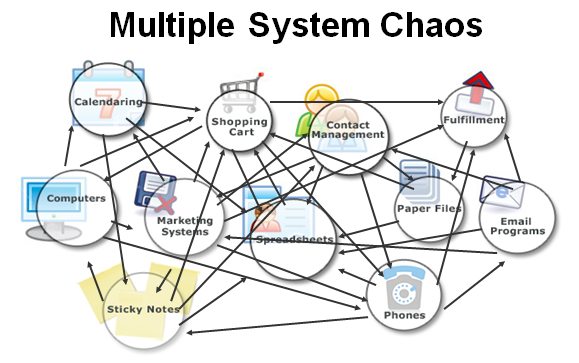
In today’s fast-paced business and marketing world, it’s easy to fall into a trap that we call “Multi-System Chaos.”

It usually starts innocently enough. You launch your business and pick up tools as you go:

  • A shopping cart for online sales

  • An email marketing platform for newsletters and promotions

  • A separate tool for booking appointments

  • Spreadsheets to track leads

  • Sticky notes for those urgent call-backs

  • Maybe a social media scheduling tool to keep up with posting

In other words, your tech stack grows one piece at a time — but not in a planned, strategic way.

The problem? Many older tools don’t have APIs, webhooks, or even Zapier connectivity. They sit there like lonely islands, completely cut off from the rest of your systems. If you want them to talk to each other, you’re stuck with manual exports, copy-and-paste, or time-consuming workarounds. Over time, that’s not just inconvenient — it’s a massive drain on efficiency and accuracy.

This is Multi-System Chaos in action — and it’s a silent killer of productivity, sales, and sanity.


Why Multi-System Chaos Is a Problem

When your tech stack is made up of disconnected tools (especially older, “island” systems), you face several issues:

  1. Data Silos – Your customer information is scattered and can’t flow automatically between platforms.

  2. Wasted Time – Exporting, importing, and updating records manually eats up hours each week.

  3. Inconsistent Communication – With email, SMS, and social media in separate systems, you risk sending the wrong message to the wrong person — or no message at all.

  4. Increased Costs – Subscriptions pile up. Often, you’re paying for overlapping features you don’t fully use.

  5. Scaling Problems – As you grow, the chaos grows with you. Adding more clients just adds more strain on a disconnected system.


The Solution: HighLevel

HighLevel replaces the chaos of a bloated, uncoordinated tech stack with a single, all-in-one platform that’s built for modern connectivity. Instead of a cluster of lonely islands, you get one integrated mainland where everything works together.

Here’s what’s included:

  • CRM – All your customer and lead data in one central hub.

  • Email & SMS Marketing – Automate campaigns and follow-ups across multiple channels.

  • Funnels & Websites – Build high-converting landing pages without relying on a separate builder.

  • Appointment Scheduling – Clients can book straight into your calendar, with automated reminders to reduce no-shows.

  • Social Media Management – Schedule posts and track engagement from the same platform.

  • Automation – Build workflows that run on autopilot, ensuring no lead is ever forgotten.

  • Connectivity – HighLevel integrates with other systems via API, webhooks, and Zapier if needed — meaning no more “island” tools.


Real-World Impact

I’ve seen businesses cut their admin time in half by switching to HighLevel. Imagine:

  • A new lead fills in a form on your website.

  • They’re instantly added to your CRM.

  • They get a personalised welcome email and SMS.

  • If they book a call, it’s automatically in your calendar.

  • If they don’t, a follow-up sequence runs without you touching a thing.

No exports. No copy-paste. No lonely islands.


Is HighLevel Right for You?

If your current setup feels like a patchwork of disconnected systems — especially older tools that can’t integrate — it’s time to simplify. A quick discovery call can help you see how HighLevel could streamline your tech stack, integrate your processes, and give you back hours every week.

You’ll walk away knowing:

  • Where your current systems are slowing you down

  • How HighLevel could replace or connect your tools

  • What automations could save you the most time and stress


Don’t let Multi-System Chaos hold your business back.
Unify your marketing, sales, and customer communication in one powerful platform — and take the first step towards a calmer, more profitable business.

Like to learn more and determine if HighLevel could be a good fit for your business?

📅 Book your Discovery Call here