British Gas Is Cutting 1,300 Jobs as It Invests in AI. Is It Time Your Business Did the Same?

british gas replaces staff with ai

british gas replaces staff with ai27 July 2026

British Gas owner Centrica has just announced plans to reduce its workforce by around 1,300 roles as part of a wider technology-led transformation.

When a company the size of British Gas announces job reductions while increasing its investment in digital customer service and artificial intelligence, people understandably ask the same question:

Is AI replacing people?

The answer is more nuanced than some of the headlines suggest.

Centrica says that changing customer behaviour is a major part of the decision. More customers are choosing digital channels first, which has resulted in fewer people calling its customer service teams.

At the same time, the company is investing in artificial intelligence, automation and digital tools designed to handle more customer enquiries without relying entirely on traditional call centres.

Whether AI is the direct cause of the job reductions or simply part of a much wider transformation, one thing is becoming increasingly clear:

The way businesses communicate with customers is changing permanently.

The important question for small business owners is not whether they operate on the same scale as British Gas.

It is whether they can now benefit from similar AI technology.

The answer is yes.

What Does the British Gas Announcement Mean for Small Businesses?

For many years, sophisticated automated customer service systems were only available to large corporations.

Building an intelligent telephone system, connecting it to a CRM and automating the customer journey required specialist developers and substantial budgets.

That is no longer the case.

Platforms such as HighLevel have made AI-powered customer service available to businesses of almost any size.

Through MarketerM8, we can now provide small businesses with many of the same capabilities that major organisations are investing millions of pounds to develop.

An accountant, estate agent, renewable energy installer, dentist, solicitor, marketing agency or local trades business can now use AI to answer telephone calls, qualify enquiries, book appointments and trigger follow-up automation.

Meet Your New AI Employee

At MarketerM8, we build AI Employees using HighLevel.

Think of an AI Employee as a receptionist, customer service assistant and sales administrator working together inside one connected system.

Unlike a traditional voicemail service, an AI Employee can have a genuine two-way conversation with a caller.

It can:

  • Answer your telephone 24 hours a day.
  • Answer common customer questions.
  • Qualify new enquiries.
  • Collect names, email addresses and telephone numbers.
  • Book appointments directly into your calendar.
  • Create and update contact records automatically.
  • Create opportunities inside your sales pipeline.
  • Send confirmation emails and text messages.
  • Continue conversations by SMS or WhatsApp.
  • Transfer urgent calls to a member of your team.
  • Trigger follow-up workflows automatically.

This is far more than a simple telephone answering service.

It becomes part of the way your business handles enquiries, follows up prospects and manages customer relationships.

AI Is Not Necessarily About Replacing Staff

The discussion around artificial intelligence often focuses on job losses.

For most small businesses, however, the more immediate opportunity is not replacing good members of staff.

It is removing repetitive work and preventing valuable enquiries from being missed.

Imagine how much time your team spends answering questions such as:

  • What time do you open?
  • Do you cover my area?
  • Can I book an appointment?
  • How much does the service cost?
  • Can somebody call me back?
  • Do you have any availability this week?

These are exactly the types of conversations an AI receptionist can handle.

Your team can then concentrate on the conversations that require experience, judgement and a human relationship.

These might include:

  • Closing important sales.
  • Advising customers.
  • Resolving complicated problems.
  • Delivering the actual service.
  • Building long-term client relationships.

For many businesses, AI does not replace staff.

It helps existing staff become more productive.

Never Miss Another Valuable Enquiry

One missed telephone call could be worth hundreds or even thousands of pounds.

This is particularly important for businesses such as:

  • Renewable energy installers.
  • Emergency trades.
  • Dentists and healthcare providers.
  • Estate agents.
  • Solicitors.
  • Accountants.
  • Marketing agencies.
  • Home improvement companies.

Unfortunately, many small businesses still rely on voicemail, an answerphone or ‘hopefully’ somebody remembering to call the prospect back later.

By the time the call is returned, the prospect may already have spoken to a competitor.

An AI Employee answers immediately.

It can respond during lunchtime, in the evening, at weekends and on Bank Holidays.

Every caller receives an immediate response, even when your office is closed or your team is busy.

For many businesses, capturing just one extra customer each month could more than cover the cost of the technology.

The AI Receptionist Is Only the Beginning

Many standalone AI telephone systems stop once the call has finished.

HighLevel goes much further because the AI receptionist is connected to your CRM, calendars, sales pipelines, email marketing, SMS, WhatsApp and automated workflows.

A typical customer journey could look like this:

A prospect calls your business.

↓

The AI receptionist answers immediately.

↓

It asks questions and qualifies the enquiry.

↓

It books an appointment into your calendar.

↓

HighLevel creates or updates the contact record.

↓

An opportunity is created in your sales pipeline.

↓

The prospect receives an email and text confirmation.

↓

Your team is notified.

↓

Appointment reminders are sent automatically.

↓

If the prospect does not proceed, an automated follow-up campaign continues the conversation.


This is why I often describe HighLevel as an AI Operating System for small businesses, rather than simply another CRM.

The telephone call, contact record, calendar, pipeline and follow-up marketing all work together.

AI Phone Answering at a Sensible Price

Many small business owners assume that this type of technology will cost thousands of pounds every month.

It does not.

HighLevel has made AI-powered telephone answering and customer service available at a price that is realistic for smaller companies.

Through MarketerM8, we help businesses plan, configure and train their AI Employee so it understands:

  • The services the business provides.
  • The areas it covers.
  • The questions customers frequently ask.
  • The information that should be collected.
  • The appointments that can be booked.
  • When a call should be transferred to a human.
  • What should happen after the conversation.

Your AI Employee can work 24 hours a day, handle multiple calls and continue supporting the business as it grows.

There are usage costs associated with AI voice calls, but these are typically measured by the minute and can be substantially less than the cost of employing an additional full-time receptionist.

AI Works Best Alongside People

The best use of AI is not to remove every human interaction.

It is to decide which interactions should be automated and which should remain human.

An AI receptionist can deal with the first stage of an enquiry, collect information and route the caller to the right person.

A member of your team can then take over when specialist knowledge, empathy or commercial judgement is required.

This combination gives customers a faster initial response without removing the human support they need later in the journey.

AI should not make your business feel less personal.

Used properly, it gives your team more time to be personal where it matters most.

Julian Mills’ View

The British Gas announcement is an important reminder that AI-powered customer service is quickly becoming mainstream.

Large businesses are investing in AI because customers increasingly expect immediate answers, faster service and support outside normal working hours.

Small businesses face exactly the same customer expectations.

The difference is that platforms such as HighLevel have made this technology affordable and accessible without requiring a large internal IT department.

I do not believe every business should immediately replace its reception team with AI.

I do believe every business should examine where calls are being missed, where staff are repeating the same answers and where slow follow-up is costing sales.

AI is not replacing small businesses. It is allowing small businesses to compete with big businesses.

Should Your Business Invest in an AI Receptionist?

An AI receptionist may be worth considering if your business:

  • Misses telephone calls while staff are busy.
  • Receives enquiries outside normal office hours.
  • Frequently answers the same questions.
  • Needs to qualify prospects before booking appointments.
  • Has slow or inconsistent lead follow-up.
  • Wants to reduce repetitive administration.
  • Wants every enquiry recorded in its CRM.
  • Needs to scale without immediately recruiting more administrative staff.

The first step is not simply buying an AI telephone system.

It is mapping out what should happen when somebody contacts your business.

At MarketerM8, we help businesses design that process and then build it inside HighLevel.

See a HighLevel AI Employee in Action

If you would like to hear an AI receptionist in action, you can call Bob, my AI receptionist, on 07897 031 750.

Bob can answer questions and help you book a discovery call with me.

You can also book a discovery call online to explore how HighLevel and MarketerM8 could help your business answer more enquiries, automate follow-up and capture more sales.

Book a free HighLevel discovery call

Source

The British Gas and Centrica announcement discussed in this article was reported by Reuters:

British Gas owner Centrica to cut 1,300 jobs

The announcement relates to Centrica’s wider digital and technology-led transformation. AI is part of that transformation, although Centrica has not stated that all 1,300 roles are being directly replaced by AI telephone agents.

Julian Mills HighLevel Consultant and Marketing Automation Strategist

About the Author

Julian Mills

HighLevel Consultant & Marketing Automation Strategist

Julian Mills helps business owners automate lead generation, sales follow-up, customer communication and business processes using HighLevel and MarketerM8. Since 2009 he has helped businesses implement CRM, marketing automation and AI-powered systems that save time, improve customer experience and generate more sales.

About Julian
Book a Discovery Call
Join a Free HighLevel Workshop
Learn About HighLevel with MarketerM8


How to Build a HighLevel Snapshot (SaaS style) That Can Scale to Hundreds of Clients

How to Build a HighLevel Snapshot (SaaS style) That Can Scale to Hundreds of Clients

How to Build a HighLevel Snapshot (SaaS style) That Can Scale to Hundreds of ClientsQuick Answer

A HighLevel Snapshot can absolutely be scaled to hundreds or even thousands of client accounts. However, this only works if it has been designed as a reusable software platform rather than as a one-off CRM implementation.The biggest mistake most HighLevel users make is building a snapshot around the needs of their first client. A scalable snapshot is designed around the needs of the next hundred clients.In this guide, I’ll share the principles I use when designing HighLevel systems for agencies, franchise organisations and businesses that want to create their own “Marketing System in a Box.”

Is This Article for You?

This isn’t a beginner’s guide to HighLevel.

If you’ve only just opened your first account or you’re learning how to build your first workflow, I’d recommend becoming familiar with the fundamentals before tackling the concepts in this guide.

This article is aimed at people who want to take HighLevel to the next level by creating scalable, repeatable systems that can be deployed again and again.

You might be:

  • A marketing agency building the same solution for multiple clients.
  • A consultant creating an industry-specific CRM for accountants, dentists or estate agents.
  • A SaaS entrepreneur using HighLevel’s white-label platform to launch your own software business.
  • A franchise organisation looking to deploy a standardised CRM across hundreds of franchisees.
  • An experienced HighLevel user who has realised that every new client shouldn’t require reinventing the wheel.

If that sounds like you, you’re in the right place.

There Are Two Types of HighLevel Users

Over the years, I’ve noticed there are two very different ways people approach HighLevel.

The first group sees HighLevel as a CRM.

They create pipelines.

They build workflows.

They send emails.

They book appointments.

There’s absolutely nothing wrong with this. In fact, it’s exactly how most businesses should use HighLevel.

The second group sees HighLevel as a software development platform.

Instead of asking:

“How do I build this workflow?”

They ask:

“How do I build this once so hundreds of businesses can use it?”

That subtle change in thinking changes everything.

Instead of building automations, you’re building products.

Instead of configuring software, you’re engineering a platform.

That’s the mindset this article is all about.

Why This Matters More Than Ever

HighLevel has evolved into something far bigger than a CRM.

Today it can power:

  • Marketing agencies
  • White-label SaaS businesses
  • Franchise organisations
  • Membership businesses
  • Training companies
  • Estate agencies
  • Dentists
  • Trades businesses
  • Financial advisers
  • Multi-location businesses

HighLevel continues to add new features such as AI Employees, Voice AI, WhatsApp automation, Documents and Contracts, Communities, Memberships and much more.

The challenge is no longer building a CRM.

The challenge is designing one that can continue growing without becoming difficult to maintain.

What Exactly Is a HighLevel Snapshot?

A HighLevel Snapshot is one of the platform’s most powerful features.

Think of it as a blueprint.

Rather than creating a CRM from scratch every time you onboard a new client, you build it once and save everything into a reusable package.

A snapshot can include assets such as:

  • Pipelines
  • Workflows
  • Email templates
  • SMS templates
  • Forms
  • Surveys
  • Calendars
  • Websites
  • Funnels
  • Blogs
  • Custom fields
  • Custom values
  • Documents
  • Communities
  • Opportunities
  • Automation triggers
  • AI assets
  • Much more

Once your snapshot is complete, it can be installed into another HighLevel account in minutes.

That means you don’t just build a CRM.

You build a repeatable business system.

A Real-World Example

Let’s imagine you’re working with dentists.

You spend three months creating the perfect patient acquisition system.

It includes:

  • New patient enquiries
  • Appointment booking
  • Missed appointment reminders
  • Google Review requests
  • AI review replies
  • Treatment follow-up campaigns
  • Membership plans
  • Recall reminders
  • Internal staff notifications
  • KPI dashboards

Once perfected, every new dental practice can start with exactly the same proven system.

Now imagine instead of ten dental practices, you’re onboarding one hundred.

Or one thousand.

Without snapshots, that becomes extremely difficult.

With snapshots, it is entirely achievable.

The challenge is making sure the snapshot has been designed properly from the beginning.

Why Most HighLevel Snapshots Don’t Scale

Here’s something I’ve learnt after working with agencies and businesses across the UK.

Most snapshots work brilliantly, until they don’t.

Typically, they begin life with one client in mind.

A workflow is added here.

An email template is copied there.

A few custom fields are created.

Then another client asks for something slightly different.

So another workflow is copied.

Another email is duplicated.

Another custom field appears.

Fast forward eighteen months and the snapshot has become almost impossible to understand.

I’ve seen snapshots containing:

  • Hundreds of workflows
  • Duplicate automations
  • Multiple versions of the same email
  • Broken links
  • Old branding
  • Hard-coded phone numbers
  • Test assets that were never deleted
  • Naming conventions that make no sense

The snapshot still works.

But nobody enjoys maintaining it.

Think Like a Software Architect

This is probably the biggest mindset shift I can share.

When I build a HighLevel Snapshot, I don’t think of myself as building a CRM.

I think of myself as building software.

Software developers don’t just ask:

“Does it work today?”

They ask:

  • Will this still work next year?
  • Can another developer understand it?
  • Can we add new features?
  • Can we update it safely?
  • Will changing one component break something else?
  • Can this be reused?

Those are exactly the same questions we should be asking when designing HighLevel systems.

Because that’s what they are.

They’re software.

No coding required.

A Franchise Example

Imagine a home cleaning franchise with 300 franchisees across the UK.

Every franchisee needs:

  • Their own contacts
  • Their own opportunities
  • Their own calendar
  • Their own staff
  • Their own review requests
  • Their own invoices
  • Their own AI receptionist
  • Their own website
  • Their own phone number

But they all follow exactly the same business processes.

This is where HighLevel shines.

Instead of building 300 independent CRMs, you build one well-designed snapshot.

Every franchisee starts with the same proven business system.

Need to improve the review request process?

Improve the core system and include the change in future deployments.

Need to add WhatsApp automation?

Add it to the architecture.

Need to introduce AI Voice?

Build it once.

The value of your snapshot grows with every improvement.

That’s why I often describe a HighLevel Snapshot as a Marketing System in a Box rather than simply a CRM template.

Introducing the HighLevel Snapshot Architecture Framework

Over the years, I’ve developed a set of principles that I follow whenever I’m designing a scalable HighLevel system.

I call it the HighLevel Snapshot Architecture Framework.

Rather than thinking about individual features, it focuses on creating business systems that remain easy to understand, maintain and expand as your business grows.

The framework consists of ten principles:

  1. Design the business before you build the CRM.
  2. Build everything to be modular.
  3. Develop naming standards from day one.
  4. Make Custom Values your best friend.
  5. Design for future expansion.
  6. Eliminate duplicate logic.
  7. Document everything.
  8. Test like a software company.
  9. Design for franchises and multi-location businesses.
  10. Think in versions, not projects.

In this first part, we’ll cover the principles that form the foundation of every scalable HighLevel Snapshot.

Principle 1. Design the Business Before You Build the CRM

One of the biggest mistakes I see is people opening HighLevel and immediately starting to build.

That’s like asking a builder to start laying bricks before an architect has drawn the plans.

The most successful HighLevel implementations always begin away from the software.

Before I create a single workflow, I map out:

  • The customer journey from first enquiry to loyal customer.
  • Every key touchpoint where automation can add value.
  • The sales pipeline and opportunity stages.
  • Staff roles and responsibilities.
  • Internal notifications.
  • Required reports and KPIs.
  • Communication channels such as email, SMS, WhatsApp and phone.
  • Third-party integrations.
  • Future features that may be added over the next 12 to 24 months.

Only once that blueprint is complete do I start building inside HighLevel.

This approach reduces rework, improves consistency and creates a much stronger foundation for everything that follows.

What Does This Planning Look Like in Practice?

Let’s take the example of a dental practice.

A basic HighLevel user might begin by creating a new patient enquiry workflow.

A snapshot architect starts by mapping the entire patient journey.

For example:

  1. A potential patient submits an enquiry.
  2. The enquiry is added to the New Patient Pipeline.
  3. The reception team is notified.
  4. The patient receives an immediate email, SMS or WhatsApp response.
  5. The patient is invited to book a consultation.
  6. Appointment reminders are sent.
  7. Missed appointments enter a rebooking campaign.
  8. Attended appointments move into a treatment follow-up process.
  9. Completed treatments trigger a review request.
  10. Patients enter a long-term recall or nurture campaign.

The workflow is not the starting point.

The customer journey is the starting point.

Once the journey is understood, the workflows become much easier to design.

Build the Map Before the Automation

Before building, I recommend creating a simple system map.

This does not need to be a complicated technical diagram.

It can be a spreadsheet, flowchart or whiteboard showing:

  • Where leads come from
  • What information is captured
  • Which pipeline they enter
  • Who is responsible for them
  • What communication is sent
  • What happens if they respond
  • What happens if they do not respond
  • What moves them to the next stage
  • What happens after they become a customer

This planning becomes even more important when the snapshot will be installed into hundreds of accounts.

A small design mistake repeated once is inconvenient.

A small design mistake repeated 300 times becomes expensive.

Design for the Typical Client, Not Every Possible Client

There is another challenge when designing a reusable HighLevel Snapshot.

You need to avoid trying to solve every possible scenario.

A snapshot that tries to accommodate every type of business can quickly become bloated, confusing and difficult to implement.

The better approach is to design around the typical client or franchisee.

For example, your standard cleaning franchise snapshot might assume that every franchisee has:

  • One main service area
  • One primary phone number
  • One booking calendar
  • One sales pipeline
  • A standard review request process
  • A standard quotation follow-up process

Exceptional requirements can be handled as optional modules rather than being forced into the core snapshot.

Part 2: Turning the Map into a Scalable HighLevel System

In Part 1, we looked at why scalable HighLevel Snapshots need to be designed more like software products than one-off CRM builds.

We also covered the first principle of the HighLevel Snapshot Architecture Framework:

Design the business before you build the CRM.

Before opening HighLevel and creating workflows, you need to understand the business process you are attempting to automate.

You need to map:

  • How leads enter the business.
  • How they are followed up.
  • How opportunities move through the sales pipeline.
  • Which actions are completed by staff.
  • Which actions can be automated.
  • What happens when a prospect responds.
  • What happens when they do not respond.
  • What happens when an opportunity is won or lost.
  • How customers are onboarded, retained and encouraged to buy again.

Once that business process has been agreed, it should be turned into a visual flow diagram.

This becomes the architect’s blueprint for the entire HighLevel Snapshot.

The blueprint then allows you to divide the complete system into smaller, modular components.

Once those modules have been identified, the number-based coding system gives each component a clear and logical place inside HighLevel.

The three principles work together:

  1. The architect’s blueprint shows the complete system.
  2. Modularity divides that system into manageable components.
  3. The coding system connects the blueprint to the actual assets inside HighLevel.

This is the organisational foundation of a scalable HighLevel Snapshot.

Principle 2: Create the Architect’s Blueprint Before You Build

A complex HighLevel Snapshot should never begin with someone opening the workflow builder and immediately adding actions.

Before building anything, map the entire process using flow diagram software.

This flow diagram becomes the architect’s blueprint for the Snapshot.

Just as an architect would not expect a construction team to build a complex property without detailed plans, you should not build a substantial CRM and automation system without first mapping how it is intended to work.

The architect’s blueprint provides the high-level view that is often difficult to see once you are working inside individual workflows.

What Should the Architect’s Blueprint Show?

The diagram should show:

  • Where leads and customers enter the system.
  • Which forms, surveys, calendars or integrations capture their details.
  • Which pipeline and stage they enter.
  • Which workflows are triggered.
  • Which emails, text messages and WhatsApp messages are sent.
  • Which staff members are notified.
  • Which tasks are created.
  • Which decisions or If/Else branches take place.
  • What happens when a contact responds.
  • What happens when a contact does not respond.
  • How opportunities move through the pipeline.
  • What happens when an opportunity is won.
  • What happens when an opportunity is lost.
  • Which other campaigns or modules the contact enters.

This allows you to review the complete process before building the individual components.

It is much easier to identify a missing step, duplicated process or potential conflict on a flow diagram than after dozens of workflows have already been built.

Example: Mapping a Sales Pipeline

A simplified sales process might look like this:

1. Sales Pipeline

1.1 New Lead Stage
    ↓
New enquiry received
    ↓
Create contact and opportunity
    ↓
Send welcome email and text
    ↓
Notify salesperson
    ↓
Create follow-up task
    ↓
1.2 Working Stage
    ↓
Follow-up and qualification
    ↓
1.3 Proposal Sent Stage
    ↓
Proposal follow-up
    ↓
1.4 Won or 1.5 Lost Stage

The full diagram would also show:

  • Alternative routes.
  • Delays.
  • Decision points.
  • Staff responsibilities.
  • Appointment bookings.
  • No-response follow-up.
  • Connected onboarding campaigns.
  • Lost opportunity nurture.
  • Review and referral campaigns.

This blueprint gives you a complete view of how the business process should work before you start translating it into HighLevel assets.

The Blueprint Becomes the Basis of the Modular Build

Once the complete process is visible, you can begin dividing it into separate modules.

For example, the sales pipeline blueprint may reveal that you need individual modules for:

  • New lead capture.
  • Lead assignment.
  • Immediate lead response.
  • Salesperson notification.
  • Appointment booking.
  • Appointment reminders.
  • Proposal follow-up.
  • Won opportunity handover.
  • Lost opportunity nurture.
  • Customer onboarding.

Without the blueprint, these processes may become mixed together inside one enormous workflow.

With the blueprint, you can see the natural boundaries between them.

This is why the architect’s blueprint and modularity are so closely connected.

The blueprint shows the complete building.

Modularity identifies the individual rooms, services and components that make the building work.

The Blueprint Should Remain a Live Document

The architect’s blueprint should not be created at the beginning and then forgotten.

It should remain a live document that evolves alongside the Snapshot.

Whenever you:

  • Add a workflow.
  • Change a trigger.
  • Introduce a new branch.
  • Add WhatsApp.
  • Introduce Voice AI.
  • Change a pipeline stage.
  • Add a booking calendar.
  • Replace an integration.
  • Introduce a new module.

The architect’s blueprint should also be updated.

This ensures the diagram continues to represent the system that is actually operating.

Use the Blueprint for Staff Training

The architect’s blueprint is one of the best tools for explaining a complex HighLevel system to staff.

Rather than asking a new team member to open multiple workflows and work out how everything connects, you can walk them through the complete customer journey visually.

The blueprint helps staff understand:

  • What they are responsible for.
  • What HighLevel is doing automatically.
  • When tasks will be created.
  • When prospects will receive messages.
  • What moving an opportunity to a new stage will trigger.
  • What happens after an opportunity is won or lost.

This is particularly useful in larger companies and franchises where several people may interact with the same process.

It can also prevent staff manually carrying out tasks that are already automated.

Use the Blueprint for Troubleshooting

When something goes wrong, the architect’s blueprint gives you a logical starting point.

Imagine a prospect receives the wrong proposal reminder.

The diagram can help you identify:

  • How the prospect entered the process.
  • Which pipeline stage they were in.
  • Which workflow should have been triggered.
  • Which conditions were evaluated.
  • Which message should have been sent.
  • Which connected workflows may also have affected the contact.

You can follow the route through the blueprint before opening the individual assets inside HighLevel.

Once the coding system has also been applied, the process becomes even easier.

The blueprint tells you which part of the system caused the problem.

The code tells you where to find it.

Use the Blueprint When Adding New Features

The blueprint is also invaluable when expanding the Snapshot.

Suppose you want to add WhatsApp follow-up to the New Lead stage.

The diagram allows you to decide:

  • Where the WhatsApp message should sit.
  • Whether it should replace or support SMS.
  • Which contacts should receive it.
  • What should happen when someone replies.
  • Which existing workflows might be affected.
  • Whether a new module is required.

The same process applies when adding:

  • Voice AI.
  • Conversation AI.
  • Review automation.
  • Referral campaigns.
  • New calendars.
  • New pipeline stages.
  • Customer onboarding.
  • Additional franchise services.
  • Third-party integrations.

Without a current blueprint, new features tend to be bolted onto whichever workflow appears convenient.

Over time, this creates duplicated logic, conflicts and an increasingly fragile system.

Flow Diagram Software I Recommend

Two particularly useful options are Lucidchart and Draw.io.

Lucidchart

Lucidchart is particularly useful when you are working with multiple clients, franchises or different versions of the same system.

It allows you to organise and collaborate on multiple diagrams within one platform.

You might maintain:

  • A master Snapshot blueprint.
  • Individual client versions.
  • Franchise-specific variations.
  • Separate campaign diagrams.
  • Diagrams for different Snapshot releases.
  • Shared documentation for implementation teams.

It is a strong option when flow diagramming becomes a regular part of your delivery process.

Draw.io

Draw.io, also known as diagrams.net, is a free flow diagram tool.

It can store each diagram as a separate file in Google Drive.

This is useful when each client or Snapshot has its own Google Drive folder.

That folder might contain:

  • The architect’s blueprint.
  • Installation checklist.
  • Custom Value information.
  • Integration details.
  • Testing records.
  • Version notes.
  • Training documentation.

Draw.io is a practical option when you want a free tool or prefer to manage each flow diagram as a separate file.

Julian Mills’ View

The first version of a complex Snapshot should exist as a flow diagram before it exists inside HighLevel. I often say to clients that we do the hard work on the “virtual piece of paper” and the the building in HighLevel becomes the easy part.

The architect’s blueprint allows you to see the complete system.

Only when the full process is visible can you make sensible decisions about how it should be divided into workflows, folders, modules and other assets.

Principle 3: Build Everything to Be Modular

Once the architect’s blueprint has been created, the next step is to divide the complete process into smaller modules.

A module is a component that performs one clear function.

For example:

  • Respond to a new lead.
  • Notify a salesperson.
  • Create an opportunity.
  • Send appointment reminders.
  • Follow up a proposal.
  • Request a review.
  • Reactivate an old customer.
  • Handle a missed call.
  • Start customer onboarding.

Each module should have a clearly defined purpose.

This is very different from building one enormous workflow that attempts to manage the entire customer journey from the first enquiry to repeat purchase.

Large workflows can appear efficient at first because everything is contained in one place.

However, they quickly become difficult to understand, test and maintain.

A small change near the top of a large workflow may affect contacts much further down.

Different members of the team may struggle to understand the logic.

Reusing one part of the process elsewhere becomes difficult.

A modular architecture turns the sections identified on the architect’s blueprint into smaller, connected workflows.

Example: Turning the Blueprint into Modules

The sales pipeline blueprint may show this journey:

New enquiry
    ↓
Immediate response
    ↓
Sales team notified
    ↓
Appointment booking
    ↓
Proposal
    ↓
Won or Lost

Rather than placing all of this inside one workflow, you might create separate modules for:

1.1.1 New Lead Follow-Up
1.1.2 New Lead Internal Notification
1.1.3 New Lead Assignment
1.2.1 Working Stage Follow-Up
1.3.1 Proposal Sent Follow-Up
1.4.1 Won Opportunity Handover
1.5.1 Lost Opportunity Nurture

The blueprint shows how these modules connect.

Each module performs one specific job.

Why Modularity Matters

A modular system is easier to:

  • Understand.
  • Build.
  • Test.
  • Troubleshoot.
  • Document.
  • Reuse.
  • Update.
  • Deploy across multiple accounts.

It also allows optional features to be introduced without rebuilding the core system.

For example, WhatsApp follow-up could be added as a separate module.

Voice AI could be added as a separate module.

A referral campaign could be added as a separate module.

This allows the Snapshot to expand without the original workflows becoming unmanageable.

Example: A Dental Practice

A single dental workflow might attempt to manage:

  1. A new patient enquiry.
  2. Reception notification.
  3. Appointment booking.
  4. Appointment reminders.
  5. Missed appointment follow-up.
  6. Treatment plan follow-up.
  7. Review requests.
  8. Patient recall reminders.

That workflow could quickly contain hundreds of actions, delays, conditions and branches.

A modular approach would create separate workflows such as:

  • New patient enquiry response.
  • Reception team notification.
  • Consultation confirmation.
  • Appointment reminders.
  • Missed appointment follow-up.
  • Treatment plan follow-up.
  • Patient review request.
  • Six-month patient recall.

Each workflow has one job.

Each workflow can be tested independently.

Each workflow can be improved without unnecessarily changing the others.

Why Modularity Matters for Franchises

Imagine a home cleaning franchise with 300 locations.

The core Snapshot might include modules for:

  • New enquiries.
  • Quotation follow-up.
  • Booking reminders.
  • Cleaner notifications.
  • Customer feedback.
  • Google Review requests.
  • Referral campaigns.
  • Lapsed customer reactivation.

Some franchisees may use all of these modules.

Others may initially use only the lead, quotation and booking modules.

A modular system allows features to be introduced in stages.

It also gives the franchise group or agency the opportunity to offer additional modules as upgrades.

Principle 4: Develop a Number-Based Coding System from Day One

Once the architect’s blueprint has been divided into modules, the number-based coding system makes complete sense.

The blueprint shows the entire customer journey.

The modules identify the separate components.

The code gives each component a clear address inside HighLevel.

When a Snapshot contains only a few workflows, forms and email templates, it is usually easy to find what you need.

Once the system grows to include dozens of campaigns, hundreds of workflows and large numbers of emails, forms, surveys, trigger links, Custom Values and other assets, poor naming quickly becomes a problem.

You need a structure that makes it easy to see:

  • Which campaign an asset belongs to.
  • Which part of the customer journey it supports.
  • Which workflow it is connected to.
  • Which email, text message or action comes next.
  • Where the related assets are stored.

For scalable HighLevel systems, I use a number-based coding structure.

The same code follows the campaign through the different areas of HighLevel.

Start by Coding the Main Campaign

At the top level, each major business system is given a number.

For example:

1. Sales Pipeline

This becomes the identifying code for the entire sales campaign.

Everything connected to the sales pipeline begins with the number 1.

Other major systems could then be numbered separately:

1. Sales Pipeline
2. Customer Onboarding
3. Appointment Management
4. Review Requests
5. Customer Reactivation
6. Referral Campaign

The exact numbering will depend on the business.

What matters is that each major system has its own clear code.

Create a Matching Workflow Folder

Inside the HighLevel workflow area, I would create a main folder called:

1. Sales Pipeline

Within this folder, I would create subfolders based on the stages of the sales pipeline:

1.1 New Lead Stage
1.2 Working
1.3 Proposal Sent
1.4 Won
1.5 Lost

This immediately shows where each workflow belongs within the overall customer journey.

Rather than searching through one long list of workflows, you can go directly to the relevant pipeline stage.

Code the Individual Workflows

The workflows inside each subfolder continue the same numbering structure.

For example, inside 1.1 New Lead Stage, you might have:

1.1.1 New Lead Follow-Up
1.1.2 New Lead Internal Notification
1.1.3 New Lead Assignment
1.1.4 No Response Follow-Up

Inside 1.3 Proposal Sent, you might have:

1.3.1 Proposal Sent Follow-Up
1.3.2 Proposal Reminder
1.3.3 Proposal Viewed Notification
1.3.4 Proposal Expired Follow-Up

The workflow number tells you exactly where it sits within the wider system.

For example, 1.3.2 Proposal Reminder means:

  • 1 represents the Sales Pipeline.
  • 3 represents the Proposal Sent stage.
  • 2 represents the second workflow within that stage.

Code the Important Actions Inside Each Workflow

The coding structure should also continue inside the workflow.

The most important actions to name clearly are usually:

  • Emails.
  • SMS messages.
  • WhatsApp messages.
  • Internal notifications.
  • Tasks.
  • Webhooks.
  • Opportunity actions.
  • Important data updates.

For example, the workflow 1.1.1 New Lead Follow-Up might contain:

1.1.1.1 Welcome Email
1.1.1.2 Welcome Text
1.1.1.3 Notify Sales Team
1.1.1.4 Create Follow-Up Task
1.1.1.5 Add to Nurture Sequence

When you see 1.1.1.2 Welcome Text, you immediately know that it belongs to:

  • Campaign 1: Sales Pipeline.
  • Stage 1: New Lead.
  • Workflow 1: New Lead Follow-Up.
  • Action 2: Welcome Text.

Use the Same Coding Across Email Templates

The same campaign code should continue into the email template area.

I would create an email template folder called:

1. Sales Pipeline Emails

Within that folder, the email templates could be named:

1.1.1.1 Welcome Email
1.1.4.1 Still Interested Email
1.2.2.1 Working Stage Follow-Up
1.3.1.1 Proposal Sent Email
1.3.2.1 Proposal Reminder Email
1.4.1.1 New Customer Congratulations Email
1.5.1.1 Lost Opportunity Nurture Email

The email template name matches the workflow action using it.

There is no need to guess which email belongs to which workflow.

Apply the Same Structure to Forms

Any forms used by the campaign should also begin with the same campaign code.

Create a folder called:

1. Sales Pipeline Forms

The forms might include:

1.1.1 New Lead Enquiry Form
1.2.1 Sales Qualification Form
1.3.1 Proposal Acceptance Form
1.5.1 Lost Opportunity Feedback Form

Continue the Coding Throughout HighLevel

The same logic should be used wherever possible:

1. Sales Pipeline Emails
1. Sales Pipeline Forms
1. Sales Pipeline Surveys
1. Sales Pipeline Trigger Links
1. Sales Pipeline Custom Values
1. Sales Pipeline Documents
1. Sales Pipeline Funnels
1. Sales Pipeline Calendars

The precise structure may vary depending on the asset and what HighLevel allows you to organise into folders.

The principle stays the same:

  • Everything connected to Campaign 1 begins with 1.
  • Everything connected to the New Lead stage begins with 1.1.
  • Everything connected to the New Lead Follow-Up workflow begins with 1.1.1.

Why This Coding System Works

Related Assets Are Easier to Find

Searching for 1.1.1 can reveal the workflow, email template and related assets connected to the same process.

The Customer Journey Is Visible

The numbers show the order of the stages and workflows.

Troubleshooting Becomes Faster

When someone reports a problem with 1.3.2.1 Proposal Reminder Email, the implementation team knows exactly where to look.

New Team Members Can Understand the System

The structure itself explains how the account has been organised.

Future Assets Have a Clear Home

When a new workflow, form or email is created, it is easier to decide where it belongs and how it should be named.

The Snapshot Becomes Easier to Scale

The same system can be repeated across hundreds of accounts without each implementation team inventing its own naming structure.

Julian Mills’ View

The purpose of a coding system is not simply to make the account look tidy.

It is to make the system easier to build, use, troubleshoot, document and improve.

A well-structured number system turns hundreds of individual HighLevel assets into one understandable business platform.

Principle 5: Make Custom Values Your Best Friend

Hard-coded information is one of the biggest barriers to scalable Snapshot deployment.

A hard-coded value is information typed directly into an email, workflow, funnel or template.

For example:

  • A business name.
  • A phone number.
  • An email address.
  • A booking link.
  • A price.
  • A logo.
  • A website URL.
  • A staff member’s name.
  • A social media profile.
  • A physical address.

This may be acceptable in a one-off HighLevel account.

It becomes a serious problem when the Snapshot will be installed into dozens or hundreds of accounts.

A Poorly Scalable Example

Imagine a cleaning franchise email containing:

Thank you for contacting Bright & Clean Manchester. Call us on 0161 000 0000 or book your survey at brightandclean.co.uk/manchester-booking.

If that information exists in 40 templates and 20 workflows, each new franchisee requires dozens of manual edits.

It only takes one missed edit for a Birmingham customer to receive Manchester contact details.

A Better Approach

Replace the business-specific information with Custom Values:

{{custom_values.company_name}}
{{custom_values.main_phone_number}}
{{custom_values.booking_link}}
{{custom_values.website_url}}
{{custom_values.support_email}}
{{custom_values.company_address}}
https://images.leadconnectorhq.com/image/f_webp/q_80/r_1200/u_https://assets.cdn.filesafe.space/VRoL61OWUDQvfRiROZZa/media/651d39a1b3b58d9b1c17fd2b.png

The email can then say:

Thank you for contacting {{custom_values.company_name}}. Call us on {{custom_values.main_phone_number}} or book your survey here: {{custom_values.booking_link}}.

The same email template can now be used by every franchisee.

During onboarding, the implementation team only needs to complete the Custom Values.

Treat Custom Values Like a Configuration Panel

A scalable Snapshot should have a central collection of values that control the account.

Business Details

  • Business name.
  • Trading name.
  • Main telephone number.
  • Support email.
  • Website.
  • Address.
  • Company registration number.
  • VAT number.

Branding

  • Main logo.
  • Secondary logo.
  • Primary brand colour.
  • Secondary brand colour.
  • Email footer.
  • Strapline.

Staff

  • Consultant name.
  • Salesperson name.
  • Support contact.
  • Escalation contact.
  • Manager email.

Links

  • Main booking calendar.
  • Review link.
  • Payment link.
  • Customer portal.
  • Facebook page.
  • LinkedIn page.
  • Privacy policy.
  • Terms and conditions.

Commercial Information

  • Standard pricing.
  • Deposit amount.
  • Cancellation fee.
  • Guarantee wording.
  • Offer expiry period.

The more configuration you can centralise, the easier it becomes to deploy and maintain the Snapshot.

Principle 6: Design for Future Expansion

HighLevel changes quickly.

Features that did not exist when your original Snapshot was created may become essential later.

Examples include:

  • WhatsApp messaging.
  • Voice AI.
  • Conversation AI.
  • Documents and Contracts.
  • Communities.
  • Courses.
  • Affiliate management.
  • Additional payment options.
  • New calendar types.
  • New workflow actions.
  • New reporting tools.

A scalable Snapshot needs space to grow.

This does not mean building every possible feature from the beginning.

It means avoiding design decisions that make future additions unnecessarily difficult.

Example: Adding WhatsApp Later

Imagine your original lead nurture process only uses email and SMS.

If all the logic is contained inside one huge workflow, adding WhatsApp may require editing dozens of branches and delays.

A modular system could separate the communication channels:

1.1.1 New Enquiry Entry
1.1.2 Email Nurture
1.1.3 SMS Nurture
1.1.4 WhatsApp Nurture

WhatsApp can then be added without rebuilding the entire lead management system.

Plan for Optional Modules

Core Module

  • Contact management.
  • Sales pipeline.
  • Basic email follow-up.
  • Appointment booking.
  • Internal notifications.

Growth Module

  • Review requests.
  • Referral campaigns.
  • Reactivation.
  • Lead nurture.
  • Advanced reporting.

AI Module

  • AI receptionist.
  • Conversation AI.
  • AI review replies.
  • Lead qualification.
  • AI-generated internal summaries.

This approach allows the system to evolve without forcing every client to adopt every feature immediately.

Principle 7: Eliminate Duplicate Logic

Duplicate logic occurs when several workflows perform the same task.

For example, five different lead workflows might all contain the same internal notification actions.

Ten booking workflows might all contain the same reminder sequence.

At first, copying the actions may seem faster.

The problem appears when something needs to change.

If a notification is contained in one shared workflow, it is updated once.

If it has been copied into 25 workflows, all 25 must be found and updated.

Create Shared Utility Workflows

A utility workflow performs a common task that can be used by other parts of the system.

Examples include:

  • Send a new lead notification.
  • Assign a lead owner.
  • Create a standard opportunity.
  • Add the lead source.
  • Format contact data.
  • Send appointment reminders.
  • Notify a manager of a failure.
  • Remove a contact from nurture.
  • Start the review request process.

Example: Review Requests

A dental Snapshot may trigger review requests after:

  • A hygiene appointment.
  • A completed treatment.
  • A new patient consultation.
  • A membership sign-up.
  • A successful emergency appointment.

A poor structure creates five separate review request sequences.

A better structure uses five entry points that all feed into one review request workflow.

If the review wording changes, it is updated once.

Principle 8: Document Everything

The architect’s blueprint is the central visual document, but it should be supported by practical documentation.

A Snapshot should not rely on one person remembering how it works.

People leave. Agencies grow. Franchise support teams change. Consultants take holidays.

Documentation protects the value of the system.

What Should Be Documented?

  • The purpose of the Snapshot.
  • The intended type of client.
  • The architect’s blueprint.
  • Required setup steps.
  • Required Custom Values.
  • Required Custom Fields.
  • The number-based coding system.
  • Pipeline structure.
  • Calendar configuration.
  • User permissions.
  • Third-party integrations.
  • Phone and email configuration.
  • Dependencies between workflows.
  • Optional modules.
  • Known limitations.
  • Testing procedures.
  • Version history.
  • Changes made in each release.

Include an Installation Checklist

  1. Install the Snapshot.
  2. Add users.
  3. Connect the sending domain.
  4. Connect personal email accounts.
  5. Purchase or connect a phone number.
  6. Complete Custom Values.
  7. Configure calendars.
  8. Check workflow senders.
  9. Connect the payment provider.
  10. Test forms.
  11. Test the booking journey.
  12. Test internal notifications.
  13. Test review links.
  14. Activate approved workflows.
  15. Record the installed version.

Include a Dependency Map

Some workflows depend on other assets.

  • A form may trigger a workflow.
  • The workflow may create an opportunity.
  • The opportunity may rely on a specific pipeline.
  • The workflow may assign a user.
  • An email may contain a Custom Value.
  • A payment link may rely on a connected product.
  • A calendar may require specific users or teams.

The architect’s blueprint should show the wider process.

The dependency documentation should record the specific assets and settings needed for that process to work.

Principle 9: Test Like a Software Company

A workflow working once does not mean the system has been properly tested.

Scalable Snapshots need systematic testing.

The goal is not simply to prove that the ideal customer journey works.

You also need to test what happens when information is missing, duplicated or unexpected.

What Should Be Tested?

  • A brand-new contact.
  • An existing contact.
  • A contact with a missing email address.
  • A contact with a missing phone number.
  • A duplicate form submission.
  • A booking.
  • A cancellation.
  • A reschedule.
  • A no-show.
  • A failed payment.
  • A successful payment.
  • A contact replying to an email.
  • A contact replying by SMS.
  • A contact opting out.
  • A contact changing pipeline stage.
  • A staff member being unavailable.
  • An opportunity already existing.
  • An integration failing.
  • A Custom Value being blank.

Use the Blueprint During Testing

The architect’s blueprint can become the basis of the test plan.

The tester can follow each route through the diagram and check that HighLevel behaves as expected:

  • Follow the New Lead route.
  • Follow the no-response route.
  • Follow the booked appointment route.
  • Follow the cancelled appointment route.
  • Follow the Proposal Sent route.
  • Follow the Won route.
  • Follow the Lost route.

Build a Test Account

Before deploying to hundreds of clients, use a dedicated test account containing:

  • Test contacts.
  • Test email addresses.
  • Test phone numbers.
  • Test products.
  • Test bookings.
  • Test pipelines.
  • Test users.

New versions of the Snapshot should be installed and tested there before being used with client accounts.

Julian Mills’ View

When a Snapshot will be installed into hundreds of accounts, testing is not an optional final step.

It is part of the product.

A mistake in one account is a support issue.

A mistake copied into 300 accounts is a system failure.

Principle 10: Design for Franchises and Multi-Location Businesses

Franchises are one of the strongest use cases for HighLevel Snapshots.

They combine standardised processes with local delivery.

Head office wants consistency.

Franchisees want local control.

Customers want to deal with a local business.

What Should Be Standardised?

  • Lead handling.
  • Sales pipeline stages.
  • Quotation follow-up.
  • Appointment reminders.
  • Review requests.
  • Referral campaigns.
  • Customer reactivation.
  • Reporting definitions.
  • Brand standards.
  • Data capture.
  • Customer service processes.

What Should Remain Local?

  • Franchisee name.
  • Territory.
  • Staff members.
  • Telephone number.
  • Email address.
  • Calendar availability.
  • Local website.
  • Review profile.
  • Services offered.
  • Prices.
  • Local promotions.

These variations should ideally be handled through Custom Values, Custom Fields and configuration rather than rebuilding the workflows.

Example: A 300-Franchise Cleaning Company

Each franchisee could receive a HighLevel account containing:

  • A website
  • A website enquiry form.
  • A sales pipeline.
  • Quote follow-up.
  • Booking confirmations.
  • Appointment reminders.
  • Customer feedback.
  • Review requests.
  • Referral campaigns.
  • Reactivation campaigns.
  • An AI receptionist.
  • Local reporting.

The business process is standardised.

The local details are configured during onboarding.

This is not simply CRM setup.

It is the creation of a franchise technology platform.

Principle 11: Think in Versions, Not Projects

A one-off HighLevel build has a completion date.

A scalable Snapshot is never truly finished.

It evolves.

New features are added. Old processes are improved. Messages are rewritten. Integrations change. Bugs are fixed. Client feedback is incorporated.

A Simple Version Structure

  • Version 1.0: Initial launch.
  • Version 1.1: Minor improvements and bug fixes.
  • Version 1.2: Updated appointment reminders.
  • Version 2.0: New AI receptionist module.
  • Version 2.1: WhatsApp follow-up added.
  • Version 3.0: New franchise reporting architecture.

Every version should have release notes.

Example: Version 2.1

  • Added WhatsApp to new lead follow-up.
  • Updated the missed call workflow.
  • Corrected the review request link.
  • Added a manager escalation notification.
  • Replaced the previous appointment reminder workflow.
  • Added a new required Custom Value for the WhatsApp number.
  • Updated the architect’s blueprint and staff training materials.

The Challenge of Updating Existing Accounts

Creating a new Snapshot version does not automatically mean every existing account will receive every update.

You need an update strategy.

Depending on the nature of the change, you might:

  • Manually update existing accounts.
  • Provide an add-on Snapshot.
  • Create a new workflow that can be copied across.
  • Use shared templates where appropriate.
  • Train account owners to apply the change.
  • Include the improvement only in future deployments.
  • Offer managed updates as part of a support plan.

A modular system with a current architect’s blueprint is much easier to update than a collection of tightly connected, duplicated workflows.

Common HighLevel Snapshot Mistakes

Building Around the First Client

The first client’s requirements become embedded into every workflow and template.

Building Without a Blueprint

The builder starts creating workflows before the complete customer journey has been mapped.

Letting the Blueprint Become Outdated

A flow diagram is created during planning but is not updated when the system changes.

Hard-Coding Everything

Business names, phone numbers, links and staff details are typed directly into assets.

Creating Huge Workflows

One workflow attempts to manage the entire customer lifecycle.

Copying Instead of Reusing

The same notification, email sequence or data update is copied into multiple workflows.

No Consistent Coding Structure

The relationship between workflows, emails, forms and other assets becomes unclear.

No Supporting Documentation

The system depends on the memory of the original builder.

No Testing Process

The ideal journey is tested once while alternative routes and edge cases are ignored.

Building Too Much

The Snapshot attempts to solve every possible requirement and becomes bloated. The old adage still applies – keep things simple.

Failing to Plan for Updates

The Snapshot is treated as a completed project rather than a product that will evolve.

When Should You Work With a HighLevel Snapshot Architect?

You may need specialist help when:

  • Your Snapshot will be deployed to many clients.
  • You are building a HighLevel SaaS product.
  • You are creating a system for a franchise network.
  • Your current Snapshot has become difficult to maintain.
  • You have large numbers of duplicated workflows.
  • You do not have a clear visual blueprint of your system.
  • You need to introduce a coding and documentation structure.
  • You want to productise your industry knowledge.
  • You need to add AI, WhatsApp or Voice AI without rebuilding everything.
  • You are planning a complex multi-location system.
  • Your implementation team needs a repeatable deployment process.

There is a major difference between knowing how to use HighLevel and knowing how to architect a scalable HighLevel platform.

A skilled HighLevel user can build a workflow.

A Snapshot Architect maps the business process and designs how the workflows, pipelines, data, templates, users and integrations fit together as one complete system.

Frequently Asked Questions

Can a HighLevel Snapshot scale to hundreds of clients?

Yes. A HighLevel Snapshot can support hundreds of client or franchise accounts when it is designed as a reusable and configurable system. Scalability depends on modular workflows, consistent coding, centralised Custom Values, clear documentation, systematic testing and a planned update process.

What makes a HighLevel Snapshot scalable?

A scalable Snapshot avoids hard-coded information, duplicated logic and oversized workflows. It uses reusable modules, a consistent number-based coding structure, Custom Values, a live architect’s blueprint, testing procedures and version control.

Should I map a HighLevel system before building it?

Yes. A complex HighLevel system should be mapped using flow diagram software before the main build begins. The diagram becomes the architect’s blueprint and helps identify missing steps, duplicated logic and dependencies.

What is a HighLevel architect’s blueprint?

A HighLevel architect’s blueprint is a live flow diagram showing how leads and customers move through forms, calendars, pipelines, workflows, messages, decisions and staff actions. It is used for planning, staff training, troubleshooting and future development.

Which flow diagram software can I use for HighLevel?

Lucidchart is useful for agencies and consultants managing diagrams for multiple clients. Draw.io, also known as diagrams.net, is a free option that can store individual flow diagrams as separate Google Drive files.

Should I create one large workflow or several smaller workflows?

In most cases, several smaller workflows are easier to test, maintain and reuse. Each workflow should perform one clear function and connect cleanly with the rest of the system.

How should I name HighLevel workflows?

I use a number-based coding structure that connects each workflow to its campaign, pipeline stage and related assets.

1. Sales Pipeline
1.1 New Lead Stage
1.1.1 New Lead Follow-Up
1.1.1.1 Welcome Email
1.1.1.2 Welcome Text

Can HighLevel Snapshots be used for franchises?

Yes. Franchises are one of the strongest uses for HighLevel Snapshots. A core system can standardise lead handling, sales, bookings, reviews and customer follow-up while allowing each franchisee to use local branding, staff, phone numbers and calendars.

Can I update a HighLevel Snapshot after installing it?

You can update the master Snapshot for future installations. Updating existing accounts requires a rollout strategy, such as manually applying changes, installing add-on assets or offering managed updates.

Can AI features be included in a HighLevel Snapshot?

Many AI-related assets and workflows can form part of a wider Snapshot system. However, some settings, integrations, phone numbers, knowledge bases and account-specific configurations may still need to be completed during onboarding.

Can I sell a HighLevel Snapshot?

Yes. Agencies and consultants often use Snapshots to create repeatable industry-specific systems, SaaS products or implementation packages. The value comes from the business process, architecture, support and continued improvement, not simply from copying a collection of assets.

What is a HighLevel Snapshot Architect?

A HighLevel Snapshot Architect plans and structures reusable HighLevel systems. The role includes process mapping, modular design, coding standards, Custom Values, documentation, testing, deployment and future version planning.

Final Thoughts

HighLevel Snapshots are much more than a convenient way to copy workflows between accounts.

Used properly, they allow agencies, consultants, SaaS entrepreneurs and franchise organisations to build complete business systems that can be deployed repeatedly.

However, the ability to copy a Snapshot does not automatically make it scalable.

Scalability comes from the thinking behind the build.

It comes from designing the business first.

It comes from creating an architect’s blueprint.

It comes from modular workflows.

It comes from consistent number-based coding.

It comes from using Custom Values instead of hard-coded information.

It comes from removing duplicate logic.

It comes from documentation, testing and version control.

Most importantly, it comes from treating the Snapshot as a product that will continue to evolve.

The goal is not simply to build a CRM that works today.

The goal is to build a Marketing System in a Box that can be installed, configured and improved across hundreds of businesses.

That is the real power of HighLevel Snapshots.

Need Help Building a Scalable HighLevel Snapshot?

I work with marketing agencies, consultants, SaaS entrepreneurs, franchises and multi-location businesses to plan and build scalable HighLevel systems.

This can include:

  • Mapping the customer journey.
  • Creating the architect’s blueprint.
  • Designing pipelines and data structures.
  • Creating modular workflows.
  • Developing a number-based coding system.
  • Planning Custom Values.
  • Building implementation checklists.
  • Structuring franchise systems.
  • Reviewing and improving existing Snapshots.
  • Adding AI, Voice AI and WhatsApp automation.
  • Creating a long-term Snapshot development roadmap.

If you are looking to build a HighLevel system that can scale beyond the first few clients, you can book a discovery call with me here:

Book a HighLevel discovery call with Julian Mills

Julian Mills HighLevel Consultant and Marketing Automation Strategist

About the Author

Julian Mills

HighLevel Consultant & Marketing Automation Strategist

Julian Mills helps business owners automate lead generation, sales follow-up, customer communication and business processes using HighLevel and MarketerM8. Since 2009 he has helped businesses implement CRM, marketing automation and AI-powered systems that save time, improve customer experience and generate more sales.

About Julian
Book a Discovery Call
Join a Free HighLevel Workshop
Learn About HighLevel with MarketerM8
How to Use HighLevel Call Dispositions to Automate Your Sales Process with Pipelines, Call Scripts and Workflows

How to use HighLevel call dispositions to make telesales teams more effective

How to use HighLevel call dispositions to make telesales teams more effective

If you are only using HighLevel Call Dispositions to record the outcome of a phone call, you are missing one of the most powerful sales automation opportunities within the platform.

Most businesses treat call dispositions as little more than reporting data.The customer answered.Left voicemail.No answer.

Useful? Yes.

Transformational? Not really.

When we build HighLevel systems for clients, we think about call dispositions very differently.

A call disposition is not simply a record of what happened. It is the decision that determines what happens next.

Should HighLevel send an email?

Should it send a text message?

Should it move the opportunity to the next stage of your sales pipeline?

Should it create a task to call the prospect again tomorrow?

Should it notify a manager?

Should it start onboarding a brand-new customer?

Instead of relying on your sales team to remember every next step, HighLevel can make those decisions automatically.

That is when your CRM stops being a database and starts becoming an active member of your sales team.

What Are HighLevel Call Dispositions?

A Call Disposition records the outcome of a telephone call.

Typical call dispositions might include:

  • No Answer
  • Left Voicemail
  • Call Back Requested
  • Appointment Booked
  • Qualified
  • Proposal Required
  • Sale Won
  • Not Interested
  • Wrong Number
  • Do Not Call

Most CRM systems simply store this information for reporting.

HighLevel allows you to do something much more valuable.

Each call outcome can trigger a different workflow, meaning every prospect receives the most appropriate follow-up based on what actually happened during the call.

Two Ways to Set Up Call Dispositions in HighLevel

There are two ways to implement Call Dispositions in HighLevel.

The best method depends on whether your sales or customer service team make their calls through HighLevel or use a separate phone system.

Option 1. Use HighLevel’s Built-In Call Disposition Feature

The official method is to use the Call Disposition feature included as part of the HighLevel dialler.

This is the recommended approach when your sales or customer service team make and receive calls through HighLevel, either using the desktop version or the HighLevel mobile app.

At the end of each call, the user selects the appropriate disposition to record the outcome.

That disposition can then be used to:

  • trigger workflows
  • send follow-up messages
  • create tasks
  • move opportunities through a pipeline
  • notify team members
  • support management reporting

For businesses using HighLevel as their main phone system, this provides the most integrated calling experience.

Option 2. Build Your Own Call Disposition System

But what happens if your team uses a regular phone that is not connected to HighLevel?

Your salespeople might make calls using:

  • their personal or business mobile phones
  • traditional desk phones
  • Microsoft Teams
  • an existing VoIP phone system
  • another telephone platform

That does not mean you cannot benefit from call disposition automation.

In these situations, we build our own Call Disposition system directly inside the HighLevel Opportunity record.

How to Create a Custom Call Disposition Field

Create a custom field within the Opportunity record and call it Call Disposition.

Use either a dropdown field or a radio select field and add the call outcomes that are relevant to your business.

For example:

  • No Answer
  • Left Voicemail
  • Call Back Requested
  • Appointment Booked
  • Qualified
  • Proposal Required
  • Sale Won
  • Not Interested
  • Wrong Number
  • Do Not Call

Your salesperson simply opens the Opportunity after making the call and selects the appropriate outcome.

You can then create workflows that trigger when the Opportunity record is updated.

Within the workflow, filter the trigger so that it only continues when the Call Disposition field contains the relevant value.

Each call outcome can then trigger the appropriate automation.

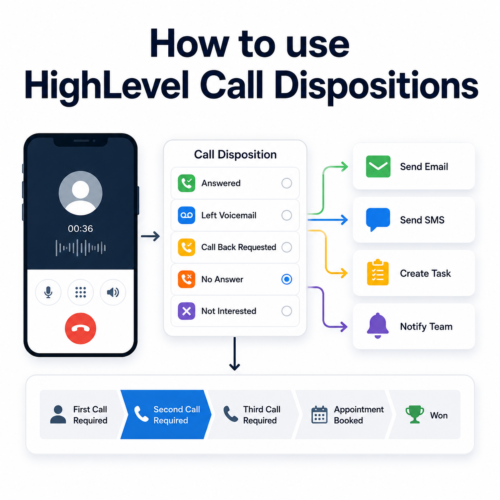
Example. No Answer

If the salesperson selects No Answer, HighLevel could automatically:

  • send an email saying that you have just tried to call
  • send an SMS asking the prospect to call back
  • move the opportunity to Second Call Required
  • create a task for the salesperson to call again tomorrow

Example. Appointment Booked

If the salesperson selects Appointment Booked, HighLevel could:

  • move the opportunity to Appointment Scheduled
  • send an appointment confirmation
  • send email and SMS reminders
  • notify the assigned salesperson

Example. Sale Won

If the salesperson selects Sale Won, HighLevel could:

  • move the opportunity into a New Customer stage
  • start the customer onboarding process
  • notify the delivery team
  • create internal fulfilment tasks
  • schedule a future review request

The result is very similar to using HighLevel’s official Call Disposition feature.

The main difference is where the salesperson records the outcome.

With the official method, the disposition is selected inside the HighLevel dialler.

With the custom method, the disposition is selected from a custom field inside the Opportunity record.

The important point is not where the call outcome is recorded. The important point is that the outcome triggers the correct next step.

The Four Components of an Automated Sales Process

The most effective HighLevel sales systems combine four separate features.

1. Pipelines

Your pipeline shows where every sales opportunity currently sits within your sales process.

Typical stages might include:

  • New Enquiry
  • First Call Required
  • Second Call Required
  • Third Call Required
  • Appointment Booked
  • Proposal Required
  • Awaiting Decision
  • Won
  • Lost

2. Call Scripts

A structured Call Script helps ensure every salesperson asks the right questions and follows the same proven process.

The Call Script can contain:

  • opening questions
  • qualification questions
  • objection-handling guidance
  • pricing information
  • next-step instructions
  • links to supporting resources

You can learn more about using Call Scripts in HighLevel in my related guide:

How to Use Telesales Call Scripts in HighLevel

3. Call Dispositions

At the end of the call, the salesperson records what happened.

This creates a simple decision point that tells HighLevel what to do next.

4. Workflows

The workflow reads the Call Disposition and performs the appropriate actions.

Together, these four features create a sales process that is consistent, repeatable and far less reliant on human memory.

How the Automated Sales Process Works

  1. A new lead enters the sales pipeline.
  2. The salesperson opens the Opportunity.
  3. They follow the HighLevel Call Script.
  4. They make the call.
  5. They record the Call Disposition.
  6. HighLevel automatically performs the correct next steps.

Those next steps could include:

  • moving the opportunity to another pipeline stage
  • creating a follow-up task
  • sending an email
  • sending a text message
  • sending a WhatsApp message
  • notifying the assigned salesperson
  • alerting a manager
  • starting another workflow

The salesperson concentrates on having the conversation.

HighLevel takes care of the administration.

Real-World Example. Photography Studio Snapshot

A recent project illustrates how powerful this can become.

We built a HighLevel snapshot for photography studios that receive a regular flow of enquiries.

The challenge was not necessarily generating more leads.

The challenge was making sure every lead received consistent follow-up and that opportunities did not get forgotten.

The process now works like this.

A new photography enquiry enters the First Call Required stage of the pipeline.

The salesperson opens the Opportunity and follows a structured Call Script to qualify the enquiry.

They then attempt to call the prospect.

The prospect does not answer.

Rather than making a note and hoping they remember to follow up, the salesperson selects the No Answer Call Disposition.

Everything else happens automatically.

Within seconds, HighLevel:

  • sends a personalised email explaining that the studio has just tried to call
  • sends a text message asking the prospect to call back or reply with a convenient time
  • moves the Opportunity from First Call Required to Second Call Required
  • creates a task for the salesperson to call again the following day
  • records the activity against the contact and Opportunity
  • updates the sales pipeline automatically

If the second call also goes unanswered, selecting the relevant disposition moves the Opportunity to Third Call Required.

A new follow-up task is created and the prospect can receive a different email and text message.

Nobody has to remember what happens next.

The Call Disposition tells the workflow what decision has been made, and the workflow carries out the process automatically.

Automatically Moving Opportunities Through Your Pipeline

One of the biggest reasons sales pipelines become inaccurate is that salespeople forget to move Opportunities after calls.

After a few weeks, the pipeline no longer reflects reality.

Opportunities remain in New Enquiry even though several calls have been attempted.

Customers who have already booked appointments remain in a follow-up stage.

Sales that have been won are still shown as open.

Call Disposition automation helps solve this problem by moving Opportunities automatically.

Call Disposition Pipeline Stage Automation
No Answer Second Call Required Send email and SMS, then create a task for tomorrow
No Answer. Second Attempt Third Call Required Send a different follow-up and create another task
Left Voicemail Waiting for Response Send a message referencing the voicemail
Call Back Requested Callback Required Create a dated callback task
Appointment Booked Appointment Scheduled Send confirmation and reminder messages
Qualified Proposal Required Create a proposal task and notify the salesperson
Proposal Sent Awaiting Decision Start a structured proposal follow-up sequence
Sale Won New Customer Begin onboarding and notify the delivery team
Not Interested Long-Term Nurture Add the prospect to an appropriate nurture campaign
Wrong Number Closed Stop future telephone follow-up
Do Not Call Closed Apply the appropriate DND settings and stop outbound calls

This creates a pipeline that is far more likely to reflect what is actually happening.

Managers can trust the reports, and salespeople spend less time on administration.

Decision-Based Automation

Most businesses automate tasks.

The best businesses automate decisions.

Instead of creating one workflow that sends every prospect the same email, HighLevel asks:

What happened during the call?

The answer determines what happens next.

A prospect who did not answer receives one customer journey.

A qualified lead receives another.

A customer who has purchased enters onboarding.

A prospect who is not ready to proceed can enter a long-term nurture sequence.

A wrong number is removed from future calling activity.

Every customer receives the appropriate follow-up based on the actual outcome of the conversation.

Call Scripts and Call Dispositions Work Together

Call Scripts and Call Dispositions solve two different parts of the same problem.

The Call Script tells your salesperson what to say.

The Call Disposition tells HighLevel what happened.

The workflow then tells HighLevel what to do next.

Together, they create a sales process that is:

  • consistent
  • measurable
  • repeatable
  • scalable
  • easier for staff to follow

A new salesperson does not have to remember every follow-up rule from their first day.

They follow the script, record the outcome and allow HighLevel to guide the next stage of the process.

Taking Call Disposition Automation Further

Once your basic system is working, you can build much more advanced automations around the same call outcomes.

You could automatically:

  • assign follow-up calls to different salespeople
  • notify managers when high-value Opportunities require attention
  • trigger proposal preparation workflows
  • send WhatsApp messages instead of SMS
  • update lead scores
  • add or remove tags
  • notify your accounts team when a sale is won
  • create onboarding tasks
  • trigger review requests after successful projects
  • launch customer referral campaigns
  • escalate complaints to a customer service manager

Every Call Disposition can become the starting point for a different automated customer journey.

Your CRM Should Think Like Your Best Salesperson

An experienced salesperson usually knows what needs to happen after every conversation.

If the prospect does not answer, try again tomorrow.

If they request a proposal, prepare it quickly.

If they book an appointment, stop sending general sales follow-up and begin appointment reminders.

If they become a customer, stop selling and start onboarding.

If they ask not to be called again, respect that request and update the CRM.

HighLevel allows you to build those decisions into your workflows.

This means every salesperson follows the same process, even when your most experienced team member is not available.

Why This Matters

Businesses often invest in CRM software expecting it to improve sales.

Software alone does not improve sales.

Processes do.

HighLevel gives you the tools to document, standardise and automate those processes.

When your team no longer has to remember whether to send an email, move an Opportunity or schedule another call, they can focus on what they are actually employed to do.

  • Build relationships.
  • Have better conversations.
  • Close more sales.
  • Look after customers.

Everything else can happen automatically.

Julian Mills’ View

When I work with clients, I rarely start by asking which emails they want to automate.

Instead, I ask:

What decisions does your best salesperson make after every conversation?

Those decisions become the blueprint for the automation.

Whether you use HighLevel’s built-in Call Disposition feature or create your own custom Call Disposition field within the Opportunity record, the principle is exactly the same.

Every call outcome should trigger the next logical step.

That is how we build HighLevel systems that genuinely save time, improve consistency and increase conversions.

If your sales team is still relying on memory, sticky notes or spreadsheets after every telephone call, Call Dispositions could be one of the most valuable features you have not yet fully implemented.

Automate the decisions, not just the tasks, and your CRM becomes far more than a database.

It becomes a system that actively helps your team sell more effectively.

Frequently Asked Questions

What is a HighLevel Call Disposition?

A Call Disposition records the outcome of a telephone call. HighLevel can use that outcome to trigger workflows, move Opportunities through a pipeline, create tasks and send automated follow-up communications.

Can Call Dispositions trigger HighLevel workflows?

Yes. Depending on how your system is configured, a Call Disposition can trigger emails, text messages, tasks, notifications, pipeline movements and other workflow actions.

Can Call Dispositions automatically move Opportunities through a pipeline?

Yes. For example, selecting No Answer could move an Opportunity from First Call Required to Second Call Required, send an email and SMS, and create a task for the following day.

Can I use Call Dispositions if I do not use HighLevel’s phone system?

Yes. You can create a custom Call Disposition field within the Opportunity record and trigger workflows whenever the Opportunity is updated and the field contains a specific value.

Should I use a Contact custom field or an Opportunity custom field?

In most sales pipeline situations, an Opportunity custom field is the better choice because the call outcome relates to a specific sales Opportunity. A contact might have more than one Opportunity over time, so storing the disposition against the Opportunity helps keep the sales history separate.

Should I use a dropdown or radio select field?

Either can work. A dropdown takes up less space, while a radio select field makes all the available outcomes immediately visible to the salesperson. The best choice depends on the number of dispositions and how your team uses the Opportunity record.

Can I create my own Call Dispositions?

Yes. You can create outcomes that match your own sales or customer service process, such as Qualified, Proposal Required, Appointment Booked, Sale Won, No Answer, Call Back Requested, Not Interested or Do Not Call.

Do Call Scripts work with Call Dispositions?

Yes. A Call Script guides the salesperson through the conversation. The Call Disposition records the outcome. HighLevel then uses that outcome to trigger the appropriate workflow.

What is the difference between a Call Script and a Call Disposition?

A Call Script tells the salesperson what to say and which questions to ask. A Call Disposition records what happened during the call and tells HighLevel which automation should happen next.

Can I send an email and text message after a No Answer disposition?

Yes. A No Answer disposition can trigger an immediate email and SMS explaining that you have just tried to call and asking the prospect to call back or reply with a convenient time.

Can the same Call Disposition produce different outcomes?

Yes. Your workflow can also check the current pipeline stage, previous call attempts, lead value, salesperson or other data before deciding which action to take. For example, No Answer from the First Call Required stage could move the Opportunity to Second Call Required, while No Answer from the Second Call Required stage could move it to Third Call Required.

Can Call Dispositions help with reporting?

Yes. Recording call outcomes consistently helps managers understand how many calls are being made, how many prospects answer, how often callbacks are requested and which outcomes eventually lead to appointments or sales.

Are Call Dispositions suitable for customer service teams?

Yes. Customer service dispositions might include Resolved, Waiting for Customer, Escalated, Follow-Up Required or Complaint. Each outcome can trigger the appropriate tasks, notifications and customer communications.

Are Call Dispositions suitable for small businesses?

Yes. Smaller businesses can benefit significantly because automation removes manual administration, keeps pipelines accurate and helps ensure every enquiry receives consistent follow-up.

Need Help Building a Smarter Sales Process?

If you would like help implementing Call Scripts, Call Dispositions, Pipelines and Workflow Automation in your own HighLevel account, I would be delighted to help.

Whether you are starting from scratch or improving an existing system, we can help you build a sales process that is easier for your team to follow and delivers a more consistent experience for every customer.

Julian Mills HighLevel Consultant and Marketing Automation Strategist

About the Author

Julian Mills

HighLevel Consultant & Marketing Automation Strategist

Julian Mills helps business owners automate lead generation, sales follow-up, customer communication and business processes using HighLevel and MarketerM8. Since 2009 he has helped businesses implement CRM, marketing automation and AI-powered systems that save time, improve customer experience and generate more sales.

About Julian
Book a Discovery Call
Join a Free HighLevel Workshop
Learn About HighLevel with MarketerM8

How to Use Telesales Call Scripts in HighLevel

telesales call scripts in highlevel
telesales call scripts in highlevelIf your team regularly makes sales calls, follow-up calls or customer service calls,


HighLevel Call Scripts can help you improve consistency, boost conversions
and reduce training time.Instead of relying on memory, your team can have a proven script displayed alongside the
phone call. This helps ensure every important question is asked and every conversation ends
with a clear next step.

It is one of those HighLevel features that is easy to miss. Once you start using it, you may
wonder how your team managed without it.

What Are Call Scripts in HighLevel?

Call Scripts allow you to create reusable scripts that your team can view while making phone
calls through HighLevel’s built-in phone system.

A script can be opened during a live call, giving your team prompts, questions, objection
handling and closing statements exactly when they need them.

If the conversation changes direction, the user can switch to a different script without
ending the call.

Think of Call Scripts as a digital sales playbook that is always available during every
conversation.

Why Use Call Scripts?

Even experienced telesales salespeople occasionally forget to ask an important question or mention a
key benefit.

HighLevel Call Scripts help ensure every prospect or customer receives a consistent
experience.

Some of the main benefits include:

  • Better sales conversations
  • Faster onboarding for new staff
  • Consistent messaging across your team
  • Easier objection handling
  • Higher conversion rates
  • Less reliance on memory
  • Greater confidence on the phone

Call Scripts are just as useful for customer service teams as they are for sales teams.

Who Should Use HighLevel Call Scripts?

Almost any business that regularly speaks to prospects or customers by phone can benefit
from using Call Scripts.

Examples include:

  • Marketing agencies
  • Estate agents
  • Mortgage advisers
  • Dentists
  • Accountants
  • Trades businesses
  • Coaches and consultants
  • Recruitment agencies
  • Customer support teams
  • Appointment setters

How to Set Up Call Scripts in HighLevel

Creating a Call Script in HighLevel only takes a few minutes.

Inside your HighLevel sub-account, navigate to:

Settings > Phone System > Voice > Call Scripts

Then follow these steps:

  1. Click Add Script.
  2. Give your script a clear and descriptive name.
  3. Enter or paste your call script into the editor.
  4. Review the script and make any required changes.
  5. Click Save.

You can create different scripts for different products, services, types of prospect and
stages of your sales process.

How to Use a Call Script During a Live Call

When making a call through HighLevel’s phone system, click the
Scripts button inside the call window.

Select the script you want to use and it will appear alongside the live call.

If the conversation changes, you can switch to another script without interrupting the call.
For example, you might start with a new enquiry script and then switch to a price objection
script if the prospect raises concerns about cost.

This gives your team guidance and confidence while still allowing the conversation to feel
natural.

Examples of HighLevel Call Scripts

Most businesses will benefit from creating a library of scripts rather than relying on a
single script for every conversation.

New Lead Qualification Script

Use this script to understand what the prospect needs, establish whether they are a good fit
and agree on the next step.

Discovery Call Script

A discovery call script can help your team ask structured questions about the prospect’s
goals, challenges, budget, timing and decision-making process.

Product Demonstration Script

Use a demonstration script to guide prospects through the most relevant features and
benefits while addressing common questions.

Follow-Up Call Script

A follow-up script can help your team reconnect with prospects who have received a proposal,
attended a demonstration or expressed interest but have not yet made a decision.

Existing Customer Upsell Script

Use this script to introduce additional products or services based on the customer’s existing
purchase, needs or previous conversations.

Review Request Script

A review request script can help your team ask satisfied customers to leave a genuine review
on Google, Facebook or another relevant platform.

Referral Request Script

Use a referral script to ask happy customers whether they know anyone else who may benefit
from your services.

Combine Call Scripts with Call Dispositions

Call Scripts tell your team what to say.

Call Dispositions record what happened once the call has
finished.

After completing a call, your team might select a disposition such as:

  • Appointment Booked
  • Follow-Up Required
  • Left Voicemail
  • No Answer
  • Quote Requested
  • Not Interested
  • Existing Customer
  • Wrong Number

Depending on how your HighLevel account is configured, Call Dispositions can be used to help
standardise follow-up actions and reporting.

They may form part of a wider process that:

  • Triggers a HighLevel workflow
  • Sends an email or SMS message
  • Creates a follow-up task
  • Updates an opportunity
  • Moves a prospect through a sales pipeline
  • Reports on call outcomes

Together, Call Scripts and Call Dispositions can help create a more consistent phone process.
Your team knows what to cover during the call and can accurately record the result afterwards.

Check out my blog post on Call Dispositions.

Use AI to Improve Your Call Scripts

You do not have to write every call script from scratch.

Tools such as ChatGPT and HighLevel’s AI features can help you:

  • Create scripts for different industries
  • Improve your qualifying questions
  • Draft responses to common objections
  • Rewrite scripts in your preferred tone of voice
  • Create different versions for different types of prospect
  • Shorten long scripts into practical call prompts
  • Improve scripts based on feedback from your sales team

The important point is that someone should review the finished script before it is used.
AI can help you produce a useful first draft, but the script should still reflect your
services, customers and real sales process.

Best Practices for HighLevel Call Scripts

Keep the Script Conversational

Avoid creating a long block of text that your team has to read word for word. Customers can
usually tell when someone is reading from a rigid script.

Use Prompts Rather Than Paragraphs

Short prompts, questions and reminders are often easier to use during a live conversation.

Include Qualifying Questions

Make sure the script helps your team understand the prospect’s needs, urgency, budget and
decision-making process.

Add Common Objections

Include short responses to the objections your team hears most often, such as concerns about
price, timing, contracts or implementation.

Finish with a Clear Next Step

Every script should lead towards a clear outcome, such as booking a meeting, arranging a
demonstration, sending a proposal or agreeing on a follow-up date.

Review Your Scripts Regularly

Your scripts should evolve as your services change and your team learns which questions and
responses work best.

Common Call Script Mistakes

Avoid these common mistakes:

  • Reading the script word for word
  • Using the same script for every type of prospect
  • Creating scripts that are too long
  • Forgetting to include qualifying questions
  • Failing to agree on a clear next step
  • Not updating scripts as your business changes
  • Giving staff scripts without explaining how to use them

A Call Script should guide the conversation. It should not prevent your team from listening
and responding naturally.

Julian Mills’ View

Call Scripts are one of HighLevel’s hidden gems.

They are simple to set up, but they can make a noticeable difference to the consistency of
your sales and customer service calls.

I do not recommend reading a script word for word. Customers can usually tell when someone
sounds robotic.

Instead, think of your Call Script as a checklist of the important questions, benefits,
objections and next steps you want to cover.

Used properly, scripts help ensure every customer receives a consistent experience while
still allowing the person making the call to use their own personality and judgement.

When combined with HighLevel’s phone system, pipelines, workflows, AI and Call Dispositions,
Call Scripts can become an important part of a repeatable sales process.

Frequently Asked Questions About HighLevel Call Scripts

Can I create multiple Call Scripts in HighLevel?

Yes. You can create different scripts for products, services, teams, prospect types and
stages of your sales process.

Can I switch scripts during a call?

Yes. If the conversation changes direction, you can select a different script while the call
is still in progress.

Should my team read the script exactly?

No. In most cases, the script should be used as a guide. It should help the user remember
important questions and talking points while keeping the conversation natural.

Can Call Scripts trigger automations?

The script itself is designed to guide the conversation. For follow-up automation, you may
use features such as workflows, pipeline updates, tasks and Call Dispositions.

Can AI write my HighLevel Call Scripts?

AI can help create a first draft, improve objection handling and adapt a script for different
audiences. The finished script should still be reviewed and tested by your team.

What is the difference between Call Scripts and Call Dispositions?

Call Scripts guide what your team says during the conversation. Call Dispositions help
categorise or record the outcome after the call. Check out my blog post on Call Dispositions.

Final Thoughts

HighLevel Call Scripts are a simple feature that can make a significant difference to the
quality and consistency of your phone conversations.

Whether you are onboarding new staff, improving sales performance or trying to provide a
consistent customer experience, Call Scripts give your team a practical framework to follow.

For even better results, combine Call Scripts with Call Dispositions, HighLevel workflows,
opportunity pipelines and AI-assisted follow-up.

This helps you create a more complete process, from the first conversation through to the
agreed next step.

Need Help Setting Up HighLevel?

I help UK businesses, marketing consultants and agencies get more value from HighLevel using
a practical, Done With You approach.

We can help you plan your phone processes, create effective Call Scripts, configure your
sales pipeline and build the workflows needed to follow up every call.


Book a discovery call with Julian Mills.

Julian Mills HighLevel Consultant and Marketing Automation Strategist

About the Author

Julian Mills

HighLevel Consultant & Marketing Automation Strategist

Julian Mills helps business owners automate lead generation, sales follow-up, customer communication and business processes using HighLevel and MarketerM8. Since 2009 he has helped businesses implement CRM, marketing automation and AI-powered systems that save time, improve customer experience and generate more sales.

About Julian
Book a Discovery Call
Join a Free HighLevel Workshop
Learn About HighLevel with MarketerM8

🎓 HighLevel Live Training Workshop #1: GoHighLevel for Beginners: Free HighLevel Foundations Training : 10 November 2026

highlevel training workshop for beginners

If you’ve just started using HighLevel, it can be difficult to know where to begin.

HighLevel does a lot.

CRM, email marketing, SMS, WhatsApp, calendars, sales pipelines, forms, websites, funnels, workflows, social media, reviews, payments, courses and increasingly AI all sit inside one platform.

That’s incredibly powerful.

But when you first log in, it can also leave you wondering:

“What do I actually need to learn first?”

That’s exactly why we created our HighLevel Foundations for Beginners workshop.

It’s the first workshop in MarketerM8’s rolling programme of 13 free live HighLevel training workshops and is designed to give new HighLevel users the foundations they need before moving on to the more advanced parts of the platform.

But there’s something important about the way I teach HighLevel.

We’re not learning HighLevel simply for the sake of learning software.

We’re learning how to use it to improve the way your business markets, sells and looks after customers.


HighLevel Foundations for Beginners free live training workshop

New to HighLevel?

Join our free live HighLevel Foundations workshop and learn the essential building blocks you need to get started with HighLevel.

Register for the next Free HighLevel Foundations Training Workshop

HighLevel for Beginners: Where Should You Start?

One of the biggest mistakes I see new HighLevel users make is trying to learn everything.

You don’t need to.

In fact, I’d recommend that you don’t.

HighLevel is a huge platform, and there will almost certainly be parts of it that your business doesn’t need yet.

Instead, start by understanding the basic building blocks.

I’d concentrate initially on six things.

1. Understand Your HighLevel Account

Before building anything complicated, learn your way around.

Understand where your contacts live, where conversations appear, where opportunities are managed, where your calendars sit and where automations are built.

You don’t need to understand every menu option.

You need to become comfortable enough that HighLevel stops feeling unfamiliar.

2. Understand Contacts

At the heart of HighLevel is your contact database.

A contact might be a prospect, customer, past customer or another person your business communicates with.

Their record can hold information such as their name, email address and telephone number, alongside custom information specific to your business.

Understanding contacts is therefore one of the first things I’d recommend any HighLevel beginner learns.

3. Understand Conversations

One of HighLevel’s strengths is bringing different customer communications together.

Depending on how your account is configured, your team can potentially manage communications across channels such as email, SMS, telephone and WhatsApp from within HighLevel.

For a beginner, the important concept isn’t necessarily how every communication feature works.

It’s understanding that HighLevel can become a central place for managing customer conversations.

4. Understand Pipelines and Opportunities

This is one of the areas that can initially confuse new HighLevel users.

A contact is a person.

An opportunity represents a potential deal or sale associated with a contact.

A pipeline represents the sales process that opportunity moves through.

For example:

John Smith → £5,000 potential project → Sales Pipeline → Proposal Sent

Once you understand that distinction, HighLevel’s Opportunities area starts to make considerably more sense.

5. Understand Calendars

If people book appointments with your business, HighLevel’s calendars can potentially replace separate scheduling tools.

But the bigger lesson for a beginner isn’t simply learning how to create a calendar.

Think about the customer journey around the appointment.

What happens when someone books?

Should they receive confirmation?

Do they need a reminder?

Should somebody on your team be notified?

What happens if they cancel?

What happens if they don’t show up?

This is where HighLevel starts moving from being a booking system to becoming a marketing automation platform.

6. Understand the Basic Idea Behind Workflows

Workflows are where HighLevel becomes particularly powerful.

But don’t start by trying to build an enormous automation.

Start with the basic concept:

Something happens → HighLevel automatically does something else.

For example:

Someone submits an enquiry form → Send confirmation email → Notify salesperson → Create opportunity

Once you understand that basic principle, you can gradually build more sophisticated automations.

You can also explore HighLevel’s official Getting Started with Workflows guide.

Don’t Start With Complicated HighLevel Automations

This deserves emphasising.

HighLevel beginners often see demonstrations of sophisticated automations and immediately want to build them.

I’d resist that temptation.

A 75-step workflow isn’t necessarily better than a five-step workflow.

In fact, if you don’t properly understand what you’re automating, you can simply make a bad process happen faster.

Start with simple, useful wins.

  • New enquiry → Immediate acknowledgement
  • Appointment booked → Confirmation + reminder
  • Missed telephone call → Automatic text message
  • New customer → Welcome message + internal notification

Learn how those work.

Test them.

Understand what happens to the contact.

Then build from there.

Marketing First. HighLevel Second.

This is one of the most important things I try to teach new HighLevel users.

Before asking:

“How do I build this in HighLevel?”

ask:

“What am I trying to achieve?”

That’s a subtle difference, but an important one.

HighLevel gives you an enormous toolbox.

But owning an enormous toolbox doesn’t automatically make you a good carpenter.

You can build an elaborate email sequence around a poor offer.

You can automate a bad sales process.

You can create a sophisticated pipeline nobody in your business actually uses.

You can introduce AI where a simple human conversation would work better.

So we start with the business and marketing objective.

Then we decide how HighLevel can help.

HighLevel Training Backed by Real Marketing Experience

This is also what makes our Foundations training a little different.

I’m not simply somebody who has learned how to use HighLevel.

I’ve worked hands-on in direct marketing since 1996 and with CRM and marketing automation since 2009.

Since 2009, I’ve helped hundreds of businesses improve, automate and systemise their marketing.

I’m also a Certified Entrepreneurs Circle Marketing Coach and have helped Entrepreneurs Circle GenieAI subscribers implement AI and marketing automation in their businesses.

Through my own HighLevel agency, MarketerM8, I’ve personally onboarded more than 100 new HighLevel users.

So when I’m teaching HighLevel, I’m effectively wearing three hats:

  • The Marketer
  • The Marketing Automation Specialist
  • The Marketing Coach

That means we can discuss not only how something works in HighLevel, but why you might want to use it in the first place.

What Will You Learn in the HighLevel Foundations Workshop?

The Foundations workshop is designed to help new users get comfortable with HighLevel and understand how the major building blocks fit together.

We’ll look at areas such as:

  • navigating HighLevel;
  • understanding contacts;
  • conversations;
  • calendars;
  • pipelines and opportunities;
  • the basic principles of workflows and automation;
  • how the different parts of HighLevel connect;
  • common mistakes new users make;
  • and how to decide what you should learn next.

This isn’t about turning you into a HighLevel expert in an hour.

That’s unrealistic.

The objective is to give you the foundations on which you can build.


Free live HighLevel Foundations training workshop for beginners

Learn HighLevel Live, Not Just From Videos

Join Julian Mills for the free live Foundations workshop. Learn the HighLevel basics, see how the different parts fit together and ask questions as we work through the platform.


Register for the next Free HighLevel Foundations Training Workshop

This Is the First of 13 Free HighLevel Workshops

Foundations isn’t a standalone course.

It’s the starting point in MarketerM8’s rolling programme of 13 free live HighLevel training workshops.

Once you’ve got the basics, we can go deeper into individual areas such as:

  • Email Marketing
  • Calendars & Appointments
  • Sales Pipelines & Opportunities
  • Workflows & Automation
  • Database Management
  • Forms, Surveys & Quizzes
  • Websites & Funnels
  • Social Media & Reputation Management
  • Courses & Communities
  • Ecommerce
  • Advertising
  • HighLevel AI

You don’t have to attend every workshop.

Choose the subjects that are relevant to what you’re trying to achieve.

Do I Need to Be a MarketerM8 Customer?

No.

The live HighLevel workshops are designed to help people learn the platform, whether you’re already a MarketerM8 subscriber or simply interested in getting more from HighLevel.

If you’re considering HighLevel and want to understand what the platform can actually do before making decisions about it, the Foundations workshop is also a useful place to start.

What If I Need More Than a Free HighLevel Workshop?

Sometimes a workshop is enough.

Sometimes you have a specific problem that isn’t going to be solved in a group training session.

That’s where I also provide remote HighLevel training and Done-With-You implementation, working directly with you on your own HighLevel account.

For teams and larger projects, on-site HighLevel training and implementation is also available throughout the UK and internationally.

And if you’re simply stuck, take a look at my guide to HighLevel support in the UK.

The important thing is to use the right type of help for the problem you’re trying to solve.

Frequently Asked Questions About GoHighLevel for Beginners

What Is GoHighLevel?

GoHighLevel, generally branded simply as HighLevel, is a CRM, sales and marketing automation platform.

It brings together tools that businesses might otherwise purchase separately, including contact management, sales pipelines, email and SMS marketing, calendars, forms, websites, funnels, automation and other features.

If you’re completely new to the platform, you can also explore HighLevel’s official Getting Started resources.

Are GoHighLevel and HighLevel the Same Thing?

Yes.

You’ll commonly see the platform referred to as both GoHighLevel and HighLevel.

If you’re searching for GoHighLevel training for beginners or HighLevel training for beginners, you’re talking about the same platform.

Is GoHighLevel Difficult for Beginners to Learn?

HighLevel isn’t inherently difficult, but its size can make it initially feel complicated.

The mistake is trying to understand everything at once.

Learn the fundamentals first, then concentrate on the HighLevel features that solve real problems for your business.

You don’t need to master every feature to start getting value from the platform.

Where Should a Beginner Start With HighLevel?

I’d start with your contacts, conversations, calendars, pipelines and basic workflows.

More importantly, understand how those areas connect.

For example, a new contact might submit a form, automatically enter a workflow, receive an email and become an opportunity in your sales pipeline.

Once you understand those relationships, HighLevel becomes much easier to grasp.

What Should I Set Up First in HighLevel?

Before launching complex marketing campaigns, get the foundations right.

That normally means your users, contact data and essential communications, followed by the calendars, pipelines and basic automations your business actually needs.

Don’t build things simply because HighLevel allows you to build them. Start with the processes that are important to your business.

Do I Need Coding Skills to Use HighLevel?

No.

You can use the core HighLevel CRM, calendars, pipelines, forms, marketing and workflow features without being a programmer.

There are more advanced situations where technical knowledge can be useful, particularly when working with APIs, webhooks, custom code or complex integrations.

But you certainly don’t need to be a developer to get started with HighLevel.

How Long Does It Take to Learn GoHighLevel?

There’s no meaningful single answer because it depends on what you need HighLevel to do.

You can understand the basic principles relatively quickly.

Becoming confident with workflows, CRM structure, integrations, marketing automation and more advanced features takes longer.

I wouldn’t set yourself the objective of “learning HighLevel”.

Set yourself the objective of learning the parts of HighLevel your business needs next.

Can I Learn HighLevel Myself?

Yes.

There are extensive learning resources available, including HighLevel’s official Getting Started resources.

You can also read my guide to learning how to use HighLevel.

MarketerM8’s free workshops give you another option if you prefer live training where the software can be explained in a business and marketing context.

What Are the Most Important HighLevel Features for Beginners?

I’d prioritise contacts, conversations, calendars, opportunities and pipelines, followed by simple workflows.

The exact order depends on your business.

A consultant who books discovery calls might need calendars immediately.

A company with several salespeople might benefit from understanding pipelines first.

A business generating lots of online enquiries may want to concentrate on forms and follow-up automation.

Your business should determine your HighLevel priorities.

Should a Beginner Start Building HighLevel Workflows Straight Away?

Yes, but start simple.

A workflow is essentially a sequence of automated actions that begins when something happens. HighLevel calls that starting event a trigger.

Build something you can easily understand and test.

For example:

Form submitted → Confirmation email → Notify salesperson

Once you understand that, start adding complexity where complexity genuinely adds value.

What Is a HighLevel Pipeline?

A pipeline is a visual representation of a process, commonly your sales process.

You might have stages such as:

New Enquiry → Qualified → Appointment Booked → Proposal Sent → Won/Lost

An opportunity representing a potential sale moves through those stages as the relationship progresses.

Your pipeline should reflect the way your business actually sells rather than simply copying somebody else’s pipeline structure.

What’s the Difference Between a Contact and an Opportunity in HighLevel?

A contact is the person.

An opportunity is a potential deal or sale involving that person.

One contact can therefore exist in your database without necessarily representing an active sales opportunity.

Understanding this distinction is important when you start using HighLevel as a CRM rather than simply as a contact database.

Can HighLevel Replace My Existing CRM?

Potentially, yes.

But whether it should replace your CRM depends on your requirements, existing systems, integrations and how your business operates.

Don’t migrate simply because HighLevel has a CRM.

First understand what your current CRM does, what you need to preserve and what you’re hoping to improve.

Can HighLevel Replace Calendly, Mailchimp and Other Marketing Tools?

HighLevel includes functionality that overlaps with many standalone tools, including appointment scheduling and email marketing.

Whether you should replace a particular piece of software depends on how you currently use it.

The objective shouldn’t be:

“Let’s replace everything.”

It should be:

“Can consolidating these tools make our business simpler or better?”

Does HighLevel Include AI?

Yes.

AI now appears across a growing number of areas within HighLevel.

For a beginner, however, I wouldn’t make AI your starting point.

First understand the process you’re trying to improve.

Then ask whether AI is the appropriate way to improve or automate it.

Is the HighLevel Foundations Workshop Really Free?

Yes.

The Foundations for Beginners workshop is part of MarketerM8’s programme of free live HighLevel workshops.

There’s no charge to attend the live workshop.

Do I Need to Be a MarketerM8 Customer to Attend?

No.

You can attend the free HighLevel workshops without being a MarketerM8 HighLevel subscriber.

Can I Ask Questions During the Live HighLevel Workshop?

Yes.

One of the advantages of attending live rather than simply watching another prerecorded HighLevel tutorial is the opportunity to learn in a live environment and ask questions.

What Should I Learn After HighLevel Foundations?

Don’t automatically move on to the most advanced feature you can find.

Move on to the next thing your business actually needs.

That’s why our workshops are split into individual subjects.

If appointment booking is important, learn Calendars.

If you have a sales team, learn Pipelines & Opportunities.

If you want to automate follow-up, learn Workflows.

If your database needs organising, learn Database Management.

And if you’re not sure, follow the full free HighLevel training programme in order.

Ready to Learn HighLevel?

If you’re new to GoHighLevel, don’t worry about becoming an expert.

Start with the foundations.

Understand the basic building blocks, understand what you’re trying to achieve and then gradually build your knowledge from there.

That’s exactly what the HighLevel Foundations for Beginners workshop is designed to help you do.


Register for the free HighLevel Foundations for Beginners workshop

Ready to Build Your HighLevel Foundations?

Join the free live HighLevel Foundations for Beginners workshop and start learning HighLevel with the essential building blocks first.


Register for the next Free HighLevel Foundations Training Workshop

Julian Mills HighLevel Consultant and Marketing Automation Strategist

About the Author

Julian Mills

HighLevel Consultant & Marketing Automation Strategist

Julian Mills helps business owners automate lead generation, sales follow-up, customer communication and business processes using HighLevel and MarketerM8. Since 2009 he has helped businesses implement CRM, marketing automation and AI-powered systems that save time, improve customer experience and generate more sales.

About Julian
Book a Discovery Call
Join a Free HighLevel Workshop
Learn About HighLevel with MarketerM8

How to Get More Google Reviews. 5 Proven Strategies That Actually Work (Including How to Automate the Entire Process)

How to Get More Google Reviews. 5 Proven Strategies That Actually Work (Including How to Automate the Entire Process)

How to Get More Google Reviews. 5 Proven Strategies That Actually Work (Including How to Automate the Entire Process)Quick Answer

If you’re looking for the fastest way to generate more Google reviews, the answer is surprisingly simple.

Ask every happy customer at the right moment, make leaving a review effortless, and build a system that asks consistently instead of relying on memory.

Most businesses don’t struggle because customers are unwilling to leave reviews. They struggle because they ask too late, make the process difficult, or simply forget to ask.

The businesses that consistently collect five-star Google reviews don’t necessarily provide a better service than everyone else. They simply have a better review process.

Throughout this guide I’ll show you how to build a repeatable review generation system using HighLevel automation, while staying firmly within Google’s review guidelines.

Key Takeaways

  • Google rewards businesses that receive a regular stream of authentic reviews.
  • Ask customers immediately after delivering value, while the experience is still fresh.
  • Remove as much friction as possible by using direct review links, QR codes and NFC review cards.
  • Customers should always write and submit reviews in their own words.
  • Avoid using AI to generate customer reviews, as this could breach Google’s review policies.
  • AI is extremely effective for automating review requests, replying to reviews and managing your review workflow.
  • The best businesses don’t just collect reviews. They turn happy customers into long-term advocates.

Why Google Reviews Matter More Than Ever

Twenty years ago people asked friends, neighbours and colleagues for recommendations.

Today they ask Google.

Increasingly, they also ask AI assistants such as ChatGPT, Gemini, Claude and Perplexity.

Whether someone is looking for a plumber, accountant, dentist, solicitor, consultant or software provider, one of the very first things they look at is your online reviews.

Your Google Business Profile has become your digital shop window.

Potential customers often decide whether to contact you before they’ve even visited your website.

That’s why Google reviews influence far more than just your reputation.

  • Local search rankings
  • Google Maps visibility
  • Click-through rates
  • Customer trust
  • Enquiry rates
  • Sales conversions
  • Repeat business

Two businesses offering almost identical services can receive dramatically different numbers of enquiries simply because one has hundreds of recent reviews while the other has only a handful.

Reviews have become social proof at scale.

Google Isn’t Looking for Perfect Businesses

Here’s something many business owners misunderstand.

Google doesn’t expect perfection.

It expects authenticity.

A business with 400 reviews averaging 4.8 stars often appears more trustworthy than one with 12 reviews averaging 5.0 stars.

Why?

Because customers understand that no business can please everybody all of the time.

A steady flow of genuine reviews tells both Google and potential customers that your business is active, trusted and continuing to serve real people.

That steady flow is far more valuable than collecting twenty reviews one month and then none for the next year.

Consistency beats intensity.

The Rise of AI Search

Something else has changed over the last couple of years.

People are no longer simply typing questions into Google.

They’re asking ChatGPT.

They’re asking Gemini.

They’re asking Claude.

They’re asking Perplexity.

Instead of searching:

Best accountant near me

People increasingly ask:

Which accountant in Manchester has the best reviews for small businesses?

AI assistants are becoming another layer between customers and search engines.

That makes your online reputation even more valuable.

The businesses that consistently receive authentic, descriptive reviews are creating signals that benefit both traditional search engines and the rapidly growing world of AI search.

Important. Don’t Use AI to Write Customer Reviews

Before we go any further, it’s important to address something that has become increasingly common.

Many businesses are experimenting with AI to draft reviews for customers before asking them to copy and paste them into Google.

Personally, I don’t recommend this approach.

Google expects reviews to reflect the genuine opinions and experiences of the customer who actually received the product or service.

Although AI can be an incredibly useful business tool, using it to generate reviews on behalf of customers risks falling outside Google’s review policies.

If Google believes reviews have been artificially generated or manipulated, the consequences could include:

  • Individual reviews being removed.
  • Large numbers of reviews being filtered out.
  • Your Google Business Profile being restricted or suspended.
  • Serious or repeated breaches putting your online visibility at significant risk.

My advice is simple.

Always encourage customers to write honest reviews based on their own experience and in their own words.

Where AI really shines is helping your business, not writing reviews for your customers.

Throughout this guide I’ll show you how HighLevel uses AI safely and effectively to automate review requests, reply to reviews, analyse customer sentiment and trigger intelligent follow-up automations.

The Biggest Mistake Most Businesses Make

Whenever I ask business owners how they collect Google reviews, I usually hear something like this.

“We ask when we remember.”

Or…

“We send an email every few months.”

Or perhaps…

“We mention it on our invoices.”

None of those approaches are really a system.

They’re good intentions.

Unfortunately, good intentions don’t produce consistent results.

The businesses collecting dozens or even hundreds of Google reviews every year aren’t necessarily asking more persuasively.

They’re asking more consistently.

That’s a huge difference.

Stop Asking Occasionally. Start Building a System.

Imagine two dentists.

Both provide excellent treatment.

Both have friendly staff.

Both genuinely care about their patients.

Dentist A asks for reviews whenever the receptionist remembers.

Dentist B has an automated process that requests feedback after every completed appointment.

Who do you think collects more reviews?

Exactly.

The quality of the dentistry may be identical.

The quality of the process isn’t.

Introducing The Review Journey

Most businesses think review generation looks like this.

Complete the work

↓

Ask for a review

That’s far too simplistic.

I prefer to think of it as The Review Journey.

Deliver Outstanding Service

↓

Confirm Customer Satisfaction

↓

Collect Feedback

↓

Request a Review

↓

Customer Writes Genuine Review

↓

Reply to the Review

↓

AI Identifies the Most Likely Customer

↓

Update Contact Record

↓

Referral Campaign

↓

Case Study Request

↓

Generate Repeat Business

↓

Build a Customer Advocate

Notice something important.

The review isn’t the destination.

It’s simply another milestone in building a long-term relationship with your customer.

That’s an important mindset shift.

Strategy 1. Make Leaving a Review Effortless

One of the biggest misconceptions about Google reviews is that people are unwilling to leave them.

In reality, most happy customers are perfectly willing to help.

The real problem is friction.

Every extra click, every extra search and every extra decision dramatically reduces the chances of someone actually completing the review.

Think about the traditional process.

“If you get chance, could you leave us a Google review?”

The customer agrees.

They get back to work.

A few days later they vaguely remember.

Now they have to search for your business, find the correct listing, click Reviews and decide what to write.

It’s no surprise that many good intentions never become published reviews.

The businesses generating large numbers of reviews have one thing in common.

They remove almost every obstacle.

A direct review link is better than asking someone to search.

A QR code is better than asking someone to type a website address.

And there’s something even better.

NFC Review Cards

This is still one of my favourite ways of collecting Google reviews because it’s so simple.

Instead of asking someone to scan a QR code, you simply tap a credit card-sized NFC review card against their phone.

Your Google review page opens instantly.

No typing.

No searching.

No confusion.

They’re perfect for:

  • Tradespeople
  • Dentists
  • Estate agents
  • Consultants
  • Personal trainers
  • Hairdressers
  • Restaurants
  • Retail businesses
  • Networking events
  • Exhibitions

I’ve been so impressed with these cards that I’ve produced my own version.

If you’d like to try one yourself, I’m happy to send you one free of charge. Simply cover the postage and packing.

Claim your free NFC QR Google Review Card here.

The important thing isn’t the card itself.

It’s reducing friction.

Every second you save your customer increases the likelihood they’ll actually leave a review.

Strategy 2. Don’t Rely on Memory

I often ask business owners a simple question.

“Who asks your customers to leave Google reviews?”

The answers are usually something like:

  • “My receptionist.”
  • “My office manager.”
  • “One of the engineers.”
  • “Me.”

Then I ask another question.

“What happens when they’re on holiday?”

Usually there’s a smile.

Because everyone knows what happens.

Review requests stop.

The reality is that people are inconsistent.

We’re busy.

We forget.

We get distracted.

That’s exactly why systems outperform good intentions every single time.

Enter HighLevel Automation

This is where HighLevel becomes incredibly powerful.

Instead of relying on someone remembering to ask for a review, HighLevel remembers for you.

Imagine a customer has just completed a job.

Job Completed

↓

Wait 2 Hours

↓

Send Thank You Email

↓

Wait 3 Days

↓

Send SMS Reminder

↓

Wait 4 Days

↓

Send WhatsApp Message

↓

Still No Review?

↓

Create Task For Team Member to personally reach out

Every customer receives exactly the same professional experience.

No spreadsheets.

No sticky notes.

No relying on someone’s memory.

Just a consistent process running automatically in the background.

Go Beyond a Single Email

Many businesses stop after sending one review request.

If the customer misses the email, the opportunity disappears.

HighLevel allows you to build far more intelligent workflows.

For example:

  • If they don’t open the email, send an SMS.
  • If they don’t reply to the SMS, send a WhatsApp message.
  • If they still don’t respond, notify a member of staff to make a personal follow-up call.

Everything can happen automatically.

Your team only gets involved when they genuinely need to.

Even Direct Mail Can Become Automated

One feature many HighLevel users overlook is direct mail.

Imagine your customer hasn’t responded to your digital reminders.

Instead of giving up, HighLevel could automatically trigger a professionally printed postcard.

The postcard could include:

  • A personalised request.
  • A QR code linking directly to your Google review page.
  • A handwritten-style design.
  • Your branding.

Receiving something physical is unexpected.

Because very few businesses do it, it often gets noticed.

Sometimes old-fashioned marketing still works brilliantly.

Strategy 3. Make Writing a Review Easy

One of the biggest barriers to collecting more Google reviews isn’t that customers don’t want to help.

It’s that they simply don’t get around to doing it.

Life gets busy.

People have good intentions.

Then something else comes along.

The answer isn’t to write the review for them.

The answer is to make writing their own review as easy as possible.

For example:

  • Ask while the experience is still fresh.
  • Provide a direct review link.
  • Keep your request short and friendly.
  • Explain that honest feedback really helps your business.
  • Thank them for taking the time.

Simple changes like these can dramatically improve response rates while ensuring every review remains authentic.

Avoid Review Gating

There’s another practice that’s worth avoiding.

It’s known as review gating.

Review gating is where a business tries to filter customers before inviting them to leave a public review.

For example, you might ask:

“Were you happy with our service?”

If they answer “Yes”, they’re sent to Google to leave a review.

If they answer “No”, they’re sent to a private feedback form instead.

While this might sound like a sensible way to protect your online reputation, it isn’t something I’d recommend.

Google wants businesses to collect genuine, honest reviews from real customers, not just the customers most likely to leave five-star ratings.

If your review process is designed to selectively encourage positive reviews while discouraging less favourable ones, you risk falling outside Google’s review policies.

A better approach is to invite every customer to leave an honest review.

At the same time, give customers an easy way to contact you directly if they have concerns or feel you’ve fallen short.

Many businesses include a simple message such as:

“We genuinely value your feedback. If there’s anything we could have done better, we’d love the opportunity to put things right. If you’d like to share your experience publicly, we’d also really appreciate an honest Google review.”

This approach is transparent, ethical and much more likely to build long-term trust with both customers and Google.

What About AI?

This is where there’s often confusion.

Some people assume AI should write reviews for customers.

I don’t believe that’s the right approach.

Instead, I believe AI should help your business manage the review process more efficiently.

Think of AI as your digital assistant rather than your customer’s copywriter.

Used in the right places, it can save hours every week while keeping you safely within Google’s review guidelines.

Strategy 4. Reply to Every Review

Collecting reviews is only half the story.

Responding to them is just as important.

Google likes to see businesses actively engaging with customers.

More importantly, future customers notice.

Imagine two businesses.

Business A never replies.

Business B thanks every customer personally.

Which business feels more approachable?

Exactly.

Replies demonstrate that there are real people behind the business.

HighLevel AI Can Help You Reply to Reviews

This is one area where AI really comes into its own.

Rather than writing reviews for customers, HighLevel’s AI Employee can help your business reply to the reviews you’ve received.

Google actively encourages businesses to engage with customer feedback.

The challenge for many business owners is simply finding the time.

That’s where AI can make a genuine difference.

You can create different AI Employees depending on the personality of your business.

For example:

  • Professional and corporate.
  • Friendly and approachable.
  • Luxury brand.
  • Fun and humorous.
  • Local family business.

The AI can draft thoughtful responses that thank customers for their feedback while maintaining a consistent brand voice.

Instead of spending half an hour every evening replying to reviews, the process can take just a few minutes.

Don’t Treat Every Review the Same

Although AI is excellent at replying to reviews, I’d still recommend using a little human judgement.

For example:

★★★★★

AI replies automatically.

★★★★☆

AI replies automatically.

★★★☆☆

Manager reviews before publishing.

★★☆☆☆

Create internal task.

★☆☆☆☆

Notify business owner immediately.

Launch customer recovery process.

Sometimes your greatest marketing opportunity isn’t a five-star review.

It’s how professionally you recover from a poor experience.

A thoughtful response to a negative review can often impress future customers just as much as a glowing testimonial.

Identifying Which Customer Left the Review

One of the biggest frustrations with Google reviews is that Google doesn’t tell your CRM exactly which customer left the review.

If you’ve ever wanted to automatically trigger a referral campaign or thank-you journey after a review has been published, you’ll know this is the missing piece of the puzzle.

This is where AI becomes genuinely exciting.

Instead of analysing the wording of the review, AI can analyse context.

For example, it could look at:

  • The reviewer’s display name.
  • Customers who were asked to leave a review during the previous seven days.
  • Appointment history.
  • Completed jobs.
  • Previous conversations.
  • Timing.

Based on all of that information, AI can determine the most likely customer who submitted the review.

Will it be right every single time?

Probably not.

But if the AI is able to assign a high confidence score, it becomes possible to automate what has traditionally been a completely manual process.

Imagine receiving a notification like this:

“AI believes there is a 94% probability this review was submitted by Sarah Jones following her boiler installation last Tuesday.”

That level of confidence is often more than enough to automate the next stage of your customer journey.

The Review Doesn’t End With Google

This is something I think many businesses miss.

They celebrate receiving another five-star review.

Then they move on.

I see the review as the beginning of another automation.

Customer Leaves Review

↓

AI Identifies Most Likely Customer

↓

Update Contact Record

↓

Send Thank You

↓

Invite Referral

↓

Request Case Study

↓

VIP Customer Journey

Suddenly your review process becomes much more than reputation management.

It becomes a customer advocacy engine.

Strategy 5. Turn Reviews Into One of Your Most Valuable Marketing Assets

Here’s another mistake I see businesses making.

They celebrate receiving a new Google review.

Then they move on.

That review has far more value than simply sitting on your Google Business Profile.

Every genuine review is another piece of social proof that can be used throughout your marketing.

Think about where your best reviews could appear.

  • Your website homepage.
  • Service pages.
  • Landing pages.
  • Email newsletters.
  • Sales proposals.
  • Social media posts.
  • Printed brochures.
  • Presentation slides.
  • Exhibition stands.
  • Recruitment pages.

Your happiest customers have already written some of your best marketing copy.

Don’t leave it hidden away on Google.

Build a Review Library

One idea I recommend to clients is creating a central testimonial library.

Every time a new review arrives, categorise it.

For example:

  • Customer service.
  • Value for money.
  • Speed of response.
  • Quality of workmanship.
  • Communication.
  • Reliability.
  • Technical expertise.

Very quickly you’ll build an incredible collection of real customer stories that your marketing team can use throughout the year.

Because they’re genuine customer reviews, they often carry far more credibility than anything your business could write about itself.

The Review Flywheel

When businesses think about reviews, they often see them as the finish line.

I see them as the beginning of another cycle.

Outstanding Service

↓

Happy Customer

↓

Google Review

↓

Business Reply

↓

Website & Marketing

↓

More Trust

↓

More Enquiries

↓

More Customers

↓

More Reviews

↓

Higher Visibility

↓

Repeat

Every review strengthens your reputation.

A stronger reputation generates more enquiries.

More enquiries create more customers.

More customers create more reviews.

Eventually the process develops its own momentum.

That’s what I call the Review Flywheel.

The Role of AI in Modern Reputation Management

Throughout this guide I’ve deliberately separated where I believe AI adds value from where I believe businesses should be cautious.

In my opinion, AI should never replace your customer’s voice.

Their review should always be their own.

However, AI can become an invaluable assistant behind the scenes.

For example, HighLevel AI can help you:

  • Automate review requests.
  • Choose the best communication channel.
  • Send follow-up reminders.
  • Draft personalised replies to reviews.
  • Analyse customer sentiment.
  • Highlight unhappy customers.
  • Identify the most likely customer who left a review.
  • Trigger referral and customer advocacy campaigns.

Used this way, AI isn’t replacing human interaction.

It’s making your business more responsive, more consistent and more efficient.

Julian Mills’ View

I’ve been helping businesses automate their marketing and customer journeys for over twenty-five years.

One lesson has remained constant.

The businesses with the strongest reputations aren’t always the ones providing the very best service.

They’re the ones with the best systems.

When I first started exploring the possibilities of AI within review management, I was excited by the idea of AI helping customers draft reviews.

However, after researching Google’s latest guidance in more detail, I changed my view.

Today I believe the safest and most sustainable approach is straightforward.

Customers should always write and submit their own reviews based on their genuine experience.

Where AI becomes incredibly powerful is everywhere else.

It can automatically ask for reviews at exactly the right moment.

It can ensure no customer is forgotten.

It can help your business reply consistently to every review.

It can identify trends in customer feedback.

It can even determine, with a high degree of confidence, which customer most likely left a review so your CRM can trigger the next stage of their journey.

For me, that’s where the real opportunity lies.

Not using AI to create reviews.

Using AI to build a complete reputation management system that helps businesses earn more authentic reviews, strengthen customer relationships and generate more referrals.

That’s exactly why I’m so excited about what HighLevel is making possible.

Frequently Asked Questions

How many Google reviews should my business have?

There isn’t a magic number. A steady stream of recent, authentic reviews is generally far more valuable than a large number of older reviews.

Can I ask customers to leave Google reviews?

Absolutely. Google encourages businesses to ask customers for honest feedback, provided you don’t pressure customers or attempt to manipulate the outcome.

Can I offer incentives for Google reviews?

Generally no. The safest approach is to ask for honest feedback without offering rewards or incentives in exchange for positive reviews.

Should every review receive a reply?

Yes. Responding to reviews demonstrates that you value customer feedback and helps build trust with future customers.

Can AI reply to Google reviews?

Yes. This is one of the most valuable uses of AI. HighLevel’s AI Employee can draft thoughtful replies that reflect your brand’s tone of voice, helping businesses respond consistently while saving significant time.

Can AI write Google reviews for my customers?

I wouldn’t recommend it. Customers should always write and submit reviews in their own words. This helps ensure reviews remain authentic and avoids unnecessary risks under Google’s review policies.

Can HighLevel automate review requests?

Yes. HighLevel can automatically request reviews using email, SMS and WhatsApp, send reminders, notify your team and build sophisticated multi-step review workflows.

Can HighLevel identify who left a Google review?

Google doesn’t identify the customer directly. However, AI can often determine the most likely reviewer by comparing names, timing and recent review requests. While this isn’t guaranteed to be 100% accurate, it can provide sufficient confidence to trigger automated customer journeys.

What is an NFC Review Card?

An NFC Review Card is a credit card-sized card containing a small NFC chip. Tapping it against a compatible smartphone instantly opens your Google review page, making it much quicker and easier for customers to leave feedback.

What is the Review Journey?

The Review Journey is my framework for turning satisfied customers into long-term advocates by combining review requests, review replies, CRM automation, referrals, testimonials, case studies and repeat business into one connected process.

Final Thoughts

If there’s one message I’d like you to take away from this guide, it’s this.

Businesses don’t receive more Google reviews because they ask harder. They receive more Google reviews because they build a better review system.

By removing friction, asking at exactly the right moment, automating your follow-up and making it as easy as possible for customers to leave genuine reviews, you can create a reputation strategy that delivers results year after year.

AI has an important role to play.

Not by replacing your customers’ voices.

But by helping your business automate, analyse and manage the entire review journey more effectively.

That’s exactly what we’ve built into our HighLevel Review Journey system.

If you’d like to see it in action, I’d be delighted to show you how it works.

Useful Links

Julian Mills HighLevel Consultant and Marketing Automation Strategist

About the Author

Julian Mills

HighLevel Consultant & Marketing Automation Strategist

Julian Mills helps business owners automate lead generation, sales follow-up, customer communication and business processes using HighLevel and MarketerM8. Since 2009 he has helped businesses implement CRM, marketing automation and AI-powered systems that save time, improve customer experience and generate more sales.

About Julian
Book a Discovery Call
Join a Free HighLevel Workshop
Learn About HighLevel with MarketerM8

🎓 HighLevel Live Training Workshop #13 : AI Employee Training : 3 November 2026

ai employee workshop highlevel

AI is rapidly changing what you can do with HighLevel.

We’re moving well beyond simply asking AI to write an email or generate a social media post.

HighLevel AI can now talk to your prospects, answer your telephone, help build websites and tools, work inside your HighLevel account and even operate a web browser to carry out tasks.

That’s what we’ll explore in our free live GoHighLevel AI Training Workshop.

We’ll take a top-line tour through some of the most exciting AI capabilities now appearing inside HighLevel, including:

  • AI Employee
  • Conversation AI
  • Voice AI
  • AI Studio
  • AskAI
  • and HighLevel’s AI Browser Control extension

The important question throughout the workshop will be:

What could this actually do in your business?

This workshop is part of MarketerM8’s rolling programme of free live HighLevel training workshops.


GoHighLevel AI Employee training workshop

Discover What HighLevel AI Can Now Do

From AI receptionists and website chat to building websites with AI and asking HighLevel to carry out tasks for you, the platform is evolving incredibly quickly.

Register for the next Free HighLevel AI Employee Training Workshop

What Is HighLevel AI Employee?

HighLevel uses the term AI Employee for a growing collection of AI tools designed to help businesses automate work that would traditionally require a person.

That can include communicating with prospects and customers, answering calls, booking appointments and helping your team complete tasks.

But HighLevel’s AI story is now becoming much bigger than chatbots.

HighLevel Conversation AI

Conversation AI allows HighLevel to have written conversations with prospects and customers.

For example, somebody could visit your website outside normal office hours and ask a question.

Instead of simply leaving a message, the AI could potentially:

Answer the question → Continue the conversation → Capture their details → Qualify the enquiry → Book an appointment

That means your website chat can start behaving much more like an AI sales or customer service assistant.

HighLevel Voice AI

Voice AI takes a similar idea onto the telephone.

You can create an AI agent capable of answering incoming calls and having a natural conversation with the caller.

One obvious application is an AI receptionist.

Imagine somebody calls your business at 8:30pm.

Rather than reaching voicemail, the AI could answer, ask why they’re calling, answer appropriate questions, capture their information and potentially book an appointment.

Incoming call → AI answers → Understands enquiry → Captures information → Books appointment or takes message → Team follows up

Voice AI could be used after hours, for overflow calls or perhaps to handle particular types of routine enquiry.

HighLevel AI Studio: Build by Talking to AI

One of the most interesting recent developments is HighLevel AI Studio.

Think of this as a rapidly evolving vibe-coding environment built directly into HighLevel.

Instead of starting with a blank website builder or writing code yourself, you describe what you want.

For example:

“Build me a landing page for a plumbing company with a quote form and appointment calendar.”

AI Studio can create the initial experience.

You can then carry on talking to it:

  • “Make the headline stronger.”
  • “Add a testimonial section.”
  • “Change this form.”
  • “Create another page.”

And the AI continues building and refining the project.

It isn’t limited to straightforward websites either.

AI Studio can create things such as:

  • landing pages
  • multi-page websites
  • forms
  • surveys
  • booking experiences
  • storefronts
  • dashboards
  • and other interactive web tools

This is an area of HighLevel that is developing extremely quickly.

AskAI: Imagine ChatGPT Built Into HighLevel

Then there’s AskAI.

The easiest way to understand AskAI is to imagine something like ChatGPT specifically for HighLevel.

You can ask it questions in natural language.

For example:

“How do I create a workflow that follows up somebody who misses an appointment?”

But this is where it becomes much more interesting.

AskAI isn’t limited to telling you how HighLevel works.

It understands the HighLevel environment and, for supported areas of the platform, can actually take actions for you.

So instead of AI simply saying:

“Here are the six steps you need to follow…”

we’re moving towards:

“I’ll do that for you.”

AskAI can retrieve information, create content, work with HighLevel data and carry out supported actions across the platform.

That starts to change the relationship you have with software.

Instead of learning where every button and menu lives, increasingly you can simply tell HighLevel what you want to achieve.


Free HighLevel AI Employee Voice AI AskAI AI Studio training

HighLevel AI Is Becoming Far More Than a Chatbot

Talk to customers. Answer phone calls. Build websites. Create tools. Ask HighLevel questions. Get AI to carry out tasks.


Register for the next Free HighLevel AI Employee Training Workshop

HighLevel’s AI Browser Control Takes AskAI to Another Level

HighLevel has taken AskAI another step further with its AI Browser Control extension for Chrome-based browsers.

This gives AskAI the ability to operate a web browser.

It can perform supported browser actions such as:

  • opening web pages
  • navigating websites
  • clicking buttons
  • typing into fields
  • filling in forms
  • reading information from pages
  • and completing multi-step browser tasks

You can watch what it is doing as it works.

So AskAI is no longer limited to actions that happen inside HighLevel.

It can potentially interact with other browser-based systems as part of the task you’ve given it.

That’s a significant change.

AI gives me advice → AI helps me inside HighLevel → AI actually carries out the task

The Direction of Travel Is the Important Part

Some of these HighLevel AI tools are developing incredibly quickly.

Individual capabilities will change.

New actions will appear.

Existing tools will become more sophisticated.

So the purpose of this workshop isn’t to provide an exhaustive list of every AI button currently inside HighLevel.

That list could be out of date surprisingly quickly.

Instead, we’ll look at the bigger picture.

HighLevel is steadily bringing AI into more parts of the platform.

Talk to AI → Tell it what you want → Let it help build, configure or carry out the work

That is a very different way of using business software.

What Could an AI Employee Do in Your Business?

The most useful question isn’t:

“How much AI can I add?”

It’s:

“What useful job could I give AI?”

Perhaps it could:

  • answer website enquiries
  • answer your phone outside office hours
  • qualify leads
  • book appointments
  • answer repetitive customer questions
  • create a landing page
  • build an internal tool
  • help configure something inside HighLevel
  • or carry out a repetitive browser-based task

Start with a genuine business problem.

Then look at whether AI is the right way to solve it.

Bring Your Own AI Idea

The workshop will also give us the opportunity to look at ideas from attendees.

Perhaps you’ve been wondering:

  • Could I build an AI receptionist?
  • Could AI deal with our initial sales enquiries?
  • Could AI Studio build a tool we’ve previously needed a developer for?
  • Could AskAI automate a repetitive job my team currently does manually?

Bring the idea along.

We’ll explore what HighLevel can currently do and how the pieces might fit together.

GoHighLevel AI Training With a Marketing Perspective

AI technology may be changing incredibly quickly, but good marketing principles haven’t disappeared.

I’ve worked hands-on in direct marketing since 1996 and with CRM and marketing automation since 2009.

Since 2009, I’ve helped hundreds of businesses improve, automate and systemise their marketing.

I’m also a Certified Entrepreneurs Circle Marketing Coach.

Through my own HighLevel agency, MarketerM8, I’ve personally onboarded more than 100 HighLevel users.

So when we look at an AI feature, the question isn’t simply:

“Isn’t this clever?”

It’s:

  • Will it save time?
  • Will it improve customer service?
  • Could it help us capture more opportunities?
  • Can it remove repetitive work?
  • Does it make the customer journey better?
  • Where could it go wrong?
  • And is AI actually the right solution?

What Will We Cover in the HighLevel AI Workshop?

We’ll take a practical, top-line look at areas including:

  • AI Employee
  • Conversation AI
  • Voice AI and AI receptionists
  • training AI on your business
  • AI appointment booking
  • AI Studio and vibe coding
  • building websites and tools through conversation
  • AskAI
  • getting AI to carry out actions inside HighLevel
  • AI Browser Control
  • using AskAI to carry out browser-based tasks
  • and practical ways businesses could use these technologies

Because HighLevel AI is evolving so rapidly, we’ll also look at any significant new developments available at the time of the live workshop.

Who Is This GoHighLevel AI Training For?

This workshop is suitable for business owners, marketers and HighLevel users who want to understand what is actually happening with AI inside HighLevel.

You don’t need to be an AI expert.

You don’t need to understand programming.

And you certainly don’t need to become an AI developer.

The whole point of many of these tools is that increasingly you can simply explain, in normal English, what you want to achieve.

Do I Need to Be a MarketerM8 Customer?

No.

You don’t need to be a MarketerM8 subscriber to attend our free live HighLevel training workshops.

You can attend whether you use MarketerM8, another HighLevel provider or are simply exploring what HighLevel can do.

Frequently Asked Questions About GoHighLevel AI

What Is HighLevel AI Employee?

AI Employee is HighLevel’s collection of AI-powered capabilities designed to help businesses automate tasks and customer interactions.

These include areas such as Conversation AI and Voice AI, alongside a growing range of other AI tools across the HighLevel platform.

Where Do I Find AI Employee in the HighLevel Dashboard?

HighLevel’s AI tools aren’t all located under one single AI Employee menu in the dashboard.

Instead, you’ll find different AI capabilities within the relevant areas of HighLevel.

For example, Conversation AI is available within the conversations and AI areas of the platform, Voice AI can be found within HighLevel’s AI agent tools, while newer capabilities such as AskAI and AI Studio appear in their own relevant areas.

HighLevel is developing its AI tools rapidly, so the exact navigation can change as new features are released.

We’ll show you where to find the key HighLevel AI tools during the live workshop.

What Is HighLevel Conversation AI?

Conversation AI allows AI agents to have written conversations with prospects and customers.

It can answer questions, capture information, qualify enquiries and help move people towards an appropriate next step.

What Is HighLevel Voice AI?

Voice AI allows an AI agent to answer telephone calls and have spoken conversations with callers.

One obvious use is creating an AI receptionist for routine, overflow or out-of-hours enquiries.

Can HighLevel AI Book Appointments?

Yes.

HighLevel AI can be configured to help suitable prospects book appointments using HighLevel calendars.

What Is HighLevel AI Studio?

AI Studio is HighLevel’s conversational AI-powered builder.

You describe what you want to create and AI can generate and refine websites, landing pages and other interactive web experiences.

It is rapidly becoming HighLevel’s answer to the growing trend towards vibe coding, where people build software and digital experiences by describing what they want rather than manually writing every line of code.

Can HighLevel AI Studio Build More Than Websites?

Yes.

AI Studio can create interactive experiences including forms, surveys, booking flows, storefronts, dashboards and other web-based tools.

What Is HighLevel AskAI?

AskAI is HighLevel’s built-in AI assistant.

You can ask it questions in natural language, use it to retrieve information and, importantly, have it carry out supported actions inside HighLevel.

Is AskAI Like ChatGPT for HighLevel?

That’s a useful way to think about it.

The important difference is that AskAI operates within the HighLevel environment and can work with supported HighLevel features and data rather than simply providing general advice.

Can AskAI Actually Do Things in HighLevel?

Yes.

For supported areas of HighLevel, AskAI can take actions rather than simply explaining how you could perform the task yourself.

The range of actions it can perform is continuing to develop.

What Is HighLevel AI Browser Control?

AI Browser Control is a browser extension that allows AskAI to operate a Chrome-based browser session.

It can navigate pages, click, type, fill forms and complete supported multi-step browser tasks.

Does That Mean HighLevel AI Can Use My Computer?

More accurately, the Browser Control extension allows AskAI to operate a managed browser session.

It doesn’t simply have unrestricted access to everything on your computer.

The important point is that AskAI can now move beyond simply giving instructions and can carry out supported browser-based tasks for you.

Can I Create an AI Receptionist With HighLevel?

Yes.

An AI receptionist is one of the most obvious practical applications of HighLevel Voice AI.

It could potentially answer calls, identify why somebody is calling, answer appropriate questions, collect information and move the caller towards the next step.

Can HighLevel AI Work Outside Office Hours?

Yes.

AI agents can respond when your normal team isn’t available, making them particularly useful for evening, weekend and out-of-hours enquiries.

Do I Need to Know How to Code?

No.

That’s one of the most interesting developments.

Tools such as AI Studio increasingly allow people to build by describing what they want in ordinary language.

Is HighLevel AI Suitable for Small Businesses?

Potentially, yes.

AI can give smaller businesses access to capabilities that would once have required additional employees, developers or specialist software.

The important thing is finding a worthwhile use case rather than introducing AI simply because it’s fashionable.

Can I Bring My Own AI Idea to the Workshop?

Yes.

Bring along an AI idea, business process or customer journey and we can explore how HighLevel AI might be used.

Is the GoHighLevel AI Training Workshop Free?

Yes.

The AI Employee workshop is part of MarketerM8’s programme of free live HighLevel training workshops.

You don’t need to be a MarketerM8 customer to attend.


Register for free GoHighLevel AI Employee training workshop

See Where HighLevel AI Is Heading

HighLevel AI can now talk to prospects, answer calls, build websites and tools, take actions inside HighLevel and even operate a web browser.


Register for the next Free HighLevel AI Employee Training Workshop

Julian Mills HighLevel Consultant and Marketing Automation Strategist

About the Author

Julian Mills

HighLevel Consultant & Marketing Automation Strategist

Julian Mills helps business owners automate lead generation, sales follow-up, customer communication and business processes using HighLevel and MarketerM8. Since 2009 he has helped businesses implement CRM, marketing automation and AI-powered systems that save time, improve customer experience and generate more sales.

About Julian
Book a Discovery Call
Join a Free HighLevel Workshop
Learn About HighLevel with MarketerM8

🐶 How Dog Groomers Can Use HighLevel Alongside Fresha, Gingr and Other Grooming Software

How Dog Groomers Can Use HighLevel Alongside Fresha, Gingr and Other Grooming Software

Dog groomers can use HighLevel alongside booking systems like Fresha, Gingr and PetExec to automate enquiries, improve rebooking, capture reviews and grow their business through marketing automation.


How Dog Groomers Can Use HighLevel Alongside Fresha, Gingr and Other Grooming SoftwareThe Reality of Running a Dog Grooming Business

Dog grooming is a repeat-cycle business. Most dogs return every 4 to 8 weeks, meaning retention is just as important as new bookings.

Most groomers use:

  • Fresha
  • Gingr
  • PetExec
  • Square Appointments

These systems manage bookings, payments and diaries extremely well.

But they do not actively grow your business.

The real challenge is making sure every enquiry becomes a booking and every customer returns regularly.


⚙️ What Grooming Software Does Well

  • Online booking systems
  • Pet records and grooming notes
  • Vaccination tracking
  • Payments and invoicing
  • Staff scheduling

They are essential operational tools.

But they do not handle marketing, follow-up or customer reactivation.


🚀 Where HighLevel Fits In

HighLevel sits on top of your grooming system as the growth engine.

  • Instant enquiry responses
  • Missed call recovery
  • AI Voice Receptionist
  • WhatsApp messaging + voice calls
  • Automated rebooking reminders
  • Google & Facebook review automation
  • Video testimonial collection
  • Seasonal campaigns
  • Google Ads tracking
  • Customer reactivation

Grooming software runs your diary. HighLevel grows your business.


📞 AI Voice Receptionist (24/7 Front Desk)

Dog groomers miss calls during the day and outside working hours.

HighLevel’s AI Voice Receptionist answers every call automatically and acts like a real receptionist.

  • Answers pricing questions
  • Takes booking requests
  • Captures customer details
  • Identifies urgent grooming needs
  • Books appointments directly
  • Stores everything in your CRM

🐶 Real Example

A customer calls at 9pm:

My Cockapoo is really matted and needs grooming urgently.

The AI captures details, checks urgency and books the appointment immediately.

🎧 Live Demo: 07458 008090


📅 Rebooking Automation (Core Revenue Driver)

Dogs need grooming every 4–8 weeks, but customers forget.

HighLevel sends automatic reminders:

“Bella is due for her next groom. Would you like to book your next appointment?”

This dramatically increases repeat bookings.


📣 Missed Calls Turn Into Bookings

If you miss a call while grooming, HighLevel automatically:

  • Sends instant SMS reply
  • Captures details
  • Offers booking links
  • Follows up until response

No enquiry is lost.


⭐ Google, Facebook & Video Testimonials

HighLevel automates review requests across Google and Facebook.

It also captures video testimonials, which are far more powerful for grooming businesses.

  • Before and after grooming videos
  • Dog transformations
  • Owner feedback

These can be used on:

  • Websites
  • Google Ads
  • Social media
  • WhatsApp campaigns

💬 WhatsApp Messaging + Voice Calling

Dog owners prefer WhatsApp communication.

  • Messages
  • Photos of dogs
  • Appointment confirmations
  • Customer updates
  • Voice calls on desktop and mobile

You communicate where your customers already are.


📊 Google Ads for High-Intent Customers

Google Ads captures customers actively searching:

  • Dog groomer near me
  • Puppy grooming
  • Mobile dog grooming
  • Dog nail clipping

HighLevel tracks every lead from click to booking.


🎯 Seasonal Marketing Campaigns

Dog grooming demand changes throughout the year.

🌞 Summer Campaigns

  • Summer cuts
  • De-shedding
  • Coat thinning

“Keep your dog cool this summer. Book early before slots fill up.”

🎄 Christmas Campaigns

  • Festive grooming
  • Christmas packages
  • Priority booking

“Christmas grooming slots are now open. Book early to secure your appointment.”

🍂 Autumn Campaigns

  • Shedding treatments
  • Winter prep grooming

❄️ Winter Campaigns

  • Mud removal
  • Post-storm grooming
  • January reactivation campaigns

You are no longer waiting for demand. You are creating it.


🧠 Julian Mills’ View

Most grooming businesses already have good booking systems.

The issue is not operations. It is communication.

  • Are enquiries followed up instantly?
  • Are missed calls recovered?
  • Are customers reminded to rebook?
  • Are reviews consistently generated?
  • Are seasonal opportunities being used?

HighLevel does not replace grooming software.

It fixes everything around it that drives growth.


🔄 Do You Need Both Systems?

Yes.

  • Grooming software = bookings and operations
  • HighLevel = marketing and growth

🧩 Integration Is the Real Opportunity

Every grooming business is different.

The value is not replacement, it is integration.

HighLevel connects enquiries, calls, ads, WhatsApp and follow-ups into one system.


📞 Book a Free Discovery Call

We will map how HighLevel integrates with your grooming software and identify growth opportunities.

  • Enquiry flow analysis
  • Booking system review
  • Automation opportunities
  • WhatsApp + AI Voice setup
  • Google Ads strategy

👉 https://www.julianmills.co.uk/discovery


Julian Mills HighLevel Consultant and Marketing Automation Strategist

About the Author

Julian Mills

HighLevel Consultant & Marketing Automation Strategist

Julian Mills helps business owners automate lead generation, sales follow-up, customer communication and business processes using HighLevel and MarketerM8. Since 2009 he has helped businesses implement CRM, marketing automation and AI-powered systems that save time, improve customer experience and generate more sales.

About Julian
Book a Discovery Call
Join a Free HighLevel Workshop
Learn About HighLevel with MarketerM8


How Tree Surgeons Can Use HighLevel Alongside Arb Pro, ArbScribe and Other Arborist Software

How Tree Surgeons Can Use HighLevel Alongside Arb Pro, ArbScribe and Other Arborist Software

How Tree Surgeons Can Use HighLevel Alongside Arb Pro, ArbScribe and Other Arborist SoftwareDiscover how tree surgeons can generate more enquiries, automate customer communication and grow their business using MarketerM8 + HighLevel, while continuing to use specialist arborist software such as Arb Pro, ArbScribe and ServiceM8 for day-to-day operations.
Suggested category: HighLevel for Tree Surgeons
Suggested meta description: How tree surgeons can use HighLevel with Arb Pro, ArbScribe and ServiceM8 to win more work, automate follow-up and answer calls 24/7.
Suggested image alt text: Tree surgeon marketing automation system showing Google Ads, AI Voice, WhatsApp, HighLevel CRM and job management software working together.

Running a Successful Tree Surgery Business Takes More Than Great Job Management Software

If you are a professional tree surgeon or arborist, chances are you already use software to help run your business.

Platforms such as Arb Pro, ArbScribe and ServiceM8 are popular because they help tree surgery businesses manage quotations, schedule jobs, allocate crews, record site information and invoice customers.

They are excellent at helping you deliver work efficiently.

But there is another challenge many tree surgery businesses face.

How do you consistently generate more enquiries, respond quickly to new leads, follow up every quotation, encourage repeat business and keep previous customers coming back year after year?

That is where MarketerM8 + HighLevel comes in.

Rather than replacing your existing arborist software, HighLevel works alongside it to become the marketing, sales and customer communication platform that helps your business grow.

Think of it this way.

Your existing software helps you manage today’s work.

HighLevel helps you generate tomorrow’s work.

What Is HighLevel?

HighLevel is an all-in-one CRM, marketing automation and customer communication platform designed to help businesses attract more enquiries, convert more leads into customers and build stronger long-term relationships.

Unlike specialist arborist software, HighLevel was not developed to manage crews, complete tree surveys or produce arborist-specific reports.

Instead, it is designed to manage everything that happens before, during and after the job.

That includes:

  • Capturing website enquiries
  • Following up every quotation automatically
  • Booking appointments online
  • Sending SMS and email campaigns
  • WhatsApp messaging and voice calling
  • AI Voice Receptionists
  • Live website chat
  • Customer review generation
  • Sales pipelines
  • Google Ads lead management
  • Marketing automation
  • Customer databases
  • Repeat business campaigns

For many tree surgeons, HighLevel fills the marketing gap that specialist job management software does not attempt to solve.

Why Tree Surgeons Need More Than Job Management Software

Ask most tree surgeons what keeps them busy and you will often hear the same answer.

Word of mouth.

Word of mouth is fantastic. But relying on it alone means your future workload is largely outside your control.

Every enquiry matters. Every quotation matters. Every previous customer matters.

Yet many businesses unintentionally lose opportunities because they are simply too busy.

Perhaps someone phones while the team are working on site. Maybe a quotation is emailed but never followed up. Or perhaps a previous customer would happily use you again but simply forgets your business exists.

None of these are operational problems.

They are marketing and communication problems.

And marketing automation is exactly what HighLevel was built for.

How HighLevel Complements Arb Pro

Arb Pro has built a strong reputation within the UK arboriculture industry. It is designed specifically for tree surgeons and tree contractors, with tools for managing quotations, invoices, risk assessments, tree information, maps, tools required and work logistics.

If your business already runs on Arb Pro, there is absolutely no reason to replace it.

Instead, imagine adding another system whose sole purpose is to generate more work for your business and make sure every enquiry is followed up properly.

A Typical Arb Pro + HighLevel Workflow

A homeowner searches Google because they need a tree removed.

They find your website and submit an enquiry, or they phone the number on your Google Ad.

HighLevel immediately:

  • Captures the enquiry
  • Sends an instant confirmation email
  • Sends a personalised text message
  • Creates a sales opportunity
  • Notifies your office
  • Starts an automated follow-up sequence if they do not respond
  • Allows your AI Voice Receptionist to answer calls when nobody is available

By the time your office contacts the customer, they have already received a professional first impression.

Once the quotation is accepted, the customer can then be managed inside Arb Pro, where your operational workflow takes over.

It is a perfect partnership.

HighLevel helps you win the customer.

Arb Pro helps you deliver the work.

Using HighLevel Alongside ArbScribe

ArbScribe has become another popular choice among UK arborists thanks to its modern cloud-based approach to tree surgery management. ArbScribe promotes features such as integrated CRM, invoicing, scheduling and mobile working for tree surgeons.

Like Arb Pro, it is designed to help businesses organise daily operations.

But when it comes to marketing, many businesses still rely on manual processes.

Imagine if every enquiry automatically received a professional response within seconds.

Imagine if every quotation was followed up automatically.

Imagine if every completed job triggered a Google review request.

Imagine if every previous customer received a reminder twelve months later suggesting an annual tree inspection.

That is exactly what HighLevel does.

Instead of replacing ArbScribe, HighLevel becomes the marketing engine working quietly behind the scenes to keep new enquiries flowing and previous customers engaged.

What About ServiceM8?

Many smaller tree surgery businesses choose ServiceM8 because it is simple, reliable and ideal for managing field work.

It is particularly popular with owner-operated businesses and small teams.

ServiceM8 is excellent at scheduling work, recording job notes and producing invoices.

Where HighLevel complements ServiceM8 is in everything that happens before and after the job.

For example:

  • Website enquiries automatically entered into your CRM
  • Google Ads enquiries feeding directly into sales pipelines
  • Automated quotation follow-up
  • AI answering your phone
  • WhatsApp conversations linked to customer records
  • Automated Google review requests
  • Seasonal marketing campaigns
  • Customer newsletters
  • Repeat business reminders

Together they create a complete business system.

One manages the work.

The other helps generate more of it.

7 Ways HighLevel Can Help Grow Your Tree Surgery Business

1. AI Voice Receptionist. Answer Every Call, Day or Night

Every missed phone call is a potential customer choosing another tree surgeon.

Sometimes that is because your team are busy working on site, climbing trees, operating machinery or travelling between jobs.

But just as many enquiries arrive outside normal office hours.

A homeowner notices a dangerous tree after getting home from work. Strong winds overnight leave a large branch hanging over a driveway. A commercial property manager discovers storm damage on a Sunday morning.

In each of these situations, the customer is unlikely to wait until your office opens. They will often phone the next company on Google.

That is where HighLevel’s AI Voice Receptionist can make a real difference.

Available 24 hours a day, 7 days a week, it can answer calls professionally whether your team are on site, travelling between jobs or the office is closed for the evening.

Your AI receptionist can:

  • Answer common questions about your services
  • Capture the caller’s details
  • Qualify the enquiry
  • Identify emergency situations
  • Book quotations directly into your calendar
  • Create a new customer record automatically
  • Notify your team of urgent enquiries

The caller receives an immediate, professional response, giving them confidence that they are dealing with an organised business from the very first conversation.

Experience Our AI Receptionist Yourself

Reading about AI is one thing. Talking to it is something else.

We have created a live AI Voice Receptionist that you can call yourself to experience just how natural conversational AI has become.

AI Voice Demo: 07458 008090

Ask it questions, have a conversation and imagine how it could answer enquiries for your own tree surgery business, even while you are on site or out of office hours.

2. Automated Quotation Follow-Up

How many quotations have you sent over the years that were never accepted?

The customer may have been distracted. They may have forgotten. Or perhaps they intended to call you back but never got round to it.

Most tree surgeons send a quotation and hope the customer gets back to them.

HighLevel removes the guesswork.

The moment a quotation is sent, an automated follow-up campaign can begin.

For example:

  • Day 3: Just checking you have received your quotation. If you have any questions, simply reply to this message.
  • Day 7: Share a recent customer testimonial and a link to your Google reviews.
  • Day 14: Offer helpful advice about tree maintenance and explain why delaying work could become more expensive.
  • Day 21: Send a friendly reminder inviting them to get back in touch whenever they are ready.

Every quotation is followed up consistently, without anyone needing to remember.

3. Google Review Automation

When homeowners search for a tree surgeon, Google reviews often influence who they choose.

The difference between fifty reviews and five hundred reviews can be enormous.

Yet many businesses simply forget to ask.

HighLevel can automatically request a review as soon as a job has been completed.

Customers receive a polite email or text message thanking them for their business and inviting them to leave a review.

Over time, this creates a steady stream of genuine reviews that improve trust with future customers and support your local marketing.

4. WhatsApp Business Messaging and Voice Calling

Many customers today prefer sending a WhatsApp message rather than making a traditional phone call.

HighLevel allows tree surgeons to communicate with customers using WhatsApp Business, helping you meet people on the communication channel they already use every day.

Your team can manage:

  • New enquiries
  • Quotation discussions
  • Appointment reminders
  • Photographs of trees and completed work
  • Customer updates
  • General customer support

Every conversation is stored against the customer’s CRM record, giving your whole team visibility of previous interactions.

HighLevel also supports WhatsApp voice calling within the CRM. This means your team can manage voice and chat interactions in one place, see call history alongside messages and reduce the need to jump between different apps.

With WhatsApp voice calling available through desktop and mobile app workflows, it becomes much easier to communicate with customers whether you are in the office or out on site.

This is about talking to people where they are already at.

Rather than forcing customers into your preferred communication method, HighLevel helps you respond in the way that feels easiest and most natural for them.

5. Generate More High-Quality Enquiries with Google Ads

Every business wants more enquiries.

The question is how to generate enquiries from people who are actually looking for a tree surgeon today.

Whilst many marketing agencies focus heavily on Facebook advertising, I would generally take a different approach for tree surgeons.

People scrolling Facebook are not usually thinking about removing a dangerous tree, arranging stump grinding or booking a hedge reduction.

You are interrupting what they are doing and hoping your advert catches their attention.

Google is completely different.

Someone searching for:

  • Emergency tree surgeon near me
  • Tree removal
  • Tree surgeon in your town
  • Fallen tree removal
  • Hedge cutting service
  • Stump grinding

already has intent.

They are actively looking for someone to solve a problem.

That is why I believe Google Ads should usually be the priority for tree surgery businesses that want more enquiries quickly.

HighLevel includes its own Ad Manager, allowing businesses to connect Google Ads, create Google Search Ad campaigns and view campaign statistics from inside the platform.

More importantly, every lead generated through Google Ads can automatically:

  • Create a contact in HighLevel
  • Enter your sales pipeline
  • Trigger automated follow-up
  • Be routed to your AI Voice Receptionist if they phone
  • Receive quotation reminders
  • Be nurtured until they book or decline

Instead of simply paying for clicks, you are creating a complete lead generation system that follows every enquiry from the first Google search through to becoming a customer.

6. Seasonal Marketing Campaigns

Tree surgery is not always reactive.

Many services are seasonal.

Rather than waiting for customers to remember you, HighLevel allows you to stay in touch throughout the year with timely, relevant campaigns.

For example:

  • Spring: hedge cutting, garden preparation and tree health inspections
  • Summer: commercial grounds maintenance, tree pruning and site clearance
  • Autumn: preventative maintenance, leaf clearance and winter preparation
  • Winter: storm damage inspections, dangerous tree assessments and emergency call-out services

Each campaign can be automated, ensuring previous customers remember your business when they need your services most.

7. Annual Customer Reminders and Storm Damage Campaigns

Trees continue to grow long after you have completed the work.

That makes tree surgery an ideal business for repeat custom.

HighLevel can automatically contact customers twelve months after their previous job with a friendly reminder.

For example:

It has been around a year since we last visited your property. Many trees benefit from an annual inspection to identify potential issues before they become more serious. If you would like us to arrange another visit, simply reply to this message.

HighLevel can also help you react quickly after periods of high winds or storms.

You can send an email, SMS or WhatsApp message to customers in the affected area offering:

  • Emergency tree inspections
  • Fallen tree clearance
  • Dangerous branch removal
  • Insurance quotations
  • Safety assessments

You can even create a dedicated landing page where customers upload photographs of damaged trees before requesting a quotation.

Instead of waiting for the phone to ring, you are proactively reaching out to customers who may need your help.

A Typical Customer Journey

One of the easiest ways to understand how HighLevel works alongside job management software is to map the customer journey.

Google Search
Google Ad
Website or Phone Call
AI Voice Receptionist
HighLevel CRM
Quote Follow-Up
Accepted Job
Arb Pro, ArbScribe or ServiceM8
Job Complete
Google Review
Annual Reminder
Repeat Customer

This is where the power lies.

HighLevel does not need to take over your entire business.

It simply needs to manage the customer communication and marketing stages that often fall between the cracks.

Do Tree Surgeons Need Both HighLevel and Job Management Software?

It is a question many business owners ask.

Can HighLevel replace software like Arb Pro or ArbScribe?

For most established tree surgery businesses, my answer is no, and it does not need to.

Specialist arborist software has been developed over many years to solve operational challenges specific to the industry.

That is why products such as Arb Pro and ArbScribe are so useful for:

  • Tree surveys
  • Risk assessments
  • Crew scheduling
  • Job management
  • Site records
  • Equipment management
  • Invoicing

HighLevel was not designed to replace those specialist features.

Instead, it focuses on helping you generate more enquiries, respond faster, improve customer communication and automate much of the sales and marketing process.

When used together, the two systems complement each other perfectly.

One helps you deliver the work.

The other helps you win more of it.

Feature Comparison

Feature Arb Pro ArbScribe ServiceM8 MarketerM8 + HighLevel
CRM Yes Yes Yes Yes
Tree surveys Yes Yes No No
Risk assessments Yes Limited / workflow dependent Limited No
Job scheduling Yes Yes Yes Calendar booking and sales appointments
Crew management Yes Yes Yes No
Invoicing Yes Yes Yes Can integrate with accounting software
Google Ads lead management Limited Limited Limited Yes
AI Voice Receptionist No No No Yes
Website live chat No No No Yes
WhatsApp messaging Limited Limited Limited Yes
WhatsApp voice calling No No No Yes
Email marketing Basic Basic Basic Advanced
SMS marketing Basic Basic Basic Advanced
Automated quote follow-up Limited / workflow dependent Limited / workflow dependent Limited / workflow dependent Yes
Google review automation Basic Basic Basic Yes
Sales pipelines Basic Basic Basic Yes
Marketing automation Limited Limited Limited Advanced
AI Employee No No No Yes

Looking at the comparison, you can see that there is surprisingly little direct overlap between specialist arborist software and HighLevel.

Each platform has been built with a different purpose in mind.

The Real Trick. Integrating HighLevel with the Software You Already Use

The real opportunity is not simply installing another piece of software.

The trick is working out how HighLevel can integrate with your existing job management software, business processes and customer journey.

Every tree surgery business is different.

Some businesses already have an established workflow using Arb Pro. Others prefer ArbScribe or ServiceM8. Some have accounting software like Xero, QuickBooks, Google Workspace, Microsoft 365, Stripe, WhatsApp Business or other specialist tools that have become part of their daily operations.

That is why there is not a one-size-fits-all answer.

The real value comes from understanding how HighLevel can work alongside your existing software and business processes, rather than trying to replace everything you have already invested in.

Depending on the software you currently use, there may be several ways to connect it with HighLevel.

For example:

  • Native integrations
  • APIs
  • Automation platforms
  • Webhooks
  • Bespoke integrations
  • Or sometimes simply redesigning the workflow so both systems work together more efficiently

The best solution depends entirely on how your business operates today and what you want to improve.

Julian Mills’ View

I have been helping businesses implement CRM and marketing automation systems since 2009.

One thing I have learned is that most businesses do not actually need to replace the software they already rely on every day.

What they often need is another layer that helps them win more work.

For tree surgeons, specialist software like Arb Pro or ArbScribe already does an excellent job of managing operations.

I would leave that exactly where it is.

Instead, I would focus on everything that happens before and after the job.

  • How quickly do you respond to new enquiries?
  • What happens if somebody phones on a Sunday afternoon?
  • How many quotations never receive a follow-up?
  • Are you consistently asking every happy customer for a Google review?
  • Do previous customers hear from you again twelve months later?
  • Can you clearly see which Google Ads enquiries became actual customers?

Those are the areas that have the biggest impact on growth.

That is why I see MarketerM8 + HighLevel as the marketing and communication layer that sits above your existing job management software.

Rather than asking, Should I replace Arb Pro?, I think a better question is:

How can I get more value from the software I already have by adding marketing automation?

For many tree surgeons, that is where the biggest opportunity lies.

Frequently Asked Questions

Can HighLevel replace Arb Pro?

Not for most established tree surgery businesses. Arb Pro has been purpose-built for arborists and is strong for operational management. HighLevel complements it by providing advanced CRM, marketing automation and customer communication.

Can HighLevel replace ArbScribe?

The same principle applies. ArbScribe focuses on running your business day to day, while HighLevel focuses on generating enquiries, improving customer communication and automating follow-up.

Is HighLevel suitable for small tree surgery businesses?

Yes. Whether you are a sole trader or manage multiple teams, HighLevel can scale as your business grows. Many automations, such as AI phone answering, quotation follow-up and review requests, save just as much time for small businesses as they do for larger ones.

Can HighLevel help generate more enquiries?

Yes. HighLevel helps convert more website visitors into enquiries and provides the tools to automate communication throughout the customer journey. Combined with Google Ads and effective local SEO, it becomes a powerful lead generation platform.

Should tree surgeons use Facebook Ads or Google Ads?

Facebook Ads can have a place for brand awareness and local visibility. However, for many tree surgeons, Google Ads are more attractive because they capture people who are actively searching for help. If someone searches for emergency tree surgeon near me, they already have intent.

Can HighLevel answer my business phone?

Yes. HighLevel’s AI Voice Receptionist can answer calls 24 hours a day, qualify enquiries, answer common questions and book appointments directly into your calendar. You can experience the technology yourself by calling our live demonstration on 07458 008090.

Does HighLevel support WhatsApp?

Yes. HighLevel integrates with WhatsApp Business, allowing you to manage messages and voice calls while keeping a complete history against each customer record.

How can HighLevel integrate with tree surgery job management software?

That depends on the software you use and the workflow you want to create. Some connections may be handled with native integrations, APIs, webhooks, automation platforms or carefully designed manual handover points. The best starting point is to map your current customer journey and identify where HighLevel can add the most value.

Book a Free Discovery Call

If you are already using Arb Pro, ArbScribe, ServiceM8 or another arborist management system, you do not need to replace the software that keeps your business running.

Instead, imagine adding a platform that helps you:

  • Generate more enquiries
  • Respond to every lead, even outside office hours
  • Automate quotation follow-up
  • Capture more Google reviews
  • Stay in touch with previous customers
  • Manage WhatsApp conversations and voice calls
  • Use AI to answer your phone 24 hours a day
  • Turn more enquiries into paying customers

During a free, no-obligation Discovery Call, we can look at the software you currently use and investigate how HighLevel could work alongside it.

We will explore how enquiries are generated today, how quotations are managed, where customers fall through the cracks and whether tools such as AI Voice, WhatsApp, Google Ads, automated follow-up and review generation could improve your conversion rate.

By the end of the call, you will have a clearer idea of how your current software and HighLevel could work together to create a more joined-up marketing and customer management system.

Book your free Discovery Call

Julian Mills HighLevel Consultant and Marketing Automation Strategist

About the Author

Julian Mills

HighLevel Consultant & Marketing Automation Strategist

Julian Mills helps business owners automate lead generation, sales follow-up, customer communication and business processes using HighLevel and MarketerM8. Since 2009 he has helped businesses implement CRM, marketing automation and AI-powered systems that save time, improve customer experience and generate more sales.

About Julian
Book a Discovery Call
Join a Free HighLevel Workshop
Learn About HighLevel with MarketerM8

HighLevel Explained for Beginners 2026: What It Is, What It Does & Whether It Is Right for Your Business in 9 minutes

HighLevel 2026 for beginners explained in 9 minutes

Published: 28 June 2026
Category: HighLevel Beginner’s Guide
Reading time: 9 minutes


HighLevel 2026 for beginners explained in 9 minutesIn Brief

If you are new to GoHighLevel, the simplest way to describe it is this:

GoHighLevel is an all-in-one sales, marketing, CRM, automation and AI platform designed to replace many of the separate software tools businesses currently use.

Instead of paying for a CRM, email marketing system, calendar booking tool, funnel builder, website platform, text messaging system, review platform and several other apps, HighLevel brings much of that into one place.

That is the real power of HighLevel. Not simply that it has lots of features, but that those features are connected.

And in 2026, with AI now built deeply into the platform, I increasingly think of HighLevel as more than a CRM. It is becoming an AI operating system for service businesses, consultants, agencies and local businesses that want to automate more of their marketing, sales and customer communication.

Why Businesses End Up With a Frankenstein Software Stack

Most businesses do not set out to create a complicated software mess.

It usually happens gradually.

You need email marketing, so you sign up for an email platform.

You need appointment booking, so you add a calendar tool.

You need landing pages, so you add a funnel builder.

You need a CRM, so you add another system.

You need SMS reminders, so you bolt on another app.

You need automation, so you add Zapier or Make to connect everything together.

Before long, you have multiple subscriptions, multiple logins and multiple points of failure.

I call this the Frankenstein software stack.

Each individual tool may be good. The problem is that they were not designed to work together as one joined-up customer journey.

When something breaks, it can be difficult to know where the problem is. Is it the form? The CRM? The email platform? The automation tool? The integration?

HighLevel solves this problem by bringing many of these tools into one platform.

What Does GoHighLevel Replace?

HighLevel can potentially replace or reduce the need for several different systems, including:

  • CRM software
  • Email marketing software
  • Calendar booking tools
  • Landing page builders
  • Sales funnel builders
  • Website builders
  • SMS marketing systems
  • Ecommerce
  • Document Signing
  • WhatsApp marketing tools
  • Review management platforms
  • Social media scheduling tools
  • Course and community platforms
  • Basic helpdesk and conversation tools
  • Marketing automation platforms

That does not mean every business should immediately cancel everything else they use.

There are still situations where a specialist platform may be the right choice.

But for many service businesses, HighLevel can simplify the entire marketing and sales operation.

See How Much You Could Save

Many businesses are surprised by how much they are spending each month across separate CRM, email, booking, website and automation tools.

Before switching, try my HighLevel Savings Calculator and estimate your potential monthly and annual savings.

See how much you could save by switching to HighLevel

The CRM: One Place for Every Lead and Customer

At the centre of HighLevel is the CRM.

This is where your contacts, leads, customers, conversations, opportunities, appointments, notes and tasks are stored.

When you open a contact record, you can see the history of that relationship in one place.

That might include:

  • Email conversations
  • SMS messages
  • WhatsApp messages
  • Facebook Messenger conversations
  • Instagram messages
  • Website chat conversations
  • Call notes
  • Appointments
  • Tasks
  • Pipeline opportunities
  • Form submissions

This matters because most businesses lose opportunities through poor follow-up, not because they need more leads.

If your team cannot quickly see who someone is, what they asked about, what was promised and what should happen next, leads get missed.

A well-structured CRM gives you control.

Sales Pipelines: Know Where Every Opportunity Is

HighLevel pipelines allow you to visually track opportunities through your sales process. Ths looks and works the same as Pipedrive.

For example, a simple pipeline might include:

  • New enquiry
  • Contacted
  • Consultation booked
  • Proposal sent
  • Won
  • Lost

For a dentist, the stages may be different.

For a consultant, they may be different again.

For a martial arts school, a pipeline might track trial lesson enquiries, booked trials, attended trials and new members.

The key point is that HighLevel lets you build pipelines around your business, not the other way around.

Websites, Funnels and Landing Pages

HighLevel includes a website and funnel builder. Just like LeadPages and ClickFunnels.

This means you can build:

  • Websites
  • Landing pages
  • Sales funnels
  • Lead magnet pages
  • Workshop registration pages
  • Thank you pages
  • Booking pages
  • Checkout pages

The important difference is what happens after someone submits a form or books a call.

In many systems, the form lives in one tool, the CRM lives somewhere else and the follow-up is handled elsewhere again.

In HighLevel, the page, form, CRM and follow-up automation can all be part of the same system.

That reduces friction and makes the customer journey easier to manage.

Calendars and Appointment Booking

HighLevel includes calendar booking functionality, which means many businesses can replace separate booking tools like Calendly or Acuity.

You can create calendars for:

  • Discovery calls
  • Sales consultations
  • Service appointments
  • Team bookings
  • Round-robin bookings
  • Class bookings
  • Rental or resource bookings

When someone books an appointment, HighLevel can automatically create or update the contact record, add the person to a pipeline, send confirmations, send reminders and trigger follow-up.

This is where the platform starts to feel very different from using a standalone booking tool.

The booking is not isolated. It becomes part of the wider customer journey.

Marketing Automation: The Feature That Changes Everything

For me, marketing automation is where HighLevel really comes alive.

A workflow can take a repetitive process and make sure it happens consistently every time.

For example:

  1. A new enquiry comes in.
  2. The contact is added to the CRM.
  3. An opportunity is created in the sales pipeline.
  4. An email is sent immediately.
  5. An SMS reminder is sent if they have not booked.
  6. A task is created for a team member.
  7. A follow-up sequence runs over the next few days.
  8. If they book, the system changes direction and sends appointment reminders.

This is powerful because most businesses do not have a lead generation problem.

They have a lead follow-up problem.

They are spending money generating enquiries, but then they are slow to respond, inconsistent with follow-up or too dependent on memory and manual admin.

HighLevel workflows help fix that.

Want to Learn Before You Buy How to Use HighLevel Properly?

If you are new to HighLevel, automation is often where you will see the quickest return, but it is also the area that can feel most intimidating at first.

That is why we run a popular free HighLevel workshop training series, covering everything from the basics through to advanced marketing automation, AI and sales pipelines.

Join our free HighLevel workshop training series

Email, SMS, WhatsApp and Voice

HighLevel is not just a database.

It also gives you communication tools that allow you to follow up across multiple channels.

These can include:

  • Email
  • SMS
  • WhatsApp messaging & Voice
  • Website chat
  • Facebook Messenger
  • Instagram messaging
  • Phone calls
  • AI voice conversations

This is important because customers do not all communicate in the same way.

Some respond to email.

Some respond faster to text.

Some prefer WhatsApp.

Some will only engage if they can book a call.

HighLevel gives you the flexibility to build communication around the way your customers behave.

AI Is Now a Major Part of HighLevel

One of the biggest changes in HighLevel is the way AI has been built into the platform.

This is no longer just about sending emails and managing contacts.

HighLevel now includes AI across several areas.

Workflow AI

Workflow AI can help you build automations by describing what you want to happen in plain English.

For beginners, this removes some of the fear around automation.

Conversation AI

Conversation AI can respond to enquiries through website chat, SMS, WhatsApp, Facebook Messenger and Instagram.

It can be trained on your business information, so it answers in a way that is relevant to your company.

Voice AI

Voice AI can act as an AI receptionist, answering calls, asking questions, qualifying enquiries and helping route people to the next step.

For businesses that miss calls or struggle to respond quickly, this can be a major improvement.

Content AI

Content AI can help create emails, social media posts, marketing copy and other content.

It will not replace good strategy, but it can speed up the production process.

Funnel AI

Funnel AI can help create landing pages and funnels faster than starting from a blank page.

Reviews AI

Reviews AI can help respond to customer reviews, which is useful for local businesses where reputation and Google reviews matter.

AI Employee and AI Studio

HighLevel is also moving beyond simple AI copywriting.

The direction of travel is towards AI employees and AI-powered business systems.

AI Employee can help businesses manage conversations, answer enquiries and support customers.

AI Studio allows users to build AI-powered tools and applications using natural language, without traditional software development.

This is why I now describe HighLevel as an AI operating system for business.

It is not just a CRM with some AI features attached.

It is becoming a central platform where your CRM, automation, communication, marketing and AI tools all work together.

SaaS Mode: Build Your Own White Label HighLevel Agency

One of the more advanced parts of HighLevel is SaaS Mode.

This allows agencies, consultants and entrepreneurs to rebrand HighLevel as their own software platform.

In simple terms, you can create your own white label CRM and marketing automation platform without building the software from scratch.

This can be particularly attractive if you already serve a specific niche.

For example, you could create a branded marketing automation platform for:

  • Dentists
  • Accountants
  • Coaches
  • Martial arts schools
  • Estate agents
  • Mortgage brokers
  • Trades businesses
  • Consultants

Instead of only charging for services, you can add recurring monthly software revenue.

Want to Become Your Own HighLevel White Label Agency?

If you are interested in building your own branded HighLevel agency or SaaS business, our HighLevel SaaS Entrepreneur Programme is designed to help you get started properly.

Learn more about the HighLevel SaaS Entrepreneur Programme

How Much Does HighLevel Cost?

HighLevel has different pricing options depending on whether you are using it for your own business or as an agency.

For many small businesses, the key question is not simply the monthly price of HighLevel.

The better question is:

What software can HighLevel replace, and what time can it save?

If you are currently paying for several different tools, the savings can quickly become significant.

However, cost is only one part of the decision.

The bigger win is often having one joined-up system, fewer manual processes and more consistent follow-up.

Get Started With HighLevel for £97 Per Month

If you are looking to get started, you can subscribe to HighLevel for £97 per month through my HighLevel agency, MarketerM8.

You will also get our expert one-to-one assistance to help you configure the basics correctly and avoid the common beginner mistakes.

Start with HighLevel through MarketerM8

Should You Buy HighLevel Directly or Through an Agency?

You can buy HighLevel directly. Click here to go to HighLevel.

However, for many beginners, the bigger issue is not buying the software.

It is setting it up properly.

HighLevel can do a lot. That is both its strength and its challenge.

If you are new to CRM and marketing automation, it is easy to become overwhelmed or to build things in the wrong order.

Through MarketerM8, the aim is not just to give you access to HighLevel.

The aim is to help you get started correctly, with practical guidance, sensible setup and a clear path forward.

Julian Mills’ View

I have been implementing CRM and marketing automation systems since 2009, starting with platforms such as Infusionsoft, now Keap.

Over the years, I have seen businesses make the same mistake repeatedly.

They buy more software when what they really need is a better system.

HighLevel is not perfect.

There is a learning curve.

Because it can do so much, beginners can easily feel overwhelmed.

But when it is implemented properly, it can become the central operating system for your sales, marketing, follow-up and customer communication.

What I like most about HighLevel is not any single feature.

It is the way the features connect.

A form can create a contact.

A contact can enter a pipeline.

A pipeline stage can trigger a workflow.

A workflow can send emails, SMS messages, WhatsApp messages, tasks, reminders and review requests.

AI can then support parts of that customer journey.

That is where the real value is.

Not in having more tools, but in having a more joined-up business.

Is HighLevel Right for You?

HighLevel may be a good fit if you want to:

  • Replace multiple software subscriptions
  • Improve lead follow-up
  • Automate repetitive tasks
  • Manage contacts and conversations in one CRM
  • Build landing pages and funnels
  • Use appointment booking with automated reminders
  • Add AI chat or voice capability
  • Improve reviews and reputation
  • Create a more joined-up customer journey

It may not be right if you want a tiny, single-purpose tool or if you have no appetite to build proper systems.

HighLevel rewards businesses that think strategically.

The platform is powerful, but the real results come from how it is implemented.

Ready to Take the Next Step?

There are four practical next steps depending on where you are now.

1. Calculate Your Potential Savings

See how much you could save by replacing multiple software subscriptions with HighLevel.

Try the HighLevel Savings Calculator

2. Start Using HighLevel for £97 Per Month

Subscribe through my HighLevel agency, MarketerM8, and get expert one-to-one help to get started.

Get started with MarketerM8

3. Join Our Free HighLevel Workshops

Learn how to use HighLevel properly through our popular free workshop training series.

Join the free HighLevel workshops

4. Build Your Own HighLevel SaaS Agency

If you want to become your own HighLevel white label agency, explore our HighLevel SaaS Entrepreneur Programme.

Explore the HighLevel SaaS Entrepreneur Programme


Frequently Asked Questions

What is GoHighLevel?

GoHighLevel is an all-in-one CRM, marketing automation, website, funnel, calendar, communication and AI platform designed to help businesses manage leads, customers and follow-up from one place.

Is GoHighLevel suitable for beginners?

Yes, but there is a learning curve. Beginners can use HighLevel successfully, especially when the setup is approached in the right order.

Can HighLevel replace Calendly?

Yes. HighLevel includes appointment booking calendars, confirmations, reminders and follow-up automation.

Can HighLevel replace PipeDrive?

Yes. HighLevel includes sales pipelines and opportunities (Deal in Pipedrive).

Can HighLevel replace Mailchimp, ActiveCampaign or Keap?

For many businesses, yes. HighLevel includes email marketing and automation. However, the right decision depends on how advanced your current email marketing setup is.

Can HighLevel replace ClickFunnels?

HighLevel includes funnels, landing pages, checkout pages and automation, so it can replace ClickFunnels for many businesses.

Can HighLevel replace DocuSign or Panda Docs?

HighLevel includes a Documents & Contracts module. When hooked up to Workflows you get a single document signing system that is integrated into all the other HighLevel looks – no Zapier or Make required.

Does HighLevel include AI?

Yes. HighLevel includes AI features across workflows, conversations, voice, content, funnels, reviews and AI Studio.

What is HighLevel Voice AI?

Voice AI allows businesses to use AI voice agents to answer calls, ask questions, qualify enquiries and support customers.

What is HighLevel Conversation AI?

Conversation AI responds to enquiries through channels such as website chat, SMS, WhatsApp, Facebook Messenger and Instagram.

What is HighLevel SaaS Mode?

SaaS Mode allows agencies and entrepreneurs to white label HighLevel and sell it as their own branded software platform.

Is HighLevel only for agencies?

No. Although HighLevel is popular with agencies, it is also used by service businesses, consultants, coaches, local businesses and many other organisations.

What is the biggest benefit of HighLevel?

The biggest benefit is having CRM, marketing automation, communication, booking, funnels and AI tools connected in one platform.

What is the biggest challenge with HighLevel?

The biggest challenge is that it can feel overwhelming at first because it includes so many features. A structured setup process helps avoid confusion.

Can I get help setting up HighLevel?

Yes. If you subscribe through MarketerM8, you can get expert one-to-one assistance to help you get started correctly.