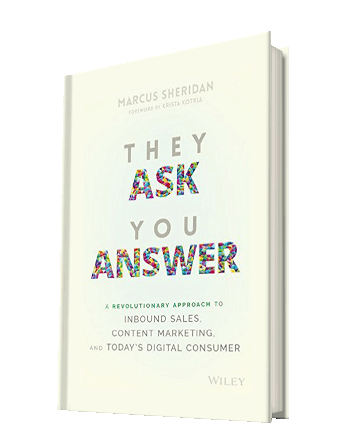
Have you read ‘They Ask You Answer’ by Marcus Sheridan ⭐⭐⭐⭐⭐

Knowledge Centre

Knowledge Centre they ask you answer

Have you had a chance to read “They Ask, You Answer” by Marcus Sheridan yet?

If you are conducting marketing for a small business then this is a must-read for you!

This book provides a view of blogging, content marketing and SEO that non-techie, business owners can understand and implement. The book is full of real-life examples and Marcus uses the resurrection and growth of his struggling pool company during the 2008 recession as a powerful real-life case study.

This book really resonates with me as I have found out these principles by trial and error myself over the last 10 years. At the end of the day, it is really practical commonsense stuff, but Marcus’s book formalises and adds the structure on how to generate traffic to your website- that is what I was lacking.

Read my blog post here on why you need a Knowledge Centre and how to set one up for your business.

I regularly recommend ‘They Ask You Answer‘ to my clients and they have all thanked me immensely for highlighting that they needed to get a copy, read it and then implement what this book teaches.

If you would like to discuss further how the “They Ask, You Answer” methodology could be applied in your business then I would be happy to have a short 20 minute call.

Outrageous Multi-Step Marketing Campaigns That Are Outrageously Successful by Bill Glazer

This is a fantastic book for any marketer. But it is real inspiration for anyone looking to automate their marketing with Keap / Infusionsoft. There are 49 multi-step proven and tested campaigns in the book that every marketer can take lessons from.

What I found very useful was that this book is not just about online marketing – sending emails, Facebook ads etc. But real-world tangible marketing like print, direct mail and phone calls blended with online marketing.

One gem that I took away was in Campaign 44 by Oli Billson. On the initial sign-up web form he asks a simple and innocuous question that enabled him to identify his ideal customers from amongst everyone who submitted the form. Based on this information he was able to take his prospective ideal customers through a Keap / Infusionsoft campaign (using the dynamic content functionality) that was designed specifically to resonate and appeal to his idea prospective customers and so achieve a much higher conversion rate. How simple and smart is that!

So this is definitely an inspiring read for any marketer. Cherry-pick from all the campaigns the individual elements that suit your business and build your own outrageously successful campaigns.


LinkedIn Contact Mining – LinkedIn Automation is the answer

linkedhelper2 linkedIn automation

Have you built up a list of 1st level contacts in your LinkedIn? It most likely includes past and present – clients, colleagues, prospects etc.

There will be hidden opportunities within that list. But how can you tap into them.

1. You could start manually “working LinkedIn” as LinkedIn want you to do – going through the list and reaching out to them via LinkedIn messages. You can do that, but to my mind that is labour-intensive work. (and I am always looking to minimise work through automation)

2. You may think “Ahhh – I’ll download my list of contacts from LinkedIn and get a CSV file and I’ll use that as a database”. And when you do this you will find basically a list of names with the odd email address sprinkled in for good measure”. This is next to useless.

3. Or you can use a LinkedIn automation tool. Recently I have been usingΒ LinkedHelper2. This can run some sophisticated invite and follow-up campaigns on autopilot to your LinkedIn account. But the key one for me is this. LinkedHelper2 is able to go in and extract all the contact details of your 1st level connections and download them to an Excel file. Imagine being able to extract a full list of 1st level contacts with name, email (often their personal email address, so it does not go out of date when they switch companies), telephone number, company website + more. Then with a little work on your part you could identify past/lapsed customers and prospects and then selectively target them. You could do this by a targeted LinkedIn message campaign by LinkedHelper2 or import the list into your CRM/ Marketing automation tool (I recommend Keap πŸ˜‰ and then you can follow up offline by email, phone calls and direct mail.

4. Now once you have this valuable list – what you could it is work through it and identify your top 100 that you would love to turn into clients. Once you have your “Dream 100” then we can apply the “Dream 100 marketing strategy” developed by Chet Holmes in his brilliant book – The Ultimate Sales Machine – read about it here.


Let me know how you get on with accessing your LinkedIn databases and leveraging it to the full. Contact Julian

Have you got staff recruitment LinkedIn marketing automation strategy?

schedule linkedin posts automatically

LinkedIn staff recruitment marketing automationHave you got a staff recruitment Linkedin marketing automation strategy that will make staff recruitment easier?Β  (or do you want to generate more sales? – that’s a whole other topic. Click here)

Most employers never tap into the full staff recruitment potential of LinkedIn because it is hard and time-consuming work. Proactively searching for candidates and trying to engage them with them. And don’t forget at any one time only about 20% of people are actively looking for a new job, so there could be a huge universe of potential employees who have not even thought of moving jobs – that is until you engage with them, build a relationship so that they want to come and work for you. This can all take a huge amount of time and I certainly do not have time for all that. But there is an answer – and it does not require a recruitment consultant!

One way that employers often restrict their success on LinkedIn is to only connect with people they know – friends, colleagues, clients, prospects. Doing this will mean you have a very low number of 1st-degree connections and hence limited LinkedIn success.

On average 70% of LinkedIn members have less than 1000 1st Connections. Which is just not enough critical mass to make LinkedIn work for you.

staff recruitment LinkedIn marketing automation


But, there is an answer.

LinkedIn Staff Recruitment Automation – let the automation take the strain and sell your job with your company to prospective employees.

Here are the top automated LinkedIn automated strategies that I deploy when working with clients in order to build a complete LinkedIn staff recruitment strategy bespoke for the client.


1/ 1st Connection Builder Strategy

In LinkedIn, it is not just about the number of 1st Degree connections you have. What is key is the number of 2nd and 3rd connections. The more 2nd and 3rd connections that you have then the larger the searchable universe of contacts you have available for future staff recruitment marketing campaigns. Imagine having at your fingertips an up-to-date database of people that you can reach who have the skills you need.

Imagine you are a 1st Degree connection to a previous employee who went to work for a competitor or maybe they set up their own business. They probably started their new job and then connected with their new colleagues, they are now your 2nd degree connections. And these 2nd degree connections most likely have a whole bunch of their own connections, and these are now your 3rd degree connections. And we can reach these people and start to build a relationship with marketing automation.

I would say you need 2500 1st connections to give you a valuable full universe of millions (unfortunately LinkedIn no longer shows us the total number of connections) of searchable 2nd and 3rd degree contacts.

It took me 10 years to get my first 1000 contacts. With my ethical strategy, we can now build that number of contacts within months.


2/ LinkedIn Data Mining Strategy

Set marketing automation to data-mine your 1st, 2nd and 3rd degree connections to find potential employees in your industry and then automatically follow up with direct messages. I recently had one client with over 3000 high-value 1st degree connections. But he could not access the contact details i.e. phone and email number from LinkedIn (the LinkedIn contact export tool gives very restricted data). We data-mined his 1st-degree connections and created a usable spreadsheet with the full contact details and a wealth of other data on the contacts which he could then use for marketing purposes.


3/Β  LinkedIn Dream 100 Strategy

Use LinkedIn to identify your Dream 100 ideal potential employees. Then target them with direct messages in LinkedIn. And you could even bolt on an automated marketing tool, like Keap (learn more here) to follow up offline from LinkedIn with emails, texts, direct mail and phone calls.


4/ Direct Message 1st Degree Contacts Strategy

Say you want to get a direct message out to a select group of your 1st Degree connections saying that you are looking to recruit a staff member. Imagine having to manually direct message one-by-one over say 2500 1st connections that you have a new job opening. Or all the members of an industry-based LinkedIn Group you are a member of. It’s not possible to do it yourself, let the automation take the strain. It’s like having your own email list to spread the word.


5/ CRM & Marketing Automation Strategy

From all your LinkedIn automated strategies we can push 1st-degree contacts into your chosen CRM / Marketing automation platform. For example – MailChimp, ActiveCampaign, Pipedrive or my preferred solution Keap (for transparency I am Keap Certified Partner). Imagine proactively and automatically connecting with a potential employee in LinkedIn before you even have a job opening. You keep in touch and build “Know, likeΒ  and trust” with automated LinkedIn direct messages over time. But then outside of linkedIn you could even keep in touch over the long term with via email, texts, phone calls and even direct mail (we can do 100% automated direct mail with Keap). Then when you have a job opening you have a hot list of not only people who are looking for a job at that time (the 20%) but also all the others who were happy in their job – that is until you approached them directly – automatically of course.


If you are interested to learn more about how I assist clients with staff recruitment automation then I would be happy to discuss this on a short Discovery call.


staff recruitment LinkedIn marketing

Webinar marketing – Two tips to increase webinar attendance

webinar marketing

webinar marketing

If you are running webinars you will know that attendance can be an issue. You invest time and money to generate registrations and then find that maybe only 30% of people show up.

Here are two webinar marketing tips that I have learnt from the experts over the years that can help to boost your webinar attendance rates.

1/ This first one I learnt from Brendon Burchard a few years back. On your website, your Thank You page is one of your most valuable pages. When someone arrives at a Thank You page they have already taken action and they are at their most interested in what you do. They will never be “hotter”. So why do most website owners simply put a boring “Thank you for your order” type message on the Thank You page? You should be using this page to the max – upsell, cross-sell, a video welcoming them as a customer etc. etc.

So you should be using your webinar registration Thank You page to reinforce why they should be attending your webinar – so they definitely put the webinar date and time in their calendar. And the real killer idea – Brendon suggests delivering part one of your webinar right on the Thank You page! Knock their socks off with valuable content right off the Thank You page and then who in their right mind would want to miss the full webinar???


2/ This second idea came from Bill Glazer in his book ” OUTRAGEOUS Multi-Step Marketing Campaigns That Are Outrageously Successful” in this he says that if you are running aΒ  webinar then you should create an accompanying workbook they can print. A “fill the gaps” style workbook where they only get the key learnings/offers by watching the full webinar. The workbook when printed can create intrigue and a tangible reminder of the webinar – pre and post-event. And even better, Bill recommends sending the workbook when you first invite people to register – the workbook also serves as a sales tool to encourage registrations!


I hope these tips prove valuable for you and if you have any tips on running better webinars that have served you then I would love to hear them.

If you are just starting out with webinar marketing then WebinarJam is a great tool to host and manage your webinars.

Julian


Webinar marketing photo by Austin Distel on Unsplash

How many of the 74 marketing pillars are you using in your business?

marketing pillars entrepreneurs circle

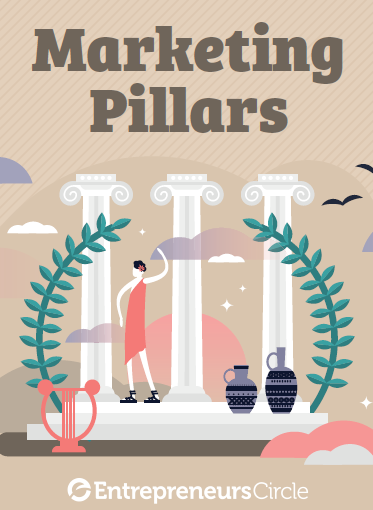
marketing pillars entrepreneurs circleTake a look a the list of 74 marketing pillars your business could be using and count up how many you are actually using in your business today.

Then take a look a the ones you are not using and ask yourself which pillars could be worth testing for your business.

The more marketing pillars you have that support your business, so the stronger and more resilient your business will be. If your business is just supported by one pillar then if anything should happen with that pillar then your business could be vulnerable.

Download theΒ Marketing_Pillars PDF here

Unscreen.com – a handy tool to remove backgrounds from videos

This handy graphics tool is calledΒ  Β unscreen.com

What this tool does is automatically remove the background from a video. So no need for a green screen.

It’s free too. When I tested this tool the results really depended on the quality of the video that you input.

So I would create a favourite for this webpage on your browser favourites and give it a try on your next video.


Klaviyo email marketing for ecommerce clients

klaviyo email marketing

I have recently been consulting with a UK e-commerce client who uses Shopify as their shopping cart and was looking to use Klaviyo email marketing.

klaviyo email marketing

The client wanted to organise their email marketing. Now even though this could have been done using Keap / Infusionsoft we found Klaviyo a better solution for them. (however, if you are looking to directly integrate Shopify into Keap / Infusionsoft, click here for a suitable direct integration solution).

But for this client all they want to do is simple email marketingΒ  -so send out email offers to their list, capture newsletter subscribers, rescue abandoned shopping carts, and for products that have to be replenished on a monthly basis they wanted to send reminders, but only if they had not purchased in the last 2 weeks.

So we just used Klaviyo to automate simple email marketing for this Shopify e-commerce client. It is relatively simple and cost-effective to set up and put the email marketing for a Shopify commerce site on autopilot.

Klaviyo works with other shopping carts too – WooCommerce, Magento, BigCommerce to name a few.

If you run a Shopify store and would like to learn more about Kalviyo email marketing or how to use Keap / Infusionsoft with Shopify just schedule a Discovery call.


Cheers

Julian


Klaviyo email marketing photo by rupixen.com on Unsplash

A marketing no-brainer – Retargeting previous website visitors


Are you familiar with Retargeting or Remarketing?

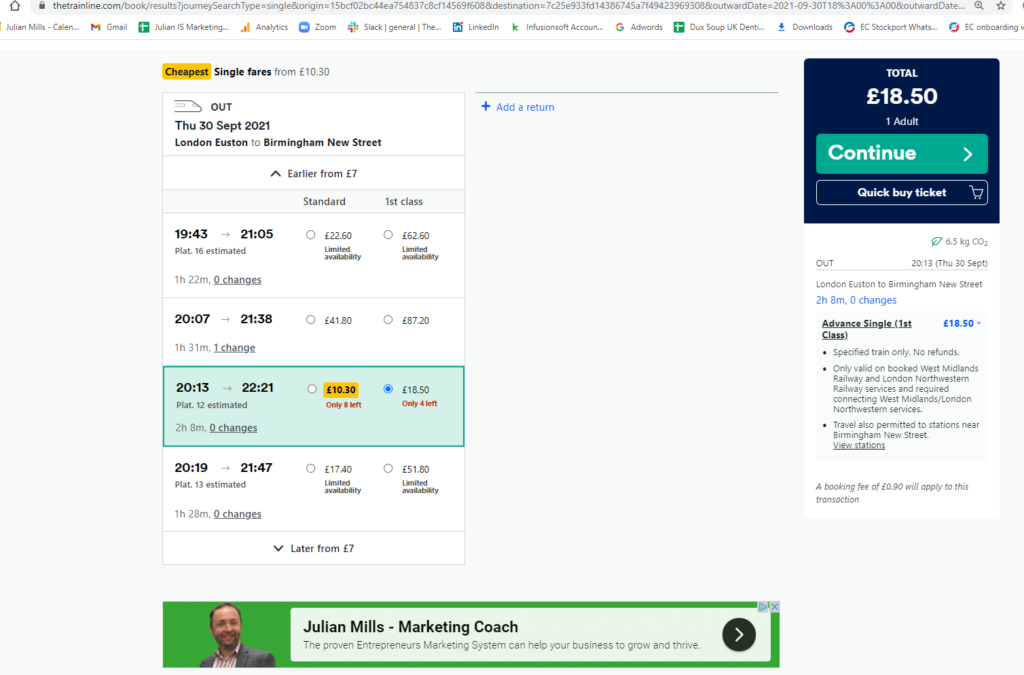
This is the marketing technique whereby when someone visits your site they are tagged with a cookie and you can then advertise to them as they browse around the internet. (Remarketing is one of the foundation blocks of the Entrepreneurs Marketing System.)

Below is an example of my remarketing in action that I spotted as I was booking a train ticket.


So when your website visitor visits a site that supports advertising (eg in the Google AdSense network) then you can display your banner ads. So in effect, you can target banner ads to people who have visited your site. Very cool and achieves a very high ROI.

There are agencies out there who can set all this up. But, if you have a Google Ads account then you can set it up yourself and run it as if it is a content advertising campaign. There is a Responsive Ads builder in Google Ads. And you can see an example of this in the image above. So what this means is that I do not have to worry about having a designer create maybe 15 or 20 different ad sizes. I just upload images, logo, headlines, call to action links and the system just creates the ads “on the fly” as they are required. So this is really handy and quick. The downside is that you have much less control over how the ad actually looks. Which I myself can live with, but if you have strict brand guidelines to adhere to then I can see the responsive builder may not be for you and you would have to have a designer create individual ads.

There are lots of helpful videos on YouTube on how to set these up. For example https://www.youtube.com/watch?v=DmyhreJS37Y

Is a lost customer really lost?

lost customer campaign

lost customer campaignEvery business loses customers. These are customers who bought from you previously but have not come back to you in the anticipated amount of time.

Typical reasons;

They just forgot about you.
A competitor tempted them away.
They no longer need your product/service at the time.
The member of staff who purchased left the company.
They moved house
They died or the business closed
etc
etc


But that does not mean we should ignore them.

In fact, did you know that lost customers are the third easiest customers to sell too?

(1)Active customers are the easiest to sell to,
followed by (2)referrals
and then (3)lost customers.

The first thing you need to do is make sure the list is clean and that you have up-to-date contact details for your “lost” customers. And this is where we can delete from your list those individuals and companies that are no longer with us and will never buy again.

Then it is your job to remind them about who you are and the service/ products that you offer. Remember customers are busy people and they quickly forget about you if you do not keep reminding them. Your goal is to ensure you are never forgotten.

But how do you do this? Well of course you use marketing automation and build an automated lost customer campaign to attract lost customers back to you. So typically clients like to send out a series of emails with a special offer. And this is a good start, but you can get so much more creative. How about regularly updating them on changes and improvements you have made to your service or product. And rather than use a fixed number of emails use an automated evergreen campaign that only every ends when they either unsubscribe OR they become an active customerΒ  And then there is the media you use, why rely solely on email as your competitors probably do – how about phone calls, texts, direct mailΒ  -all of which can be automated with Keap / Infusionsoft.

If you would a little help on how to build a bespoke lost customer reactivation campaign for your business then feel free to schedule a Discovery Call and together we can map out a lost customer campaign for your company.

Lost Customer campaign photo by Sourabh Gijare on Unsplash