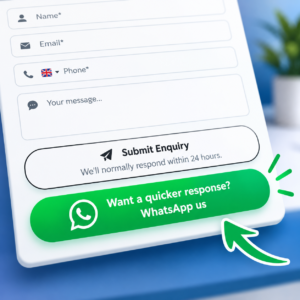
 What if, instead of asking somebody to fill in your website contact form, press Submit and then wait for you to respond, you could start a WhatsApp conversation with them within 60 seconds?
Better still, what if you could answer their initial questions and even get a call booked before they felt the need to go back to Google and contact your competitors?
That’s the really exciting idea behind a very simple change we’ve recently been experimenting with on HighLevel forms.
Twice as Many Prospects Choose WhatsApp
Atticus and I were speaking with a client recently who had added an interesting twist to his HighLevel contact form.
At the bottom of the form, prospects have two choices.
They can press the traditional Submit button and expect a response within 24 hours.
Or they can press a large green WhatsApp button and get a much quicker response.
| Did you find this content useful? |
|---|
| Sign up for my free Marketing Hints, Tips and Hacks email newsletter every Tuesday at 11am. => Sign up here <= |
The client told us something that immediately got our attention:
Around twice as many people choose the WhatsApp button as the traditional Submit button.
That’s impressive on its own.
But I think the really interesting part is what happens next.
Because once you combine this simple button with HighLevel’s WhatsApp integration, Workflows, Conversation AI, WhatsApp Flows and Calendars, you’re no longer simply collecting an enquiry.
You’re starting a sales conversation while the prospect is still interested.
And that could be far more valuable than simply doubling your response rate.
I’ve Now Added the WhatsApp Button to My Own Contact Form
I liked the idea enough to try it myself.
You can see it working on my own Contact Us page.
Complete the form and, underneath the normal Submit button, you’ll see the green WhatsApp option.
But there is an important little bit of cleverness going on behind the scenes.
If somebody has already typed their name, email address, telephone number and enquiry into the form, I don’t want them to have to type it all again when they choose WhatsApp.
So the WhatsApp button grabs the information they’ve already entered and uses it to draft their WhatsApp message.
For example, somebody might complete the form with:
Name: John Smith
Email: john@example.com
Phone: 07123 456789
Enquiry: We’re currently using HubSpot and are considering moving to HighLevel. Can you help?
They press the green WhatsApp button.
WhatsApp opens with something like this already prepared:
Hi Julian,
I’m John Smith.
Email: john@example.com
Phone: 07123 456789My enquiry:
We’re currently using HubSpot and are considering moving to HighLevel. Can you help?
All John has to do is press Send.
No retyping. No copying and pasting. No additional form.
We’ve simply made it easier for the prospect to start talking to us.
But Then We Realised This Could Go Much Further
Initially, we thought this was simply a clever way of making a HighLevel form more convenient.
Then we started thinking about what could happen after the prospect presses Send in WhatsApp.
With WhatsApp connected to HighLevel, that incoming message can become part of the prospect’s CRM conversation and trigger a HighLevel Workflow.
HighLevel allows a Customer Replied Workflow trigger to be filtered to Reply Channel = WhatsApp.
The Workflow can then bring Conversation AI into the conversation.
Suddenly our customer journey changes from:
Website → Form → Submit → Wait → Human responds
to:
Website → Form → WhatsApp → AI responds within 60 seconds → Conversation → Appointment booked
That’s a completely different experience.
The Biggest Benefit Isn’t Actually the 2x Response Rate
This, for me, is the killer idea.
Our client is seeing roughly twice as many people choose WhatsApp.
Great.
But think about what normally happens after somebody submits a contact form.
They see something like:
Thanks for your enquiry. We’ll respond within 24 hours.
What do they do next?
Twenty years ago, perhaps they waited.
I’m not convinced people behave like that today.
We’ve all completed online forms and never received a response. Or received one three days later. Or received an automated acknowledgement followed by silence.
People have become conditioned not to rely on a website form producing a quick response.
So imagine I’m looking for an accountant, solicitor, builder, mortgage adviser, dentist, IT company or marketing consultant.
I find your website.
I like what I see.
I submit your contact form.
But I still have a problem I want solving.
So what am I likely to do while I wait?
Go straight back to Google.
I find your competitor.
I submit their form as well.
Perhaps I contact a third company.
Now three businesses are competing for my attention and my business.
The first one to actually engage me has an enormous advantage.
I’ve written previously about why businesses can lose opportunities through slow WhatsApp responses. The same principle applies here. Every minute the prospect is left waiting is another opportunity for them to continue their search.
What If We Stop the Search?
Now consider the WhatsApp experience.
The prospect sends their question.
Within 60 seconds they receive a response.
We’re open about the fact that the immediate response is AI. There is no reason to pretend otherwise.
But it’s useful AI.
It understands their enquiry.
It asks a relevant question.
It answers something they wanted to know.
The prospect replies.
Now they’re engaged in a conversation.
Perhaps the AI answers their next question.
Then it asks:
Would you like to book a quick call with us to discuss this?
The prospect says yes.
And now we get the appointment booked.
At that point, why does the prospect need to return to Google?
We’ve satisfied their immediate need.
They wanted information. They got it.
They wanted to know whether we could help. We’ve established that.
They wanted reassurance. They’ve received it.
They wanted a next step. They now have an appointment.
We haven’t simply generated a lead.
We’ve potentially stopped the prospect’s search.
That, to me, is where this gets really exciting.
Response Speed Becomes a Competitive Advantage
This is why I think businesses sometimes underestimate response time.
Speed isn’t simply about giving better customer service.
It can become a competitive advantage.
The Traditional Contact Form
Prospect searches → Finds you → Submits form → Waits → Returns to Google → Finds competitors → Sends more enquiries → Businesses compete for prospect
HighLevel + WhatsApp + AI
Prospect searches → Finds you → Sends WhatsApp → Gets immediate engagement → Question answered → Conversation develops → Call booked
The prospect may never get as far as the next competitor.
That’s potentially worth considerably more than simply increasing the number of people who submit your form.
Could You Really Respond Within 60 Seconds?
Yes. Technically this is very achievable with HighLevel.
Once somebody sends you a WhatsApp message, HighLevel can use the Customer Replied Workflow trigger and filter it specifically for the WhatsApp channel.
That means an incoming WhatsApp message can immediately start a Workflow.
The Workflow can then use HighLevel’s Conversation AI to respond to the prospect based on the information and instructions you’ve given it.
Conversation AI is part of what HighLevel calls its AI Employee, bringing AI into conversations and other areas of the platform.
So rather than promising that a human being will personally respond within 60 seconds, your button could say:
Get a response within 60 seconds on WhatsApp
And underneath you could explain:
Our AI assistant can answer many questions immediately or help you book a call with our team.
Be Upfront That It’s AI
Personally, I would always tell the prospect that the immediate response is coming from AI.
There is a good marketing reason for doing that. I don’t believe you should trick somebody into thinking they’re talking to a human.
The objective is to be genuinely useful incredibly quickly.
But there is increasingly a legal reason to be transparent too.
In the European Union, transparency requirements under the EU AI Act now apply to certain AI systems that interact directly with people. In general, people need to be informed that they are interacting with AI unless that is already obvious from the circumstances.
The position in the UK is different. There isn’t currently an equivalent blanket requirement covering every business chatbot, but UK consumer-law guidance also emphasises that businesses should avoid misleading consumers about the use of AI agents.
So rather than trying to disguise your AI, why not make its speed and availability part of the benefit?
Your first WhatsApp response could begin:
Hi John, I’m Julian’s AI assistant. I can answer many questions immediately or help you book a call with Julian.
There’s no ambiguity.
The prospect knows they’re talking to AI, understands what it can do and can immediately take advantage of it.
Being upfront about AI isn’t a weakness. The fact that you’ve provided a useful response within 60 seconds is the selling point.
The AI Could Answer Their Question There and Then
Imagine our prospect asks:
We’re currently using HubSpot and are considering moving to HighLevel. Can you help?
Your Conversation AI could respond:
Hi John. I’m Julian’s AI assistant. Yes, we regularly help businesses migrate from other CRM systems to HighLevel. Are you mainly using HubSpot for your CRM and sales pipeline, or are you also using its marketing automation, forms and email tools?
John replies.
The AI can continue the conversation using the information and instructions you’ve provided.
It can answer straightforward questions.
It can collect additional information.
It can ask qualifying questions.
And when appropriate, it can move towards the next logical step.
For many businesses, that’s going to be booking an appointment.
They Don’t Even Have to Leave WhatsApp to Book
This is where another HighLevel feature makes the whole idea even more interesting.
HighLevel supports WhatsApp Flows for appointment booking.
That means we don’t necessarily have to send the prospect a calendar link and ask them to leave WhatsApp, open another webpage, choose an appointment and complete another form.
We can potentially keep the experience inside WhatsApp.
So our journey becomes:
Complete form
↓
Press WhatsApp button
↓
Press Send
↓
Conversation AI responds
↓
AI answers questions
↓
Prospect wants a call
↓
WhatsApp booking Flow appears
↓
Prospect selects an available appointment
↓
Appointment booked into the HighLevel calendar
And the prospect has remained inside WhatsApp.
Think about how little friction there is in that journey.
Every additional click, webpage and form we remove makes it easier for the prospect to take the next step.
And because HighLevel can bring WhatsApp conversations into the wider customer service process, the conversation doesn’t have to disappear onto somebody’s personal phone. It can become part of the customer’s ongoing CRM history.
How the HighLevel Automation Could Work
At a practical level, we would build the system something like this:
1. HighLevel Contact Form
The prospect enters their name, email, telephone number and enquiry.
2. WhatsApp Button
Some simple JavaScript takes those values and creates a pre-populated WhatsApp message.
3. Prospect Presses Send
Pressing the green button on your website doesn’t itself send the WhatsApp message. It opens WhatsApp with the message drafted. The prospect then presses Send.
4. Incoming WhatsApp Message Reaches HighLevel
If you’re using HighLevel’s WhatsApp integration, the conversation can come into HighLevel.
5. Customer Replied Workflow Trigger
Create a Workflow using Customer Replied, filtered so the Reply Channel is WhatsApp.
6. Conversation AI Responds
Conversation AI uses the prospect’s message, conversation history, your instructions and its training to provide an appropriate response.
7. The Conversation Continues
The AI can answer questions, collect information and establish what the prospect wants.
8. Identify Booking Intent
When the prospect indicates they would like to talk, the conversation can move towards appointment booking.
9. WhatsApp Appointment Booking Flow
The prospect can be presented with the opportunity to book from within WhatsApp itself.
10. Appointment Enters the HighLevel Calendar
Once the appointment has been booked, your normal HighLevel appointment confirmations, reminders, workflows and sales processes can take over.
That’s a serious sales process sitting behind one little green button.
The Code for the WhatsApp Button
The button itself requires surprisingly little code.
Here is a simplified example:
<div style="margin-top:12px;">
  <button
    type="button"
    id="julian-whatsapp-button"
    style="
      width:100%;
      background:#25D366;
      color:#ffffff;
      border:none;
      border-radius:30px;
      padding:15px 20px;
      font-size:16px;
      font-weight:700;
      cursor:pointer;
    ">
    Get a response within 60 seconds on WhatsApp
  </button>
</div>

<script>
document.getElementById('julian-whatsapp-button').addEventListener('click', function () {

  const form = this.closest('form') || document;

  const nameField =
    form.querySelector('input[name="name"]') ||
    form.querySelector('input[name="full_name"]');

  const emailField =
    form.querySelector('input[type="email"]');

  const phoneField =
    form.querySelector('input[type="tel"]');

  const messageField =
    form.querySelector('textarea');

  const name = nameField ? nameField.value.trim() : '';
  const email = emailField ? emailField.value.trim() : '';
  const phone = phoneField ? phoneField.value.trim() : '';
  const enquiry = messageField ? messageField.value.trim() : '';

  const message =
`Hi,

I'm ${name}.

Email: ${email}
Phone: ${phone}

My enquiry:
${enquiry}`;

  const whatsappURL =
    'https://wa.me/44712345678?text=' +
    encodeURIComponent(message);

  window.open(whatsappURL, '_blank');

});
</script>
You need to replace 44712345678 with the WhatsApp telephone number that should receive the enquiry.
Use the international format without the +, spaces or leading zero.
Depending on the fields in your particular HighLevel form, you may also need to adjust the field selectors in the JavaScript.
One Important Point About the Form Submission
There is an important technical distinction to understand.
Clicking the WhatsApp button does not automatically mean the visitor has submitted the normal HighLevel form.
The JavaScript reads what they’ve typed into the form and uses it to construct their WhatsApp message.
The important event then becomes the prospect pressing Send inside WhatsApp.
Once that message arrives through your connected WhatsApp account, HighLevel can identify the incoming conversation and your automation can take over.
If capturing the original form submission in HighLevel as well is important to your process, you would need to account for that separately.
Don’t Remove Your Normal Submit Button
I wouldn’t replace the normal HighLevel form.
Give people a choice.
Some prospects will prefer submitting a traditional form and receiving an email response.
Others will prefer WhatsApp.
That’s exactly what we’re trying to discover.
You might therefore have:
Submit Enquiry
We’ll normally respond within 24 hours.
followed by:
🟢 Get a response within 60 seconds on WhatsApp
Then measure what actually happens.
And don’t just measure button clicks.
Measure the whole journey:
Form submissions → WhatsApp conversations → Engaged conversations → Appointments booked → Sales
That’s where we’ll discover whether the idea really works.
It’s Not Really About the WhatsApp Button
This started with a very simple idea.
Add a second button to a HighLevel form.
Our client tells us that around twice as many prospects choose his WhatsApp option.
That’s fascinating.
But I now think the button is actually the least interesting part.
The real opportunity is what happens after somebody presses it.
HighLevel allows us to bring together:
Forms + WhatsApp + Workflows + Conversation AI + WhatsApp Flows + Calendars
to potentially move somebody from:
“I have a question.”
to:
“My question has been answered and I’ve booked a call.”
within a single WhatsApp conversation.
And perhaps most importantly, we’ve done it while their interest is at its highest.
They haven’t submitted a form and gone back to Google.
They haven’t contacted another three companies while waiting for somebody to respond.
We’ve engaged them.
We’ve helped them.
We’ve given them a next step.
Perhaps the real goal of rapid response isn’t simply to reply before your competitors do.
It’s to satisfy the prospect so quickly that they don’t feel the need to contact your competitors at all.
That’s the idea I’m now going to be testing.
Would You Like to Do This With HighLevel?
If you’re already using HighLevel, or considering using it, this is a good example of what becomes possible when you stop looking at Forms, WhatsApp, Workflows, AI and Calendars as separate features and start connecting them around your customer’s journey.
If you’d like to discuss how HighLevel could work within your business, book a discovery call with me.

About the Author
Julian Mills
HighLevel Consultant & Marketing Automation Strategist
Julian Mills helps business owners automate lead generation, sales follow-up, customer communication and business processes using HighLevel and MarketerM8. Since 2009 he has helped businesses implement CRM, marketing automation and AI-powered systems that save time, improve customer experience and generate more sales.
About Julian
Book a Discovery Call
Join a Free HighLevel Workshop
Learn About HighLevel with MarketerM8